Zavedení
This manual provides detailed instructions for the QCOQ T60 Smart Watch. It covers setup, operation, maintenance, and troubleshooting to ensure optimal use of your device. The QCOQ T60 Smart Watch features a 1.91-inch display, Bluetooth call functionality, heart rate monitoring, and IP68 water resistance.
Obsah balení
Zkontrolujte prosím balení, zda neobsahuje následující položky:
- QCOQ T60 Smart Watch (1 unit)
- Nabíjecí kabel
- Uživatelská příručka
Nastavení
1. Nabíjení zařízení
Before first use, fully charge the smart watch. Connect the magnetic charging cable to the charging contacts on the back of the watch and plug the USB end into a standard USB power adapter (not included).

Image: The QCOQ T60 Smart Watch connected to its magnetic charging cable, illustrating the charging process. The watch display shows an 80% battery level, indicating partial charge.
- Doba nabíjení: Přibližně 2 hodiny pro plné nabití.
- Battery Life: Up to 7 days of typical usage on a full charge.
2. Instalace a párování aplikace
To utilize all features of your QCOQ T60 Smart Watch, download and install the companion application on your smartphone.
- Scan the QR code provided in the quick start guide or search for the app name (usually indicated in the watch's initial setup screen or manual) in your smartphone's app store (App Store for iOS, Google Play Store for Android).
- Ujistěte se, že je na vašem smartphonu povoleno Bluetooth.
- Open the installed app and follow the on-screen instructions to create an account or log in.
- Within the app, navigate to the device pairing section and select your QCOQ T60 Smart Watch from the list of available devices.
- Potvrďte požadavek na párování na smartphonu i na chytrých hodinkách.
Návod k obsluze
1. Základní navigace
The QCOQ T60 Smart Watch features a touchscreen display and a side button for navigation.
- Přejetí nahoru/dolů: Procházení nabídek a oznámení.
- Přejetí doleva/doprava: Přístup k rychlým funkcím nebo různým widgetům.
- Klepněte na: Vyberte položku nebo potvrďte akci.
- Boční tlačítko: Stisknutím se vrátíte na domovskou obrazovku nebo probudíte zařízení. Dlouhým stisknutím zobrazíte možnosti napájení.
2. Funkce volání přes Bluetooth
Once paired with your smartphone, the QCOQ T60 Smart Watch allows you to make and answer calls directly from your wrist.
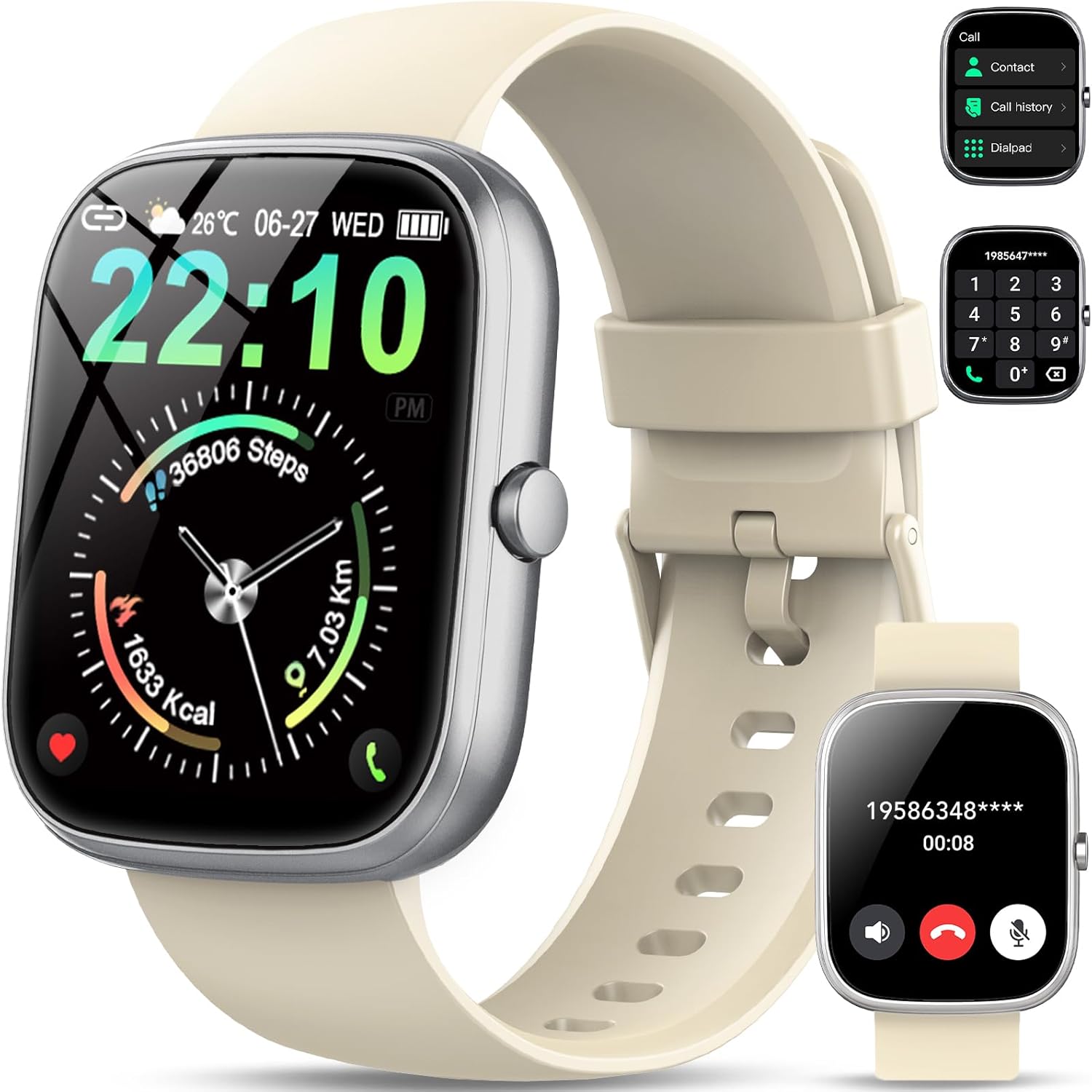
Image: The QCOQ T60 Smart Watch screen showing the call interface, including options to access contacts, view call history, and use a dialpad. A separate inset shows an incoming call notification.
- Přijímání hovorů: Když přijmete příchozí hovor, klepněte na zelenou ikonu přijetí na obrazovce hodinek.
- Uskutečňování hovorů: Access the 'Call' menu on the watch, then select from contacts, call history, or use the dialpad to enter a number.
3. Oznámení
Přijímejte oznámení ze svého smartphonu přímo na hodinky.

Image: The QCOQ T60 Smart Watch screen showing notifications from various social media and messaging applications. Adjacent to it, a smartphone displays an incoming call, demonstrating the watch's Bluetooth call feature.
- Ujistěte se, že máte pro doprovodnou aplikaci na smartphonu povolena oprávnění k oznámením.
- Přejeďte prstem dolů z horní části ciferníku pro view nedávná oznámení.
4. Sledování kondice
The QCOQ T60 Smart Watch monitors various fitness metrics.

Image: A visual representation of the QCOQ T60 Smart Watch's fitness capabilities, highlighting over 110 sport modes, step counting, calorie expenditure tracking, IP68 water resistance, and comprehensive daily activity data.
- Monitorování srdeční frekvence: The watch provides real-time heart rate data. Access the heart rate function on the watch or through the app.
- Počet kroků a kalorie: Tracks your daily steps, distance, and estimated calories burned.
- Sportovní režimy: Select from over 110 sport modes to track specific activities.
5. Monitorování spánku
The watch automatically monitors your sleep patterns.

Image: The QCOQ T60 Smart Watch screen showing detailed sleep monitoring data, including deep, light, and awake sleep stages. Another section displays a 7-day weather forecast.
- Wear the watch while sleeping for accurate data.
- View detailed sleep analysis in the companion app, including deep sleep, light sleep, and awake times.
6. Další funkce
- Předpověď počasí: View aktuální počasí a 7denní předpověď.
- Ovládání hudby: Ovládejte přehrávání hudby na svém smartphonu (přehrávání, pozastavení, přeskakování skladeb).
- Dálkové ovládání fotoaparátu: Používejte hodinky jako dálkové ovládání fotoaparátu vašeho smartphonu.
- Hlasový asistent: Získejte přístup k hlasovému asistentovi svého smartphonu.
- Sedavé připomenutí: Dostávejte upozornění na pohyb po obdobích nečinnosti.
- Poplach: Nastavujte si budíky přímo z hodinek.
- Monitorování krevního kyslíku: Změřte si hladinu kyslíku v krvi.
- Zdraví žen: Sledujte menstruační cykly a související data.
- Kalkulačka: Základní funkce kalkulačky.
7. Přizpůsobení ciferníků
Přizpůsobte si hodinky pomocí různých ciferníků.

Image: A collage of various watch faces available for the QCOQ T60 Smart Watch, demonstrating the range of styles and information displays, including options for personalized backgrounds.
- Long press on the current watch face to enter the watch face selection menu.
- Přejetím prstem doleva nebo doprava procházejte dostupné ciferníky. Klepnutím vyberte.
- More watch faces and customization options (including custom backgrounds) are available through the companion app.
Údržba
1. Čištění
- Otřete obrazovku a tělo hodinek měkkým hadříkem, který nepouští vlákna.
- For the strap, use a mild soap and water solution if necessary, then rinse thoroughly and dry completely before wearing.
- Vyhněte se používání agresivních chemikálií nebo abrazivních materiálů.
2. Voděodolnost (IP68)
The QCOQ T60 Smart Watch is IP68 rated, meaning it is resistant to dust and can withstand immersion in water up to 1.5 meters for up to 30 minutes. It is suitable for daily use, such as hand washing or light rain.
- Do not use the watch for diving, hot showers, saunas, or in environments with high-pressure water.
- Voděodolnost není trvalý stav a může se časem v důsledku běžného opotřebení snižovat.
3. Péče o baterie
- Vyhněte se extrémním teplotám, které mohou snížit výkon baterie.
- Hodinky pravidelně nabíjejte; nenechávejte baterii delší dobu zcela vybíjet.
Odstraňování problémů
- Hodinky se nezapínají: Ujistěte se, že jsou hodinky plně nabité. Připojte je k nabíječce alespoň na 10 minut.
- Nelze spárovat se smartphonem:
- Ujistěte se, že máte v telefonu i hodinkách zapnutou funkci Bluetooth.
- Ujistěte se, že jsou hodinky v dosahu vašeho telefonu.
- Restartujte hodinky i telefon.
- Check if the companion app has necessary permissions.
- Neobdržená oznámení:
- Verify that notifications are enabled in the watch's settings and the companion app.
- Ujistěte se, že jsou hodinky správně připojeny přes Bluetooth.
- Zkontrolujte nastavení oznámení pro danou aplikaci v telefonu.
- Nepřesné údaje o tepové frekvenci/aktivitě: Ujistěte se, že hodinky máte pevně na zápěstí, ne příliš těsně ani příliš volně. Pravidelně čistěte senzor.
Specifikace
| Funkce | Specifikace |
|---|---|
| Značka | QCOQ |
| Model | T60 |
| Velikost displeje | 1.91 palce |
| Technologie displeje | LCD |
| Rezoluce | 240 x 240 |
| Konektivita | Bluetooth |
| Kompatibilní zařízení | Smartphone |
| Voděodolnost | IP68 |
| Speciální funkce | Heart Rate Monitor, Notifications, Camera Remote, Voice Assistant |
| Vstup lidského rozhraní | Dotyková obrazovka |
| GPS | Bez GPS |
| Typ baterie | Lithium-iontová (vyžaduje 1) |
| Rozměry (balík) | 17.4 x 9.4 x 1.8 cm |
| Hmotnost (balíku) | 38.19 g |
| Barva | Krémově bílá |
Bezpečnostní informace
- Před zahájením jakéhokoli nového cvičebního režimu nebo pokud máte již existující zdravotní problémy, poraďte se se svým lékařem.
- Nepokoušejte se hodinky rozebírat nebo upravovat.
- Chraňte zařízení před extrémním teplem nebo chladem.
- Zařízení a jeho baterii zlikvidujte v souladu s místními předpisy.
Záruka a podpora
For warranty information and customer support, please refer to the documentation included with your purchase or visit the official QCOQ website. Ensure you have your purchase receipt and product model number (T60) available when contacting support.


