1. Úvod
Thank you for choosing Lepro E1 AI Permanent Outdoor Lights. This manual provides essential information for the safe and efficient installation, operation, and maintenance of your new lighting system. These smart RGB+IC lights offer advanced features including individual bulb control, tunable white light, AI-generated lighting effects, and smart home integration with Alexa and Google Assistant.

Image: Lepro E1 AI Permanent Outdoor Lights product packaging and an example of the lights installed on a house.
2. Bezpečnostní informace
Před instalací a použitím si pečlivě přečtěte všechny bezpečnostní pokyny. Nedodržení těchto pokynů může vést k úrazu elektrickým proudem, požáru nebo jiným nebezpečím.
- Ensure the power adapter is plugged into an outlet with an enclosed electrical box for outdoor use, as the adapter plug itself is not waterproof.
- The light kits, in-line controller, wires, and connections are waterproof (IP65 rated).
- Nepokoušejte se výrobek upravovat ani opravovat. Veškerý servis svěřte kvalifikovanému personálu.
- Uchovávejte výrobek mimo dosah otevřeného ohně nebo extrémních zdrojů tepla.
- Ensure all connections are secure and properly aligned to prevent poor contact.

Image: Components of the lighting system, highlighting their IP65 waterproof rating for outdoor use.
3. Obsah balení
Ověřte, zda jsou v balení obsaženy všechny níže uvedené položky:
- 4 × 7.6m/25ft LED permanentní světelné řetězce (15 LED uzlů na řetězec, celkem 60 LED uzlů)
- 1 × prodlužovací kabel 3M/10 stop
- 1 × prodlužovací kabel 1.5M/5 stop
- 1 × integrovaný regulátor
- 1 × napájecí adaptér (vstup: 100–240 V AC, výstup: 29 V DC)
- 70 × 3M double-sided tape (each LED node has 3M tape on the back; an extra 10 pieces of 3M tape are included in the package)
- 60 × šrouby a 60 × plastové rozpěrné kotvy

Image: Visual representation of all components included in the product package.
4. Nastavení
Follow these steps to set up your Lepro E1 AI Permanent Outdoor Lights.
4.1. Preparation Before Assembly
- Stáhněte si aplikaci Lepro z App Storu nebo Google Play.
- Register a new account within the app.
- Turn on your phone's Bluetooth and connect to your 2.4 GHz Wi-Fi network. (Note: 5 GHz Wi-Fi is not supported).
4.2. Assembling and Testing the Lights
Align connectors correctly, push firmly, and tighten to avoid poor contact. Each length (50ft/100ft/150ft kits) comes with a unique power supply and controller, so they cannot be mixed.
The extension cord can be added between the controller and the light string, or between two strings of lights.

Image: Step-by-step visual guide for assembling and installing the lights.
- Assemble all strands and test the Wi-Fi/Bluetooth connection before installation.
- Plug the power adapter into an outdoor outlet with an enclosed electrical box. A flashing white light indicates the connected length is being detected.
- If adding additional strings, detect the length by re-plugging the power or through the app settings. A flashing blue light indicates the app is pairing.
4.3. Adding Lights to the Lepro App
Once connected, add the E1 lights to your Lepro APP. The app will auto-search for available devices.
Video: Detailed instructions on how to download the Lepro app, register an account, and navigate the app for setup and control.
4.4. Fyzická instalace
- Adjust the lights' distance from the wall (2-4 inches recommended) for the best scalloped pattern.
- Use a cardboard template to ensure all light nodes are evenly spaced from the wall.
- Clean the ceiling surface with alcohol before applying adhesive.
- Use the double-sided tape for initial placement.
- Secure with screws and plastic expansion anchors for a permanent installation.
5. Návod k obsluze
Your Lepro E1 lights offer a variety of control options and lighting effects.
5.1. App Control Overview
The Lepro app is your primary interface for controlling the lights. It offers extensive features for customization and smart control.

Obrázek: Overview of the Lepro app interface for smart control.
5.2. AI Generated Lighting (LightGPM 2.0)
Lepro LightGPM is an AI model that generates lighting effects based on your prompts. Simply type or speak your activity or mood into the app, and it will suggest ideal lighting effects.

Image: How the AI voice control works to generate lighting effects.
Video: Demonstrates various AI-generated lighting effects and how they can be applied to a house.
5.3. Tunable White Light (2200K-6500K)
The lights feature dedicated white LEDs, allowing you to choose any shade of white light, from warm white (2200K) for accent lighting to daylight white (6500K) for security. Each white LED is individually addressable.

Image: Comparison of warm white and daylight white light settings on a house.
5.4. RGB+IC (Independent Control) LEDs
You can set each bulb to a specific color individually, creating a myriad of dynamic lighting effects. The app allows for detailed customization of colors and patterns.
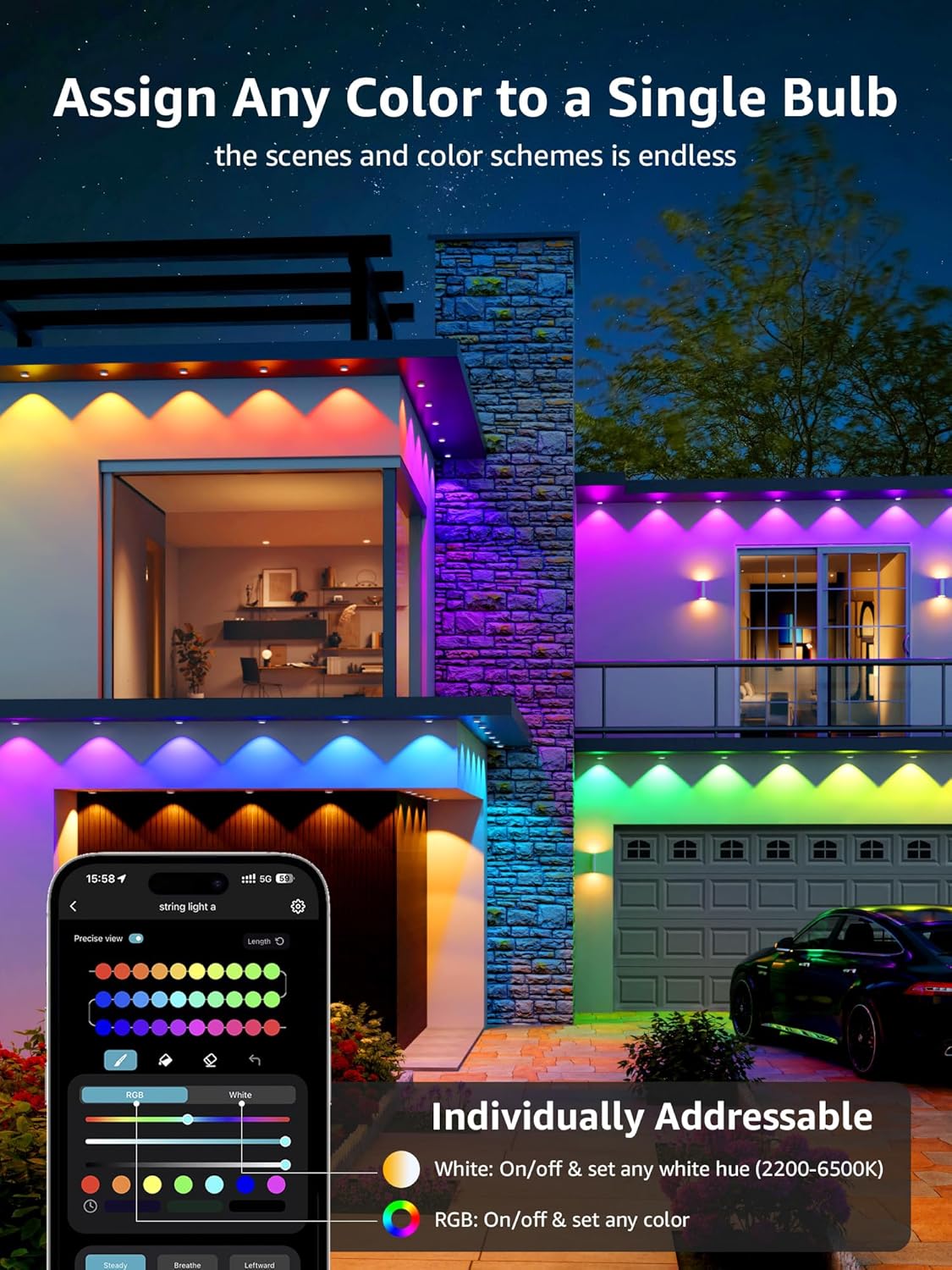
Image: App interface demonstrating individual color assignment to each light puck.
5.5. Integrace chytré domácnosti
The lights can be controlled with voice commands through Alexa or Google Assistant. Ensure the light is connected to Wi-Fi through the Lepro app for this functionality.

Image: Steps to integrate your Lepro lights with Alexa or Google Home.
6. Údržba
Proper maintenance ensures the longevity and optimal performance of your lights.
- Čištění: Gently wipe the light pucks and cables with a soft, damp tkanina. Vyhněte se používání agresivních chemikálií nebo abrazivních čisticích prostředků.
- Hydroizolace: While the lights and in-line controller are IP65 waterproof, the power adapter plug is not. Always ensure it is protected within an enclosed electrical box when used outdoors.
- Inspekce: Periodically inspect cables and connections for any signs of wear, damage, or loose connections. Address any issues promptly.
7. Řešení problémů
If you encounter issues with your Lepro E1 lights, refer to the following common solutions:
7.1. Lights Not Responding / Disconnection
- Zkontrolujte napájení: Ujistěte se, že je napájecí adaptér bezpečně zapojen do funkční zásuvky.
- Připojení Wi-Fi/Bluetooth: Verify your phone's Bluetooth is on and connected to a 2.4 GHz Wi-Fi network. Ensure the lights are within range of your Wi-Fi router.
- Stav aplikace: Check the Lepro app to see if the device is online. If not, try refreshing the app or re-pairing the device.
- Připojení kabelů: Ensure all light string connections are firm and properly aligned.
7.2. Resetování zařízení
If the lights are unresponsive or you need to re-pair them, you can perform a factory reset:
- Press and hold the button on the in-line controller for 5 seconds.
- A flashing blue light indicates a successful reset. The device is now ready for re-pairing.
8. Specifikace
| Funkce | Specifikace |
|---|---|
| Značka | Lepro |
| Model | E1-60 |
| Velikost | 100 FT |
| Typ světelného zdroje | LED |
| Počet světelných zdrojů | 60 |
| Světlá barva | Tunable White (2200K-6500K), Multicolor (RGB+IC) |
| Jas | 2400 lumenů |
| Wattage | 36 wattů |
| svtage | 29 V (DC) |
| Kontrolní metoda | Ovládání aplikací, hlasové ovládání (Alexa, Google Assistant) |
| Protokol připojení | Bluetooth, Wi-Fi (2.4 GHz) |
| Vnitřní/venkovní použití | Venkovní |
| Úroveň odolnosti proti vodě | Waterproof (IP65 for lights/controller) |
| Průměrný život | 15000 hodiny |
| Materiál | Polykarbonát |
| Hmotnost položky | 4.41 libry |
9. Záruka a podpora
For warranty information and technical support, please visit the official Lepro webnebo se obraťte na jejich zákaznický servis. Uschovejte si doklad o koupi pro případ reklamace.


