1. Úvod
This manual provides comprehensive instructions for the installation, operation, and maintenance of your DAYBETTER LED Strip Lights 400ft. Please read this manual thoroughly before use to ensure proper function and safety.
2. Bezpečnostní informace
- Před instalací nebo údržbou se ujistěte, že je odpojeno napájení.
- Tento výrobek je určen pouze pro použití v interiéru. Zabraňte vystavení vodě nebo vysoké vlhkosti.
- Do not cut the LED strips unless specifically indicated at designated cut marks. Cutting elsewhere may damage the product.
- Používejte pouze dodaný napájecí adaptér. Použití nekompatibilního adaptéru může způsobit poškození nebo požár.
- Uchovávejte mimo dosah dětí.
- Avoid bending the LED strips sharply, as this can damage the internal circuitry.
3. Obsah balení
Ověřte, zda jsou v balení přítomny všechny položky:
- 4 x 100ft RGB LED Strip Lights (Total 400ft)
- 1 x IR dálkové ovládání
- 1 x napájecí adaptér
- 1 x IR Receiver/Controller Box
- 2 x AAA baterie (pro dálkové ovládání)
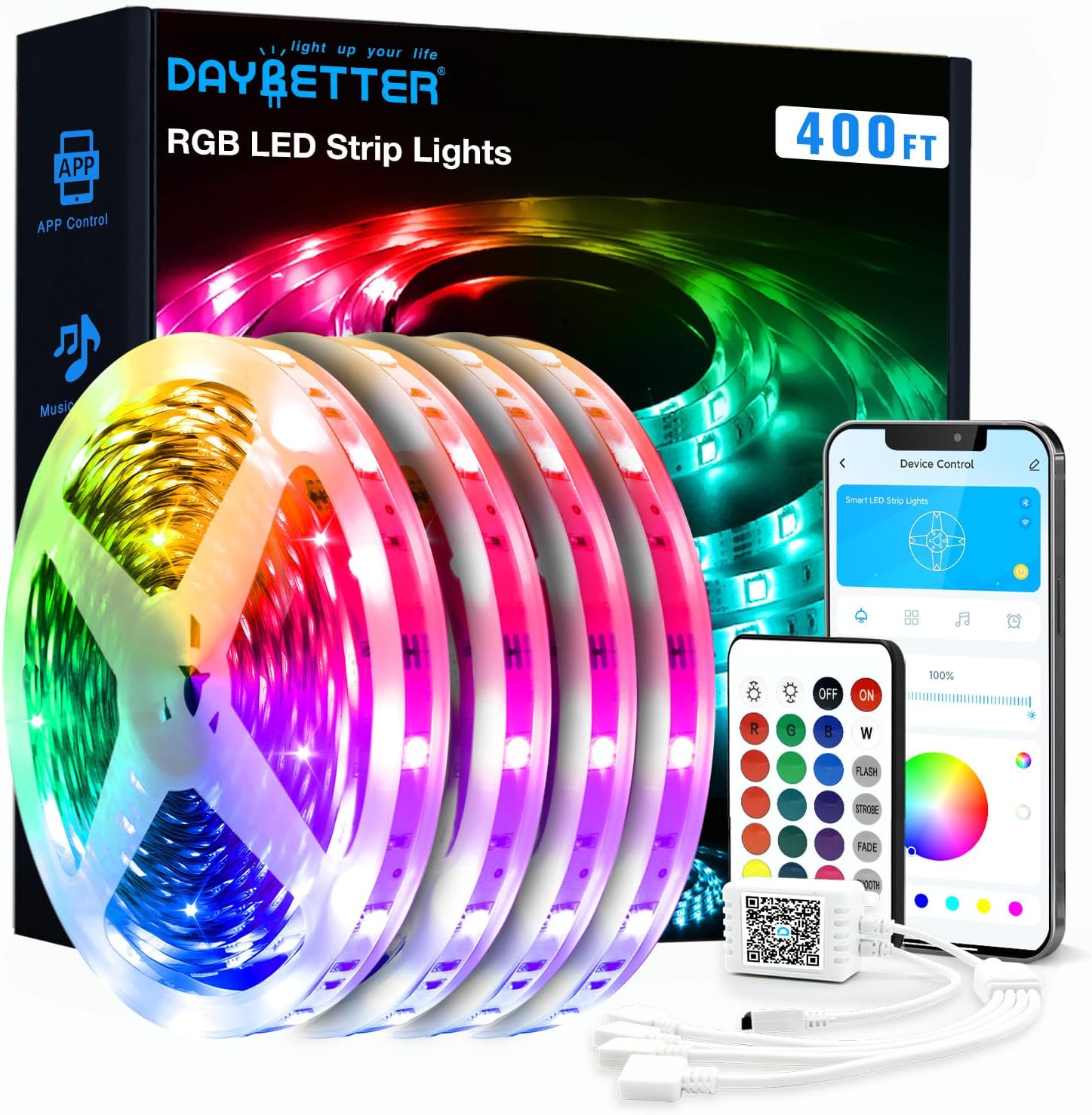
Obrázek: Overview of the DAYBETTER LED Strip Lights 400ft package contents.
4. Instalační příručka
- Připravte povrch: Clean the desired installation surface thoroughly. Ensure it is dry, smooth, and free of dust or oil. This will ensure optimal adhesion of the LED strips.
- Unroll and Plan: Carefully unroll the LED strip lights. Before removing the adhesive backing, plan the layout to ensure the strips reach the desired areas and can connect to the power source.
- Attach the Strips: Remove the adhesive backing from the LED strip in small sections and firmly press the strip onto the prepared surface. Avoid stretching the strip during application.
- Připojení komponent:
- Connect the LED strip(s) to the IR Receiver/Controller Box. Ensure the arrows on the connectors align.
- Connect the IR Receiver/Controller Box to the Power Adapter.
- Plug the Power Adapter into a standard electrical outlet.

Image: Connection diagram for LED strip lights, highlighting arrow alignment.
- Zapnutí: Once all connections are secure, plug the power adapter into an electrical outlet. The lights should illuminate.
5. Návod k obsluze
Your DAYBETTER LED Strip Lights can be controlled via the included IR remote or the DAYBETTER smartphone application.
5.1. Dálkové ovládání
Insert the two AAA batteries into the remote control. Point the remote directly at the IR Receiver/Controller Box for optimal response. The remote allows you to:
- Turn lights On/Off
- Upravte jas
- Select static colors (e.g., Red, Green, Blue, White)
- Choose dynamic modes (e.g., Flash, Strobe, Fade, Smooth)
5.2. Ovládání aplikací
For advanced features and convenience, download the DAYBETTER app on your smartphone.
- Stáhněte si aplikaci: Scan the QR code below or search for 'DAYBETTER' in the App Store (iOS) or Google Play Store (Android).
- Párování: Ensure your phone's Bluetooth is enabled. Open the DAYBETTER app, and it should automatically detect your LED strip lights. Follow the on-screen prompts to pair.
- Vlastnosti aplikace: The app provides access to a wider range of controls, including:
- Paleta barev: Choose from 16 million colors.
- Dynamické režimy: More advanced flashing, fading, and jumping effects.
- Synchronizace hudby: Lights change color and rhythm with music played through your phone's microphone.
- Nastavení časování: Schedule automatic on/off times.

Image: Demonstrating app and remote control options for the LED strips.

5.3. Funkce synchronizace hudby
The music sync feature allows the LED lights to change colors and patterns in response to audio. Activate this feature through the DAYBETTER app. The app uses your smartphone's microphone to detect sound, creating a dynamic lighting experience.

Image: LED strip lights syncing to music.
5.4. Timing Settings
Utilize the timing function in the DAYBETTER app to schedule when your LED lights turn on or off automatically. This feature is useful for daily routines or energy saving.

Image: Setting up automatic on/off times using the app.
6. Údržba
- Čištění: LED pásky jemně otřete suchým, měkkým hadříkem, abyste odstranili prach. Nepoužívejte tekuté čisticí prostředky ani abrazivní materiály.
- Skladování: If storing the lights for an extended period, ensure they are clean, dry, and rolled loosely to prevent damage to the strip or adhesive.
- Lepidlo: The adhesive is strong but may lose effectiveness if repositioned multiple times. Ensure the initial placement is accurate.
7. Řešení problémů
| Problém | Možná příčina | Řešení |
|---|---|---|
| Světla se nerozsvítí. | Power adapter not connected; IR receiver not connected; Remote batteries dead; Strip damaged. | Check all connections; Ensure power adapter is plugged in; Replace remote batteries; Inspect strip for visible damage. |
| Dálkové ovládání nefunguje. | Remote batteries dead; Obstruction between remote and IR receiver; Remote too far from receiver. | Replace remote batteries; Ensure clear line of sight to IR receiver; Move closer to the receiver. |
| Aplikace se nemůže připojit ke světelům. | Bluetooth not enabled; Lights not powered on; App not updated. | Enable Bluetooth on your phone; Ensure lights are powered on; Update the DAYBETTER app to the latest version. |
| Lights show incorrect colors or sections are off. | Loose connection; Strip damage; Controller malfunction. | Check connections, especially arrow alignment; If a section is consistently faulty, the strip may be damaged. |
| Lepidlo nelepí. | Surface not clean or dry; Surface texture unsuitable. | Clean and dry surface thoroughly; Consider using additional mounting clips for textured surfaces. |
8. Specifikace
| Funkce | Detail |
|---|---|
| Značka | DAYBETTER |
| Číslo modelu | TCF0243124G-V4 |
| Celková délka | 400 feet (4 rolls of 100ft) |
| Typ světelného zdroje | LED |
| Světlá barva | Vícebarevné (RGB) |
| Kontrolní metoda | Aplikace, Dálkové ovládání |
| Zdroj napájení | AC (s kabelem) |
| Vnitřní/venkovní použití | Krytý |
| Úroveň odolnosti proti vodě | Není odolný vůči vodě |
| Hmotnost položky | 1.61 libry |
| Jsou vyžadovány baterie | Yes (1 Lithium Ion battery included for controller, 2 AAA for remote) |
9. Záruka a podpora
DAYBETTER products are designed for quality and reliability. For warranty information or technical support, please refer to the contact details provided with your purchase or visit the official DAYBETTER website. Please have your model number (TCF0243124G-V4) and purchase information ready when contacting support.


