1. Konec produktuview
The OBDSTAR iScan BRP is a professional, portable diagnostic tablet specifically designed for BRP (Can-am) systems. It offers comprehensive diagnostic capabilities for motorcycles, snowmobiles, ATVs, and UTVs. Featuring a 5.0-inch capacitive touchscreen and running on Android 5.1.1, this tool provides an intuitive and efficient diagnostic experience.

Figure 1.1: The OBDSTAR iScan BRP Diagnostic Tool, showcasinjeho uživatelské rozhraní a robustní design.
Klíčové vlastnosti:
- Profesionální diagnostika: Tailored for BRP systems, offering superb performance.
- Pokročilé funkce: Supports automatic scanning, VIN recognition, control module programming/coding, ECU setting, instrument coding, TPMS, maintenance light reset, CO/idle speed/A/F value adjustment, ABS control unit setting, EOL mode, transmission memory reset, and clear computer memory.
- Uživatelsky přívětivé rozhraní: Equipped with Android 5.1.1 operating system and a simple, intuitive menu guide for quick operation.
- Real-Time Data Monitoring: Records and plays back data streams to quickly and accurately locate sensor and component faults.
- Podpora více jazyků: Available in English, Spanish, Portuguese, French, German, Italian, Polish, Russian, Turkish, Indonesian, Farsi, Thai, Vietnamese.
- Konektivita: Wi-Fi for one-click software updates and remote assistance.
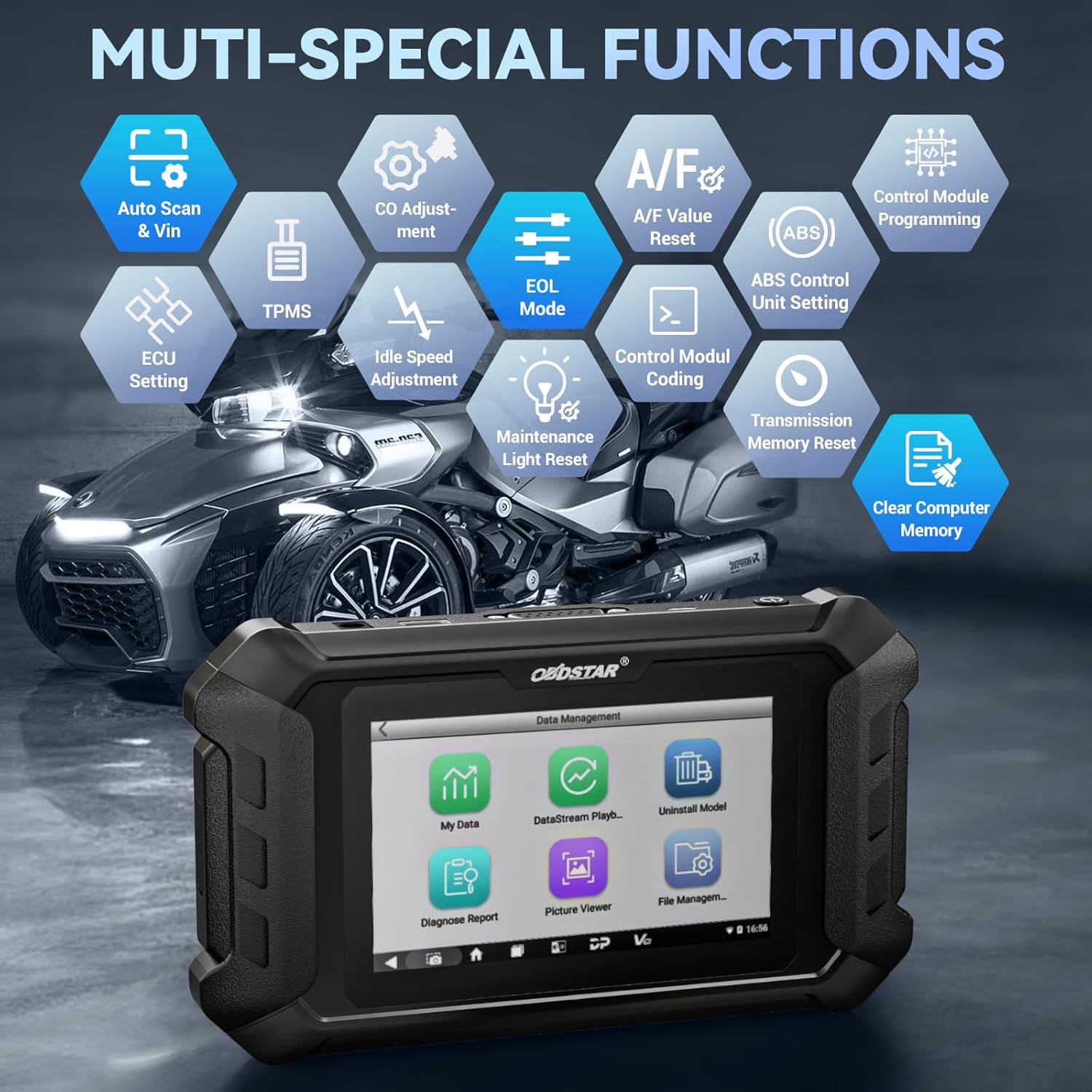
Obrázek 1.2: Přesview of the multi-special functions supported by the OBDSTAR iScan BRP, including Auto Scan & VIN, ECU Setting, TPMS, A/F Value Reset, and more.
2. Obsah balení
Po otevření balení se prosím ujistěte, že jsou všechny následující položky obsaženy a v dobrém stavu:
- Main Tablet (OBDSTAR iScan BRP Diagnostic Tool)
- Nabíječka 12V2A
- Hlavní kabel
- BRP Cable
- Uživatelská příručka

Figure 2.1: All components included in the OBDSTAR iScan BRP package: Main Tablet, 12V2A Charger, Main Cable, BRP Cable, and User Manual.
3. Průvodce nastavením
3.1 Počáteční zapnutí a konfigurace
- Nabijte zařízení: Connect the 12V2A charger to the diagnostic tool and a power outlet. Ensure the device is fully charged before first use.
- Zapnutí: Stiskněte a podržte tlačítko napájení na boku tabletu, dokud se obrazovka nerozsvítí.
- Výběr jazyka: Upon first boot, you will be prompted to select your preferred language. Choose English or another supported language from the list.
- Wi-Fi připojení: Navigate to the system settings and connect to a stable Wi-Fi network. This is crucial for software updates and remote assistance.
- Aktualizace softwaru: After connecting to Wi-Fi, it is recommended to perform a one-click software update to ensure you have the latest diagnostic software and vehicle coverage.
4. Návod k obsluze
4.1 Připojení k vozidlu
- Locate Diagnostic Port: Identify the diagnostic port on your BRP vehicle (motorcycle, snowmobile, ATV, or UTV). Refer to your vehicle's service manual for the exact location.
- Připojit kabely: Use the appropriate Main Cable and BRP Cable to connect the diagnostic tool to the vehicle's diagnostic port. Ensure connections are secure.
- Zapněte zapalování: Turn the vehicle's ignition to the 'ON' position (do not start the engine unless instructed by the diagnostic procedure).
4.2 Provádění diagnostiky
- Select 'MOTO Diag': From the main menu of the diagnostic tool, tap on the 'MOTO Diag' icon to enter the motorcycle diagnostic interface.
- Výběr vozidla: Select the correct vehicle brand (BRP) and model from the list.
- Automatické rozpoznání VIN: The tool supports automatic VIN recognition. If prompted, allow the tool to read the VIN for faster vehicle identification.
- Skenování systému: Initiate an automatic system scan to identify all available control modules and detect any diagnostic trouble codes (DTCs).
- Diagnostické funkce:
- Číst kódy: View current, pending, and historic diagnostic trouble codes.
- Vymazat kódy: Erase diagnostic trouble codes from the vehicle's ECU.
- Datový tok: Monitor real-time data parameters from various sensors and components. Data can be displayed in text, waveform, or instrument diagram formats.
- Active Test (Motion Test): Perform specific tests on actuators and components to verify their functionality.
- Speciální funkce: Access advanced functions such as ECU setting, instrument coding, TPMS reset, maintenance light reset, CO adjustment, idle speed adjustment, A/F value reset, ABS control unit setting, EOL mode, transmission memory reset, and clear computer memory.
- Save and Print Reports: After diagnosis, you can save diagnostic reports and, if connected to a compatible printer, print them for record-keeping.

Figure 4.1: The diagnostic tool's interface highlighting features like Auto VIN & Scan, One Click Upgrade, Professional Tech Support, and Live Data monitoring.

Figure 4.2: The Auto VIN & Scan feature streamlines vehicle identification for efficient diagnostics.

Figure 4.3: The Data Play Back function allows for review of recorded real-time data, aiding in fault analysis.
5. Údržba
5.1 Aktualizace softwaru
Regular software updates are essential to ensure your diagnostic tool has the latest vehicle coverage, bug fixes, and new features. Connect the device to a Wi-Fi network and use the 'Upgrade' function on the main menu for one-click updates.
5.2 Čištění a skladování
- Otřete zařízení měkkým, damp tkanina. Nepoužívejte abrazivní čisticí prostředky nebo rozpouštědla.
- Nástroj skladujte na chladném a suchém místě, mimo dosah přímého slunečního záření a extrémních teplot.
- Keep cables neatly coiled to prevent damage.
6. Řešení problémů
| Problém | Možná příčina | Řešení |
|---|---|---|
| Zařízení se nezapne. | Low battery; faulty charger/cable; device malfunction. | Charge the device for at least 30 minutes. Try a different charger/cable. If problem persists, contact support. |
| Nelze se připojit k vozidlu. | Incorrect cable connection; vehicle ignition off; incompatible vehicle model; damaged diagnostic port. | Ensure cables are securely connected. Turn vehicle ignition ON. Verify vehicle compatibility. Check vehicle's diagnostic port for damage. |
| Aktualizace softwaru selže. | Nestabilní Wi-Fi připojení; nedostatečné úložiště; problém se serverem. | Zajistěte silný signál Wi-Fi. Zkontrolujte dostupné úložiště. Zkuste aktualizaci provést později. |
| Obrazovka nereaguje. | Softwarová závada; fyzické poškození. | Restartujte zařízení. Pokud problém přetrvává, kontaktujte podporu. |
7. Specifikace
- Model: SP540
- Operační systém: Android 5.1.1
- Procesor: RK3128 Quad-core
- Zobrazit: 5.0palcový kapacitní dotykový displej
- Konektivita: Wi-Fi
- Baterie: 1 lithium-polymerová baterie (součástí balení)
- Hmotnost položky: Přibližně 2.55 libry
- Rozměry balení: Přibližně 12.91 x 9.29 x 2.76 palce
- Země původu: Čína
- Podporované jazyky: EN, ES, PT, FR, DE, IT, PL, RU, TR, ID, FA, TH, VN

Figure 7.1: Hardware highlights of the OBDSTAR iScan BRP, including Wi-Fi, Android 5.1.1, 5.0 Inch Touch Screen, RK3128 Quad-core Processor, and Intuitive Menu Guidance.
8. Podpora a záruka
8.1 Technická podpora
OBDSTAR provides technical support for the iScan BRP diagnostic tool. You can utilize the one-click remote help function on the device to receive assistance from OBDSTAR technical staff.
8.2 Zásady vrácení
This product is eligible for a 30-day refund/replacement return policy from the date of purchase. Please refer to your retailer's specific return terms and conditions for detailed information.