1. Úvod
The APC Smart-UPS SMT750C is an Uninterruptible Power Supply (UPS) designed to provide reliable power and surge protection for critical electronic equipment. This unit offers 750VA/500W of line-interactive pure sine wave power, making it suitable for servers, storage systems, network closets, business VoIP setups, desktop computers, and retail POS systems. It features Automatic VoltagRegulace (AVR) pro korekci objemutage fluctuations and a SmartConnect Ethernet Port for cloud-based remote monitoring. This manual provides essential information for the safe and efficient installation, operation, and maintenance of your SMT750C UPS.
2. Bezpečnostní informace
WARNING: Risk of electric shock. Refer to bottom of unit for warnings.
- Před instalací a provozem si pečlivě přečtěte všechny pokyny.
- This UPS contains internal batteries and may present a shock hazard even when disconnected from the AC power source.
- Neotevírejte ani nerozebírejte UPS. Uvnitř nejsou žádné součásti, které by mohl uživatel opravit, s výjimkou baterie.
- Připojujte UPS pouze k uzemněné zásuvce.
- Do not use the UPS in direct sunlight, near heat sources, or in areas with excessive humidity.
- Ensure proper ventilation around the UPS. Do not block any ventilation openings.
3. Obsah balení
Při vybalení ověřte, zda jsou všechny položky přítomny:
- Jednotka APC Smart-UPS SMT750C
- 16GB USB 3.0 Drive
- Uživatelská příručka (tento dokument)
- USB komunikační kabel
- Napájecí kabel

Image: Included 16GB USB 3.0 Drive. This USB drive provides additional storage or file přenosové schopnosti.
4. Konec produktuview
Přední panel
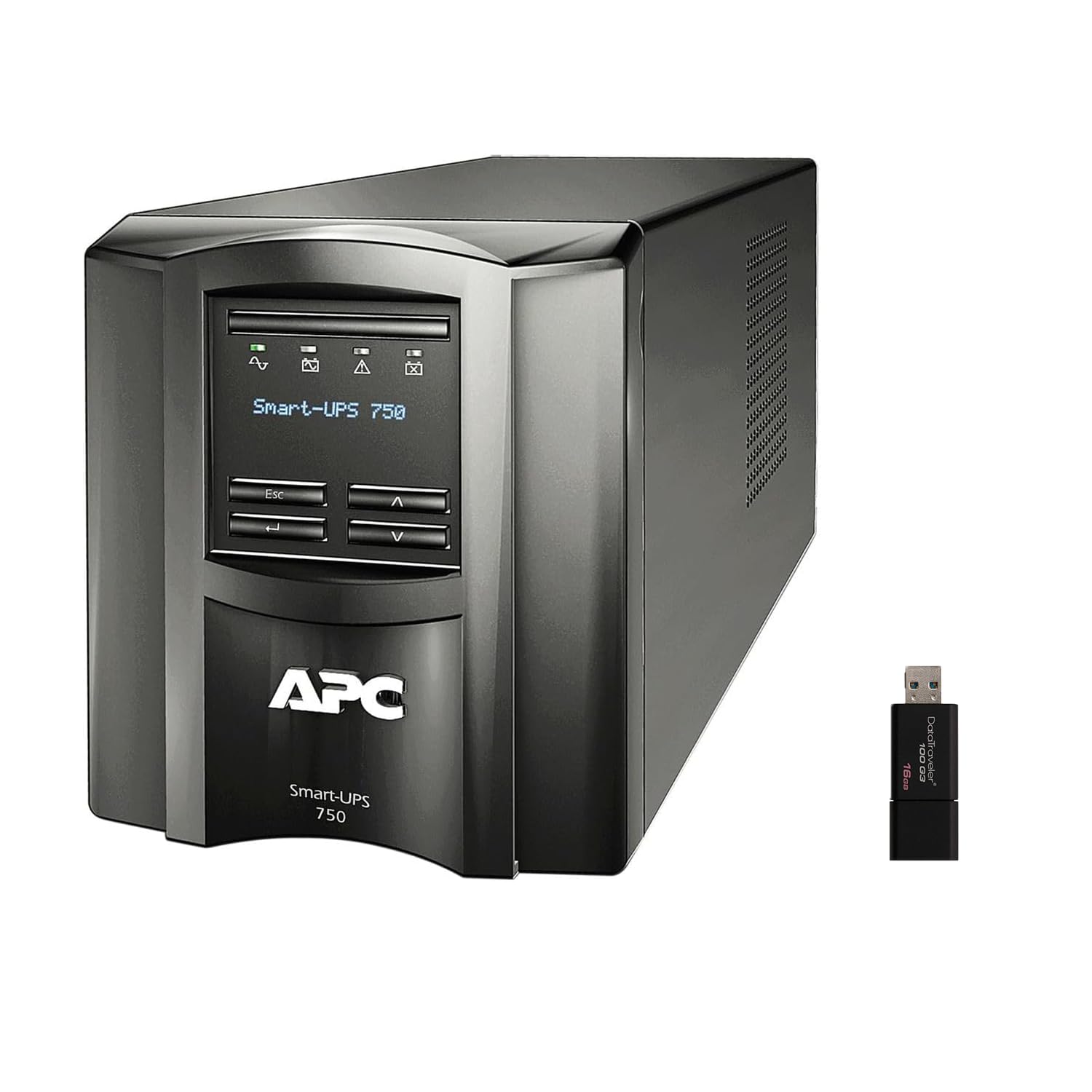
Obrázek: Přední a boční view of the APC Smart-UPS SMT750C. This image displays the compact tower design of the UPS unit.
- Vypínač: Řídí hlavní napájení UPS.
- LCD displej: Provides real-time status information, load levels, battery charge, and estimated runtime.
- Navigační tlačítka: Used to scroll through display menus and adjust settings.
Zadní panel
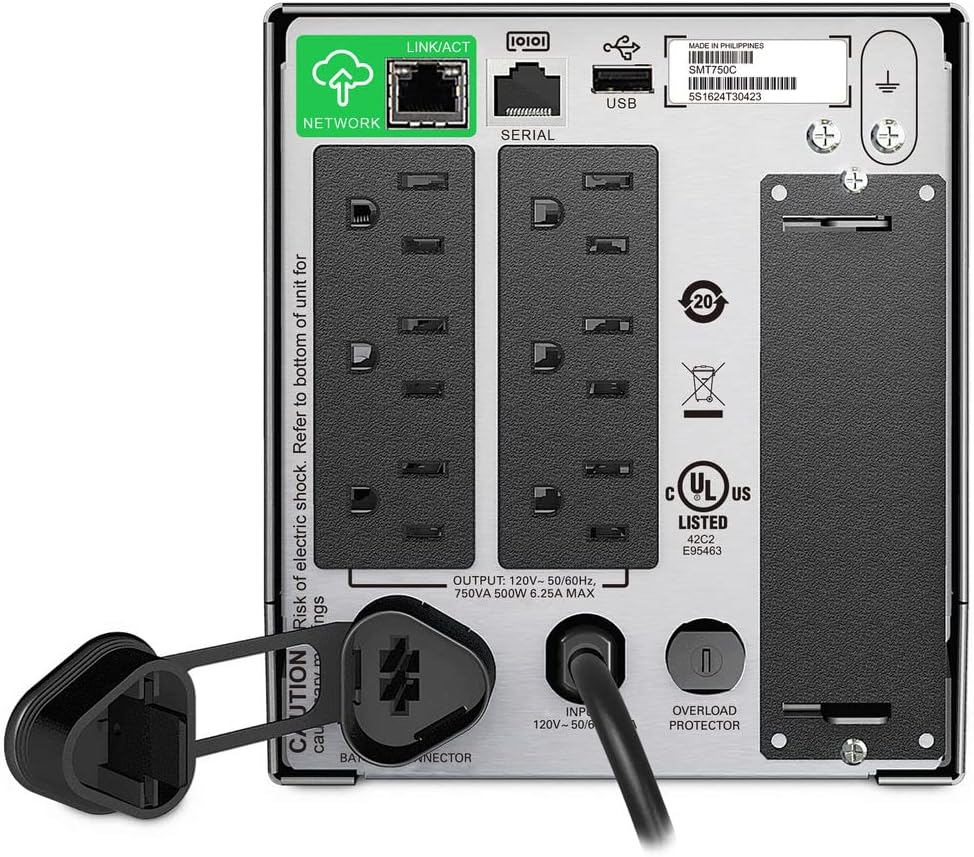
Image: Rear panel of the APC Smart-UPS SMT750C. This view highlights the various input/output ports, including NEMA 5-15R outlets, SmartConnect port, USB, and serial ports.
- NEMA 5-15R Outlets: Six outlets for connecting protected equipment.
- SmartConnect Ethernet Port: For cloud-based remote monitoring and management.
- USB port: For communication with a computer for graceful shutdown via PowerChute Serial Shutdown software.
- Sériový port: Alternative communication port for graceful shutdown.
- SmartSlot: For optional Network Management Card (sold separately).
- Vstupní napájecí kabel: Připojuje UPS k elektrické síti.
- Ochrana proti přetížení: Resettable circuit breaker.
5. Nastavení
5.1 Počáteční připojení baterie
Before initial use, the internal battery must be connected. The unit is shipped with the battery disconnected for safety during transit.
- Umístěte UPS na stabilní povrch.
- Vyhledejte kryt prostoru pro baterie, obvykle na spodní nebo zadní straně jednotky.
- Remove the cover to access the battery.
- Connect the red battery cable to the positive (+) terminal and the black battery cable to the negative (-) terminal. Ensure a secure connection.
- Nasaďte kryt prostoru pro baterie.
5.2 Připojení k elektrické síti
- Plug the UPS power cord into a grounded 3-prong AC outlet.
- Před připojením kritických zařízení nechte UPS nabíjet alespoň 24 hodin, aby byla zajištěna plná kapacita baterie.
5.3 Připojení zařízení
- Connect your critical equipment (e.g., computer, monitor, network devices) to the NEMA 5-15R outlets on the rear panel.
- For graceful shutdown capabilities, connect the provided USB cable from the UPS to your computer and install the PowerChute Serial Shutdown software (available for download from APC's webstránky).
- For remote monitoring, connect an Ethernet cable to the SmartConnect port and follow the instructions for cloud-based setup.
6. Provoz
6.1 Zapnutí/vypnutí
- To power on the UPS, press and hold the power button on the front panel until the unit beeps and the display illuminates.
- To power off the UPS, press and hold the power button until the unit beeps and the display turns off.
6.2 Automatická Voltage Regulace (AVR)
The SMT750C features AVR, which automatically corrects minor voltage fluctuations (sags and surges) without switching to battery power. This protects connected equipment from voltage irregularities and extends battery life.
6.3 Provoz se záložní baterií
Během výkonu outage, the UPS will automatically switch to battery power, providing continuous power to connected equipment. The LCD display will show the estimated remaining runtime. When utility power returns, the UPS will automatically switch back to utility power and recharge its battery.
6.4 Remote Monitoring (SmartConnect)
The SmartConnect port allows for cloud-based remote monitoring of your UPS. This feature enables IT professionals and network administrators to:
- Monitor UPS status and performance.
- Proveďte aktualizace firmwaru.
- Conduct remote diagnostics.
- Receive proactive email notifications with recommended actions.
7. Údržba
7.1 Výměna baterie
The internal battery is a user-replaceable component. When the battery reaches the end of its service life, the UPS will indicate a battery fault. To replace the battery:
- Ensure the UPS is powered off and disconnected from utility power.
- Odstraňte kryt bateriového prostoru.
- Disconnect the battery cables (red and black).
- Carefully slide out the old battery.
- Insert a genuine APC replacement battery (model RBC154, sold separately).
- Connect the battery cables, ensuring correct polarity (red to positive, black to negative).
- Nasaďte kryt prostoru pro baterie.
- Recycle the old battery responsibly.
7.2 Čištění
Pravidelně čistěte vnější povrch UPS měkkým, suchým hadříkem. Nepoužívejte tekuté ani aerosolové čisticí prostředky. Ujistěte se, že ventilační otvory jsou bez prachu a nečistot.
8. Řešení problémů
| Problém | Možná příčina | Řešení |
|---|---|---|
| UPS se nezapne | Baterie není připojena nebo je málo nabitá | Ensure battery cables are connected. Plug UPS into AC outlet and allow to charge. |
| UPS nepřetržitě pípá | Overload or on battery power | Reduce connected load. Check utility power. |
| Battery symbol blinking | Battery needs to be flipped (initial setup) or is failing | For new units, ensure battery is correctly oriented and connected. For older units, consider battery replacement. |
| Žádná energie do zásuvek | UPS is off, circuit breaker tripped, or utility power lost | Turn on UPS. Reset circuit breaker. Check utility power. |
9. Specifikace
- Model: SMT750C
- Výstupní výkon: 500 Wattů / 750 VA
- Výstupní připojení: 6 x NEMA 5-15R
- Vstupní připojení: NEMA 5-15P
- Jmenovitý vstupní objemtage: 120V
- Jmenovitý výstupní objemtage: 120V
- Typ baterie: Olověná kyselina
- Form Factor: Věž
- Rozměry (V x Š x H): 6.34 palce (16.1 cm) x 5.43 palce (13.8 cm) x 14.53 palců (36.9 cm)
- Čistá hmotnost: 27.56 lb (12.5 kg)
- Barva: Černý
- Materiál: Kov
- Dodávané příslušenství: 16GB USB 3.0 Drive
10. Záruka a podpora
Společnost APC poskytuje na tento produkt standardní záruku. Konkrétní záruční podmínky naleznete v záruční kartě dodané s produktem nebo na oficiálních webových stránkách společnosti APC. website. For technical support, product registration, or to purchase replacement parts, please visit www.apc.com nebo kontaktujte zákaznický servis APC.
Protection plans are available for extended coverage. For example, a 3-Year Protection Plan is available.