1. Úvod
This manual provides detailed instructions for the installation, operation, and maintenance of your JVC KW-M595BT Digital Car Stereo. Please read this manual thoroughly before using the product to ensure proper and safe operation. Keep this manual for future reference.
2. Co je v krabici
Před zahájením instalace ověřte, zda jsou všechny položky přítomny:
- JVC KW-M595BT Receiver
- GPS anténa
- Napájecí kabel
- Extension Parking Cable
- Sada šroubů
- Návod k použití a záruční list
3. Nastavení a instalace
Správná instalace je zásadní pro optimální výkon a bezpečnost. Doporučuje se, aby instalaci provedl kvalifikovaný odborník.
3.1 Rozměry jednotky
Ensure adequate space for installation. Refer to the diagram below for precise measurements.

Obrázek: Přední a boční view of the JVC KW-M595BT showing its dimensions in inches and millimeters.
3.2 Zapojení kabeláže
Carefully connect all necessary cables. Incorrect wiring can cause damage to the unit or vehicle. Consult your vehicle's wiring diagram and the included installation guide for specific connections.

Obrázek: Zadní view of the JVC KW-M595BT showing various input/output ports including USB, GPS antenna, iDatalink Maestro connector, audio preouts, and power connections.
- Napájecí kabel: Připojte k napájení vozidla, uzemnění a kabelům příslušenství.
- GPS anténa: Connect the GPS antenna for navigation features.
- USB Terminal (1.0 m): For smartphone connection and media playback.
- Audio Preouts: Front, Rear, and Subwoofer preouts for external ampzáchranáři.
- iDatalink Maestro Connector: For advanced vehicle integration (Maestro RR/RR2 sold separately).
- Zadní View Vstup fotoaparátu: Připojte kompatibilní zadníview fotoaparát.
- Anténní vstup FM/AM: Připojte anténu rádia vašeho vozidla.
3.3 První zapnutí
After installation, turn on your vehicle's ignition. The unit should power on. Follow any on-screen prompts for initial setup, such as language selection and time zone.
4. Návod k obsluze
Familiarize yourself with the unit's controls and features for an optimal user experience.
4.1 Ovládací prvky na předním panelu
The 6.8-inch capacitive touchscreen display provides intuitive control over all functions. Physical buttons are located on the left side of the unit.

Obrázek: Přední strana view of the JVC KW-M595BT display with labels pointing to various controls and screen elements, including power, volume, home, voice recognition, and source selection.
- Power/Home: Press to turn on/off or return to the home screen.
- Objem: Upravte úroveň zvukového výstupu.
- Hlasové rozpoznávání: Activate voice commands for connected smartphones.
- Výběr zdroje: Switch between different audio/video sources.
- Vestavěný mikrofon: For hands-free calling and voice commands.
4.2 Připojení Bluetooth
Pair your smartphone via Bluetooth for wireless audio streaming and hands-free calling.
- Povolte na svém smartphonu Bluetooth.
- On the KW-M595BT, navigate to the Bluetooth settings.
- Select your device from the list of available devices and confirm pairing.

Image: A smartphone displaying a music player app connected via Bluetooth to the JVC KW-M595BT, which is showing music playback information.
4.3 Apple CarPlay
Connect your iPhone via USB to access Apple CarPlay features directly on the unit's display.
- Connect your iPhone to the USB port using a certified USB cable.
- Select the Apple CarPlay icon on the unit's home screen.
- Follow any on-screen prompts on both the unit and your iPhone.

Image: The JVC KW-M595BT display showing the Apple CarPlay interface with various app icons like Phone, Music, Maps, and Messages, with an iPhone connected via USB.
4.4 Android Auto
Connect your Android smartphone via USB to use Android Auto for navigation, communication, and entertainment.
- Connect your Android phone to the USB port using a certified USB cable.
- Select the Android Auto icon on the unit's home screen.
- Follow any on-screen prompts on both the unit and your Android phone.

Image: The JVC KW-M595BT display showing the Android Auto interface with app icons like Maps, Waze, Messages, and Phone, with an Android phone connected via USB.
4.5 USB Mirroring for Smartphone
Mirror your Android smartphone screen (OS 7.0+) to the KW-M595BT monitor via USB and Bluetooth using the Mirroring OA for JVC app.
- Download and install the Mirroring OA for JVC app on your Android smartphone.
- Connect your smartphone via USB and ensure Bluetooth is paired.
- Launch the Mirroring OA app and select the USB Mirroring function on the KW-M595BT.

Image: The JVC KW-M595BT display showing a navigation app mirrored from a smartphone, with icons for other popular apps below.
4.6 Audio Control (Equalizer & Time Alignment)
Customize your audio experience using the 13-band graphic equalizer and digital time alignment features.

Image: The JVC KW-M595BT display showing the graphic equalizer interface, allowing users to adjust frequency bands for sound customization.
- Grafický ekvalizér: Adjust specific frequency bands to tailor the sound to your preference. Access this feature through the audio settings menu.
- Digitální zarovnání času: Optimalizace zvukutage by adjusting the delay for each speaker, ensuring sound reaches your ears simultaneously.
4.7 Integrace iDatalink Maestro
The KW-M595BT is compatible with iDatalink Maestro RR/RR2 (sold separately) for advanced vehicle integration, retaining factory features and displaying vehicle information.
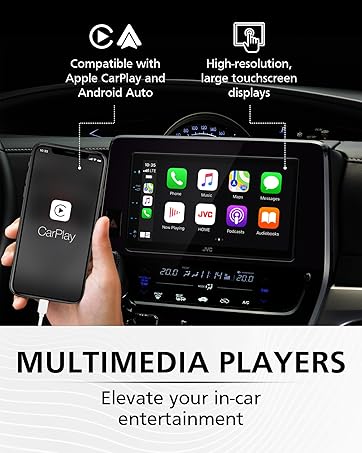
Image: The JVC KW-M595BT display showing various vehicle information screens (gauges, climate, parking assist, vehicle info) enabled by iDatalink Maestro, with the Maestro module shown next to the head unit.
5. Údržba
Regular maintenance helps ensure the longevity and performance of your car stereo.
- Čištění displeje: Dotykovou obrazovku jemně otřete měkkým, suchým hadříkem. V případě odolných šmouh lehceampOtřete hadřík vodou nebo čističem obrazovek určeným pro elektroniku. Vyhněte se agresivním chemikáliím nebo abrazivním materiálům.
- Aktualizace softwaru: Pravidelně kontrolujte JVC webweb s aktualizacemi firmwaru pro zajištění optimálního výkonu a přístupu k novým funkcím.
6. Řešení problémů
If you encounter issues with your KW-M595BT, refer to the following common problems and solutions:
| Problém | Možná příčina | Řešení |
|---|---|---|
| Žádná síla | Nesprávné zapojení, spálená pojistka, problém s autobaterií. | Check power connections, inspect the fuse (15A), ensure vehicle battery is charged. |
| Žádný zvuk | Příliš nízká hlasitost, aktivované ztlumení, nesprávné zapojení reproduktorů, ampproblém s lifikátorem. | Increase volume, check mute status, verify speaker connections, test external ampzáchranář, pokud je použit. |
| Bluetooth se nepřipojuje | Bluetooth na telefonu/jednotce vypnutý, zařízení není v režimu párování, rušení. | Ensure Bluetooth is active on both devices, put unit in pairing mode, try re-pairing, move closer to the unit. |
| Apple CarPlay/Android Auto Not Launching | Faulty USB cable, app not installed/updated, phone settings. | Use a certified USB cable, ensure the respective app is installed and updated on your phone, check phone's USB connection settings. |
| Dotyková obrazovka nereaguje | Dočasná softwarová závada, znečištěná obrazovka. | Perform a soft reset (refer to manual for reset button location), clean the screen. |
If the problem persists after trying these solutions, contact JVC customer support or a qualified service technician.
7. Specifikace
Key technical specifications for the JVC KW-M595BT Digital Car Stereo:

Image: A visual comparison demonstrating the higher resolution and finer detail of the WSVGA (1024x600 pixel) display compared to a conventional WVGA (800x480 pixel) display.
- Číslo modelu: KW-M595BT
- Zobrazit: 6.8-inch WSVGA Capacitive LCD Touch Panel (1024x600 resolution)
- Rozměry (Š x V x H): 7.06 x 3.38 x 3.94 palce (178 mm x 100 mm x 86 mm)
- Hmotnost položky: 2.41 libry
- Konektivita: Bluetooth, USB
- Integrace smartphonu: Apple CarPlay, Android Auto, USB Mirroring (for Android OS 7.0+)
- Audio vlastnosti: 13-Band Graphic EQ, Digital Time Alignment, MP3/WMA/AAC/WAV/FLAC support
- Preouts: Front, Rear, Subwoofer (2.5V)
- Speciální vlastnosti: iDatalink Maestro Ready, SiriusXM Ready, USB 2.1A Charging
- Kódování videa: H.264, MPEG-4
- Konfigurace kanálu prostorového zvuku: 5.1
8. Informace o záruce
Your JVC KW-M595BT comes with a manufacturer's warranty. Please refer to the warranty card included in the product packaging for detailed terms, conditions, and registration information. Keep your proof of purchase for warranty claims.
9. Zákaznická podpora
For further assistance, technical support, or service inquiries, please visit the official JVC webwebu nebo kontaktujte jejich oddělení zákaznických služeb:
- Oficiální JVC Webmísto: www.jvc.com
- Refer to the included documentation for specific contact numbers or email addresses for your region.


