1. Úvod
This manual provides instructions for the DIGITUS M.2 External Enclosure, Model DA-71156. This device allows you to convert an M.2 NVMe or SATA SSD into a portable external storage solution using a USB 3.1 Gen2 Type-C interface. It supports various M.2 module sizes and offers high-speed data transfer.

Obrázek 1.1: Konecview of the DIGITUS M.2 External Enclosure highlighting key features like USB-C, USB 3.1 standard, plug and play functionality, 10 Gbps data transfer rate, tool-free design, and operating temperature range (0°C to +50°C).
2. Obsah balení
Ověřte, zda jsou v balení přítomny všechny položky:
- External SSD Enclosure, M.2 - USB Type-C
- USB Cable (Type-C to Type-A), 25 cm
- Průvodce rychlou instalací (QIG)
- Rubber fasteners for M.2 SSD (typically two)
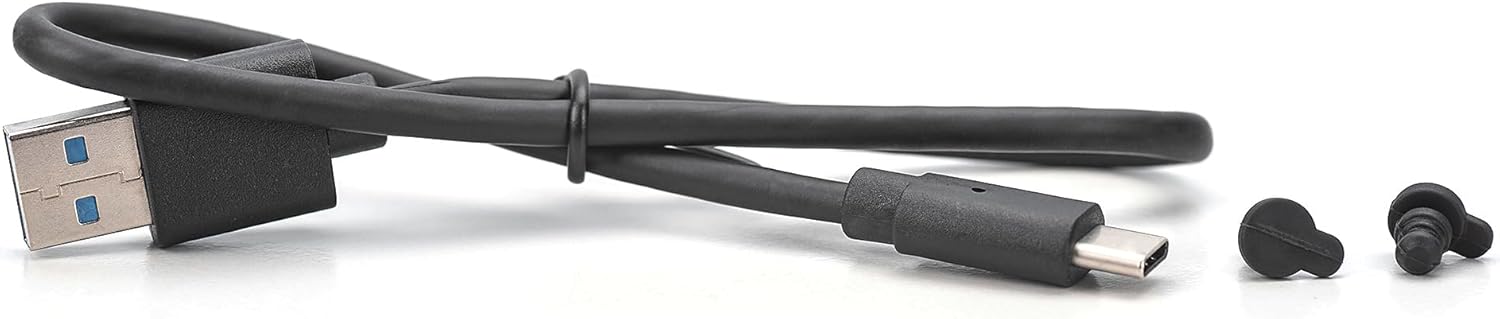
Image 2.1: Included USB cable (Type-C to Type-A) and rubber fasteners for securing the M.2 SSD within the enclosure.
3. Vlastnosti
- Vysokorychlostní přenos dat: USB 3.1 Gen2 interface supports up to 10Gbps for NVMe SSDs and 6Gbps for SATA SSDs. Backward compatible with USB 3.0, 2.0, and 1.1.
- Široká kompatibilita: Supports M.2 SSDs in B+M key format (SATA) and M key format (NVMe) with sizes 2230, 2242, 2260, and 2280.
- Velká skladovací kapacita: Compatible with solid-state drives up to 8TB.
- Instalace bez nářadí: Easy insertion of M.2 modules without the need for tools.
- Efektivní výkon: Equipped with a robust JMS581DL chipset for reliable operation.
- Odolný design: Aluminum housing (Pantone 430C) with a ribbed surface for effective passive heat dissipation.
- Přenosný: Compact dimensions (101x32x10 mm) and lightweight (97g) for mobile use.
- Zapoj a hraj: No drivers required; powered directly via the USB port.
- Široká podpora operačních systémů: Compatible with Windows (11, 10, 8, 7, XP, 2000), macOS, Linux (2.4.x or higher), Google Chrome OS (9.x or higher), Android, and iOS (iPhone 15 onwards).

Image 3.1: The aluminum housing of the enclosure, designed for durability and heat dissipation, supporting up to 8TB capacity.

Image 3.2: Illustration of the enclosure's compatibility with various M.2 SSD lengths (2230, 2242, 2260, 2280) and key types (B&M Key for SATA, M Key for NVMe).
4. Setup: SSD Installation
The DIGITUS M.2 External Enclosure features a tool-free design for easy SSD installation.
- Slide and Remove Tray: Locate the lock button on the end of the enclosure. Slide the push button and gently pull out the black internal tray from the aluminum housing.
- Vložení SSD disku: Carefully remove the black retaining buckle from the tray. Insert your M.2 SSD into the card slot on the tray, ensuring the connectors align correctly.
- Bezpečný SSD disk: The fixing buckle's angle can be adjusted by 45 degrees. Place the motherboard gently and push it into the hard disk box on the upper side. Use one of the provided rubber fasteners to secure the M.2 SSD in place at the appropriate length (2230, 2242, 2260, or 2280).
- Zavřít přílohu: Slide the assembled tray back into the aluminum housing until it clicks securely into place.

Image 4.1: Step-by-step guide for the tool-free installation of an M.2 SSD into the enclosure.

Image 4.2: The enclosure with the internal tray fully extended, demonstrating an M.2 SSD correctly installed and secured.
5. Návod k obsluze
Once the M.2 SSD is installed in the enclosure, it is ready for use.
- Připojit k zařízení: Use the provided USB Type-C to Type-A cable to connect the enclosure to a compatible USB port on your computer, laptop, tablet, or smartphone. The enclosure is powered directly via the USB port.
- Automatické rozpoznání: The enclosure is plug-and-play. Your operating system should automatically detect the new storage device.
- Initialize/Format (New SSDs): If you are using a brand new M.2 SSD, it may need to be initialized and formatted before it can be used. Refer to your operating system's disk management tools for this process.
- Přenos dat: Nyní můžete přenést files to and from the M.2 SSD as you would with any other external drive. The integrated LED indicator will show the SSD's status during operation.

Image 5.1: The enclosure connected to a laptop, demonstrating its plug-and-play functionality and high-speed data transfer capabilities across various platforms.
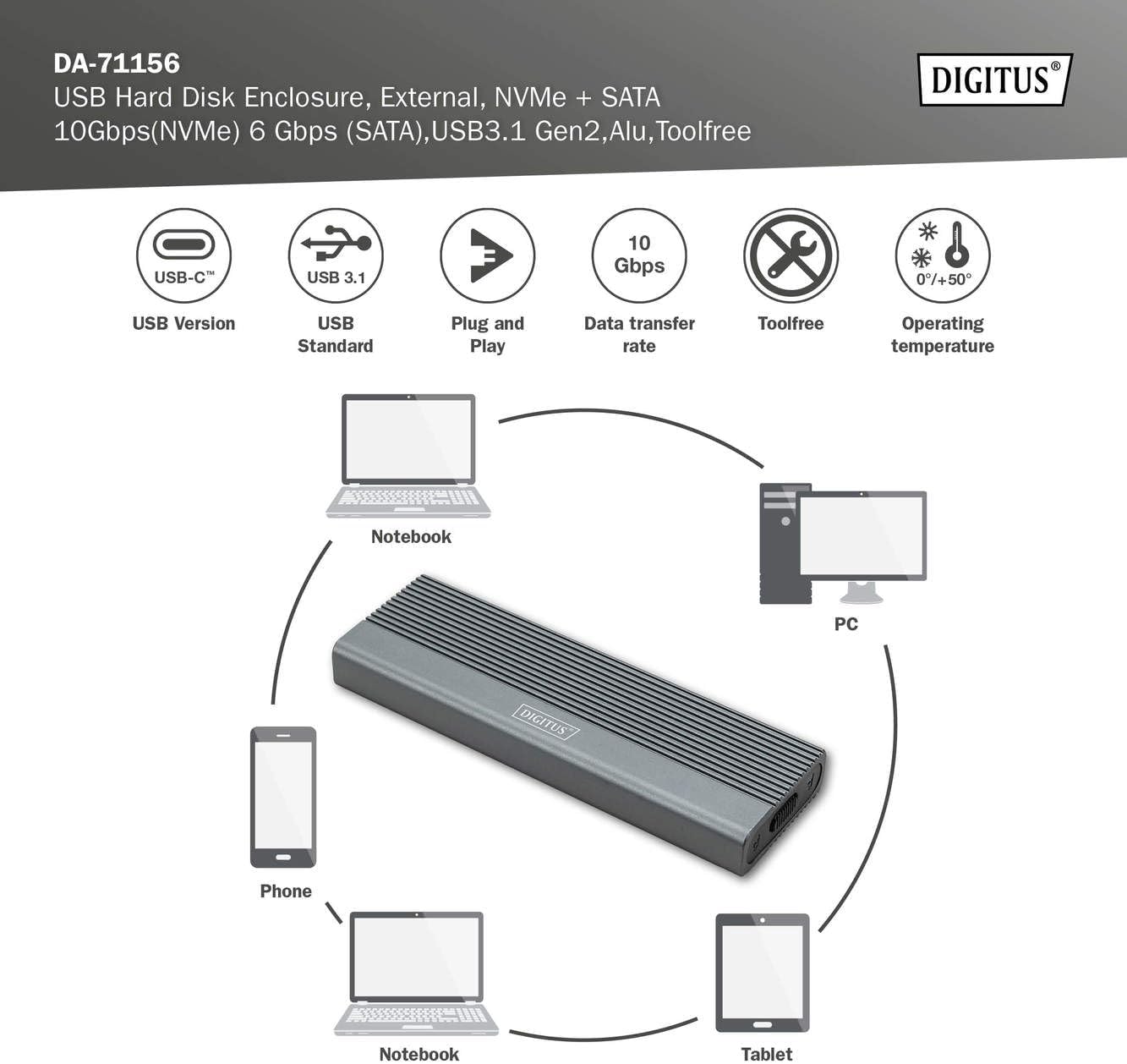
Image 5.2: The enclosure's universal compatibility, connecting to notebooks, PCs, phones, and tablets.
6. Údržba
To ensure the longevity and optimal performance of your DIGITUS M.2 External Enclosure:
- Čištění: K čištění vnější strany krytu používejte měkký, suchý hadřík. Nepoužívejte tekuté čisticí prostředky ani abrazivní materiály.
- Zacházení: Handle the enclosure with care. Avoid dropping it or subjecting it to strong impacts.
- Teplota: Operate the enclosure within the specified temperature range of 0°C to +50°C. Avoid extreme temperatures.
- Skladování: When not in use, store the enclosure in a cool, dry place away from direct sunlight and moisture.
- Odpojení: Always safely eject or unmount the drive from your operating system before physically disconnecting the USB cable to prevent data corruption.
7. Řešení problémů
If you encounter issues with your DIGITUS M.2 External Enclosure, consider the following:
- Disk nebyl detekován:
- Ensure the USB cable is securely connected to both the enclosure and your device.
- Zkuste na svém zařízení jiný USB port.
- Pokud je k dispozici, vyzkoušejte s jiným USB kabelem.
- Ověřte, zda je disk M.2 SSD správně usazen a zajištěn v pouzdře.
- For new SSDs, check your operating system's disk management utility to see if the drive needs to be initialized and formatted.
- Ensure your M.2 SSD is compatible (NVMe or SATA, B+M key or M key, supported sizes).
- Pomalý přenos dat:
- Ensure you are connected to a USB 3.1 Gen2 (10Gbps) or at least USB 3.0 (5Gbps) port on your host device. Older USB 2.0 ports will result in significantly slower speeds.
- Verify that your M.2 SSD itself is capable of high speeds.
- Zavřete ostatní aplikace, které mohou využívat systémové prostředky nebo provádět přenosy na pozadí.
- Přehřátí skříně:
- The aluminum housing is designed for passive heat dissipation. Ensure adequate airflow around the enclosure.
- Prolonged heavy data transfer can cause the enclosure to become warm, which is normal. If it becomes excessively hot, disconnect it and allow it to cool.
8. Specifikace
| Číslo modelu | DA-71156 |
| Materiál | Hliník |
| Barva | Šedá |
| Rozhraní | USB 3.1 Gen2 typu C |
| Rychlost přenosu dat | Up to 10 Gbps (NVMe), 6 Gbps (SATA) |
| Kompatibilní SSD disky | M.2 NVMe (M Key) & M.2 SATA (B+M Key) |
| Supported M.2 Sizes | 2230, 2242, 2260, 2280 |
| Maximální kapacita úložiště | 8 TB |
| Čipová sada | JMS581DL |
| Rozměry produktu | 101 x 32 x 10 mm (3.98 x 1.26 x 0.39 palce) |
| Hmotnost položky | 97 g (0.16 kg / 5.6 ounces) |
| Provozní teplota | 0 °C až +50 °C |
| Kompatibilní OS | Windows, macOS, Linux, Chrome OS, Android, iOS |
9. Záruka a podpora
For warranty information and technical support, please refer to the documentation provided with your purchase or visit the official Digitus webUschovejte si doklad o koupi pro případ reklamace.


