Zavedení
This manual provides detailed instructions for the safe and effective use of your Docooler Wireless Headphones Model BQ70. These earbuds feature advanced Bluetooth 5.3 technology, Active Noise Cancellation (ANC), Environmental Noise Cancellation (ENC), and a convenient slide-open charging case with a digital display. Please read this manual thoroughly before using the product and retain it for future reference.
Důležité bezpečnostní informace

Varování: If you find the product damaged, deformed, or exhibiting abnormal performance, please stop using it immediately and contact customer support. This image displays a universal warning symbol, emphasizing the importance of discontinuing use if any product anomalies are observed.
- Produkt nerozebírejte, neopravujte ani neupravujte.
- Chraňte výrobek před extrémními teplotami, přímým slunečním zářením a vlhkostí.
- Zabraňte pádu nebo vystavení produktu silným nárazům.
- Používejte pouze dodaný nabíjecí kabel nebo jeho certifikovaný ekvivalent.
- Výrobek zlikvidujte zodpovědně v souladu s místními předpisy.
Obsah balení
Zkontrolujte prosím, zda jsou v balení všechny položky:
- 1 Pair of Docooler Wireless Earbuds
- 1 Nabíjecí pouzdro
- Nabíjecí kabel 1
- 1 Uživatelská příručka (tento dokument)
Konec produktuview
Familiarize yourself with the components of your Docooler Wireless Headphones.

Obrázek 1.1: The sleek black charging case features a digital display indicating battery percentage, along with charging ports. This image highlights the compact design and the integrated battery level indicator.
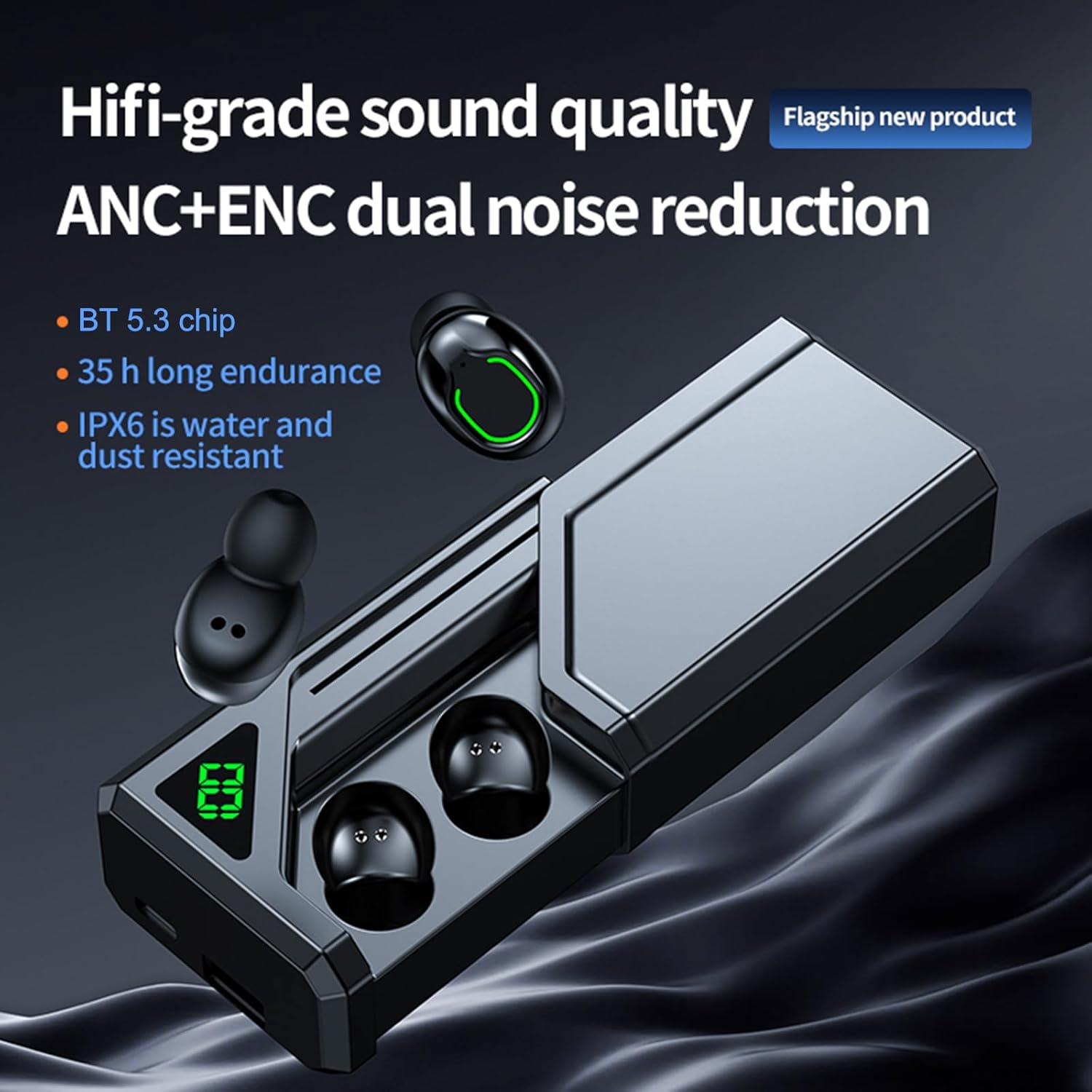
Obrázek 1.2: Tento view shows the earbuds alongside the charging case, emphasizing key features such as Hi-fi grade sound quality, ANC+ENC dual noise reduction, BT 5.3 chip, 35-hour endurance, and IPX6 water and dust resistance. The slide-open design of the case is also visible.
Průvodce nastavením
1. Nabíjení sluchátek a pouzdra
Před prvním použitím plně nabijte nabíjecí pouzdro a sluchátka.
- Connect the charging cable to the charging port on the case and to a USB power source (DC5V 1A recommended).
- The digital display on the case will show the battery percentage během nabíjení.
- Place the earbuds into the charging case. Ensure they are correctly seated; indicators on the earbuds will show charging status.
- A full charge for the case and earbuds typically takes 1-2 hours.

Obrázek 2.1: This image illustrates the charging process and battery life, showing 6-7 hours of play time, 1-2 hours of charging time, and up to 100 days of standby time for the charging case. The digital display on the case indicates its charge level.
2. Spárování se zařízením Bluetooth
The earbuds utilize Bluetooth 5.3 for a stable and low-latency connection.
- Otevřete nabíjecí pouzdro. Sluchátka se automaticky zapnou a přejdou do režimu párování.
- Na svém zařízení (chytrém telefonu, tabletu atd.) povolte Bluetooth a vyhledejte dostupná zařízení.
- Select "Docooler BQ70" (or similar name) from the list of found devices.
- Po připojení uslyšíte zvukové potvrzení a kontrolky sluchátek se změní.
- Při dalším použití se sluchátka po vyjmutí z pouzdra automaticky připojí k poslednímu spárovanému zařízení.

Obrázek 2.2: This graphic highlights the advanced Bluetooth 5.3 chip, emphasizing its role in providing faster, more stable, and lower latency wireless connectivity for an enhanced user experience.
3. Nošení sluchátek do uší
Pro optimální kvalitu zvuku a pohodlí se ujistěte, že jsou sluchátka správně usazena v uších.
- Identifikujte levé (L) a pravé (R) sluchátko.
- Jemně vložte každé sluchátko do odpovídajícího zvukovodu.
- Mírně otáčejte sluchátkem, dokud nebudete cítit bezpečné a pohodlné uchycení. Dobré utěsnění je klíčové pro efektivní potlačení hluku a basovou odezvu.
Návod k obsluze
The Docooler Wireless Headphones feature intuitive touch controls. Specific touch functions may vary slightly, but common operations are listed below.
1. Zapnutí/vypnutí
- Zapnutí: Open the charging case, and the earbuds will automatically power on. Alternatively, press and hold the touch area on both earbuds for approximately 3 seconds.
- Vypnout: Place the earbuds back into the charging case and close the lid. They will automatically power off and begin charging. Alternatively, press and hold the touch area on both earbuds for approximately 5 seconds.
2. Ovládací prvky přehrávání hudby
- Přehrát/pozastavit: Jediným klepnutím na jedno sluchátko.
- Další skladba: Dvakrát klepněte na pravé sluchátko.
- Předchozí skladba: Dvakrát klepněte na levé sluchátko.
- Zvýšit hlasitost: Trojitě klepněte na pravé sluchátko.
- Snížit hlasitost: Trojité poklepání na levé sluchátko.
3. Správa hovorů
- Přijmout/ukončit hovor: Jediným klepnutím na jedno sluchátko.
- Odmítnout hovor: Stiskněte a podržte dotykovou oblast na kterémkoli sluchátku po dobu 2 sekund.
4. Noise Cancellation Modes (ANC/ENC)
The earbuds feature both Active Noise Cancellation (ANC) for immersive listening and Environmental Noise Cancellation (ENC) for clear calls.
- Přepnout režim ANC/průhlednosti: Press and hold the touch area on the Left earbud for 2 seconds to cycle between ANC On, Transparency Mode, and ANC Off.
- ENC is automatically active during phone calls to reduce background noise for the person you are speaking with.

Obrázek 3.1: This image visually represents the noise reduction capability of the earbuds, indicating a depth of up to -36dB, allowing users to enjoy a quiet listening experience.

Obrázek 3.2: This graphic illustrates the dual noise reduction technology, ANC (Active Noise Cancellation) and ENC (Environmental Noise Cancellation), highlighting how the earbuds suppress ambient sound for both listening and calls.
5. Low Latency Gaming Mode
Experience synchronized audio and visuals with ultra-low latency, ideal for gaming.
- Aktivace herního režimu: Triple tap on the Right earbud (or refer to specific product instructions if different).
- This mode reduces audio latency to as low as 38ms, enhancing your gaming experience.

Obrázek 3.3: This image depicts a user gaming with the earbuds, emphasizing the ultra-low latency of 38ms, which provides a competitive advantage by ensuring audio and video are perfectly synchronized.
6. Použití jednoho/dvěma sluchátky
The earbuds support both single and dual earbud modes, allowing flexible usage.
- You can use either the left or right earbud independently. Simply take one earbud out of the case, and it will connect to your device.
- To switch back to dual mode, take the other earbud out of the case. They will automatically pair with each other.

Obrázek 3.4: This image demonstrates the "uncoupling ready-to-use" feature, allowing for easy switching between single and binaural modes. It shows the earbuds in the case and a phone displaying a music player interface, indicating seamless connectivity.
7. Charging Case as Portable Power Source
The 800mAh charging case can also serve as a portable power bank for other small electronic devices.
- Connect your device to the USB output port on the charging case using an appropriate cable.
- The charging case will begin to supply power to your connected device.
Péče a údržba
1. Čištění
- Pravidelně čistěte sluchátka a nabíjecí pouzdro měkkým, suchým hadříkem, který nepouští vlákna.
- Nepoužívejte agresivní chemikálie, čisticí rozpouštědla ani silné čisticí prostředky.
- Jemně odstraňte ušní maz nebo nečistoty z koncovek sluchátek a mřížky reproduktoru pomocí malého měkkého kartáčku nebo vatového tamponu.
2. Voděodolnost (IPX6)
The earbuds are rated IPX6 waterproof, meaning they are protected against powerful water jets. This makes them suitable for workouts and light rain.
- Neponořujte sluchátka do vody.
- The charging case is NOT waterproof. Keep it dry.
- If earbuds get wet, wipe them dry completely before placing them back in the charging case.
3. Skladování
- Pokud sluchátka nepoužíváte, uložte je do nabíjecího pouzdra, aby byla chráněna a zůstávala nabitá.
- Výrobek skladujte na chladném a suchém místě, mimo dosah extrémních teplot a přímého slunečního záření.
Odstraňování problémů
Pokud narazíte na problémy se sluchátky, podívejte se na následující běžná řešení:
| Problém | Možné řešení |
|---|---|
| Sluchátka se nespárují se zařízením. |
|
| Z jednoho nebo obou sluchátek není slyšet žádný zvuk. |
|
| Nabíjecí pouzdro se nenabíjí. |
|
| Sluchátka se v pouzdře nenabíjejí. |
|
| Špatná kvalita zvuku nebo přerušované připojení. |
|
Specifikace
| Model | BQ70 |
| Verze BT | 5.3 |
| Přenosová vzdálenost | 10 metrů (bez překážky) |
| Pohonná jednotka | 8mm pohyblivá cívka |
| Frekvenční odezva | 15Hz-20KHz |
| Impedance | 32Ω |
| Jmenovitý výkon | 3 mW |
| Kapacita baterie nabíjecího boxu | 800 XNUMX mAh |
| Kapacita baterie do uší | 45 XNUMX mAh (každý) |
| Doba nabíjení | 1-2 hodin |
| Čas hudby | 6-7 hodin (závisí na hlasitosti) |
| Nabíjecí svtage/Aktuální | DC5V 1A |
| Barva | Černý |
| Hodnocení odolnosti proti vodě | IPX6 (pouze sluchátka) |
| Form Factor | V uchu |
| Hmotnost položky | Approx. 4.4 ounces (119g package weight) |
| Výrobce | Docooler |
Záruka a podpora
Docooler products are designed and manufactured to the highest quality standards. For information regarding warranty coverage, please refer to the warranty card included in your product packaging or visit the official Docooler webmísto.
If you require technical assistance or have questions about your product, please contact Docooler customer support through the retailer where you purchased the product or via the contact information provided on the official Docooler webmísto.
Online zdroje: For the latest product information, FAQs, and support, please visit the Docooler Store on Amazon.