1. Úvod
This manual provides detailed instructions for the installation, operation, and maintenance of your PNI House WiFi800 NVR and PNI IP840 Outdoor Camera Wireless Surveillance Kit. Please read this manual thoroughly before using the product to ensure proper setup and functionality. Keep this manual for future reference.
2. Bezpečnostní informace
- Ujistěte se, že všechna napájecí připojení jsou bezpečná a splňují specifikovaný objem.tage (12V DC).
- Do not expose the NVR to moisture or extreme temperatures.
- The PNI IP840 cameras are IP65 rated for outdoor use; however, avoid submerging them in water.
- Installation should be performed by qualified personnel if you are unsure about electrical connections or mounting procedures.
- Udržujte výrobek mimo dosah silných magnetických polí.
- Use only original or certified replacement parts and accessories.
3. Obsah balení
Ověřte, zda jsou v balení přítomny všechny níže uvedené položky:
- PNI House WiFi800 NVR (1 unit)
- PNI IP840 Outdoor Cameras (2 units)
- Power Adapters (for NVR and cameras)
- USB Mouse (for NVR)
- Fixing Screws and Wall Plugs (for cameras)
- User Manuals (for NVR and cameras)

Image: PNI House WiFi800 NVR with included USB mouse and power adapter.

Image: PNI IP840 Outdoor Camera with its power adapter and mounting hardware.
4. Konec produktuview
4.1 PNI IP840 Outdoor Camera
The PNI IP840 camera is a high-resolution wireless outdoor surveillance camera featuring 8MP 4K video, pan/tilt functionality, and advanced night vision. It is designed for robust performance in various weather conditions.
- Senzor: 1/2.7" CMOS, 8MP
- Rezoluce: 3840x2160 (4K)
- Čočka: 3.6mm, 90° viewúhel
- Pan/Tilt: Horizontální 355°, Vertikální 90°
- Noční vidění: 4 IR LEDs and 4 White LEDs, up to 15m
- Skladování: Slot pro kartu MicroSD (až 256 GB, karta není součástí balení)
- Konektivita: WiFi 2.4GHz, ONVIF support
- Vlastnosti: Motion Detection, Human Shape Detection, Rotation after movement, ICSee app support
- Odolnost vůči počasí: Stupeň krytí IP65

Obrázek: Přední strana view of the PNI IP840 outdoor camera, showing the lens, LEDs, and antennas.

Image: Close-up of the PNI IP840 camera's connection cables for power and wired network.
4.2 PNI House WiFi800 NVR
The PNI House WiFi800 NVR (Network Video Recorder) is the central unit for managing and recording video from your surveillance cameras. It supports up to 8 channels at 5MP or 4 channels at 4K (8MP) resolution.
- Video kanály: 8 channels (5MP) / 4 channels (4K/8MP)
- Komprese videa: H.265AI/H.265+
- Rozlišení přehrávání: 1080P (HDMI output)
- Skladování: Supports 1x 2.5" HDD (up to 14TB) or 1x MicroSD card (up to 128GB)
- Síťové rozhraní: RJ45 10/100/1000 Mbit/s
- Bezdrátová frekvence: 2.4 GHz (for NVR-camera communication)
- výstupy: 1x HDMI, 1x USB 2.0
- Vlastnosti: Mobile/PC viewing (Android, iOS, Windows), ICSee/XMEye app support, Integrated voice prompt speaker

Image: Rear panel of the PNI House WiFi800 NVR, displaying its various ports including power, HDMI, Ethernet, USB, and reset button.

Obrázek: Boční view of the PNI House WiFi800 NVR, showing its antennas and port layout.
5. Nastavení
5.1 Počáteční nastavení NVR
- Připojte napájení: Připojte NVR k napájecímu adaptéru a zapojte jej do elektrické zásuvky.
- Připojení displeje: Connect the NVR to a monitor or TV using an HDMI cable.
- Připojení myši: Plug the USB mouse into the NVR's USB port for navigation.
- Síťové připojení (volitelné): For remote access and firmware updates, connect the NVR to your router using an Ethernet cable.
- Storage Installation (Optional): If using an HDD, open the NVR casing and install a 2.5" SATA HDD. Alternatively, insert a MicroSD card into the designated slot.
5.2 Instalace kamery
- Vyberte umístění: Select a suitable outdoor location for each camera, ensuring good Wi-Fi signal strength and an unobstructed view. The IP65 rating allows for outdoor exposure.
- Montáž kamery: Use the provided screws and wall plugs to securely mount the camera to a wall or ceiling.
- Připojte napájení: Connect the camera to its power adapter and plug it into an electrical outlet. Ensure the power cable is protected from the elements.
5.3 Pairing Cameras with NVR
The cameras are typically pre-paired with the NVR in the kit. If not, or if adding new cameras:
- Ensure both the NVR and cameras are powered on.
- On the NVR interface (connected to a monitor), navigate to the camera management or channel settings.
- Select the option to add or search for wireless cameras. The NVR will scan for available PNI IP840 cameras.
- Dokončete proces párování podle pokynů na obrazovce.
5.4 Mobile App Configuration (ICSee / XMEye)
- Stáhnout aplikaci: Download the ICSee or XMEye app from your smartphone's app store (Android or iOS).
- Vytvořit účet: Vytvořte si nový uživatelský účet nebo se přihlaste, pokud již nějaký máte.
- Přidat zařízení: In the app, select "Add Device" or scan the QR code displayed on the NVR's monitor (if available) or the NVR itself.
- Postupujte podle pokynů: Follow the in-app instructions to connect your NVR and cameras to your mobile device for remote viewovládání a ovládání.
6. Návod k obsluze
6.1 Živě View
Access live video feeds from your cameras via the NVR's connected monitor or through the ICSee/XMEye mobile application. The NVR interface allows for multi-channel display.
6.2 Nahrávání
- Nepřetržité nahrávání: Configure the NVR to record continuously to the installed HDD or MicroSD card.
- Nahrávání aktivované pohybem: Set up recording to trigger only when motion is detected by the cameras.
- Plánované nahrávání: Define specific time periods for recording.
6.3 Přehrávání
Na review zaznamenané footage:
- On the NVR interface, select the "Playback" option.
- Choose the desired camera, date, and time range.
- Use the controls to play, pause, fast forward, or rewind footage.
- Mobile app playback functions similarly, allowing remote access to recorded video.
6.4 Motion Detection and AI Functions
The PNI IP840 cameras feature advanced detection capabilities:
- Detekce pohybu: Configurable sensitivity to detect movement within the camera's field of view.
- Human Shape Detection: Intelligent analysis to differentiate human figures from other moving objects, reducing false alarms.
- Rotation After Movement: The camera can be set to automatically track detected movement within its pan/tilt range.
- Upozornění na alarm: Enable push notifications to your mobile phone when an alarm event (e.g., motion detection) occurs.
Access these settings through the NVR menu or the mobile application to customize detection zones, sensitivity, and notification preferences.
6.5 Ovládání otáčení/naklánění/zoomu (PTZ)
For PNI IP840 cameras, you can remotely control the camera's orientation:
- Use the PTZ controls available in the NVR interface or the ICSee/XMEye mobile app.
- Drag your finger on the live view screen in the app to pan (horizontal 355°) and tilt (vertical 90°) the camera.
- Digital zoom functionality may be available through the app.
7. Údržba
- Čištění: Pravidelně čistěte čočky fotoaparátu měkkým, suchým hadříkem, abyste zajistili ostrý obraz. Nepoužívejte agresivní chemikálie.
- Aktualizace firmwaru: Periodically check for firmware updates for both the NVR and cameras through the mobile app or NVR interface. Updates can improve performance and add new features.
- Zkontrolujte připojení: Ujistěte se, že všechny napájecí a síťové kabely jsou bezpečně připojeny a nejsou poškozené.
- Správa úložiště: Regularly back up important recordings and manage storage space on your HDD or MicroSD card.
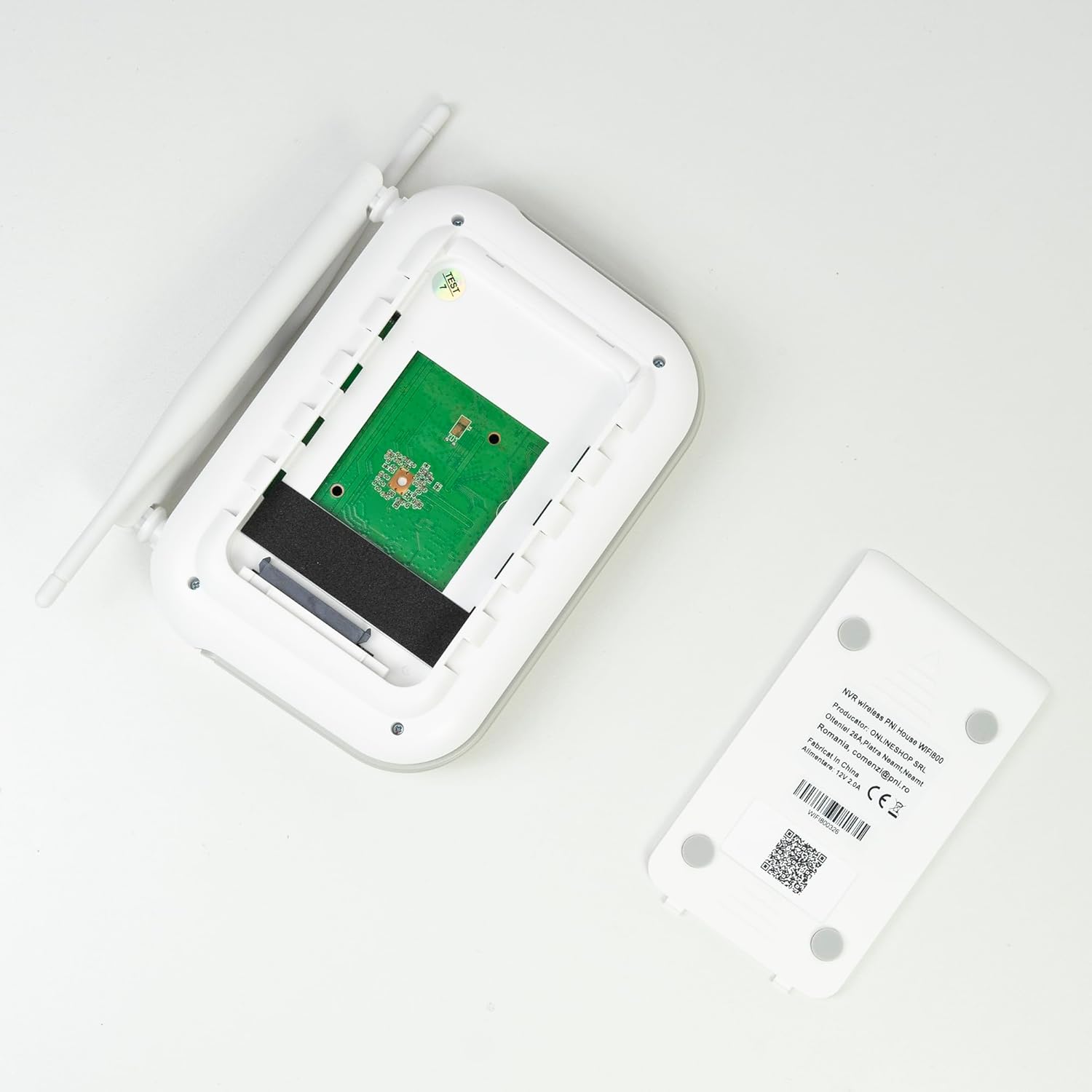
Obrázek: Interní view of the PNI House WiFi800 NVR, illustrating the circuit board and the bay for HDD installation.
8. Řešení problémů
- Žádný obraz na monitoru:
- Check NVR power supply and HDMI cable connection to the monitor.
- Ujistěte se, že je monitor nastaven na správný vstupní zdroj.
- Kamery se nepřipojují:
- Ověřte, zda jsou kamery zapnuté.
- Check Wi-Fi signal strength at camera locations.
- Re-pair cameras with the NVR if necessary (refer to Section 5.3).
- Žádný vzdálený přístup přes aplikaci:
- Ensure the NVR is connected to the internet via Ethernet.
- Zkontrolujte připojení k internetu ve vašem smartphonu.
- Verify NVR is correctly added to the ICSee/XMEye app.
- Špatná kvalita obrazu:
- Vyčistěte objektivy fotoaparátu.
- Zkontrolujte, zda se v zorném poli kamery nenacházejí překážky. view.
- Zajistěte dostatečné osvětlení pro noční vidění.
- Problémy s nahráváním:
- Check if an HDD or MicroSD card is properly installed and formatted.
- Ověřte plány nahrávání a nastavení detekce pohybu.
- Zajistěte dostatek úložného prostoru.
9. Specifikace
9.1 PNI IP840 Outdoor Camera Specifications
| Funkce | Detail |
|---|---|
| Obrazový snímač | 1/2.7" CMOS |
| Rozlišení snímače | 8 MP |
| Rozlišení videa | 3840x2160 (4K) |
| Typ objektivu | 3.6 mm |
| Viewúhel | 90° |
| Pan/Tilt | Horizontální: 355°, Vertikální: 90° |
| Infračervené osvětlení | 4x IR LEDs, 4x White LEDs |
| IR Vzdálenost | Do 15m |
| Komprese videa | H.265X (compatible with H.264+/H.264) |
| Zvuk | Integrated Microphone and Speaker |
| Bezdrátová frekvence | 2.4 GHz |
| Podporované protokoly | ONVIF |
| Skladování | Slot pro microSD kartu (max 256 GB) |
| Napájení | 12V/1A |
| Třída ochrany | IP65 |
| Provozní teplota | -26 °C ~ +80 °C |
| Rozměry | 86 x 135 x 146 mm |
| Hmotnost | 371 gramů |
9.2 PNI House WiFi800 NVR Specifications
| Funkce | Detail |
|---|---|
| Video kanály | 8 kanálů 5MP / 4 kanály 4K (8MP) |
| Komprese videa | H.265AI/H.265+ |
| Rozlišení přehrávání | 1080P (HDMI) |
| Kapacita úložiště | 1x 2.5" HDD (max 14TB) / 1x MicroSD card (max 128GB) |
| Síťové rozhraní | RJ45 - 10/100/1000 Mbit/s |
| Video výstup | 1x HDMI |
| Rozhraní USB | 1x USB 2.0 |
| Procesor | MSR621Q |
| Napájení | 12V/2A |
| Rozměry | 170 x 120 x 35 mm |
| Hmotnost | 245 gramů |
| Wi-Fi Frequency (NVR-Camera) | 2.4 GHz |
| Hlasová výzva | Yes, integrated speaker |
10. Záruka a podpora
For warranty information, please refer to the documentation provided at the time of purchase or contact your retailer. For technical support, product inquiries, or assistance with troubleshooting, please visit the official PNI website or contact PNI customer service directly. Keep your purchase receipt as proof of purchase.
Výrobce: ONLINESHOP SRL
Číslo modelu: PNI-WF8-840-2


