1. Úvod
This manual provides detailed instructions for the safe and effective use of your Zoom H1 XLR Handy Recorder. The H1 XLR is a portable audio recording device designed for musicians, podcasters, filmmakers, and content creators, featuring 32-bit float recording technology and versatile input options. Please read this manual thoroughly before operating the device to ensure proper functionality and to prevent damage.
2. Konec produktuview
2.1. Součásti a ovládací prvky
Familiarize yourself with the various parts and controls of your H1 XLR recorder.

Obrázek 2.1: Přední strana View of Zoom H1 XLR
This image displays the front of the Zoom H1 XLR, highlighting the two XLR/TRS combo input jacks at the top, the monochrome OLED display in the center, and the main control buttons including Record, Play/Pause, Stop, Menu, and navigation buttons.
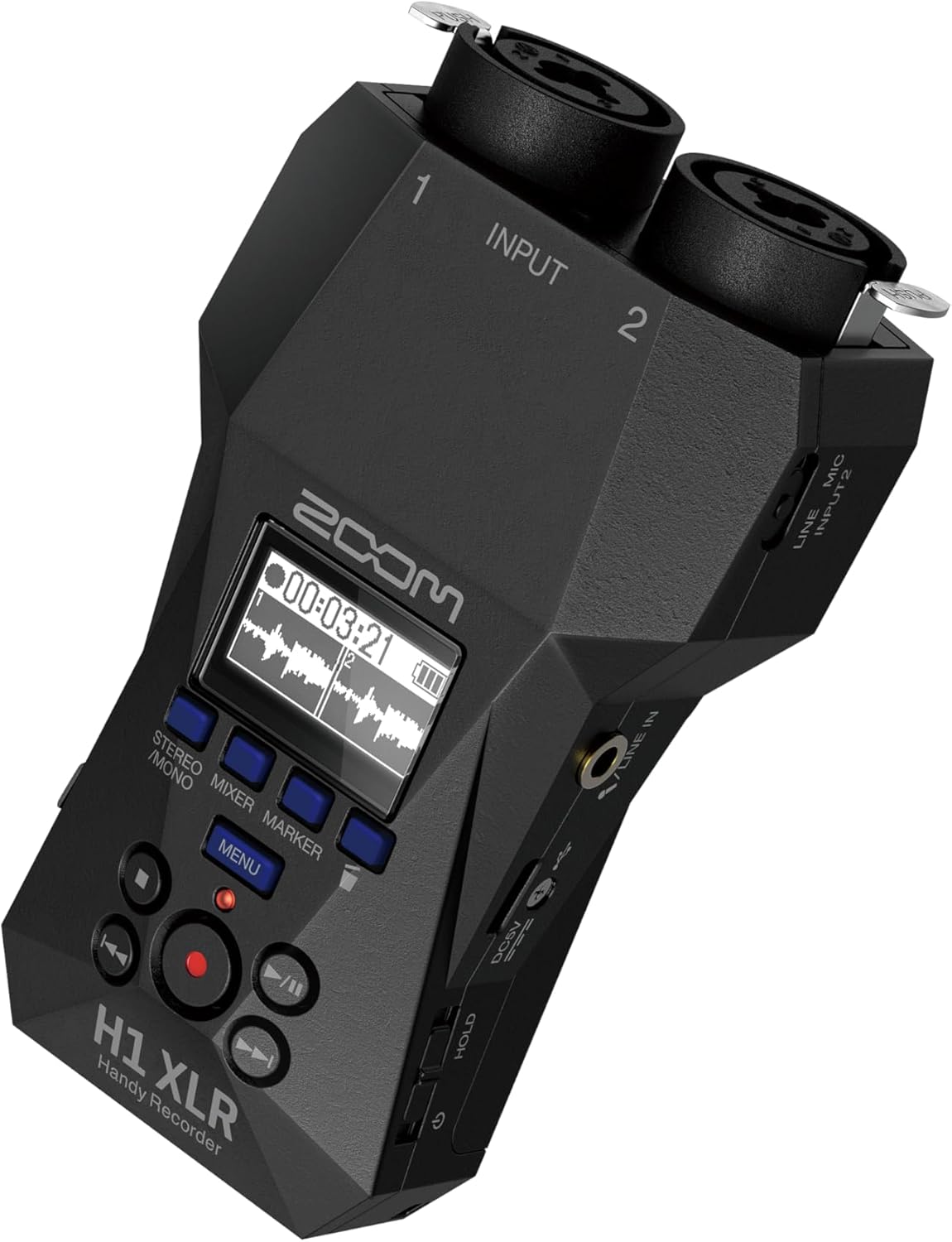
Obrázek 2.2: Úhlové View with Side Controls
Toto šikmé view of the H1 XLR shows the side panel, which includes the LINE IN/MIC IN switch, gain adjustment knobs for inputs 1 and 2, the USB-C port, and the power/hold switch.
- XLR/TRS Combo Inputs (1 & 2): Connect XLR microphones or 1/4" TRS line-level devices.
- OLED displej: Shows recording levels, battery status, time, and menu options.
- Tlačítko nahrávání: Zahájí a zastaví nahrávání.
- Tlačítko nabídky: Přístup k nastavením a možnostem systému.
- Navigační tlačítka: Používá se pro navigaci v menu a ovládání přehrávání.
- LINE IN / MIC IN Switch: Selects input type for the 3.5mm stereo jack.
- Knoflíky pro nastavení zisku: Upravte vstupní citlivost pro každý kanál.
- Port USB-C: For data transfer, power, and use as an audio interface.
- 3.5mm stereo jack: For connecting external microphones or line-level sources.
- Sluchátkový výstup: 3.5mm stereo jack for monitoring audio.
- Power/Hold Switch: Turns the unit on/off and locks controls.
3. Nastavení
3.1. Instalace baterie
- Ujistěte se, že je jednotka vypnutá.
- Otevřete kryt přihrádky na baterie na zadní straně jednotky.
- Vložte dvě baterie typu AA a dodržujte správnou polaritu (+/-) vyznačenou uvnitř přihrádky.
- Bezpečně zavřete kryt bateriového prostoru.
The H1 XLR supports alkaline, NiMH, and lithium AA batteries. Battery life is approximately 10 hours with alkaline batteries.
3.2. Instalace karty MicroSD
- Ujistěte se, že je jednotka vypnutá.
- Vyhledejte slot pro kartu microSD na boku zařízení.
- Insert a microSD card (up to 1TB capacity supported) into the slot until it clicks into place. Ensure the card is inserted in the correct orientation.
- To remove, gently push the card until it clicks out, then pull it from the slot.
A microSD card is required for recording audio. Format the card using the H1 XLR's menu before first use.
3.3. Zapnutí/vypnutí
- Zapnutí: Slide the Power/Hold switch upwards and hold for a few seconds until the display illuminates.
- Vypnutí: Slide the Power/Hold switch upwards and hold for a few seconds until the display turns off.
- Funkce Hold: Slide the Power/Hold switch downwards to the 'HOLD' position to lock all buttons and prevent accidental operation during recording or transport.
4. Základní obsluha
4.1. Connecting Microphones and Line Devices
- XLR Microphones: Connect XLR cables from your microphones to the XLR/TRS combo inputs (1 and 2) at the top of the unit. Ensure the cables lock securely.
- 1/4" TRS Line Devices: Connect 1/4" TRS cables from line-level sources to the XLR/TRS combo inputs (1 and 2).
- 3.5mm Stereo Input: For external stereo microphones or line-level devices, connect to the 3.5mm stereo jack. Use the LINE IN / MIC IN switch to select the appropriate input level.

Figure 4.1: Connecting XLR Cables
This image shows a user holding the H1 XLR with two XLR cables securely connected to the top input jacks, demonstrating the device's readiness for external microphone input.
4.2. Záznam zvuku
- Connect your audio source(s).
- Power on the H1 XLR.
- Adjust the input gain for each channel using the dedicated gain knobs. Monitor the levels on the OLED display to ensure they are not clipping. The 32-bit float recording feature provides significant headroom, reducing the risk of clipping.
- Stiskněte tlačítko Záznam button once to enter record-standby mode. The record indicator will flash.
- Stiskněte tlačítko Záznam button again to start recording. The record indicator will illuminate steadily.
- Nahrávání zastavíte stisknutím tlačítka Zastávka tlačítko. Nahraný file budou uloženy na kartu microSD.
4.3. Monitorování zvuku
Connect headphones to the 3.5mm headphone output jack to monitor your audio in real-time during recording or playback. Adjust the headphone volume using the dedicated volume controls.
4.4. Přehrávání
- Přejděte na požadované file using the navigation buttons.
- Stiskněte tlačítko Přehrát/Pozastavit tlačítko pro spuštění přehrávání.
- Stiskněte tlačítko Přehrát/Pozastavit button again to pause playback.
- Stiskněte tlačítko Zastávka přehrávání zastavíte.
5. Pokročilé funkce
5.1. Funkce USB audio rozhraní
The H1 XLR can function as a 2-input/2-output USB audio interface for your computer or mobile device. Connect the H1 XLR to your computer or smartphone via the USB-C port. Select 'Audio Interface' mode from the device's menu. This allows you to record directly to your digital audio workstation (DAW) or use the H1 XLR as a high-quality microphone input for live streaming or video conferencing.

Figure 5.1: H1 XLR as an Audio Interface
This image illustrates the Zoom H1 XLR connected to a smartphone, showcasing its capability to serve as an external audio interface for mobile recording or streaming setups.
5.2. 32-Bit Float Recording
The H1 XLR utilizes 32-bit float recording technology, which captures audio with an extremely wide dynamic range. This virtually eliminates the need to set input gain levels precisely, as clipping is prevented even with very loud signals. You can adjust the volume of your recordings in post-production without introducing noise or distortion.
6. Údržba
- Keep the unit dry and clean. Avoid exposure to extreme temperatures, humidity, or direct sunlight.
- K čištění vnějšího povrchu používejte měkký, suchý hadřík. Nepoužívejte abrazivní čisticí prostředky ani rozpouštědla.
- Pokud nebudete přístroj delší dobu používat, vyjměte baterie, abyste zabránili jejich vytečení.
- Handle the microSD card with care to prevent data loss.
7. Řešení problémů
- Jednotka se nezapne: Check battery installation and charge level. Ensure the Power/Hold switch is not in the 'HOLD' position.
- Žádný zvukový záznam: Verify a microSD card is inserted and formatted. Check input connections and gain levels. Ensure the correct input type (LINE IN/MIC IN) is selected.
- Špatná kvalita zvuku: Check microphone connections. Ensure gain levels are appropriate (though 32-bit float minimizes clipping, extremely low levels can introduce noise). Try a different microphone or cable.
- Tlačítka nereagují: Check if the Power/Hold switch is in the 'HOLD' position.
For further assistance, refer to the official Zoom support resources.
8. Specifikace
| Funkce | Specifikace |
|---|---|
| Číslo modelu | H1 XLR |
| Formát záznamu | WAV (32-bit float) |
| Vstupy | 2 x XLR/TRS Locking Combo Jacks, 1 x 3.5mm Stereo Mini Jack |
| Výstupy | 1 x 3.5mm Headphone/Line Output |
| Zobrazit | 0.96" Monochrome OLED |
| Zdroj napájení | 2 x AA Batteries (Alkaline, NiMH, Lithium) or USB-C |
| Životnost baterie | Cca. 10 hodin (alkalické) |
| Paměťová média | microSD/microSDHC/microSDXC card (up to 1 TB) |
| Rozhraní USB | USB Type-C (for data transfer, power, and audio interface) |
| Rozměry (Š x H x V) | 5.8 x 3.8 x 1.9 palce (přibližně) |
| Hmotnost | 6.4 ounces / 0.4 pounds (without batteries) |
9. Bezpečnostní informace
- Nepokoušejte se jednotku rozebírat nebo upravovat.
- Zabraňte pádu jednotky na zem nebo jejímu vystavení silným nárazům.
- Uchovávejte mimo dosah dětí.
- Zlikvidujte baterie v souladu s místními předpisy.
- Používejte pouze určené zdroje napájení a příslušenství.
10. Záruka a podpora
Informace o záruce a technickou podporu naleznete na oficiálních stránkách Zoomu. webnebo se obraťte na místního distributora. Uschovejte si účtenku jako doklad o koupi.


