
1. Úvod a konecview
This manual provides detailed instructions for the assembly, operation, maintenance, and troubleshooting of your SANODESK Electric Standing Desk EN2. This desk is designed to offer a versatile and ergonomic workspace, allowing seamless transitions between sitting and standing positions.
Key features include a spacious whole-piece desktop, an electric height adjustment system with memory presets, an integrated desk clamp power strip, and an under-desk cable management tray.

Figure 1: SANODESK Electric Standing Desk, 55x28 inches, White Frame with Rustic Brown Top.
2. Nastavení a montáž
The SANODESK Electric Standing Desk requires assembly. Please follow the detailed installation manual provided with your product. An accurate video guide is also available to assist with the process. The desk features embedded screw hole locations for easier assembly. Note that a drill may be required for certain steps, but it is not included in the package.

Figure 2: SANODESK standing desk in a home office environment, illustrating the assembled product.
3. Návod k obsluze
3.1. Nastavení výšky
The desk features an electric height adjustable system controlled by a 6-button digital controller. The height can be smoothly adjusted from 28.1 inches to 45.7 inches at a speed of 0.6 inches per second, operating quietly under 50 dB.
Use the up and down arrows on the control panel to manually adjust the desk height. The digital display will show the current height.
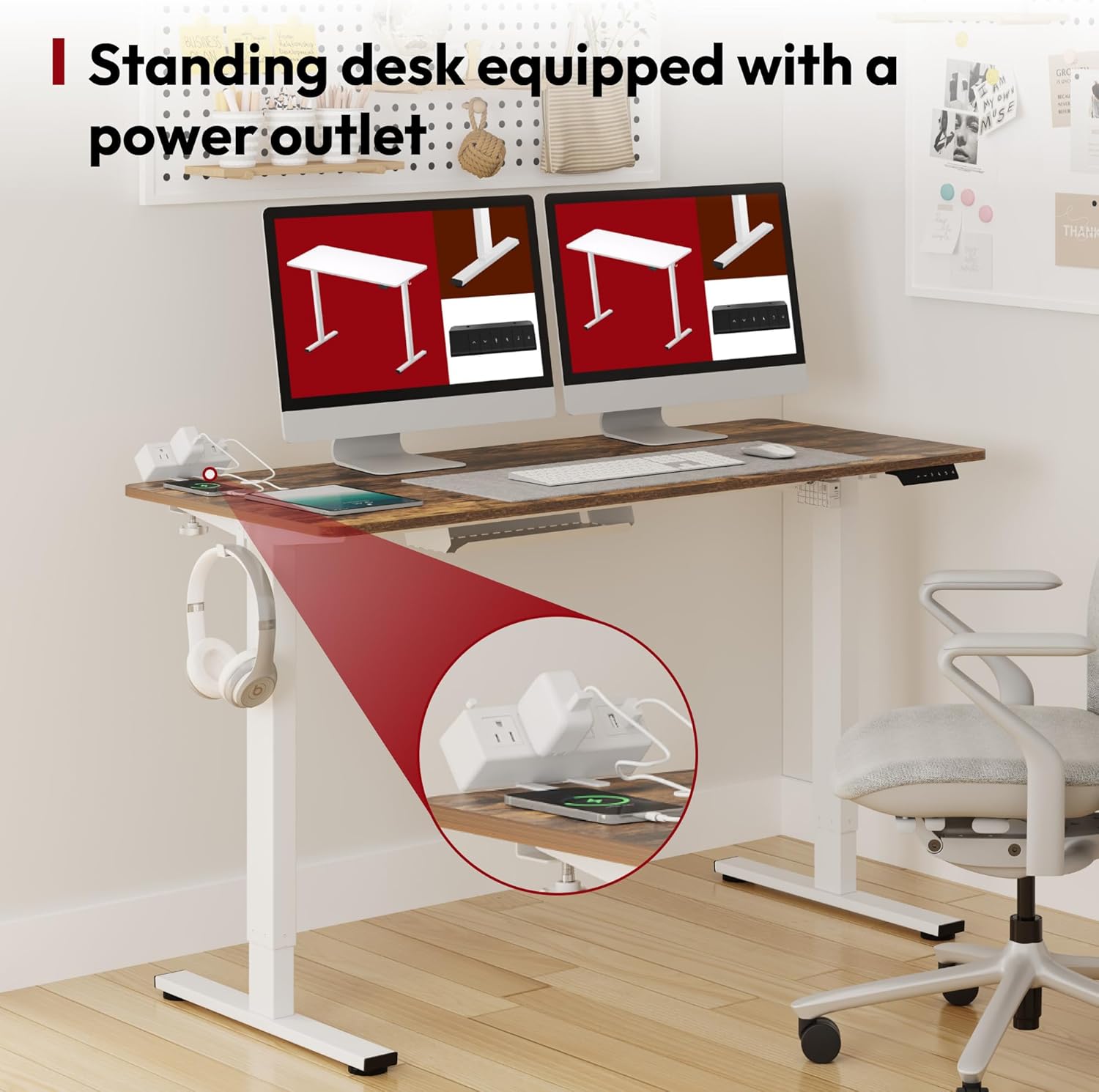
Figure 3: Digital control panel for height adjustment, located under the desktop.
3.2. Předvolby paměti
The digital controller includes 4 programmable memory presets. To save a desired height:
- Adjust the desk to your preferred sitting or standing height using the up/down arrows.
- Press the 'M' or 'Set' button (if available, otherwise refer to specific manual for your controller) followed by one of the numbered preset buttons (1, 2, 3, or 4). The height is now saved to that preset.
- To recall a saved height, simply press the corresponding numbered preset button.

Figure 4: LED memory control panel with preset buttons.
3.3 Integrovaná zásuvka
The desk is equipped with a portable power outlet that clamps to the desk surface. This power strip includes 3 AC power outlets (125V/1500W) and 2 USB-A ports (5V/2A), allowing you to power and charge multiple devices conveniently.

Obrázek 5: Detail view stolu třamp napájecí proužek.
3.4. Správa kabelů
An under-desk cable management tray is included to help keep your workspace tidy and organized. This tray reduces visible cable clutter and is spacious enough to hold multiple cables, power strips, and transformers.

Figure 6: Before and after comparison demonstrating the effectiveness of the cable management tray.
3.5. Produktová videa
Video: SANODESK Standing Desk Demo
This video provides a detailed demonstration of the SANODESK Electric Standing Desk, highlighting its features and smooth height adjustment capabilities.
Video: Durable, Noiseless Standing Desk Operation
This video showcases the durable and quiet operation of the standing desk, emphasizing its stability and ease of use for height adjustments.
Video: Adjustable Standing Desk for Home Office
This video illustrates the benefits of the adjustable standing desk for a home office setup, demonstrating its versatility and contribution to a dynamic work environment.
4. Údržba
To ensure the longevity and optimal performance of your SANODESK Electric Standing Desk, regular maintenance is recommended:
- Čištění: Otřete pracovní plochu a rám měkkým hadříkemamp cloth. For stubborn marks, use a mild, non-abrasive cleaner. Avoid harsh chemicals that may damage the surface.
- Kontrola součástí: Pravidelně kontrolujte všechny šrouby a vruty, zda jsou pevně utažené. V případě potřeby je dotáhněte pro zachování stability.
- Kontrola kabelů: Ensure all power cables and connections are secure and free from damage. Keep cables organized within the management tray to prevent strain or entanglement.
5. Řešení problémů
If you encounter any issues with your SANODESK Electric Standing Desk, please refer to the following common troubleshooting tips:
- Stůl se nehýbe: Zkontrolujte, zda je napájecí kabel bezpečně zapojen do stolu i do funkční zásuvky. Ujistěte se, že žádné předměty nebrání pohybu stolu.
- Nerovnoměrná výška: If the desk appears uneven, perform a reset procedure (refer to the specific manual for your control panel model, usually involves holding down certain buttons).
- Kódy chyb: If an error code appears on the digital display, consult the detailed manual for the specific meaning and recommended solution. Often, a simple power cycle or reset can resolve minor errors.
- Hluk: While the desk operates quietly, unusual or excessive noise may indicate an issue. Ensure all components are securely fastened.
For persistent issues or complex problems, please contact SANODESK customer support.
6. Specifikace
| Funkce | Detail |
|---|---|
| Značka | SANODESK |
| Číslo modelu | EN2 |
| Rozměry pracovní plochy | 55 cm Š x 28 cm H |
| Výškový rozsah | 28.1" až 45.7" |
| Rychlost nastavení výšky | 0.6" za sekundu |
| Úroveň hluku | Pod 50 dB |
| Hmotnostní kapacita | Až 176 liber |
| Materiál rámu | Industrial-grade Carbon Steel |
| Vrchní materiál | Umělé dřevo |
| Prodlužovací zásuvky | 3 AC (125V/1500W), 2 USB-A (5V/2A) |
| Ovládací panel | 6-button digital controller with 4 memory presets |
| Montáž Vyžadována | Ano |
7. Záruka a podpora
For warranty information or technical support, please refer to the documentation included with your product or contact SANODESK customer service directly. Ensure you have your model number (EN2) and purchase details available when seeking support.