1. Důležité bezpečnostní informace
Please read all instructions carefully before using the SANSUI ES-24C1 monitor. Keep this manual for future reference.
- Do not expose the monitor to rain or moisture to prevent fire or electric shock hazards.
- Neotevírejte monitor casing. Uvnitř nejsou žádné součásti, které by mohl uživatel opravit. Veškerý servis svěřte kvalifikovanému personálu.
- Umístěte monitor na stabilní, rovný povrch, aby nedošlo k jeho pádu.
- Zajistěte dostatečné větrání kolem monitoru. Neblokujte větrací otvory.
- Používejte pouze napájecí adaptér dodaný s monitorem.
- Během bouřek nebo pokud jej nebudete delší dobu používat, odpojte monitor ze zásuvky.
2. Obsah balení
Ověřte, zda jsou v balení přítomny všechny položky:
- SANSUI ES-24C1 24-inch Curved Monitor
- Stojan na monitor (základna a krk)
- Napájecí adaptér
- HDMI kabel
- Uživatelská příručka
3. Konec produktuview
The SANSUI ES-24C1 is a 24-inch Full HD (1920x1080) curved monitor featuring a 100Hz refresh rate, 1ms MPRT response time, and built-in speakers. It is designed for both home and office use, offering a 1500R curvature for an immersive viewzkušenosti.

Obrázek: Overview of the SANSUI ES-24C1 monitor highlighting its key features and curved design.

Image: Summary of the monitor's main features including 100Hz, 1ms MPRT, USB Type-C, HDR, 100% sRGB, 3000:1 contrast, 250 Nits, built-in speakers, and VESA mount.
Porty a ovládací prvky

Obrázek: Detail view of the monitor's rear ports, including HDMI, USB Type-C, and Audio Out.
- USB Type-C: 1 port for video input (does not support charging).
- HDMI 1.4: 1 port for video input.
- 3.5mm audio jack: Pro připojení externích sluchátek nebo reproduktorů.
- DC IN: Port napájení.
- Five-Way Joystick: Located on the back for OSD menu navigation.
4. Nastavení
4.1 Sestavení monitoru
Pro sestavení stojanu monitoru postupujte takto:
- Připevněte krk stojanu k panelu monitoru.
- Secure the stand base to the neck.
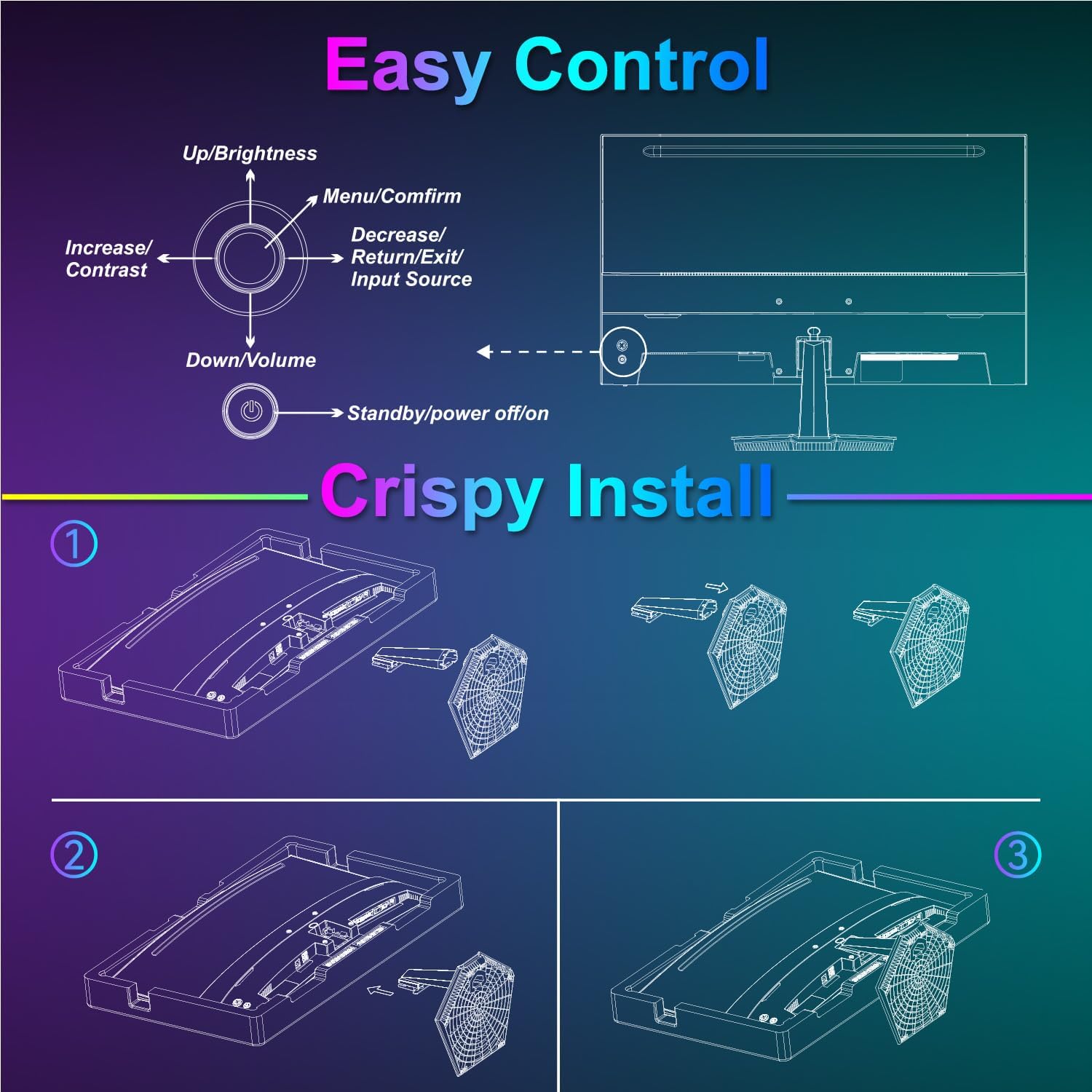
Image: Diagram illustrating the step-by-step assembly of the monitor stand.
4.2 Připojení k zařízením
Connect your monitor to a computer or other video source using the appropriate cable.
- HDMI: Connect one end of the HDMI cable to the monitor's HDMI port and the other end to your device's HDMI output.
- USB Type-C: Connect one end of the USB Type-C cable to the monitor's USB Type-C port and the other end to your device's compatible USB Type-C output.
- Zvuk: If using external audio devices, connect them to the 3.5mm audio jack.

Image: Visual representation of various devices connecting to the monitor via HDMI and USB Type-C.
4.3 Zapnutí/vypnutí
Connect the power adapter to the monitor's DC IN port and then plug it into a power outlet. Press the power button located on the back of the monitor to turn it on or off.
5. Návod k obsluze
5.1 Navigace v nabídce OSD
The On-Screen Display (OSD) menu is controlled using the five-way joystick on the back of the monitor. Press the joystick to open the menu, then move it up/down/left/right to navigate and select options.

Image: Diagram showing the five-way joystick and its functions for OSD menu navigation.
5.2 Nastavení zobrazení
Adjust various display parameters to optimize your viewzkušenosti.
- Jas/kontrast: Upravte celkovou úroveň jasu a kontrastu.
- Nastavení barev: Jemné doladění teploty barev, odstínu a sytosti.
- HDR: Enable or disable High Dynamic Range for enhanced contrast and color.
- Low Blue Light/Anti-Flicker: Reduce eye strain during prolonged use.
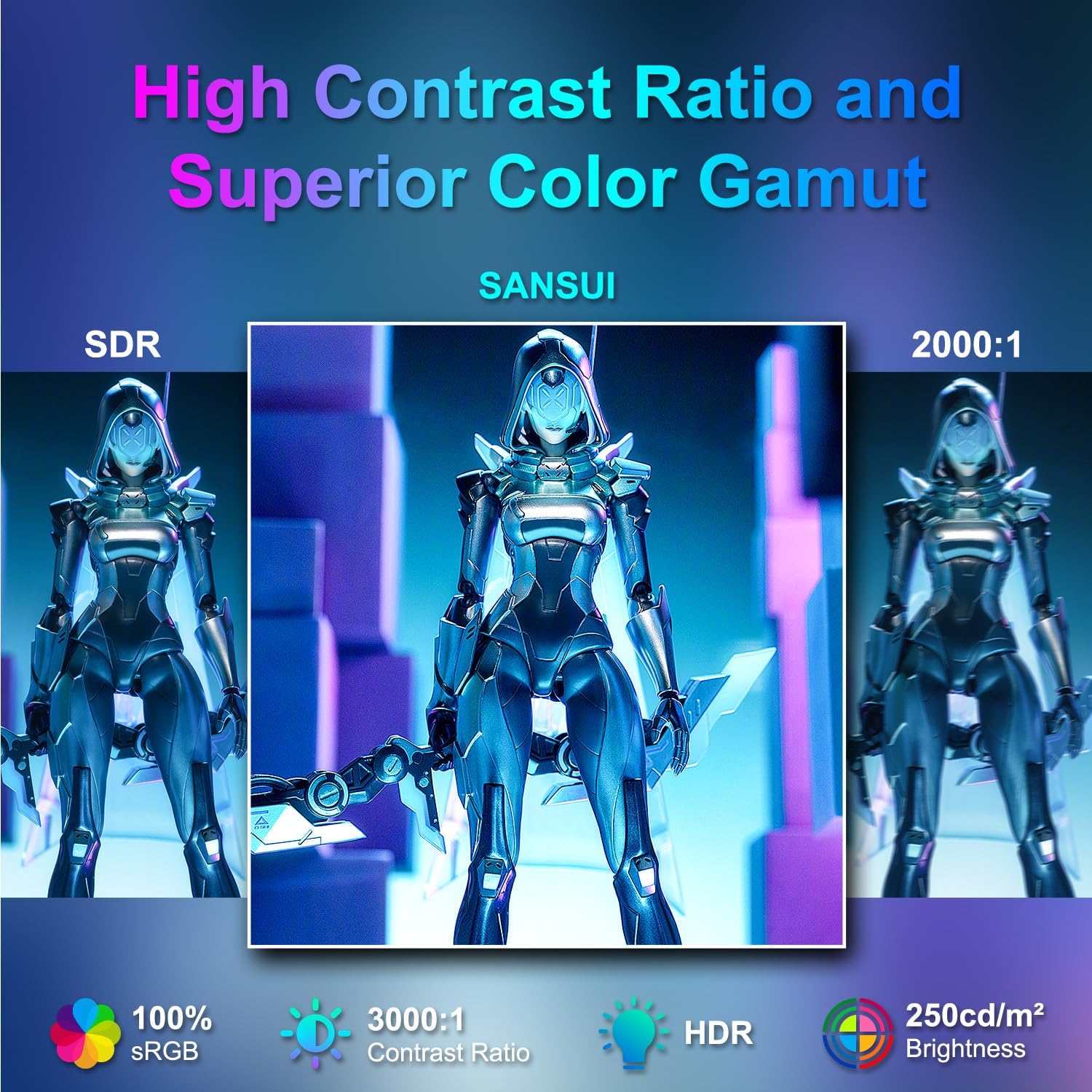
Image: Visual comparison demonstrating high contrast ratio and superior color gamut of the SANSUI monitor.

Image: Highlights of display features like 3000:1 contrast ratio, 100% sRGB, and 250 Nits brightness.

Image: Comparison of display quality with and without HDR enabled.

Image: Illustration of Low Blue Light and Flicker-Free technologies for reduced visual fatigue.
5.3 Herní funkce
The ES-24C1 monitor includes features optimized for gaming performance.
- Obnovovací frekvence 100Hz: Poskytuje plynulejší pohyb a snížené vstupní zpoždění.
- 1 ms doba odezvy MPRT: Minimalizuje rozmazání pohybu a duchy.
- Adaptivní synchronizace: Synchronizuje obnovovací frekvenci monitoru s frekvencí snímků GPU, aby se eliminovalo trhání a zasekávání obrazu.
- Herní režimy: Pre-set display modes optimized for different game genres (e.g., FPS, RTS, RPG).
- Zaměřovací kříž umělé inteligence: An on-screen crosshair overlay for improved aiming accuracy.
- Časovač hry: Časovač na obrazovce pro sledování herních událostí.

Image: Demonstrates the difference in smoothness between 60Hz, 75Hz, and 100Hz refresh rates, highlighting low blue light and Adaptive FreeSync.

Image: Illustrates the benefits of 100Hz refresh rate and 1ms MPRT response time in reducing screen tearing and improving fluidity.
5.4 Multi-Window Modes (PIP/PBP)
The monitor supports Picture-in-Picture (PIP) and Picture-by-Picture (PBP) modes, allowing you to view content from multiple input sources simultaneously.
- PBP (Picture-by-Picture): Divides the screen into two halves, displaying content from two different sources side-by-side.
- PIP (obraz v obraze): Displays content from a secondary source in a smaller window overlaid on the main display.

Obrázek: Přamples of Duplicated Mode, Second Screen Mode, and Single Display Screen Mode for enhanced productivity.
6. Údržba
6.1 Čištění
- Před čištěním monitor vždy odpojte.
- Lehce používejte měkký hadřík, který nepouští vlákna dampvodou nebo jemným, neabrazivním čisticím prostředkem speciálně určeným pro elektroniku.
- Nestříkejte čisticí prostředek přímo na obrazovku.
6.2 Péče
- Nepokládejte na monitor ani na jeho kabely těžké předměty.
- Chraňte monitor před přímým slunečním zářením, zdroji tepla a extrémními teplotami.
- Do not expose the monitor to strong magnetic fields.
7. Řešení problémů
If you encounter issues with your SANSUI ES-24C1 monitor, refer to the following common problems and solutions:
- Bez napájení: Ensure the power adapter is securely connected to both the monitor and a working power outlet. Check if the power indicator light is on.
- Bez signálu: Verify that the video cable (HDMI or USB Type-C) is correctly connected to both the monitor and your device. Ensure the correct input source is selected in the OSD menu.
- Blikající obrazovka: Zkontrolujte, zda není videokabel poškozený nebo zda nejsou uvolněné kontakty. Zkuste jiný videokabel nebo port. Ujistěte se, že máte aktuální ovladače grafické karty.
- Špatná kvalita obrazu: Adjust brightness, contrast, and color settings in the OSD menu. Ensure the display resolution and refresh rate are set correctly in your device's display settings.
- Z reproduktorů není slyšet žádný zvuk: Check the volume settings on both the monitor and your connected device. Ensure the audio cable (if used) is properly connected.
8. Specifikace
Detailed technical specifications for the SANSUI ES-24C1 24-inch Curved Monitor:
| Funkce | Specifikace |
|---|---|
| Číslo modelu | ES-24C1 |
| Velikost obrazovky | 24 palců |
| Typ panelu | Zakřivený (1500R) |
| Rezoluce | 1920 1080 x XNUMX XNUMX (FHD) |
| Obnovovací frekvence | 100 Hz |
| Doba odezvy | 1 ms (MPRT) |
| Kontrastní poměr | 3000:1 |
| Jas | 250 nitů |
| Zobrazení barev | 16.7 milionu |
| Barevný gamut | 100% sRGB |
| Viewúhel | 178° (H/V) |
| Video vstupy | 1x HDMI 1.4, 1x USB Type-C |
| Zvukový výstup | 1x 3.5mm audio jack |
| Reproduktory | 2x 2W Built-in Speakers |
| VESA Mount | 75 x 75 mm |
| Nastavení sklonu | -5° až 15° |
| Rozměry produktu | 21 x 38 x 49 palce |
| Hmotnost položky | 7.78 libry |

Image: Detailed dimensions and ergonomic features like 178° wide viewing angle and -5°~15° tilt.

Image: Visual representation of the 178° wide viewúhel.

Image: Tips for VESA mounting (75x75mm, M4*8mm screw size) and tilt adjustment.

Obrázek: Zadní view of the monitor detailing port locations and key specifications.
9. Záruka a podpora
SANSUI provides a limited warranty for this product. For detailed warranty information, please refer to the warranty card included in your package or visit the official SANSUI website. For technical support or service inquiries, please contact SANSUI customer service.
Online podpora: Navštivte obchod SANSUI na Amazonu
10. Oficiální video produktu
Watch the official product video for a visual guide to the SANSUI ES-24C1 monitor's features and benefits.
Video: SANSUI 24" 100Hz Curved Monitor USB C with Speakers. This video provides an overview of the monitor's design, key features, and connectivity options.


