1. Úvod
This manual provides detailed instructions for the proper use and maintenance of your HTC TWS9 True Wireless Bluetooth Earbuds 9. Please read this manual thoroughly before using the product to ensure optimal performance and longevity.
2. Co je v krabici
- HTC TWS9 True Wireless Bluetooth Earbuds (Left and Right)
- Nabíjecí pouzdro
- USB nabíjecí kabel
- Uživatelská příručka
3. Konec produktuview
The HTC TWS9 earbuds feature a compact, in-ear design with a transparent charging case. They are equipped with Bluetooth 5.3 for stable connectivity and offer touch controls for various functions.

Image: HTC TWS9 True Wireless Bluetooth Earbuds 9 in purple, shown with their transparent charging case. The earbuds are visible inside the open case, and also separately above it.

Image: A person holding the HTC TWS9 charging case, highlighting its transparent lid design. The earbuds are visible inside the case.
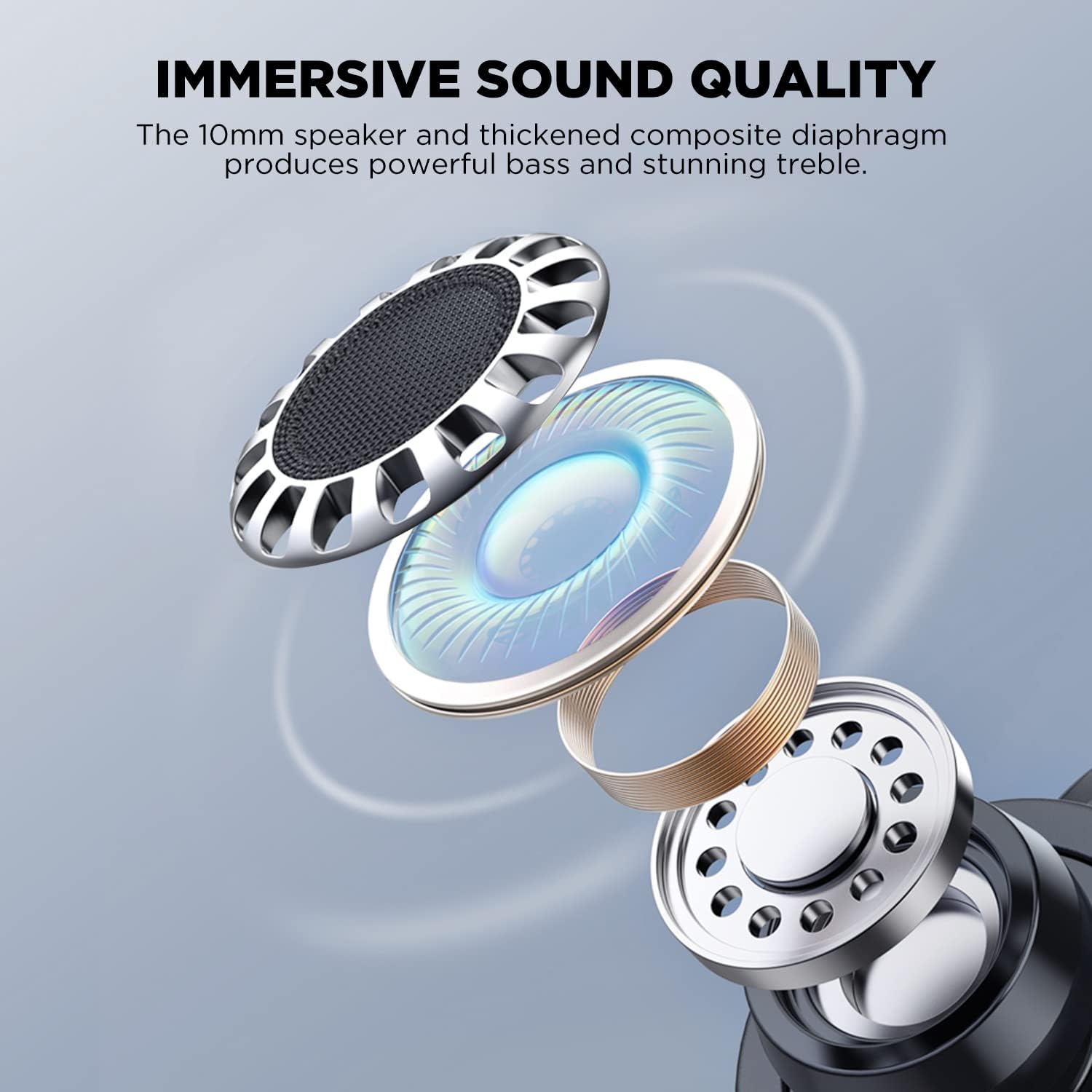
Image: An exploded diagram illustrating the internal components of an HTC TWS9 earbud, including the 10mm speaker and composite diaphragm, designed for sound quality.
4. Nastavení
4.1. Nabíjení sluchátek a pouzdra
Before first use, fully charge the earbuds and charging case. The case supports both wired (USB-C) and wireless charging.
- Vložte sluchátka do nabíjecího pouzdra. Ujistěte se, že jsou správně usazena.
- Kabelové nabíjení: Connect the provided USB charging cable to the charging port on the case and to a power source.
- Bezdrátové nabíjení: Place the charging case on a compatible wireless charging pad. The charging indicator light on the case will illuminate.
- Charging typically takes approximately 43 minutes for a fast charge.

Image: The HTC TWS9 charging case placed on a wireless charging pad, indicating its wireless charging capability.
4.2. Spárování se zařízením
The HTC TWS9 earbuds utilize Bluetooth 5.3 for a fast and stable connection.
- Ujistěte se, že je na vašem zařízení povoleno rozhraní Bluetooth.
- Otevřete nabíjecí pouzdro a vyjměte sluchátka. Automaticky se přepnou do režimu párování.
- On your device, search for Bluetooth devices and select "HTC TWS9" from the list.
- Once connected, the earbuds will automatically pair with your device upon removal from the case for subsequent uses.

Image: A smartphone screen displaying the Bluetooth settings, showing "HTC TWS9" as a connected device, illustrating the one-step pairing process.
5. Návod k obsluze
5.1. Stiskněte Ovládací prvky
The HTC TWS9 earbuds feature intuitive touch controls on each earbud for managing audio playback and calls.
- Přehrát/pozastavit: Jednou klepněte na kterékoli sluchátko.
- Další skladba: Klepněte a podržte pravé sluchátko po dobu 2 sekund.
- Předchozí skladba: Klepněte a podržte levé sluchátko na 2 sekundy.
- Přijmout hovor: Jednou klepněte na kterékoli sluchátko.
- Ukončit hovor: Jednou klepněte na kterékoli sluchátko.
- Odmítnout hovor: Klepněte a podržte jedno sluchátko po dobu 2 sekund.
- Herní režim: Tap and hold either earbud for 2 seconds (to toggle).
- Hlasový asistent: Třikrát klepněte na kterékoli sluchátko.

Image: A visual guide to the smart touch controls on the HTC TWS9 earbuds, detailing actions for game mode, voice assistant, music playback, and call management.
5.2. Herní režim
Activate Game Mode for an ultra-low latency experience (40ms), ideal for gaming. Toggle Game Mode using the touch controls as described above.

Image: A smartphone displaying a mobile game, with the HTC TWS9 earbuds and their open charging case nearby, illustrating the use of Game Mode for low-latency audio.
5.3. Nošení sluchátek do uší
The earbuds are designed for an ergonomic fit. Insert them gently into your ear canal and rotate slightly until they feel secure and comfortable.

Image: A person wearing an HTC TWS9 earbud, demonstrating its ergonomic design and how it fits in the ear.
6. Baterie a nabíjení
The HTC TWS9 earbuds offer extended playtime and convenient charging options.
- Doba přehrávání sluchátek: Až 6.5 hodin na jedno nabití (při 50% hlasitosti).
- Celková doba hraní s nabíjecím pouzdrem: 18 až 24 hodin.
- Rychlé nabíjení: Plné nabití trvá přibližně 43 minut.
- Bezdrátové nabíjení: The charging case is compatible with most wireless charging pads.

Image: An infographic detailing the battery performance of the HTC TWS9 earbuds, including 43 minutes for fast charging, 6.5 hours of playtime, and 18 hours with the charging case.
7. Údržba
Správná údržba zajistí dlouhou životnost a výkon vašich sluchátek.
- Čištění: Pravidelně čistěte sluchátka a nabíjecí pouzdro měkkým, suchým hadříkem. Nepoužívejte agresivní chemikálie ani abrazivní materiály.
- Skladování: Pokud sluchátka nepoužíváte, uložte je do nabíjecího pouzdra, aby byla chráněna a zůstávala nabitá.
- Voděodolnost: The earbuds are water-resistant, making them suitable for sports and gym use. However, they are not waterproof; avoid submerging them in water.
8. Řešení problémů
Pokud narazíte na nějaké problémy, podívejte se na následující běžná řešení:
- Sluchátka se nespárují: Ensure Bluetooth is enabled on your device and the earbuds are in pairing mode. Try resetting the earbuds by placing them back in the case and then removing them again.
- Žádný zvuk: Zkontrolujte úroveň hlasitosti na zařízení a ujistěte se, že jsou sluchátka správně připojena.
- Problémy s nabíjením: Verify that the charging cable is securely connected or that the wireless charging pad is functioning correctly. Ensure the earbuds are properly seated in the case.
- Dotykové ovládání nereaguje: Ensure your fingers are clean and dry. A quick tap or firm press may be required depending on the function.
9. Specifikace
| Funkce | Detail |
|---|---|
| Název modelu | 9 TWS |
| Technologie připojení | Bezdrátové připojení (Bluetooth 5.3) |
| Verze Bluetooth | 5.3 |
| Zvuková latence | 40 ms (herní režim) |
| Hrací doba sluchátek | Až 6.5 hodin |
| Celková doba přehrávání (s pouzdrem) | 18-24 hodin |
| Nabíjení | Wireless Charging Supported, Fast Charging (43 mins) |
| Typ ovládání | Dotykové ovládání |
| Kontrola hluku | Zvuková izolace |
| Úroveň odolnosti proti vodě | Vodě odolný |
| Materiál | Průhledný plast |
| Hmotnost položky | 0.09 kilogramů (3.2 uncí) |
| UPC | 768649987303 |
10. Oficiální video produktu
Video: An official product video from HTC-TECH showcasing the HTC True Wireless Bluetooth Earbuds 9, highlighting various features and design aspects.
11. Záruka a podpora
For warranty information and customer support, please refer to the documentation included with your product or visit the official HTC support website. Contact information for customer service is typically provided in the Quick Start Guide or on the product packaging.


