Uživatelská příručka Keychron K10 Pro Wireless Custom Mechanical Keyboard
Model: K10 Pro | Brand: Keychron
Zavedení
The Keychron K10 Pro is a wireless full-size mechanical keyboard designed for an enhanced typing experience. It features QMK programmability, hot-swappable switches, and a 1000 Hz polling rate for responsive performance. This manual provides detailed instructions for setting up, operating, and maintaining your Keychron K10 Pro keyboard.
1. Nastavení
1.1 Obsah balení
Než začnete, ověřte si prosím, zda je v balení obsaženo vše:

Obrázek 1: Rozložené view of the Keychron K10 Pro, showing keycaps, switches, frame, sound-absorbing foam, PCB, silicone bottom pad, and bottom case.
- 1x Plně sestavená klávesnice (včetně desky plošných spojů, ocelového plechu a zvukově izolační pěny)
- 1x silikonová spodní podložka
- 8 sady stabilizátorů (šroubovací do desky plošných spojů)
- 1 Set of Keycaps (Double-Shot PBT)
- 1 Set of Switches (Keychron K Pro Silent Red Switch)
- 1x kabel Type-A to Type-C
- 1x stahovák spínačů
- 1x stahovák klíčenky
- 1x Šroubovák
1.2 Režimy připojení
The Keychron K10 Pro supports both wireless (Bluetooth 5.1) and wired (USB-C) connections.

Figure 2: The Keychron K10 Pro offers both Bluetooth 5.1 wireless and USB wired connectivity options, allowing seamless switching between multiple devices like laptops, phones, and tablets.
1.2.1 Bezdrátový režim (Bluetooth)
- Locate the mode switch on the back of the keyboard and slide it to the "BT" position.
- Stiskněte a podržte Fn + 1 (nebo Fn + 2 / Fn + 3) kombinaci kláves po dobu 4 sekund, dokud kontrolka nezačne rychle blikat, což signalizuje režim párování.
- On your device (laptop, phone, tablet), enable Bluetooth and search for "Keychron K10 Pro".
- Select the keyboard to complete the pairing process. You can pair up to 3 devices and switch between them using Fn + 1, Fn + 2nebo Fn + 3.
1.2.2 Wired Mode (USB-C)
- Locate the mode switch on the back of the keyboard and slide it to the "Cable" position.
- Connect the provided Type-A to Type-C cable from your computer's USB port to the keyboard's USB-C port.
- The keyboard will automatically be recognized by your system.
1.3 Kompatibilita operačních systémů
The K10 Pro is fully compatible with macOS, Windows, and Linux operating systems. Use the OS switch on the back of the keyboard to select the appropriate layout for your system.
1.4 QMK Firmware and Keychron Launcher
The keyboard is QMK programmable, allowing for extensive customization of key assignments, macros, shortcuts, and combos. Use the Keychron Launcher online application for easy configuration.
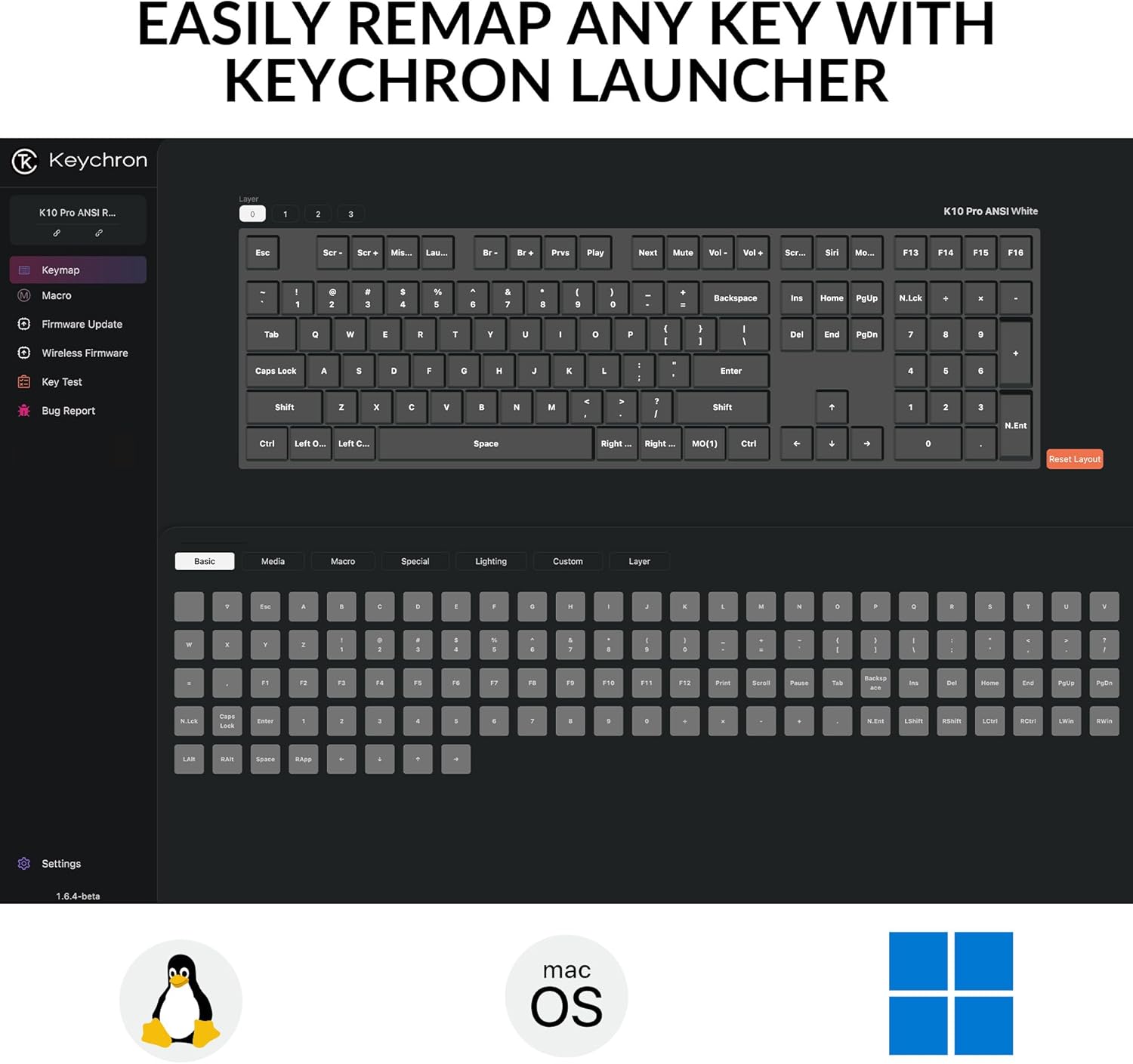
Figure 3: The Keychron Launcher online application provides a user-friendly interface for remapping keys, creating macros, and customizing keyboard functions across different operating systems like Linux, macOS, and Windows.
- Access the Keychron Launcher via a web browser (Chrome, Edge, Opera) at launcher.keychron.com.
- With onboard memory, your customized settings will sync across both wired and wireless modes.
2. Ovládání klávesnice
2.1 Klíčové funkce a rozvržení
The K10 Pro features a 100% full-size layout. Many keys have secondary functions accessible via the Fn key. Refer to the keycap legends for specific functions.

Figure 4: The Keychron K10 Pro features a 100% full-size layout, providing all standard keys including a numeric keypad, function row, and navigation cluster.
2.2 ovládání podsvícení
The keyboard features a white backlight. You can adjust the brightness and lighting effects using dedicated key combinations. Consult the keyboard's quick start guide or Keychron Launcher for specific backlight controls.
The south-facing white backlight illuminates beautifully from the typist’s angle.
2.3 Správa baterie
The K10 Pro is equipped with a 4000 mAh rechargeable Li-polymer battery.
- Životnost baterie: Up to 260 hours of continuous typing with the backlight off, or 130 hours on the lowest brightness setting.
- Nabíjení: Connect the keyboard via the USB-C cable to a power source (computer USB port or wall adapter). The charging indicator light will show the charging status.
3. Údržba
3.1 Čištění klávesnice
- Před čištěním odpojte klávesnici od všech zdrojů napájení.
- Použijte měkký hadřík, který nepouští vlákna dampKlávesy a rámeček otřete vodou nebo jemným čisticím roztokem.
- For deeper cleaning, use compressed air to remove dust and debris from between the keys.
3.2 Keycap and Switch Replacement (Hot-Swappable)
The K10 Pro features hot-swappable switches, allowing you to easily change switches without soldering. It also comes with durable double-shot PBT keycaps.
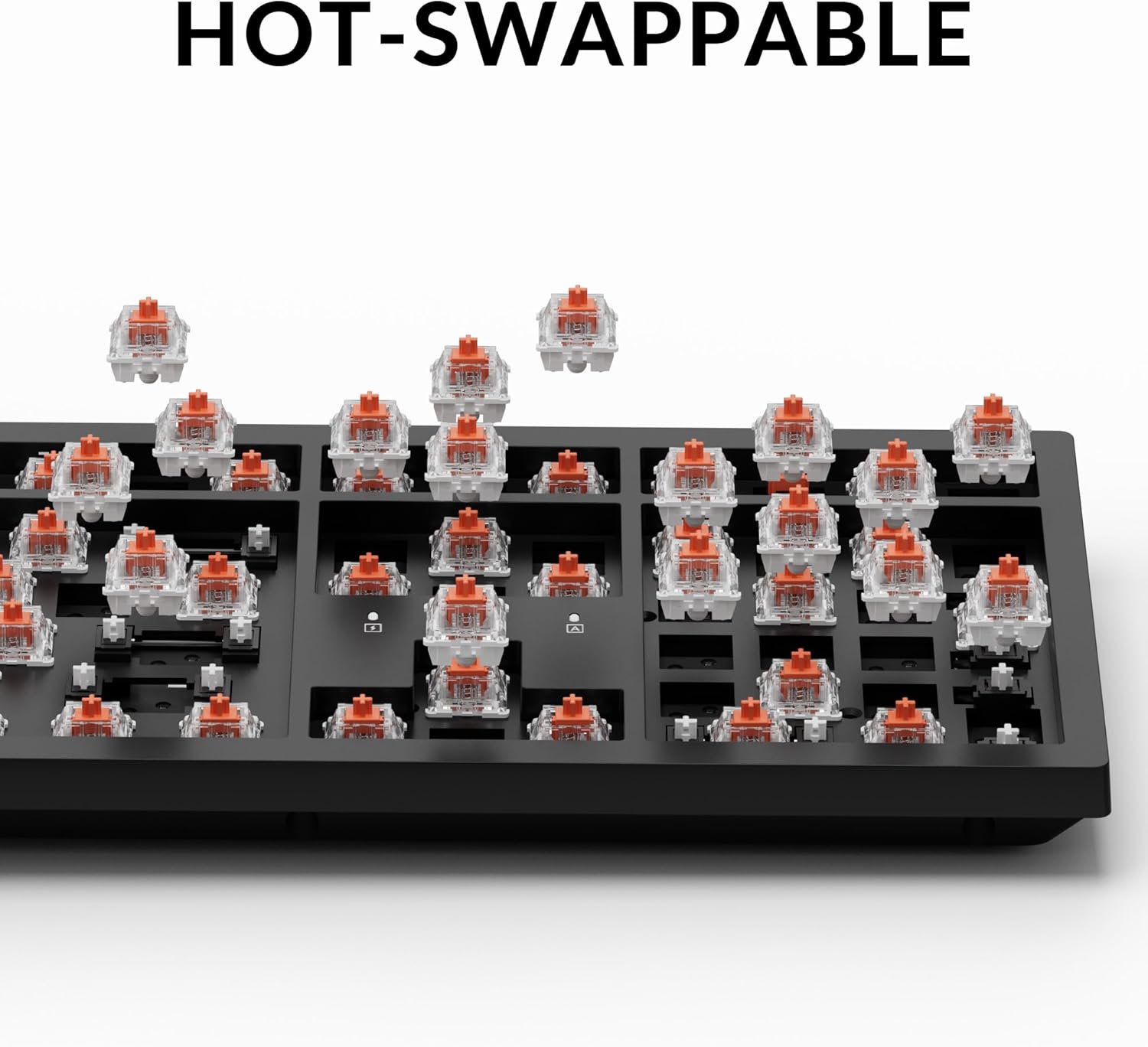
Figure 5: The hot-swappable design of the Keychron K10 Pro allows users to easily remove and replace individual switches without soldering, offering customization and simplified maintenance.

Figure 6: The Keychron K10 Pro features durable double-shot PBT keycaps with an OSA profile, designed for oil resistance and lasting comfort during extended typing sessions.
3.2.1 Removing Keycaps
- Použijte dodaný stahovák na klíčenky.
- Gently hook the puller onto the keycap and pull straight up to remove it.
3.2.2 Removing Switches
- After removing the keycap, use the provided switch puller.
- Align the prongs of the switch puller with the two clips on the top and bottom of the switch.
- Squeeze the clips and gently pull the switch straight up.
3.2.3 Instalace přepínačů a kláves
- Ensure the new switch pins are straight. Align the pins with the holes on the PCB.
- Gently push the switch down until it clicks into place. Do not force it.
- Place the keycap onto the switch stem and press down firmly until it is seated.
4. Řešení problémů
4.1 Problémy s připojením
- Bluetooth se nepřipojuje:
- Ujistěte se, že je přepínač režimů klávesnice nastaven na „BT“.
- Verify the keyboard is in pairing mode (indicator light flashing).
- Zapomeňte na zařízení v počítači/telefonu a zkuste spárování znovu.
- Ujistěte se, že je klávesnice nabitá.
- Drátové připojení nefunguje:
- Ujistěte se, že je přepínač režimů klávesnice nastaven na „Kabel“.
- Zkuste jiný kabel USB-C nebo port USB v počítači.
4.2 Klávesy nereagují / Nesprávný vstup
- Individual keys:
- If a specific key is not working, it might be a faulty switch. Utilize the hot-swappable feature to replace the switch.
- Ujistěte se, že je krytka kláves správně usazena.
- Incorrect layout:
- Check the OS switch on the back of the keyboard and ensure it matches your operating system (Mac/Windows).
- Customization issues:
- If custom key assignments are not working, revisit the Keychron Launcher (launcher.keychron.com) to verify your settings and ensure they are saved to the onboard memory.
4.3 Problémy s podsvícením
- Podsvícení vypnuto:
- Ujistěte se, že je klávesnice nabitá.
- Check backlight control key combinations (refer to quick start guide).
5. Specifikace
Detailed technical specifications for the Keychron K10 Pro keyboard:

Figure 7: Specifications for the Keychron K Pro Silent Red Switches, detailing their linear type, operation force (45±10 gf), pre-travel (2±0.4 mm), total travel (4±0.4 mm), operation life (up to 80M cycles), and a vertical, light pressing force with soft rebound feeling.
| Funkce | Detail |
|---|---|
| Model | K10 Pro |
| Rozložení | 100% Full-Size (108 Keys) |
| Spínače | Keychron K Pro Silent Red (Hot-swappable) |
| Klíčenky | Double-shot PBT, OSA Profile |
| Konektivita | Bluetooth 5.1 & USB-C |
| Míra hlasování | 1000Hz (Wired Mode) / 90Hz (Wireless Mode) |
| Baterie | 4000 mAh Rechargeable Li-polymer |
| BT Working Time | Up to 130 hours (lowest brightness) / 260 hours (backlight off) |
| Kompatibilní systém | macOS/Windows/Linux |
| Materiál rámu | ABS |
| MCU | Ultra-low-power Arm Cortex-M4 32-bit STM32L432 (128KB Flash) |
| Stabilizátory | PCB-mounted Screw-in Stabilizers |
| Hmotnost položky | 4.39 pounds (1495 g / 3.29 lbs) |
| Rozměry balení | 18.6 x 7.4 x 2.2 palce |
6. Záruka a podpora
Keychron products are designed for durability and performance. For warranty information, technical support, or further assistance, please visit the official Keychron webnebo se obraťte na jejich zákaznický servis. Uschovejte si doklad o koupi pro případ reklamace.
Oficiální Keychron Webmísto: www.keychron.com


