Zavedení
This manual provides comprehensive instructions for the ExtreLife Wireless Charging RGB Gaming Mouse Pad, model HD68-B. This product integrates a large mouse pad with wireless charging capabilities for compatible smartphones and AirPods, alongside customizable RGB lighting. Please read this manual thoroughly before use to ensure proper operation and maintenance.
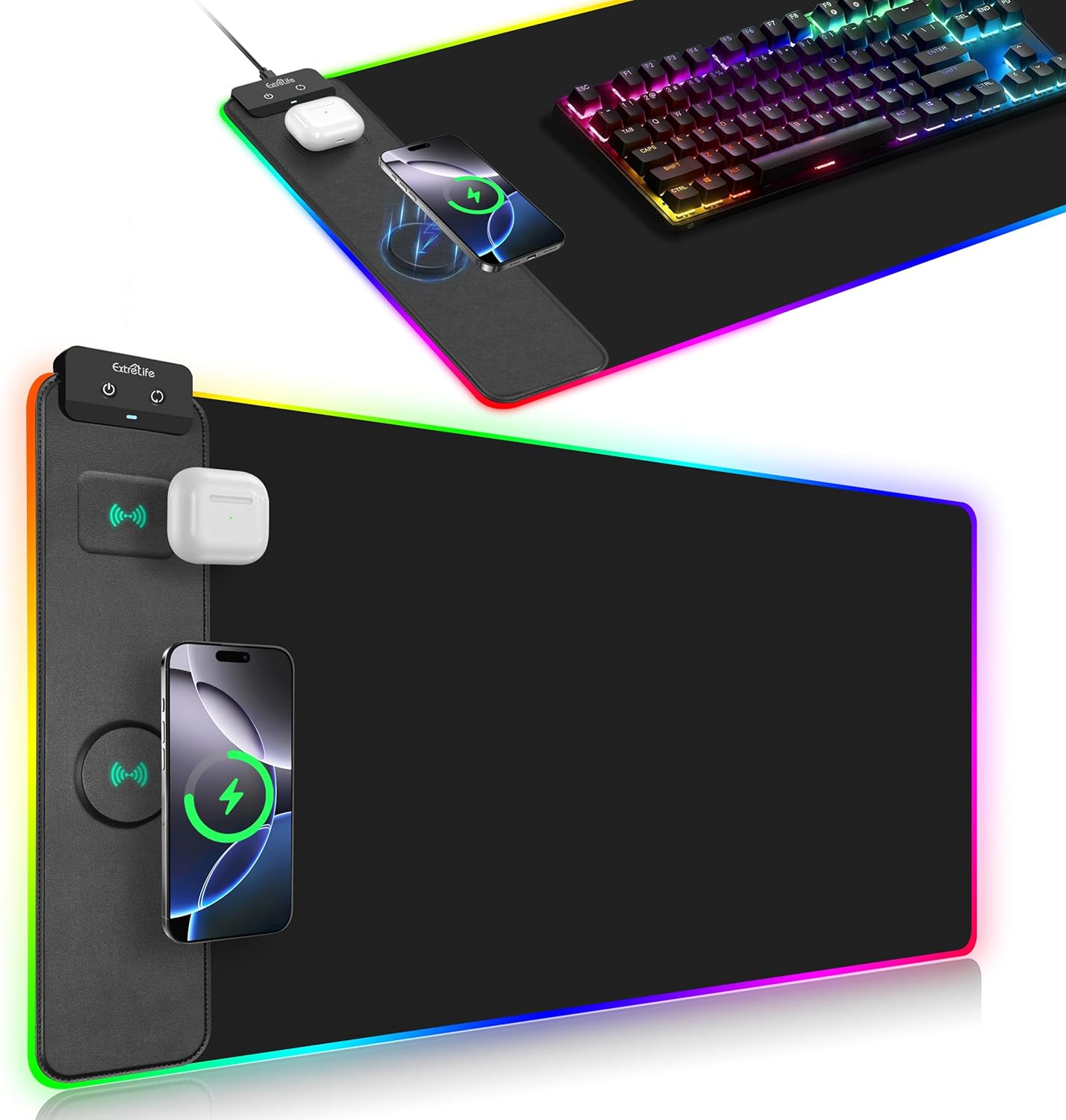
Image: The ExtreLife Wireless Charging RGB Gaming Mouse Pad, displaying its large surface, integrated wireless charging areas for a smartphone and AirPods, and vibrant RGB edge lighting. A gaming keyboard and mouse are also visible on the pad.
Obsah balení
Ověřte, zda jsou v balení přítomny všechny položky:
- ExtreLife Wireless Charging RGB Gaming Mouse Pad (Model HD68-B)
- Kabel USB typu C
- Uživatelská příručka (tento dokument)
Poznámka: A power adapter (9V 2A) is required for 15W wireless charging but is not included in the package.
Pokyny pro nastavení
- Rozbalte podložku pod myš: Carefully unroll the mouse pad and place it on a flat, stable desk surface. Allow some time for any creases from packaging to flatten.
- Připojte napájení: Locate the USB Type-C port on the control module of the mouse pad. Connect one end of the provided USB Type-C cable to this port.
- Zdroj napájení: Connect the other end of the USB Type-C cable to a compatible USB power adapter (not included) or a USB port on your computer. For optimal wireless charging performance, especially 15W charging, a 9V 2A power adapter is recommended.
- Zapnutí: Once connected to power, the RGB lighting should illuminate. Use the control buttons on the module to adjust settings.

Obrázek: Podrobný view of the mouse pad's control module, showing the two control buttons and the Type-C charging port where the power cable connects.
Návod k obsluze
Režimy RGB osvětlení
The mouse pad features 13 distinct RGB lighting modes.
- Static Lighting Modes: 11 different static color options.
- Dynamické efekty: 2 dynamic lighting effects (gradient and flashing).
To cycle through the lighting modes, press the dedicated lighting control button on the control module. The pad includes a power-off memory function, which will recall the last selected lighting mode when the device is powered on again.

Image: A visual representation of the 13 RGB lighting modes, including various static colors and dynamic effects, demonstrating the customization options for the mouse pad's edge lighting.
Funkce bezdrátového nabíjení
The mouse pad offers two wireless charging areas:
- Nabíjení telefonu: Up to 15W for compatible smartphones.
- Nabíjení AirPods: Up to 5W for compatible AirPods.
Kompatibilita:
- chytré telefony: Compatible with iPhone 16/15/14/13/12/11/X/XR/XS/8 series, Samsung Galaxy S23/S22/S21/S20/S10/S9/S8/Note 9/8, and other Qi-enabled smartphones.
- AirPods: Compatible with AirPods 3rd generation, AirPods Pro 2nd generation, and AirPods Pro.
Magnetické bezdrátové nabíjení: The phone charging area features a built-in raised magnetic charger. This function is compatible only with iPhone 16/15/14/13/12 Series. When a compatible iPhone is placed on the magnetic charging pad, it will automatically align for efficient charging.
Kontrolka nabíjení:
- White Off: Nabíjení.
- Červená bliká: Placed-error, over-temperature, or Foreign Object Detection (FOD).

Image: The mouse pad with a smartphone and AirPods placed on their respective wireless charging zones, indicating active charging.

Image: An illustration detailing the magnetic wireless charging function, showing how compatible iPhones align automatically for charging on the designated area.
Údržba a péče
- Čištění: The mouse pad features a waterproof surface. To clean, gently wipe with a damp tkanina. Vyhněte se používání agresivních chemikálií nebo abrazivních čisticích prostředků.
- Skladování: When not in use, the mouse pad can be easily rolled up without causing wrinkles or creases. Store in a dry place away from direct sunlight.
- Vyhněte se poškození: Do not bend or fold the mouse pad sharply, especially the RGB light strip. Avoid placing heavy or sharp objects on the pad for extended periods.

Image: A close-up showing water beading on the mouse pad's surface, highlighting its waterproof feature for easy cleaning.
Odstraňování problémů
| Problém | Možná příčina | Řešení |
|---|---|---|
| Wireless charging is slow or not working. |
|
|
| RGB osvětlení nefunguje. |
|
|
| Red flashing indicator light. |
|
|
Specifikace
| Značka | ExtreLife |
| Číslo modelu | HD68-B |
| Rozměry (DxŠ) | 31.5 x 15.7 palce (800 x 400 mm) |
| Tloušťka | 4 mm |
| Hmotnost položky | 2.03 libry |
| Barva | Černý |
| Materiál | Faux Leather, Rubber |
| Wireless Phone Charging Output | Up to 15W (requires 9V 2A adapter, not included) |
| Wireless AirPods Charging Output | 5W |
| Režimy RGB osvětlení | 13 (11 static, 2 dynamic) |
| Speciální funkce | Ergonomic, Non-slip, Smooth Surface, Waterproof, Wireless Charging, Magnetic Alignment (for compatible iPhones) |

Image: A visual representation of the mouse pad's extended dimensions, measuring 31.5 inches (800mm) in length and 15.7 inches (400mm) in width, with a thickness of 4mm.
Záruka a zákaznická podpora
For any issues or inquiries regarding your ExtreLife Wireless Charging RGB Gaming Mouse Pad, please contact us directly through the Amazon Message Center. Our customer service team is committed to providing a satisfactory solution and will respond to your query within 24 hours.
Kontaktní metoda:
- Via Amazon Message Center: Contact ExtreLife Direct


