1. Úvod
Thank you for choosing the ErGear EGESD8 Electric Standing Desk. This manual provides essential information for the safe and efficient assembly, operation, and maintenance of your new desk. Please read these instructions carefully before use and retain them for future reference. This electric standing desk is designed to offer ergonomic flexibility, allowing you to easily switch between sitting and standing positions, promoting a healthier work environment.

The ErGear Electric Standing Desk, showcasing its sleek design and spacious desktop in a contemporary workspace.
2. Bezpečnostní pokyny
Pro zajištění bezpečného provozu a prevenci poškození dodržujte prosím následující:
- Před obsluhou stolu se ujistěte, že jsou všechna připojení bezpečná.
- Během provozu držte děti a domácí zvířata v dostatečné vzdálenosti od stolu.
- Do not place hands or other body parts near moving parts to avoid injury.
- Do not overload the desk. The maximum weight capacity is 80 kg.
- Neumisťujte tekutiny přímo na ovládací panel nebo do blízkosti elektrických součástí.
- If the desk makes unusual noises or movements, discontinue use and consult the troubleshooting section or contact support.
- Používejte pouze dodaný napájecí adaptér a kabely.

This image highlights the robust construction of the ErGear Electric Standing Desk, capable of supporting up to 80 kg, ensuring stability even under significant load.
3. Obsah balení
Zkontrolujte prosím, zda jsou všechny součásti přítomny a nepoškozené:
- Desktop Panels (assembled)
- Nohy stolu (2)
- Chrániče nohou (2)
- Boční držáky (2)
- Příčník
- Převodová tyč
- Ovládací panel
- Napájecí adaptér a kabel
- Cable Grommets (2)
- Háčky na sluchátka (2)
- Montážní materiál (šrouby, imbusový klíč)
- Uživatelská příručka
4. Montážní návod
Follow these steps to assemble your ErGear Electric Standing Desk. It is recommended to have two people for assembly.
Official assembly video for the ErGear Electric Standing Desk, demonstrating step-by-step installation.
Krok 1: Sestavte rám
- Attach the side brackets to the desk legs using the provided screws and Allen wrench.
- Secure the foot pads to the bottom of each leg.
- Connect the two leg assemblies with the crossbar, ensuring all screws are tightened.
Step 2: Fix the Transmission Rod
- Insert the transmission rod into the designated openings on both desk legs.
- Ensure the rod is properly seated and secured with the retaining clips or screws.
Step 3: Assemble the Desktop Panel
- Lay the desktop panels face down on a soft, clean surface.
- Align the panels and secure them together using the provided connectors and screws.
Step 4: Attach the Frame to the Desktop
- Carefully place the assembled desk frame onto the underside of the desktop.
- Align the pre-drilled holes and secure the frame to the desktop using the appropriate screws.
- Připevněte ovládací panel na spodní stranu pracovní desky na vhodném místě pomocí dodaných šroubů.
- Install the headphone hooks to the underside of the desktop as desired.
Krok 5: Připojte kabely
- Connect the motor cables from the legs to the control box.
- Connect the control panel cable to the control box.
- Připojte napájecí adaptér k ovládací jednotce a poté do elektrické zásuvky.
Step 6: Fix the Cable Grommets
- Insert the cable grommets into the pre-cut holes on the desktop to manage cables.
5. Návod k obsluze
Your ErGear Electric Standing Desk features an intuitive control panel for easy height adjustment.
Short video showcasing key features of the ErGear Electric Standing Desk, including height adjustment and stability.
Konec ovládacího paneluview

The desk's intelligent control panel features an LED display showing current height in centimeters, along with up/down arrows and four memory preset buttons for quick adjustments.
- Up/Down Arrows (▲ / ▼): Press and hold to adjust the desk height manually.
- LED displej: Shows the current height of the desk in centimeters.
- Memory Presets (1, 2, 3, 4): Store and recall preferred height settings.
Nastavení výšky
The desk can be adjusted between 72 cm a 118 cm.
- Ruční nastavení: Press and hold the up (▲) or down (▼) arrow button until the desk reaches your desired height.
- Používání předvoleb paměti: Press the corresponding memory button (1, 2, 3, or 4) to automatically move the desk to the saved height.
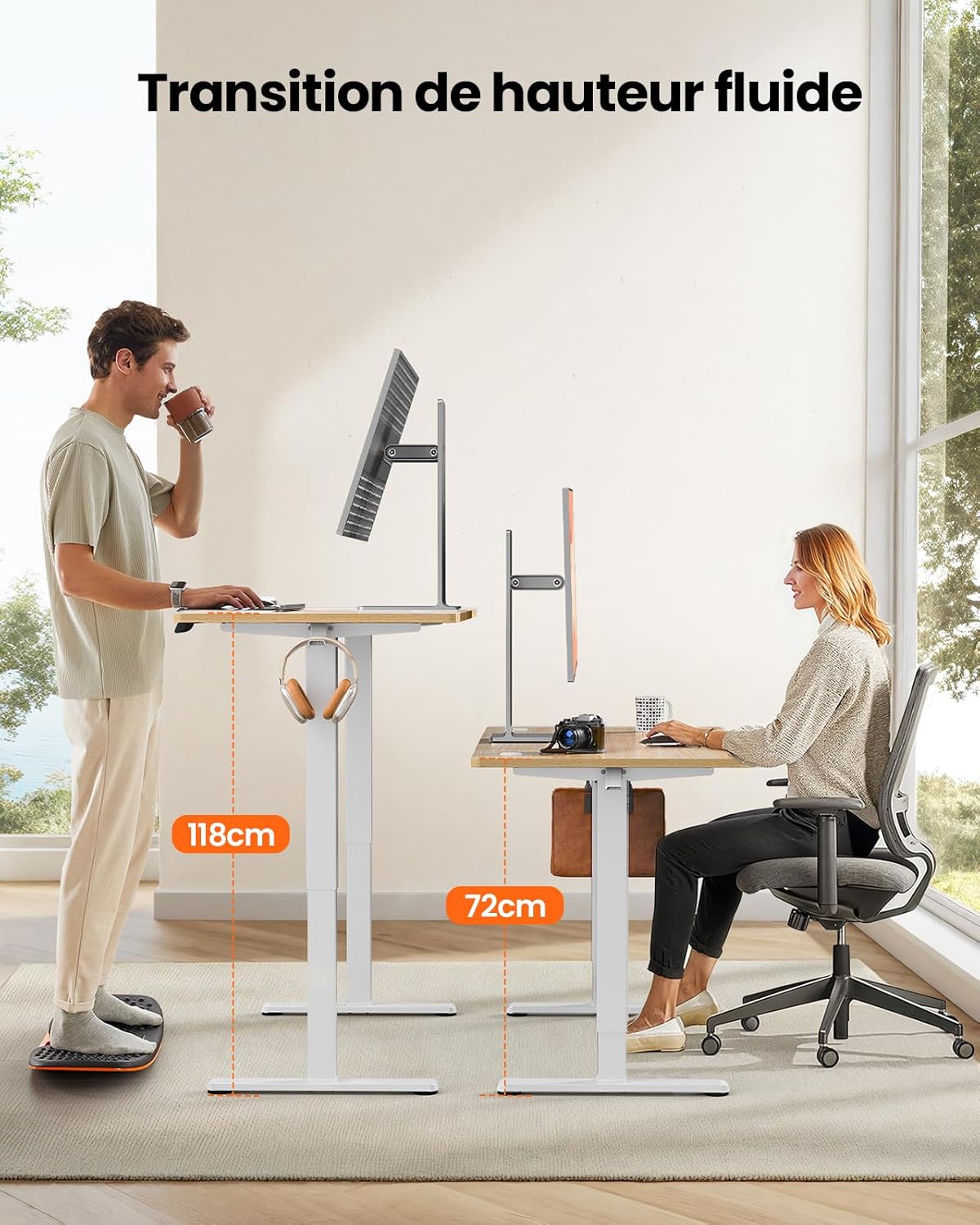
This image demonstrates the adjustable height range of the ErGear Electric Standing Desk, showing a user sitting at 72cm and standing at 118cm, emphasizing ergonomic flexibility.
Nastavení předvoleb paměti
- Nastavte stůl do požadované výšky pomocí šipek nahoru/dolů.
- Press the 'M' button (if available, or a 'Set' button) followed by the desired memory button (1, 2, 3, or 4). The display will typically flash or beep to confirm the setting is saved.
Tichý provoz
The desk operates with a quiet motor, producing a noise level of ≤ 55 dB, ensuring a peaceful work environment.

Illustrates the ultra-quiet operation of the ErGear Electric Standing Desk, with a noise level of 55dB, ensuring a peaceful and undisturbed work environment.
6. Údržba
Regular maintenance helps prolong the life of your desk:
- Čištění: Wipe the desk surface and legs with a soft, damp hadříkem. Nepoužívejte agresivní chemikálie ani abrazivní čisticí prostředky.
- Správa kabelů: Periodically check that all cables are neatly organized and not pinched or tangled. Utilize the integrated cable grommets and hooks.
- Screw Tightness: Occasionally check and tighten any loose screws on the frame or desktop connections.
- Inspekce: Inspect the desk for any signs of wear or damage. If any issues are found, contact customer support.

Detail view of the desk's integrated cable grommets and convenient hooks, designed to help maintain a tidy and organized workspace by managing cables and accessories.
7. Řešení problémů
Pokud narazíte na jakékoli problémy se stolem, podívejte se prosím na následující běžné problémy a jejich řešení:
| Problém | Možná příčina | Řešení |
|---|---|---|
| Stůl se nehýbe. | Power cable disconnected, motor cable loose, overload. | Check all power and motor connections. Reduce weight on the desk. |
| Stůl se pohybuje nerovnoměrně. | Nerovnoměrné zatížení, uvolněné šrouby, překážka. | Rovnoměrně rozložte hmotnost. Zkontrolujte a utáhněte všechny montážní šrouby. Ujistěte se, že nic nepřekáží. |
| Stůl se během nastavování zastaví. | Overload protection activated, obstruction. | Remove some weight. Check for obstructions. Wait a few minutes before trying again. |
| Ovládací panel nereaguje. | Control panel cable loose, power issue. | Check control panel cable connection. Verify power supply. |
If the problem persists after trying these solutions, please contact ErGear customer support.
8. Specifikace
| Funkce | Detail |
|---|---|
| Značka | ErGear |
| Číslo modelu | EGESD8 |
| Barva | Beige and Natural |
| Rozměry pracovní desky (D x Š) | Rozměr 120 cm x 60 cm |
| Rozsah nastavení výšky | 72 cm - 118 cm |
| Materiál | Wood (Desktop), Metal (Base) |
| Hmotnostní kapacita | 80 kg |
| Hladina hluku motoru | ≤ 55 dB |
| Speciální funkce | Ergonomic, Electric, 4 Memory Presets, Cable Grommets, Headphone Hooks |
| Hmotnost produktu | 19.05 kg |

A clear diagram illustrating the overall dimensions of the ErGear Electric Standing Desk, including its 120cm x 60cm desktop and adjustable height range of 72cm to 118cm.
9. Záruka a podpora
ErGear products are designed for durability and performance. This product comes with a standard manufacturer's warranty. For specific warranty details, please refer to the warranty card included in your package or visit the official ErGear webmísto.
If you have any questions, require technical assistance, or need to report a missing or damaged part, please contact ErGear customer support through the retailer where you purchased the product or via the contact information provided on the official ErGear webmísto.
Please have your model number (EGESD8) and purchase information ready when contacting support.


