1. Úvod
Welcome to your new ECHTPower Switch 2 Wireless Controller. This manual provides detailed instructions for setup, operation, maintenance, and troubleshooting to ensure you get the most out of your gaming experience. This controller features vibrant RGB lighting, advanced macro programming, responsive turbo functions, and adjustable vibration feedback, offering broad compatibility with Nintendo Switch/Switch 2, PC, Android, and iOS devices.
2. Bezpečnostní informace
- Nevystavujte regulátor extrémním teplotám, vlhkosti ani přímému slunečnímu záření.
- Zabraňte pádu ovladače na zem nebo jeho vystavení silným nárazům.
- Nepokoušejte se rozebírat ani upravovat ovladač. Ztratíte tak záruku.
- Chraňte regulátor před vodou a jinými kapalinami.
- Používejte pouze dodaný nabíjecí kabel nebo jeho certifikovaný ekvivalent.
- Uchovávejte mimo dosah malých dětí.
3. Obsah balení
Zkontrolujte prosím obsah balení, abyste se ujistili, že jsou přítomny všechny položky:
- 1 x ECHTPower Wireless Controller (Starry Sky Blue)
- 1 x USB nabíjecí kabel
- 1 x Uživatelská příručka
4. Rozložení ovladače
Familiarize yourself with the buttons and features of your ECHTPower controller:
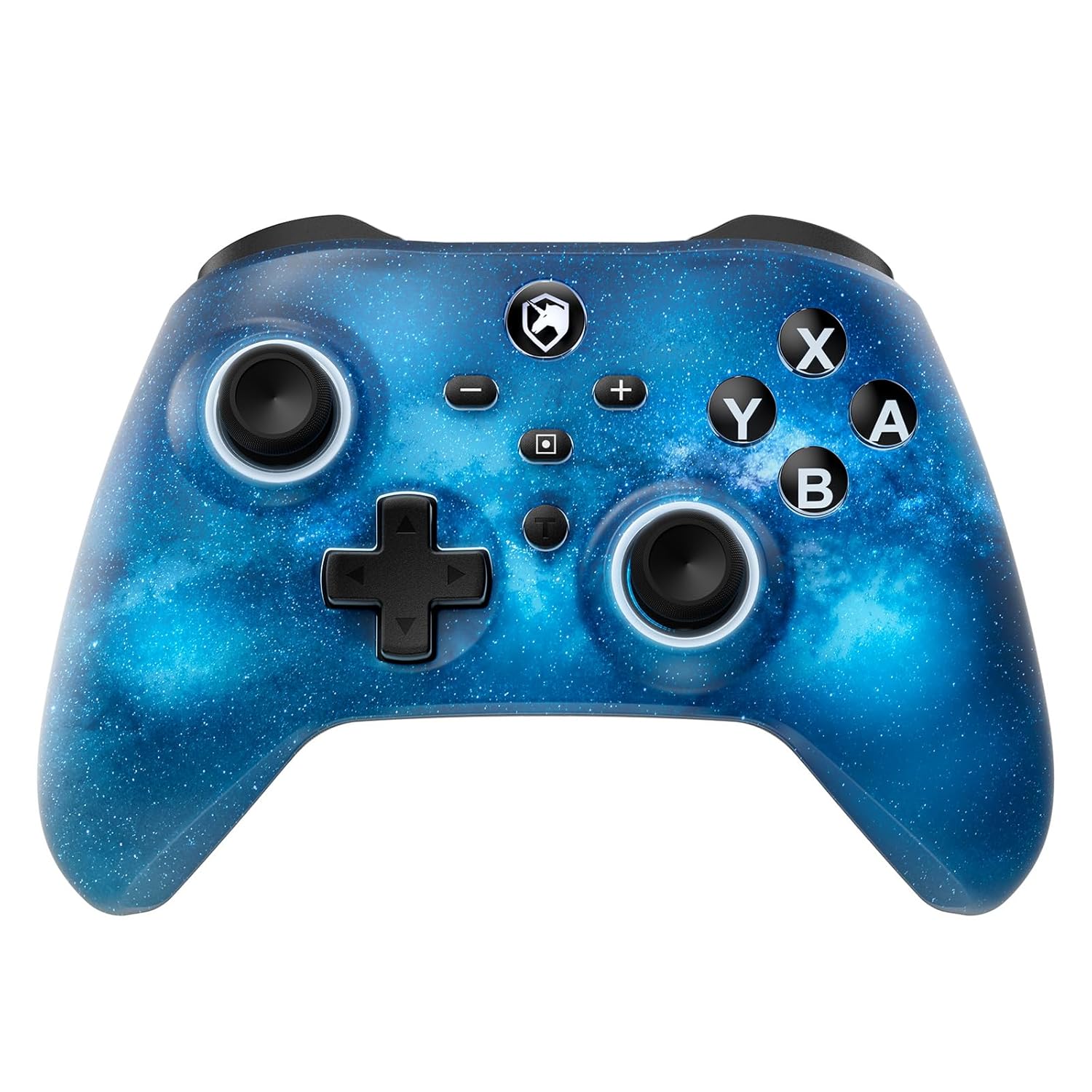
Přední view of the ECHTPower Wireless Controller, showcasing its Starry Sky Blue design and button layout.
- Levá analogová páčka: Pro ovládání pohybu a kamery.
- Pravá analogová páčka: Pro ovládání a zaměřování kamery.
- D-Pad: Směrový vstup.
- Tlačítka A/B/X/Y: Standardní akční tlačítka.
- Tlačítka L/P: Knoflíky na ramenou.
- Spouštěče ZL/ZR: Analog triggers for precise input.
- Tlačítko Domů: Návrat na domovskou obrazovku systému.
- Tlačítko pro snímek obrazovky: Pořizuje snímky obrazovky.
- Tlačítka Plus (+) / Mínus (-): Navigace v systémové nabídce.
- Turbo (T) Button: Activates and adjusts turbo functions.
- Macro (M) Button: Initiates macro programming.
- Tlačítka M1/M2: Programovatelné zadní pádla.
5. Nastavení
5.1 Počáteční nabíjení
Before first use, fully charge your controller. Connect the included USB charging cable to the controller's USB-C port and a USB power source (e.g., console, PC, USB wall adapter). The charging indicator will illuminate during charging and turn off when fully charged.

The controller features a 1000mAh battery, providing approximately 6-8 hours of playtime with lights on, and takes 2-3 hours to fully charge.
5.2 Pairing with Nintendo Switch/Switch 2
To pair your controller with a Nintendo Switch or Switch 2 console:
- V nabídce HOME vyberte Ovladače > Změnit Grip/Pořadí.
- Na ovladači stiskněte a podržte Tlačítko Domů for 3-5 seconds until the LED indicators begin to flash rapidly.
- Once paired, the corresponding player LED(s) on the controller will light up solid.

The ECHTPower controller is compatible with Nintendo Switch 2, though it does not support the C key, 3.5mm audio jack, or wake-up function on Switch 2.
5.3 Pairing with PC (Windows)
To connect to a Windows PC:
- Ujistěte se, že váš počítač má povolenou technologii Bluetooth.
- Přejít na Nastavení > Zařízení > Bluetooth a další zařízení.
- Vybrat Přidejte Bluetooth nebo jiné zařízení > Bluetooth.
- Stiskněte a podržte Tlačítko Domů on the controller until the LEDs flash.
- Select the controller from the list of available devices to pair.
5.4 Pairing with Android/iOS
To connect to Android or iOS devices:
- Povolte na svém mobilním zařízení Bluetooth.
- Stiskněte a podržte Tlačítko Domů on the controller until the LEDs flash.
- Select the controller from the Bluetooth device list on your phone/tablet.

The ECHTPower Wireless Controller offers wide compatibility across Switch, PC, Android, and iOS platforms.
6. Návod k obsluze
6.1 Zapnutí/vypnutí
- Zapnutí: Stiskněte tlačítko Tlačítko Domů jednou.
- Vypnout: Stiskněte a podržte Tlačítko Domů for 5 seconds, or the controller will automatically power off after 5 minutes of inactivity (adjustable via KeyLinker app).
6.2 Ovládání RGB osvětlení
The controller features 9 different light effects and 3 light models (Breathing Cycle, Laser Mode, Neon Mode) with 4 levels of brightness adjustment (25%-50%-75%-100%).
- Změnit barvu: Stiskněte Macro (M) + Minus (-).
- Změnit režim světla: Stiskněte Macro (M) + Plus (+).
- Upravit jas: Stiskněte Macro (M) + Left Analog Stick (down).

The controller's RGB lighting offers 9 colors and 4 light modes, creating a dynamic visual experience.
Official ECHTPower video demonstrating the wireless controller's features, including its RGB lighting and responsiveness.
6.3 Programování maker
The programmable function allows you to map up to 16 button functions to the M1 or M2 back paddles, enabling complex skill execution with a single press.
- Vstupte do režimu programování: Stiskněte a podržte Macro (M) buttona poté stiskněte tlačítko M1 or M2 button you wish to program. The indicator light will flash slowly.
- Pořadí záznamu: Press the sequence of buttons you want to record (up to 16 inputs).
- Ukončete režim programování: Stiskněte tlačítko Macro (M) button again. The indicator light will stop flashing.
- Vymazat makro: In programming mode, press the M1 or M2 button twice without inputting any sequence.

The controller's ultra-programmable design allows mapping various buttons to the M1 and M2 back paddles for enhanced gameplay.
6.4 Funkce Turbo
The controller supports both auto and manual Turbo functions with three adjustable speeds: 5 rounds/s, 12 rounds/s, and 25 rounds/s.
- Set Turbo: Stiskněte a podržte Turbo (T) button, then press the desired action button (A/B/X/Y/L/R/ZL/ZR). The button will now have Turbo functionality.
- Upravte rychlost turba: Stiskněte a podržte Turbo (T) buttona poté stiskněte tlačítko Right Analog Stick (up/down) to cycle through speeds.
- Clear Turbo: Stiskněte a podržte Turbo (T) button, then press the Turbo-enabled action button again.

The controller offers strong manual and auto turbo capabilities, allowing up to 25 shots per second for rapid actions.
6.5 Nastavení vibrací
The built-in dual vibration motors provide 4 levels of feedback: Strong, Medium, Weak, and None, for a realistic gaming experience.
- Nastavení vibrací: Stiskněte a podržte Turbo (T) buttona poté stiskněte tlačítko D-Pad (up/down) to cycle through vibration intensities.

Adjustable dual vibration provides four intensity levels (0%, 30%, 70%, 100%) for a customized gaming experience.
7. Údržba
- Čištění: K čištění ovladače používejte měkký, suchý hadřík. Nepoužívejte agresivní chemikálie ani abrazivní materiály.
- Skladování: Pokud regulátor nepoužíváte, skladujte jej na chladném a suchém místě mimo dosah přímého slunečního záření a extrémních teplot.
- Péče o baterie: Pro prodloužení životnosti baterie se vyvarujte častého úplného vybíjení ovladače. Pravidelně jej nabíjejte, i když jej nepoužíváte neustále.
8. Řešení problémů
If you encounter any issues with your ECHTPower controller, please refer to the table below for common problems and solutions:
| Problém | Možná příčina | Řešení |
|---|---|---|
| Ovladač se nezapne. | Slabá baterie. | Charge the controller for 2-3 hours. |
| Nelze spárovat se zařízením. | Controller not in pairing mode; Bluetooth interference; device Bluetooth off. | Ensure controller is in pairing mode (flashing LEDs). Turn off/on device Bluetooth. Move closer to the device. |
| Buttons/Joysticks unresponsive. | Connection issue; software glitch. | Reconnect the controller. Reset the controller (refer to manufacturer's specific reset instructions if available, usually a small pinhole button). |
| Vibrace nefungují nebo jsou příliš slabé/silné. | Vibration setting is off or at minimum/maximum. | Adjust vibration intensity using Turbo (T) + D-Pad (up/down). |
| Macro not working correctly. | Nesprávné programování. | Re-program the macro carefully following the instructions in Section 6.3. |
9. Specifikace
| Funkce | Detail |
|---|---|
| Číslo modelu | SP06GA |
| Kapacita baterie | Lithium-iontová kapacita 1000 mAh |
| Doba nabíjení | Přibl. 2-3 hodiny |
| Doba přehrávání | Approx. 6-8 hours (with lights on) |
| Kompatibilita | Nintendo Switch/Switch Lite/Switch 2, PC (Windows), Android, iOS |
| Konektivita | Bezdrátové (Bluetooth), Kabelové (USB-C) |
| Vibrace | Dual motors, 4 adjustable levels |
| Gyroskopický senzor | 6osý gyroskop |
| Rozměry | 6.3 x 4.69 x 2.72 palce |
| Hmotnost | 9.91 unce |
10. Záruka a podpora
ECHTPower provides a standard warranty for this product. For detailed warranty information, product support, or any questions not covered in this manual, please contact ECHTPower customer service through the retailer's platform or visit the official ECHTPower webstránky. Uschovejte si prosím doklad o koupi pro případ reklamace.


