1. Úvod
This manual provides essential information for the installation, operation, and maintenance of your ASUS TUF Gaming Radeon RX 9060 XT 16GB GDDR6 OC Edition graphics card. Please read this manual thoroughly before installation to ensure proper setup and optimal performance.
2. Konec produktuview a klíčové vlastnosti
The ASUS TUF Gaming Radeon RX 9060 XT is a high-performance graphics card designed for demanding gaming and computing tasks. It features AMD RDNA™ 4 Architecture, advanced cooling solutions, and robust power delivery.
Klíčové vlastnosti:
- Military-Grade Components: Certified TUF chokes and MOSFETs provide stable power delivery, enhancing system stability. TUF 5K black metallic capacitors offer wider temperature tolerance and extended lifespan.
- Ochranný povlak PCB: A conformal coating protects against short circuits caused by moisture, dust, or debris.
- Dvojitá kuličková ložiska ventilátoru: Fans utilize dual ball bearings for increased lifespan and reliable, quiet cooling performance.
- 2.5-Slot Design with Axial-tech Fans: Features a large fin array optimized for airflow from three Axial-tech fans, which spin on dual-ball bearings for improved air pressure.
- ASUS GPU Guard: Secures the GPU, reducing the risk of damage.
- Kovový exoskelet: Adds structural rigidity and includes vents for enhanced heat dissipation.
- Auto-Extreme Technology: Precision automated manufacturing ensures higher reliability and consistent quality.
- Software GPU Tweak III: Provides intuitive tools for performance tweaking, advanced thermal controls, and system monitoring.
- Duální BIOS: Allows selection between Performance mode (maximizes cooling) and Quiet mode (quieter operation with less aggressive fan curve).
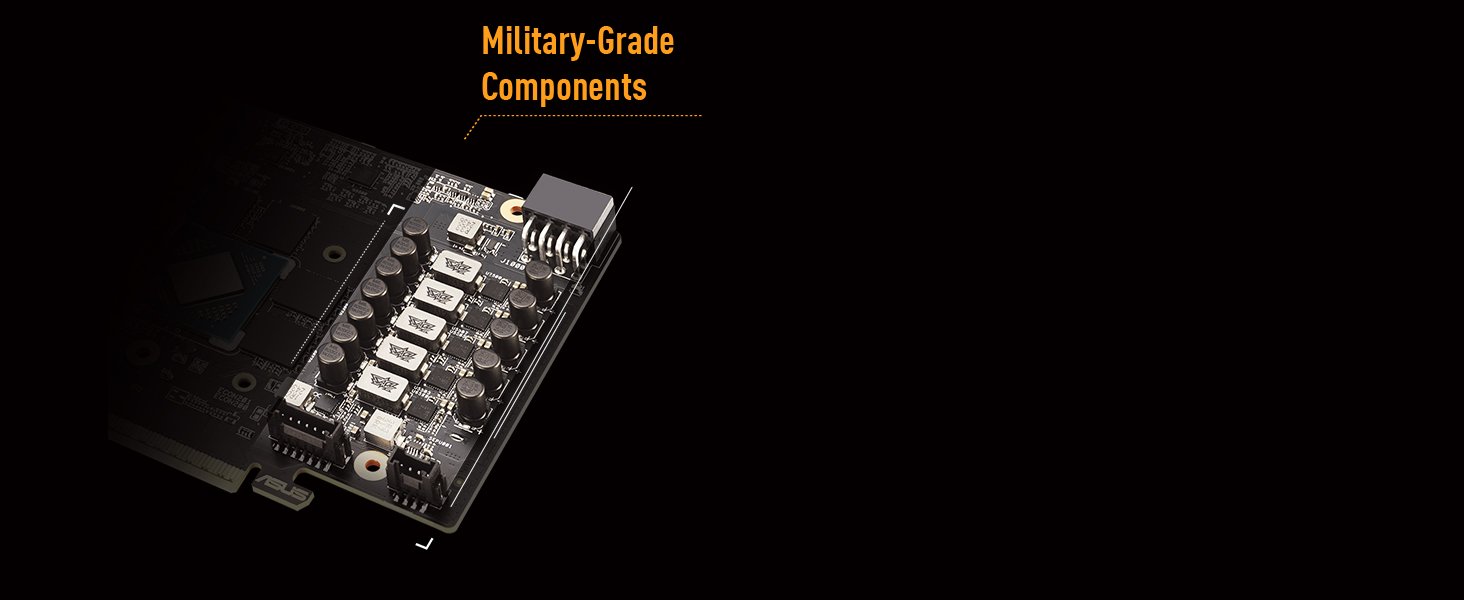
Image: Military-Grade Components. This image displays the internal components of the graphics card, highlighting the robust chokes and capacitors designed for durability and stable power delivery.

Image: Protective PCB Coating and Dual Ball Fan Bearings. This diagram illustrates the protective layer on the circuit board and the design of the fan bearings for enhanced longevity.

Image: Cooling Mastery. This image details the MaxContact heat spreader, Axial-tech fan design, and the vented exoskeleton, all contributing to efficient heat dissipation.

Image: Dual BIOS Switch. This image highlights the physical switch on the graphics card that allows users to select between Performance and Quiet BIOS modes.
3. Co je v krabici
The retail package for your ASUS TUF Gaming Radeon RX 9060 XT graphics card should contain the following items:
- TUF-RX9060XT-O16G-GAMING Graphics Card
- Poděkování
- Speed setup manual
- TUF Certificate of Reliability
- TUF Velcro Hook & Loop cable ties
- TUF Fridge Magnet

Image: Product and Packaging. This image shows the ASUS TUF Gaming Radeon RX 9060 XT graphics card alongside its retail packaging.
4. Setup Guide (Installation)
Follow these steps to properly install your graphics card into your computer system.
4.1 Systémové požadavky
- Základní deska kompatibilní s PCI Express s jedním grafickým slotem x16.
- Sufficient power supply unit (PSU) with appropriate PCIe power connectors. Refer to your PSU's documentation for details.
- Minimum 16GB system RAM recommended.
- Compatible operating system (e.g., Windows 11 Pro).
4.2 Fyzická instalace
- Vypnout: Ujistěte se, že je počítač zcela vypnutý a odpojený od zásuvky.
- Otevřený případ: Sejměte boční panel skříně počítače.
- Vyhledejte slot PCIe: Najděte na základní desce dostupný slot PCI Express x16.
- Odstraňte kryty slotů: Remove the necessary expansion slot covers from the back of your computer case that correspond to the graphics card's size (this card typically requires 2.5 slots).
- Vložit kartu: Carefully align the graphics card with the PCIe slot and press it down firmly until it is securely seated. Ensure the retention clip on the PCIe slot locks into place.
- Bezpečná karta: Fasten the graphics card to the case using screws.
- Připojte napájení: Connect the required PCIe power cables from your power supply to the graphics card. This model typically requires 8-pin PCIe power connectors.
- Zavřít případ: Vyměňte boční panel skříně počítače.
4.3 Instalace ovladače
- Zapnutí: Reconnect your computer to power and turn it on.
- Počáteční zobrazení: Your computer may boot with a basic display driver.
- Stáhnout ovladače: Navštivte oficiální podporu ASUS webweb (www.asus.com/support/) or the AMD official webweb (www.amd.com/support/) to download the latest drivers for your Radeon RX 9060 XT graphics card.
- Nainstalujte ovladače: Run the downloaded driver installer and follow the on-screen instructions. A system restart may be required.
5. Návod k obsluze
5.1 Připojení k displeji
Connect your monitor(s) to the graphics card's output ports (DisplayPort 2.1a or HDMI 2.1b) using appropriate cables. This card supports multiple displays.

Image: Video Output Interfaces. This image displays the DisplayPort and HDMI ports available on the graphics card for connecting to monitors.
5.2 Přepínač duálního BIOSu
The graphics card features a Dual BIOS switch, typically located on the side of the card. This switch allows you to toggle between two distinct BIOS profiles:
- Režim výkonu (režim P): Maximizes cooling performance, potentially resulting in higher fan speeds and noise levels.
- Tichý režim (režim Q): Utilizes a less aggressive fan curve for quieter operation, without altering core power settings.
Switching modes requires a system restart to take effect.
6. Software and Utilities
6.1 ASUS GPU Tweak III
ASUS GPU Tweak III is a utility that allows you to monitor and fine-tune your graphics card's performance. It provides features for:
- Overclocking the GPU core clock and memory clock.
- Adjusting fan speeds and creating custom fan curves.
- Monitoring GPU temperature, usage, and other vital statistics.
- Switching between predefined modes (OC, Gaming, Silent) or creating custom user profiles.
Download GPU Tweak III from the official ASUS support webmísto.

Image: GPU Tweak III Software. This image shows the GPU Tweak III interface, illustrating its capabilities for performance tuning and monitoring.
6.2 AMD Adrenaline Software
AMD Adrenaline Software provides a comprehensive suite of tools for managing your Radeon graphics card. It includes features such as:
- Game optimization and performance tuning.
- Driver updates and system monitoring.
- Advanced display settings and video enhancements.
- Recording and streaming capabilities.
Ensure you have the latest version installed for optimal performance and access to all features.
7. Údržba
Proper maintenance helps ensure the longevity and performance of your graphics card.
- Odstranění prachu: Regularly clean dust from the graphics card's heatsink and fans using compressed air. Ensure the system is powered off and unplugged before cleaning.
- Aktualizace ovladačů: Keep your graphics drivers updated by regularly checking the ASUS or AMD support websites for the latest versions.
- Průtok vzduchu systémem: Ensure your computer case has adequate airflow to prevent overheating.
8. Řešení problémů
Pokud narazíte na problémy s grafickou kartou, postupujte podle následujících běžných kroků pro řešení problémů:
- Žádný výstup na displej:
- Ujistěte se, že je kabel monitoru bezpečně připojen ke grafické kartě i monitoru.
- Ověřte, zda je grafická karta zcela zasunuta do slotu PCIe.
- Check that all necessary PCIe power cables are connected to the graphics card.
- Pokud je to možné, vyzkoušejte s jiným kabelem displeje nebo monitorem.
- Problémy s výkonem (nízké FPS, zasekávání):
- Ujistěte se, že máte nainstalované nejnovější ovladače grafické karty.
- Check GPU temperatures using monitoring software (e.g., GPU Tweak III) to rule out thermal throttling.
- Verify that your power supply unit (PSU) meets the recommended wattage for the graphics card and other system components.
- Zavřete nepotřebné aplikace na pozadí.
- Driver Installation Problems:
- Uninstall any previous graphics drivers using a utility like Display Driver Uninstaller (DDU) in Safe Mode, then attempt a clean installation of the latest drivers.
- Ujistěte se, že máte aktuální operační systém.
- Nestabilita systému (pády, zamrznutí):
- Check for system overheating.
- Ensure your system BIOS/UEFI is updated to the latest version.
- If overclocking, revert to default settings to see if stability improves.
9. Specifikace
| Funkce | Specifikace |
|---|---|
| Značka | ASUS |
| Série | TUF-RX9060XT-O16G-GAMING |
| Grafický koprocesor | AMD RX9060XT |
| Značka čipové sady | AMD |
| Velikost paměti RAM grafické karty | 16 GB GDDR6 |
| Rychlost paměti | 2800 MHz |
| Video výstupní rozhraní | DisplayPort 2.1a x2, HDMI 2.1b |
| Maximální rozlišení obrazovky | 7680x4320 pixelů |
| Hmotnost položky | 2.07 libry |
| Rozměry produktu (DxŠxV) | 11.97 x 4.96 x 0.04 palce |
| Barva | ČERNÝ |
10. Záruka a podpora
For warranty information and technical support, please visit the official ASUS support webwebu. Najdete tam ovladače, nejčastější dotazy a kontaktní informace na zákaznický servis.
Podpora ASUS Webmísto: www.asus.com/support/
Uschovejte si prosím doklad o koupi pro uplatnění záruky.


