1. Úvod
This manual provides essential instructions for the proper setup, operation, and maintenance of your Azpen A1083 10.36-inch Android Tablet. Please read this manual thoroughly before using your device to ensure optimal performance and longevity.
2. Obsah balení
Ověřte, zda jsou v balení produktu přítomny všechny položky:
- Azpen A1083 10.36-inch Android Tablet
- Surface Style Keyboard Folio Case
- Nabíjecí kabel
- Napájecí adaptér
- Rychlý průvodce

Image: The Azpen A1083 tablet and its accompanying keyboard folio, displayed alongside their retail packaging. This image illustrates the complete product set as it would appear upon unboxing.
3. Nastavení
3.1 Počáteční nabíjení
- Connect the charging cable to the tablet's USB-C port.
- Plug the other end of the cable into the power adapter.
- Zapojte napájecí adaptér do zásuvky ve zdi.
- Allow the tablet to charge until the battery indicator shows a full charge (approximately 3-4 hours for the first charge).
3.2 Zapnutí/vypnutí
- Zapnutí: Press and hold the Power button (located on the side of the tablet) until the Azpen logo appears on the screen.
- Vypnutí: Stiskněte a podržte tlačítko napájení, dokud se nezobrazí nabídka. Vyberte možnost „Vypnout“ a potvrďte.
- Restartovat: Stiskněte a podržte tlačítko napájení, dokud se nezobrazí nabídka. Vyberte možnost „Restartovat“ a potvrďte.
3.3 Connecting the Keyboard Folio
The included keyboard folio connects via a Pogo Pin connector, requiring no Bluetooth pairing.
- Align the tablet with the Pogo Pin connectors on the keyboard folio.
- Gently press the tablet onto the connectors until it securely snaps into place.
- The keyboard will automatically activate.
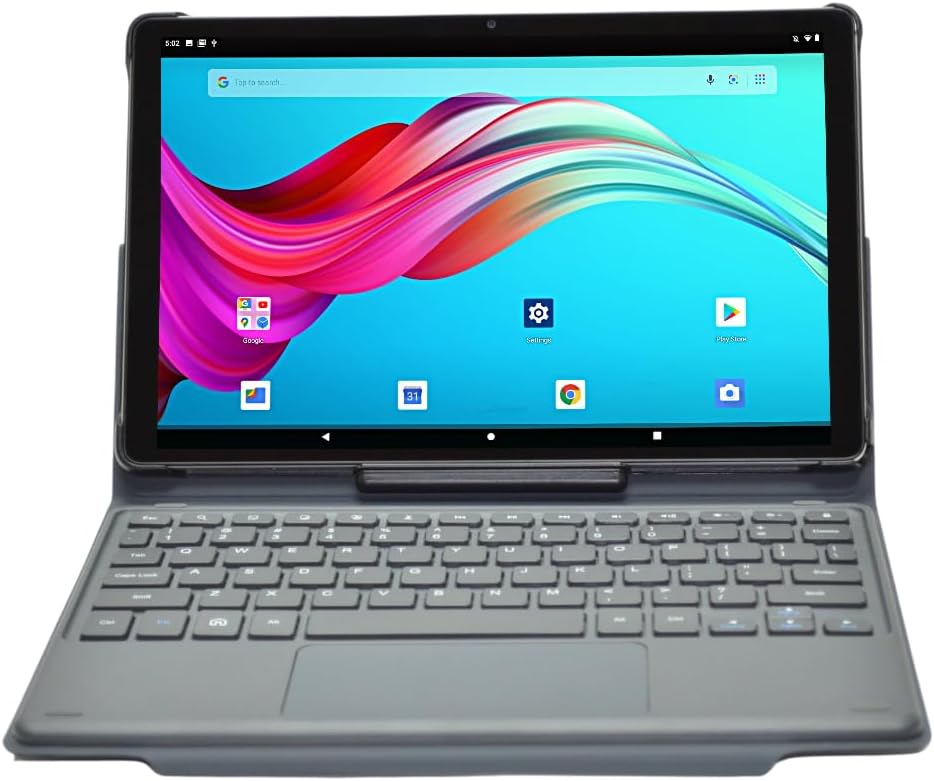
Image: The Azpen A1083 tablet securely attached to its Pogo Pin keyboard folio, displaying the Android home screen. This illustrates the tablet in its ready-to-use configuration.
4. Návod k obsluze
4.1 Základní navigace na tabletu
- Dotyková obrazovka: The tablet features a hypersensitive glass capacitive touchscreen for intuitive interaction.
- Výpad: Swipe left, right, up, or down to navigate between screens, open notifications, or access quick settings.
- Klepněte na: Tap icons to open applications or select options.
- Přiblížení/zvětšení prsty: Pro přiblížení nebo oddálení obrázků použijte dva prsty a web stránky.

Image: An infographic highlighting key features of the Azpen A1083 tablet, including Android 13, 2K HD display, 6GB RAM, 128GB storage, Pogo Pin keyboard, and Google Assistant compatibility. This provides a visual summary of the tablet's capabilities.
4.2 Using the Keyboard Folio
The keyboard folio provides a physical keyboard and trackpad for enhanced productivity.
- psaní: Use the physical keys for text input in documents, emails, and web procházení.
- Trackpad: The integrated trackpad functions like a mouse, allowing for precise cursor control.
- Multi-Angle Case: The folio case allows for multiple viewing angles, providing flexibility for different tasks such as typing, viewing media, or drawing.
Obrázek: Vícenásobný views of the Azpen A1083 tablet within its multi-angle keyboard case, demonstrating various adjustable positions for typing and viewing. This highlights the versatility of the case design.
4.3 Funkce fotoaparátu
Tablet je vybaven předním fotoaparátem s rozlišením 5 MP a zadním fotoaparátem s rozlišením 8 MP.
- Open the 'Camera' application from the home screen or app drawer.
- Vyberte mezi předním a zadním fotoaparátem pomocí ikony přepínače fotoaparátu.
- Klepnutím na tlačítko spouště pořídíte fotografie nebo spustíte/zastavíte nahrávání videa.
4.4 Asistent Google
The Azpen A1083 supports Google Assistant for voice commands and smart assistance.
- Aktivovat: Say "Hey Google" or "Ok Google" to activate the assistant.
- příkazy: Use voice commands for tasks such as setting alarms, checking weather, playing music, or opening applications.
5. Údržba
5.1 Čištění tabletu
- K čištění obrazovky a těla tabletu použijte měkký hadřík, který nepouští vlákna.
- Na odolné šmouhy lehceampOtřete hadřík vodou nebo čisticím roztokem určeným pro obrazovky. Vyhněte se agresivním chemikáliím.
- Do not spray cleaning solutions directly onto the tablet.
5.2 Aktualizace softwaru
Pravidelně kontrolujte a instalujte aktualizace softwaru, abyste zajistili, že váš tablet má nejnovější funkce a bezpečnostní záplaty.
- Go to 'Settings' > 'System' > 'System update'.
- Postupujte podle pokynů na obrazovce a stáhněte a nainstalujte všechny dostupné aktualizace.
5.3 Péče o baterii
The Azpen A1083 offers up to 8 hours of battery life under typical usage conditions.

Image: A graphic representation of a battery with the text "UP TO 8 HOURS BATTERY" prominently displayed, indicating the tablet's expected battery duration. This visually communicates the device's power autonomy.
- Vyhněte se extrémním teplotám, protože mohou snížit výkon baterie.
- Nenechávejte tablet delší dobu zcela vybitý.
- For optimal battery health, avoid constantly charging the tablet to 100% and letting it drain to 0%.
6. Řešení problémů
| Problém | Možná příčina | Řešení |
|---|---|---|
| Tablet se nezapne | Vybitá baterie; Havárie systému | Nabíjejte tablet alespoň 30 minut. Stiskněte a podržte tlačítko napájení po dobu 10–15 sekund pro vynucení restartu. |
| Klávesnice nereaguje | Improper connection; Software glitch | Ensure the Pogo Pins are clean and securely connected. Detach and reattach the tablet to the keyboard. Restart the tablet. |
| Pomalý výkon | Příliš mnoho spuštěných aplikací; Nedostatek úložného prostoru | Zavřete nepotřebné aplikace. Vymažte mezipaměť a dočasné files. Uninstall unused apps. |
| Problémy s připojením Wi-Fi | Problém s routerem; Nesprávné heslo | Restart your Wi-Fi router. Forget the network on the tablet and reconnect with the correct password. |
7. Specifikace

Obrázek: Zadní strana view of the Azpen A1083 tablet, clearly displaying the 'azpen' brand logo and 'Model: A1083' text. This image helps in identifying the specific model of the device.
| Funkce | Detail |
|---|---|
| Číslo modelu | A1083 |
| Velikost displeje | 10.36 palců |
| Rozlišení obrazovky | 2000 x 1200 pixels (2K FHD IPS) |
| Procesor | Mediatek 8183 Octa Core CPU 2.0 GHz |
| BERAN | 6 GB |
| Skladování | 128 GB |
| Operační systém | Android 13 |
| Přední kamera | 5 MP |
| Zadní kamera | 8 MP |
| Bezdrátové připojení | 802.11ac |
| Hmotnost položky | 3 libry |
| Rozměry produktu | 9.7 x 6.2 x 0.29 palce |
8. Informace o záruce
Azpen products typically come with a limited manufacturer's warranty. For detailed information regarding the warranty period, coverage, and terms and conditions for your Azpen A1083 tablet, please refer to the warranty card included in your product packaging or visit the official Azpen webmísto.
9. Zákaznická podpora
If you encounter any issues not covered in this manual or require further assistance, please contact Azpen customer support:
- Webmísto: Visit the official Azpen website for FAQs, support resources, and contact options.
- Internetový obchod: Azpen Store on Amazon


