1. Úvod
This user manual provides detailed instructions for the Baseus 17-in-1 Docking Station (Model: B0D78WFLST). This versatile docking station is designed to expand the connectivity of your laptop or compatible device, offering multiple ports for display, data transfer, networking, and power delivery. Please read this manual thoroughly before using the product to ensure proper operation and to maximize its capabilities.
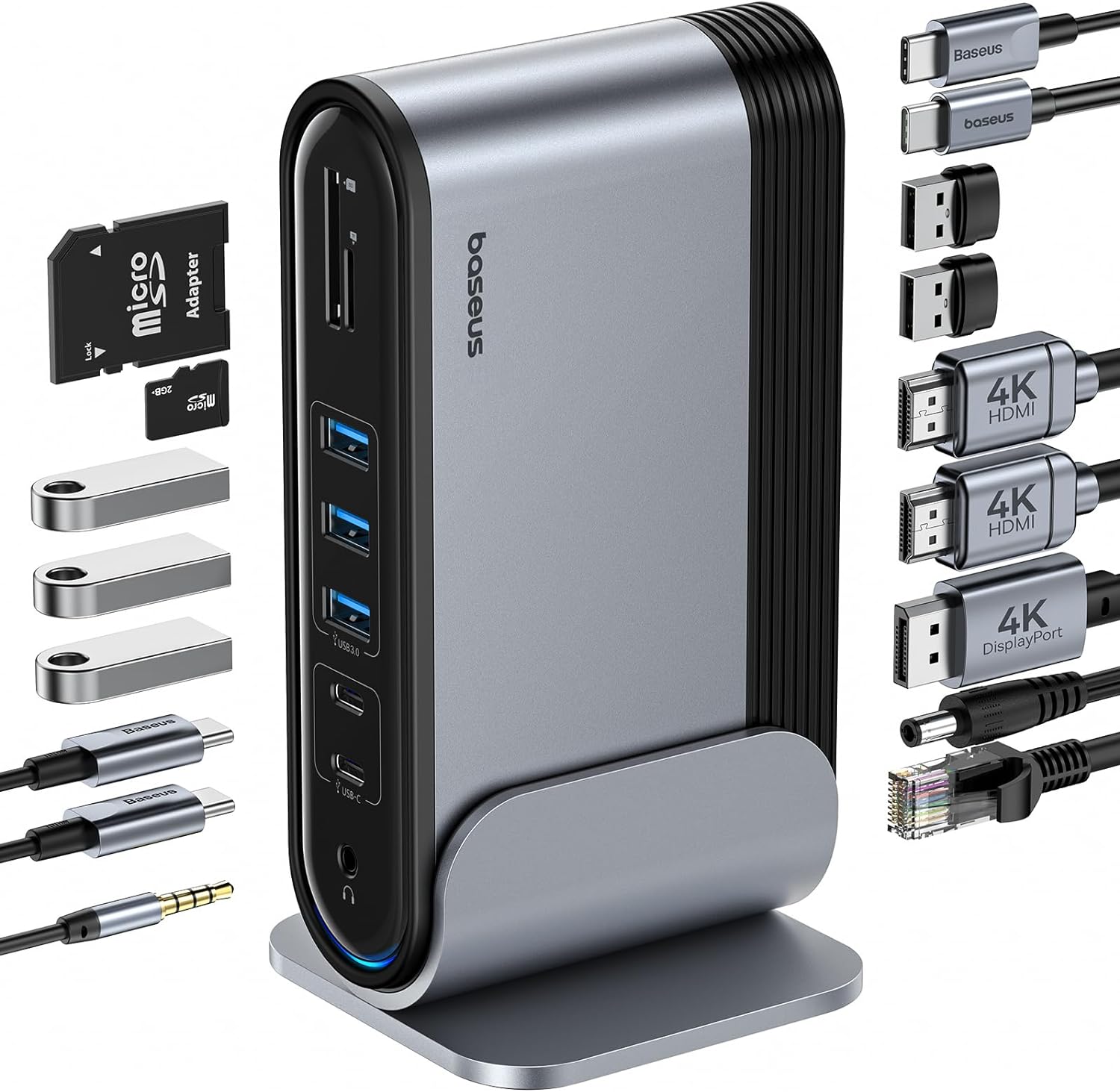
Obrázek 1: Dokovací stanice Baseus 17 v 1 a dodávané příslušenství.
2. Klíčové vlastnosti
The Baseus 17-in-1 Docking Station offers comprehensive connectivity solutions:
- Rozšíření portů 17 v 1: Integrates a wide array of ports for diverse connectivity needs.
- Triple Monitor Support: Connect up to three external monitors for enhanced productivity.
- Displej s vysokým rozlišením: Supports 4K@60Hz resolution for single and dual displays, and 1080P@60Hz for triple displays on Windows systems.
- Rychlý přenos dat: Features USB 3.0 ports with 5Gbps transfer speeds and USB 2.0 ports for peripherals.
- 100W napájení: Provides up to 85W power output to charge your laptop (100W input required).
- Gigabitový Ethernet: Ensures stable and high-speed wired network connection up to 1Gbps.
- Čtečka karet SD/TF: Convenient access to memory cards with speeds up to 104 MB/s.
- Audio konektivita: Integrated 3.5mm audio jack for headphones or speakers.
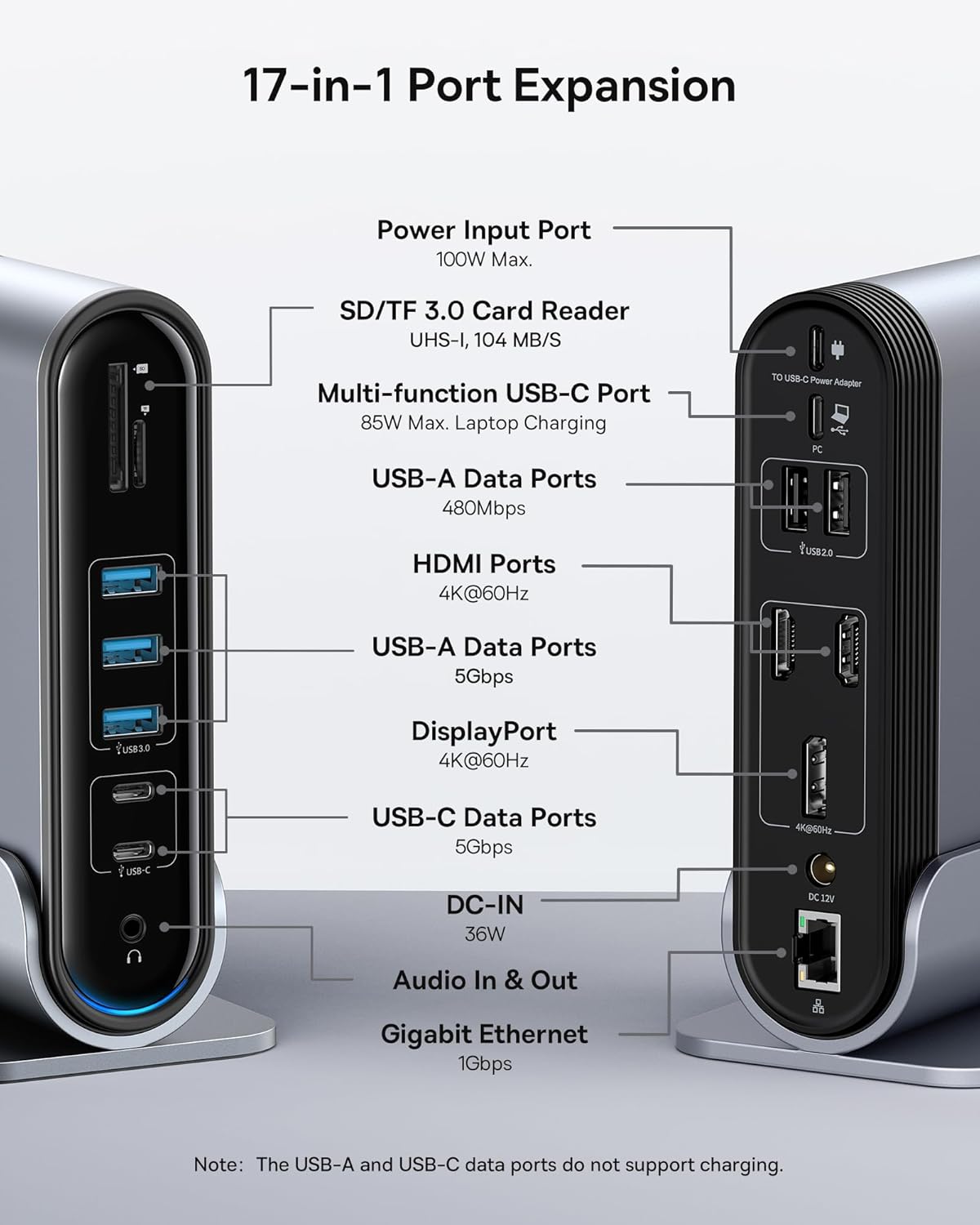
Figure 2: Detailed port layout and specifications of the docking station.
3. Obsah balení
Prosím, ověřte, zda jsou v balení přítomny všechny položky:
- Baseus UnionJoy 17portová dokovací stanice s trojitým displejem
- Dokovací stojan
- Napájecí adaptér
- Kabel USB-C na USB-C
- Adaptér pro americkou zástrčku
- Adaptér pro EU zástrčku
- Adaptér pro britskou zástrčku
- Uživatelská příručka

Obrázek 3: Co je součástí balení.
4. Pokyny k nastavení
Pro nastavení dokovací stanice Baseus 17-in-1 postupujte takto:
- Připojte napájení:
Connect the provided power adapter to the DC-IN port (36W) on the docking station. Use the appropriate regional adapter plug (US, EU, or UK) for your power outlet. For laptop charging, ensure a 100W PD charger (not included) is connected to the Power Input Port (100W Max.) on the docking station.

Figure 4: Power connection for the docking station and laptop charging.
- Připojení k hostitelskému zařízení:
Use the included USB-C to USB-C cable to connect the docking station's Multi-function USB-C Port (85W Max. Laptop Charging) to your laptop or compatible host device.
- Připojení monitorů:
Connect your external monitors to the HDMI Ports (4K@60Hz) and/or DisplayPort (4K@60Hz) on the docking station using appropriate cables. Refer to the "Operating Instructions" section for display mode configurations.
- Připojení periferií:
Connect your USB devices (keyboard, mouse, external drives, etc.) to the available USB-A Data Ports (5Gbps or 480Mbps) and USB-C Data Ports (5Gbps). Insert SD or TF cards into the respective card reader slots.
- Připojení k síti (volitelné):
For a wired network connection, connect an Ethernet cable from your router/modem to the Gigabit Ethernet port (1Gbps) on the docking station.
- Připojit zvuk (volitelné):
Connect headphones or speakers to the 3.5mm Audio In & Out jack.
5. Návod k obsluze
5.1 Režimy zobrazení
Dokovací stanice podporuje různé konfigurace displeje v závislosti na operačním systému a počtu připojených monitorů.
Pro systémy Windows:
- Mirror Mode (A+A+A): Displays the same content on all connected monitors and the laptop screen. Supports 1080P@60Hz.
- Extend Mode (A+B+C): Extends your desktop across multiple monitors, allowing different content on each screen. Supports 1080P@60Hz for triple display.
Pro systémy macOS:
- Mirror Mode (A+A+A): Displays the same content on all connected monitors and the laptop screen. Supports 4K@60Hz.
- Extend Mode (A+B+B): Extends your desktop across external monitors, but macOS typically mirrors content across multiple external displays when using a single MST hub. Supports 4K@60Hz.
- Note: macOS does not support triple extended display (A+B+C) through a single MST hub.

Figure 5: Display mode configurations for Windows and macOS.

Figure 6: Detailed resolution capabilities for various display configurations and DP versions.
5.2 Přenos dat
Dokovací stanice nabízí vysokorychlostní přenos dat:
- USB 3.0 (5Gbps): Ideal for external hard drives, SSDs, and other high-bandwidth devices.
- USB 2.0 (480 Mb/s): Suitable for keyboards, mice, printers, and other standard peripherals.
- Čtečka karet SD/TF: Quickly transfer photos and videos from memory cards.

Figure 7: Illustrating super-fast data transfer via the docking station.
5.3 Dodávka energie
The docking station supports Power Delivery (PD) to charge your laptop:
- Connect a 100W PD charger (not included) to the dedicated Power Input Port on the docking station.
- The docking station will then provide up to 85W of power to your connected laptop via the USB-C host connection.
Note: The USB-A and USB-C data ports on the front of the docking station do not support charging.
6. Údržba a péče
To ensure the longevity and optimal performance of your docking station, follow these guidelines:
- Udržujte zařízení čisté otíráním měkkým, suchým hadříkem. Nepoužívejte abrazivní čisticí prostředky ani rozpouštědla.
- Nevystavujte dokovací stanici vodě, vlhkosti ani extrémním teplotám.
- Zabraňte pádu zařízení nebo jeho vystavení silným nárazům.
- Zajistěte dostatečné větrání v okolí dokovací stanice, abyste zabránili přehřátí.
- Disconnect all cables when the device is not in use for extended periods.
7. Řešení problémů
If you encounter issues with your Baseus 17-in-1 Docking Station, refer to the following common problems and solutions:
7.1 No Display Output / Flickering Screen
- Zkontrolujte připojení kabelů: Ensure all HDMI/DisplayPort cables are securely connected to both the docking station and the monitors.
- Verify Host Connection: Confirm the USB-C cable connecting the docking station to your laptop is firmly plugged in.
- Napájení: Make sure the docking station is receiving adequate power from its power adapter.
- Nastavení obrazovky: Check your computer's display settings (e.g., Windows Display Settings, macOS System Preferences > Displays) to ensure the external monitors are detected and configured correctly (Extend, Mirror).
- Aktualizace ovladačů: Ensure your laptop's graphics drivers and USB-C drivers are up to date.
- Kompatibilita rozlišení: Verify that the selected resolution and refresh rate are supported by your monitors and the docking station. Refer to the "Multiple Display Modes" table in Section 5.1.
- macOS Triple Display: Remember that macOS does not support triple extended display (A+B+C) through a single MST hub.
7.2 Nefunkční zařízení USB
- Znovu připojte zařízení: Unplug and re-plug the USB device from the docking station.
- Zkuste jiný port: Test the USB device in another USB port on the docking station or directly on your laptop to isolate the issue.
- Napájení: Ensure the docking station has sufficient power, especially for power-hungry USB devices.
- Problémy s ovladači: Check if the USB device requires specific drivers and ensure they are installed on your computer.
7.3 Laptop Not Charging
- 100W PD Charger: Confirm you are using a 100W Power Delivery charger connected to the dedicated Power Input Port on the docking station. The docking station itself does not generate power for your laptop.
- USB-C kabel: Ensure the USB-C cable connecting the docking station to your laptop supports power delivery.
- Kompatibilita s notebooky: Verify your laptop supports charging via its USB-C port.
7.4 Problémy s ethernetovým připojením
- Kontrola kabelu: Ujistěte se, že je ethernetový kabel bezpečně připojen k dokovací stanici i k routeru/modemu.
- Nastavení sítě: Check your computer's network settings to ensure the Ethernet adapter is enabled and configured correctly.
- Router/modem: Verify your router/modem is functioning properly.
8. Specifikace
| Funkce | Specifikace |
|---|---|
| Model | B0D78WFLST |
| Značka | Baseus |
| Celkový počet portů | 17 |
| HDMI porty | 2 (4K při 60 Hz) |
| DisplayPort | 1 (4K při 60 Hz) |
| Datové porty USB-A | 7 (3x 5Gbps, 4x 480Mbps) |
| Datové porty USB-C | 2 (5 Gb/s) |
| Napájení (vstup) | 100W Max (via dedicated PD port) |
| Power Output (to Laptop) | 85W Max (via Multi-function USB-C Port) |
| Ethernetový port | 1 (1Gbps Gigabit Ethernet) |
| Čtečka karet | SD/TF (UHS-I, 104 MB/s) |
| Audio Jack | 3.5mm Audio In & Out |
| Kompatibilní zařízení | Dell, HP, Mac, Lenovo, Steam Deck, etc. |
| Rozměry | 9.29 x 8.27 x 2.28 palce |
| Hmotnost položky | 1.9 libry |
9. Záruka a podpora
Informace o záruce a technickou podporu získáte na oficiálních stránkách Baseus. website or contact Baseus customer service directly. Keep your purchase receipt as proof of purchase for warranty claims.
Baseus Official Webmísto: www.baseus.com
Pro další pomoc můžete také kontaktovat prodejce prostřednictvím platformy, kde jste produkt zakoupili.


