1. Úvod
This manual provides instructions for the safe and effective use of your SKYBASIC 2" IPS Screen 1000X Handheld Digital Microscope. Please read this manual thoroughly before operating the device and retain it for future reference.

Image: The SKYBASIC Handheld Digital Microscope, showing the main unit, USB cables, and a lanyard, alongside a monitor displaying a magnified leaf and a ladybug on leaves.
2. Konec produktuview
The SKYBASIC Handheld Digital Microscope is designed for exploring the microscopic world with ease. It features a 2-inch IPS color display, up to 1000X magnification, and adjustable LED illumination.
2.1 Klíčové vlastnosti
- 2.0 Inch IPS Color Display: Provides a clear and intuitive real-time observation experience with vibrant colors.
- 1000x zvětšení: Suitable for observing various small objects and details.
- High Resolution & 8 LED Lights: Offers excellent detail and optimal clarity with adjustable illumination.
- Přenosný design: Compact and lightweight, with a detachable screen decoration kit and lanyard for easy outdoor use.
- Foto a videozáznam: Capture images and videos of observations. Built-in storage for up to 400 photos; TF memory card (not included) required for video recording.
- Kompatibilita s PC: Connects to a computer for a larger viewzkušenosti.
2.2 Komponenty

Image: Illustration of the 2.0 Inch IPS Color Display, demonstrating how high-definition observation images are transmitted in real-time.

Image: Diagram showing the microscope's lens assembly with 8 adjustable LED lights and indicating 1000X magnification, with examples of objects that can be viewed (skin, insect, PCB, plant, coin, jewelry).
3. Nastavení
Follow these steps to prepare your microscope for first use.
3.1 Vybalení
Opatrně vyjměte všechny součásti z obalu. Zkontrolujte, zda jsou přítomny všechny níže uvedené položky:
- SKYBASIC Handheld Digital Microscope
- Nabíjecí kabel USB (typu C)
- Šňůrka
- Uživatelská příručka

Image: An illustration showing the microscope, manual, Type-C cable, and anti-lost rope (lanyard) as included package contents.
3.2 Nabíjení zařízení
Before initial use, fully charge the microscope. Connect the provided USB Type-C cable to the microscope's charging port and the other end to a standard USB power adapter (not included) or a computer USB port. The charging indicator will show the charging status.
3.3 Inserting a TF Card (Optional for Video Recording)
The microscope has built-in storage for up to 400 photos. For video recording, a TF (microSD) memory card must be inserted (not included). Locate the TF card slot, gently insert the card until it clicks into place. Ensure the card is inserted in the correct orientation.
4. Návod k obsluze
4.1 Zapnutí/vypnutí
- To power on, long press the power button located on the device.
- To power off, long press the power button again until the screen turns off.

Image: A visual guide demonstrating the four easy steps for using the microscope: 1. Turn on, 2. Rotate the focus wheel, 3. Observe details on the HD screen, 4. Connect to a computer for a larger view.
4.2 Zaostřování
After powering on, place the microscope over the object you wish to observe. Slowly rotate the focus wheel (typically located on the barrel of the microscope) until the image on the 2-inch IPS screen appears clear and sharp.
4.3 Nastavení LED světel
The microscope is equipped with 8 adjustable LED lights to illuminate your subject. Use the light adjustment buttons (refer to the device's physical buttons) to increase or decrease the brightness for optimal viewpodmínky.
4.4 Fotografování
With the desired image in focus on the screen, press the photo capture button (usually marked with a camera icon) once to take a still image. The image will be saved to the internal storage.

Image: The microscope's screen interface, illustrating the options for taking photos (with a leaf texture example) and recording videos (with an insect eye example). It notes built-in storage for photos and the requirement of a TF card for videos.
4.5 Nahrávání videí
To record video, ensure a TF memory card is inserted. Press the video recording button (usually marked with a video camera icon) once to start recording. Press it again to stop recording. Videos will be saved to the TF card.
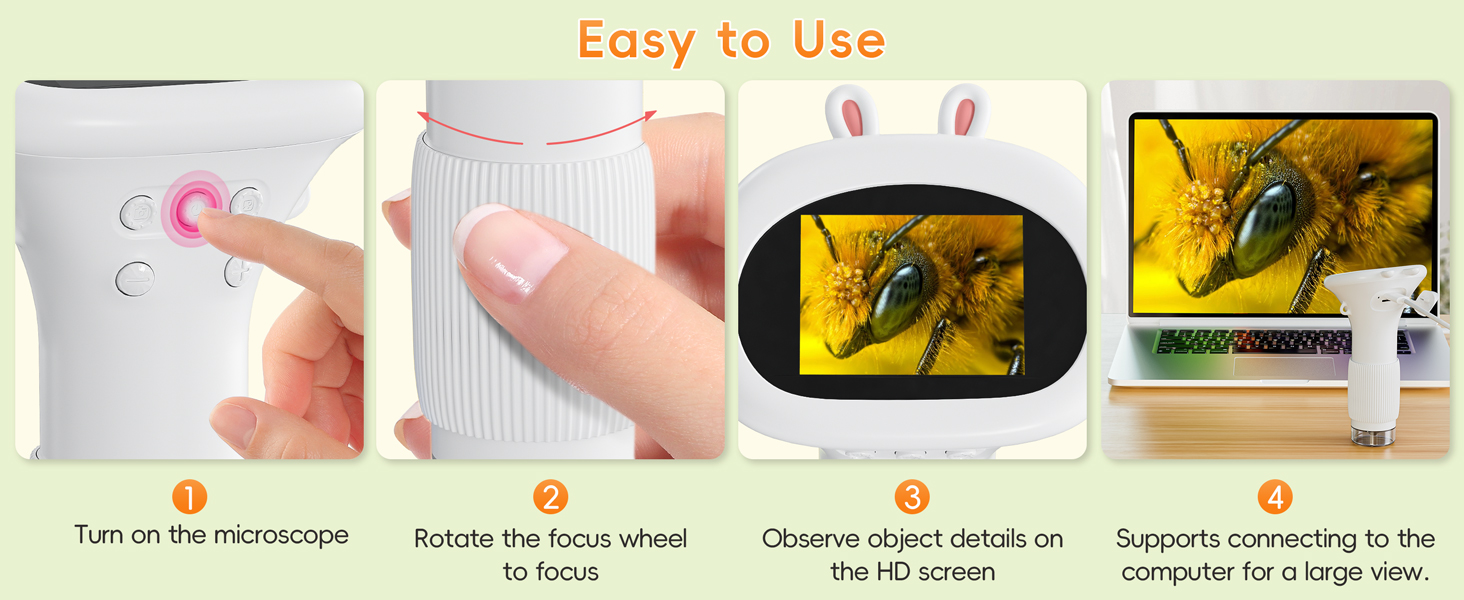
Image: A visual representation of the microscope's videography and photography capabilities, highlighting that built-in storage supports up to 400 photos, and a TF card is needed for video recording.
4.6 Připojení k PC
Pro větší viewing experience, you can connect the microscope to a computer. Use the provided USB cable to connect the microscope to your PC. The device is compatible with Windows Vista/XP/7/8/10/11 and MacOS x 11.0 or higher. Once connected, the microscope should be recognized as a webcam or storage device, allowing you to view live feed or access stored media.

Image: The microscope connected to a laptop via a USB cable, demonstrating its PC compatibility for a larger viewing experience on Windows and MacOS.
5. Údržba
Proper care ensures the longevity and optimal performance of your microscope.
- Čištění: Use a soft, dry cloth to clean the exterior of the microscope. For the lens and screen, use a specialized lens cleaning cloth and solution to avoid scratches.
- Skladování: Mikroskop skladujte na chladném a suchém místě mimo dosah přímého slunečního záření a extrémních teplot.
- Péče o baterie: Abyste zachovali stav baterie, vyvarujte se častého úplného vybíjení. Zařízení pravidelně nabíjejte, i když jej delší dobu nepoužíváte.
- Vyhněte se dopadu: Handle the microscope with care to prevent drops or impacts that could damage internal components.
6. Řešení problémů
If you encounter issues with your microscope, refer to the following common problems and solutions:
| Problém | Možná příčina | Řešení |
|---|---|---|
| Zařízení se nezapne. | Slabá baterie nebo je zařízení vypnuté. | Charge the device fully. Long press the power button to turn on. |
| Obrázek je rozmazaný. | Improper focus or insufficient lighting. | Rotate the focus wheel until the image is clear. Adjust the LED light brightness. |
| Nelze fotografovat ani nahrávat videa. | Internal storage full (for photos) or no TF card inserted (for videos). | Delete old photos or transfer them to a PC. Insert a TF card for video recording. |
| Nelze se připojit k počítači. | Faulty USB cable, incorrect port, or driver issue. | Try a different USB cable or port. Ensure your PC's operating system is compatible. |
7. Specifikace
| Funkce | Detail |
|---|---|
| Číslo modelu | inskam372 |
| Značka | SKYBASIC |
| Zobrazit | 2.0 Inch IPS Color Screen |
| Zvětšení | Až 1000X |
| Světelný zdroj | 8 nastavitelných LED světel |
| Úložiště fotografií | Built-in, up to 400 photos |
| Video úložiště | Requires TF (microSD) card (not included) |
| Kompatibilita s PC | Windows Vista/XP/7/8/10/11, MacOS x 11.0+ |
| Zdroj napájení | Napájení baterií (1 lithium-iontová baterie je součástí balení) |
| Materiál | Plast |
| Hmotnost položky | 8.4 unce |
| Rozměry balení | 6.65 x 4.25 x 3.11 palce |
8. Záruka a podpora
For warranty information and customer support, please refer to the documentation included with your purchase or visit the official SKYBASIC website. If you experience any issues not covered in this manual, please contact SKYBASIC customer service for assistance.
Manufacturer: Shenzhen Sulang Technology Co.,ltd
Pro další pomoc můžete navštívit SKYBASIC Store on Amazon.


