1. Úvod
The Frigga M2D is a multi-use USB temperature data logger designed for reliable and accurate temperature monitoring across various applications. This device is ideal for cold chain logistics, food storage, pharmaceutical monitoring, and laboratory use, ensuring product integrity and regulatory compliance. It features a large data memory, direct PDF/CSV report generation, and an intuitive LCD display.
2. Konec produktuview
Familiarize yourself with the components of your Frigga M2D data logger.
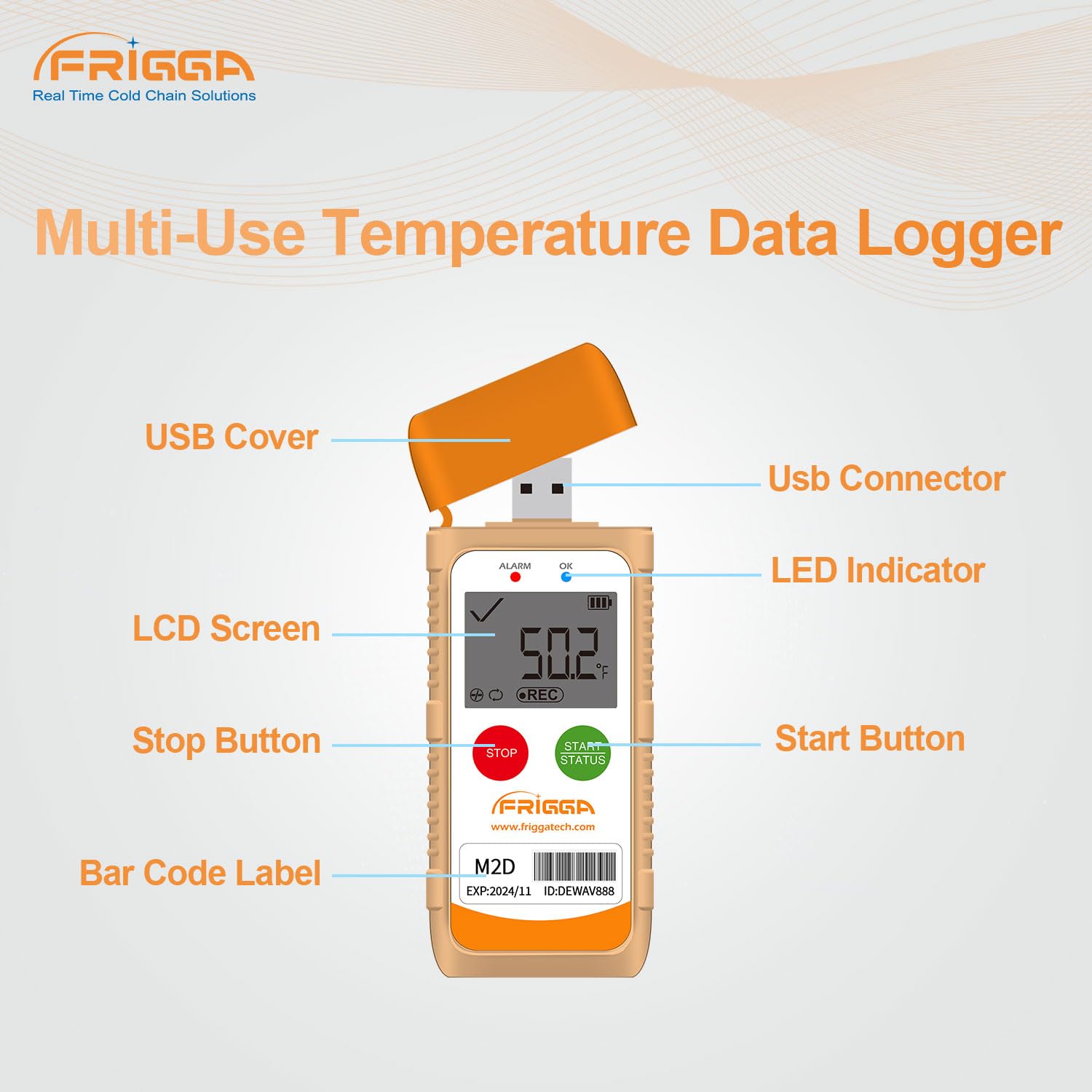
Obraz: Frigga M2D Data Logger with labeled components. This image highlights the USB Cover, USB Connector, LED Indicator, LCD Screen, Stop Button, Start Button, and Bar Code Label on the device.
- USB kryt: Protects the USB connector from dust and moisture.
- USB konektor: Used for connecting to a computer for data export and configuration.
- LED indikátor: Provides visual feedback on device status and alarms.
- LCD obrazovka: Displays real-time temperature readings, alarm status, and recording information.
- Tlačítko Stop: Initiates the stopping of a recording session.
- Tlačítko Start: Initiates the starting of a recording session.
- Bar Code Label: Contains product identification information.
3. Klíčové vlastnosti
- Multi-Use Temperature Data Logger: Advanced internal sensor provides a measuring range of -30°C to +70°C (-22°F to +158°F). Accuracy range is ±0.5°C (-20°C to +40°C) and ±1°C for other ranges. It features a large data memory of up to 14400 readings.
- Multiple Data Export Options: Easily generate PDF and CSV reports directly by plugging the device into any computer's USB slot, without requiring special software. All current and historical reports can also be exported via the Frigga Data Center software.
- LED Alarm Indicator: The device includes an LED alarm function that activates if the monitored temperature exceeds pre-set thresholds, providing immediate visual alerts.
- Všestranné aplikace: Suitable for monitoring and recording temperatures in various sectors including cold chain, food, pharmaceutical, and laboratory environments.
- Frigga Data Software Compatibility: Companion software (available via the Frigga website) allows for advanced configuration of logging conditions, including delayed start, logging intervals, temperature units, time zones, and alarm ranges. It also provides charting, statistical analysis, and data export to Excel and PDF.
- Visual LCD Display: The LCD screen provides real-time temperature readings, alarm status, and statistical information. Users can switch between Fahrenheit and Celsius units.
- Dlouhá výdrž baterie: Equipped with a CR2450 battery, ensuring extended operation suitable for remote or hard-to-reach locations.
- Třída vodotěsnosti IP65: The device is designed with an IP65 rating, offering protection against dust and water splashes.

Obraz: Frigga M2D Product Parameters. This image details the measurement range, accuracy range, and memory capacity of the device, along with its physical dimensions (4.41 inches height, 1.85 inches width).

Obraz: Frigga M2D Auto-generated PDF & CSV reports. This image illustrates the direct generation of PDF and CSV files when the data logger is connected to a computer, compatible with both Windows and Mac operating systems.

Obraz: Frigga M2D Applications. This image displays various use cases for the data logger, including Cold-chain Transportation, Medicine Storage, Food Refrigeration, Greenhouse & Planting, Environmental Testing, and Commercial & Industry.

Obraz: Frigga M2D Parameter Settable via Frigga Data Center. This image shows the Frigga Data Center software interface, demonstrating how various parameters like temperature units, display time, logging intervals, and alarm settings can be configured for the data logger.

Obraz: Frigga M2D IP65 Waterproof Grade. This image visually represents the data logger's IP65 waterproof rating, showing water splashing around the device.
4. Nastavení
- Počáteční kontrola: Upon receiving your Frigga M2D data logger, inspect it for any visible damage.
- Aktivace baterie: The device comes with a pre-installed CR2450 battery. Ensure any protective tabs are removed if present.
- Software Installation (Optional for Advanced Configuration): While basic data retrieval does not require software, for advanced settings such as delayed start, logging intervals, temperature units, time zones, and alarm ranges, download and install the Frigga Data Software from the official Frigga website. The software is compatible with Windows and Mac OS.
- Konfigurace zařízení: Connect the data logger to your computer via the USB port. Use the Frigga Data Software to set your desired logging parameters. This includes setting the start delay, logging interval, temperature units (°C/°F), time zone, and temperature alarm thresholds.
5. Návod k obsluze
- Spuštění nahrávání: Stiskněte a podržte Tlačítko Start until the 'REC' icon appears on the LCD screen, indicating that recording has begun. If a delayed start was configured, the device will begin recording after the set delay period.
- Stav sledování: The LCD screen will display the current temperature, recording status (REC), and battery level. The LED indicator will flash to confirm operation or indicate an alarm.
- Jednotky spínací teploty: Krátce stiskněte Tlačítko Start to toggle between Celsius (°C) and Fahrenheit (°F) on the LCD display.
- Stopping a Recording: Stiskněte a podržte Tlačítko Stop until the 'REC' icon disappears from the LCD screen. The recording session is now complete.
- Indikace alarmu: If the temperature exceeds the pre-set alarm thresholds during recording, the LED indicator will flash, and an alarm icon may appear on the LCD screen.
6. Data Export and Analysis
- Direct Report Generation: After stopping a recording, remove the USB cover and plug the data logger into a USB port on your computer. The device will automatically generate a PDF report and a CSV data file. Tyto files can be accessed directly from the device's storage, which appears as a removable drive.
- Using Frigga Data Software: For more detailed analysis, charting, and statistical reports, open the Frigga Data Software on your computer. Connect the data logger, and the software will allow you to download the recorded data. You can then export this data to various formats, including Excel and PDF, and generate calibration certificates.
7. Údržba
- Čištění: Wipe the device with a soft, dry cloth. Do not use abrasive cleaners or immerse the device in liquids.
- Výměna baterie: The Frigga M2D uses a CR2450 coin cell battery. When the battery indicator shows low power, replace the battery by carefully opening the battery compartment (refer to the device's physical markings for access). Ensure correct polarity.
- Skladování: Store the data logger in a cool, dry place away from direct sunlight and extreme temperatures when not in use.
8. Řešení problémů
- Device Not Starting Recording: Ensure the battery is not depleted. Check if the device was properly configured using the Frigga Data Software. Press and hold the Start Button firmly until 'REC' appears.
- No Data Exported via USB: Ensure the USB connector is fully inserted into the computer's port. Try a different USB port or computer. Verify that the recording session was stopped correctly.
- LED Alarm Flashing: This indicates that the temperature has gone outside the pre-set alarm thresholds. Review your recorded data to identify the exact time and duration of the excursion.
- Problémy se softwarem: If experiencing problems with the Frigga Data Software, ensure you have the latest version installed from the official website. Refer to the software's help documentation or contact Frigga technical support.
9. Specifikace
| Funkce | Specifikace |
|---|---|
| Název modelu | M2D |
| Rozsah měření | -30 °C ~ +70 °C (-22 °F ~ +158 °F) |
| Rozsah přesnosti | ±0.5°C (-20°C ~ +40°C); ±1°C for other ranges |
| Kapacita paměti | Max 14400 readings |
| Technologie připojení | USB |
| Typ zobrazení | Digitální LCD |
| Speciální funkce | Alarm, Fast Reading System, High Accuracy, Waterproof (IP65) |
| Baterie | CR2450 |
| Rozměry | 12.7 x 5.08 x 0.76 cm |
| Hmotnost | 158.76 g |
| Materiál | Plast |
| Certifikace | ANSI, ASME, ASTM, CCC, CE, CSA, EMC, ETL, FCC, FDA, FE, HACCP, ISO 13485, ISO 9000, ISO 9001, NIST, NSF, RoHS, UL, WEEE |
10. Záruka a podpora
Frigga provides 24/7 technician support via email for any issues or inquiries regarding your M2D data logger. For specific warranty information, please refer to the documentation included with your purchase or contact Frigga customer service directly. You can also scan the QR code provided with your product for video tutorials and additional support resources.


