Zavedení
Thank you for choosing the WORKPRO 3.6V Electric Cordless Screwdriver. This manual provides essential information for the safe and efficient operation, maintenance, and care of your new tool. Please read this manual thoroughly before use and retain it for future reference.
Bezpečnostní informace
Při používání elektrického nářadí vždy dodržujte základní bezpečnostní opatření, abyste snížili riziko požáru, úrazu elektrickým proudem a zranění osob.
- Udržujte pracovní prostor čistý a dobře osvětlený. Nepořádek nebo tmavé prostory vedou k nehodám.
- Nepracujte s elektrickým nářadím ve výbušném prostředí, například v přítomnosti hořlavých kapalin, plynů nebo prachu. Elektrické nářadí vytváří jiskry, které mohou zapálit prach nebo výpary.
- Při práci s elektrickým nářadím držte děti a přihlížející mimo dosah. Rozptylování může způsobit ztrátu kontroly.
- Zabraňte náhodnému spuštění. Před připojením akumulátoru, zvednutím nebo přenášením nářadí se ujistěte, že je vypínač v poloze vypnuto.
- Nepřesahujte. Vždy udržujte správný postoj a rovnováhu. To umožňuje lepší kontrolu nad elektrickým nářadím v neočekávaných situacích.
- Správně se oblečte. Nenoste volné oblečení nebo šperky. Udržujte své vlasy a oděv mimo pohyblivé části. Volné oblečení, šperky nebo dlouhé vlasy mohou být zachyceny pohyblivými částmi.
- Používejte bezpečnostní vybavení. Vždy používejte ochranu očí. Za vhodných podmínek je nutné používat protiprachovou masku, protiskluzovou bezpečnostní obuv, přilbu nebo ochranu sluchu.
Obsah balení
Ověřte, zda jsou v balení obsaženy všechny níže uvedené položky:
- 1 PC Electric Cordless Screwdriver
- 1 PC USB Cable (Type-A to Type-C)
- 1 PC Carrying Case
- 1 PC 50mm Extension Rod
- 2 PCS 50mm Bits (PH2/PZ2)
- 19 PCS 25mm Bits (PH0/1/2/3, PZ1/2/3, H1/8, 5/32, 3/16, 1/4, T10/15/20/25, SL1/8, 5/32, 3/16, 1/4)
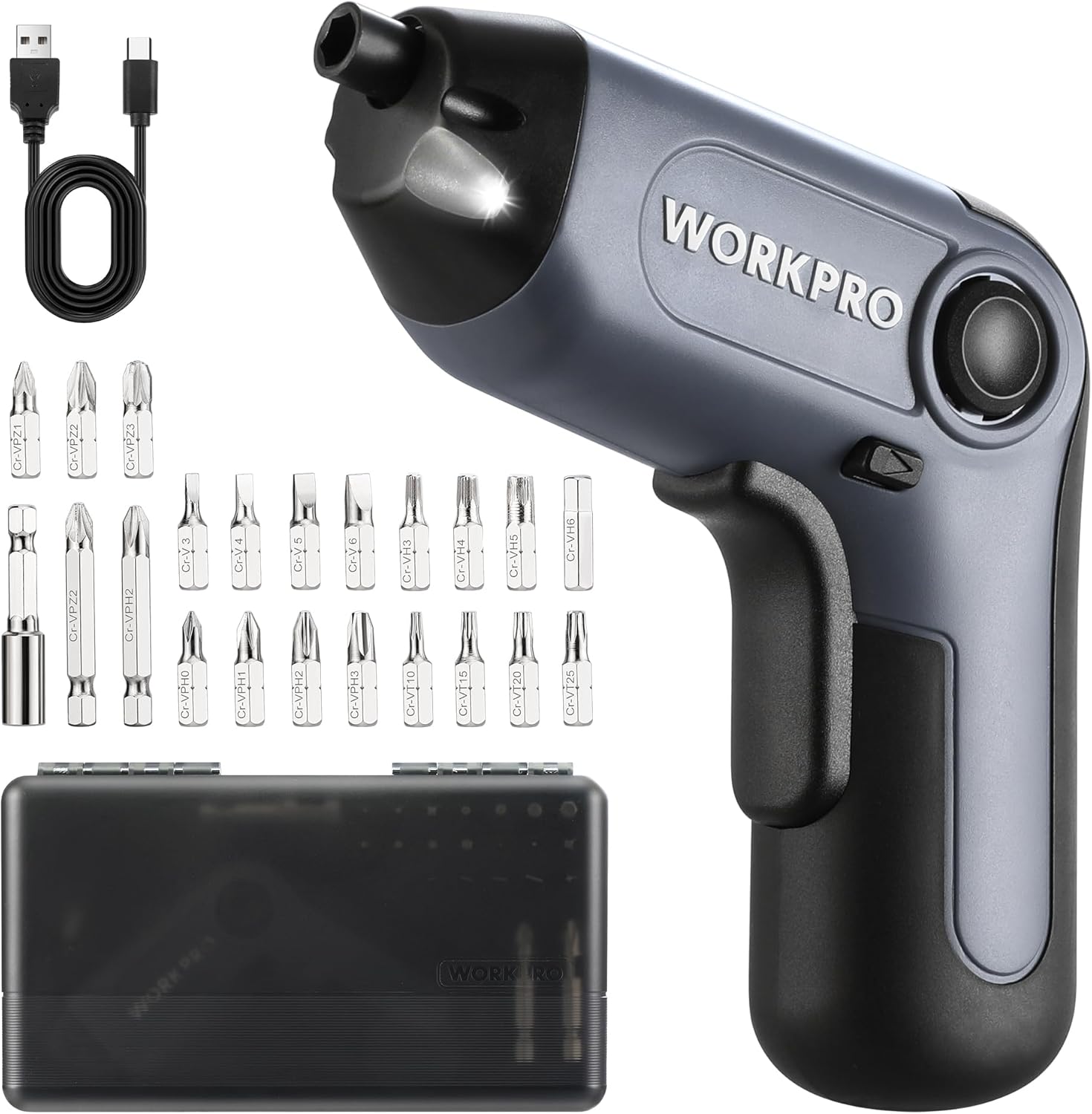
Image: The WORKPRO Electric Cordless Screwdriver, USB cable, carrying case, extension rod, and various screwdriver bits.
Konec produktuview
Familiarize yourself with the components and features of your WORKPRO Electric Cordless Screwdriver.

Image: A diagram highlighting key parts of the screwdriver, including the 1/4" Collet Sleeve, LED Light, ON/OFF Switch, USB-C Cable port, Forward/Reverse/Lock Control, and Charge Port & Charge Indicator.
- Offset Driving Shaft: Designed for improved access in tight spaces and corners, offering greater flexibility compared to traditional center-driving tools.
- LED světlo: An integrated front LED light automatically illuminates the work area, enhancing visibility in dimly lit environments.
- Magnetic Chuck: The 1/4" magnetic chuck securely holds screwdriver bits in place during operation.
- Forward/Reverse/Lock Control: A convenient switch allows for easy selection of driving direction or locking the tool for manual use.
Nastavení
Nabíjení baterie
The screwdriver is equipped with a built-in rechargeable battery. Before first use, or when the battery is low, charge the tool using the provided USB cable.
- Connect the USB cable (Type-A to Type-C) to the charging port on the screwdriver.
- Connect the other end of the USB cable to a power source such as a power bank, USB charger (5V), car charger, or laptop/PC.
- The charge indicator light will show červený při nabíjení.
- Po plném nabití se kontrolka rozsvítí zelený. A full charge typically takes 1.5-2 hours.

Image: The screwdriver being charged via USB-C, illustrating the built-in 2000mAh battery and compatible charging methods.
Instalace/výměna bitů
The screwdriver features a 1/4" magnetic chuck for quick and secure bit changes.
- Ensure the screwdriver is in the 'Lock' position (center position of the Forward/Reverse switch) to prevent accidental activation.
- Insert the desired 1/4" hex bit directly into the magnetic chuck until it is firmly seated.
- To remove a bit, simply pull it straight out from the chuck.
- For extended reach, insert the 50mm extension rod into the chuck first, then insert the desired bit into the extension rod.
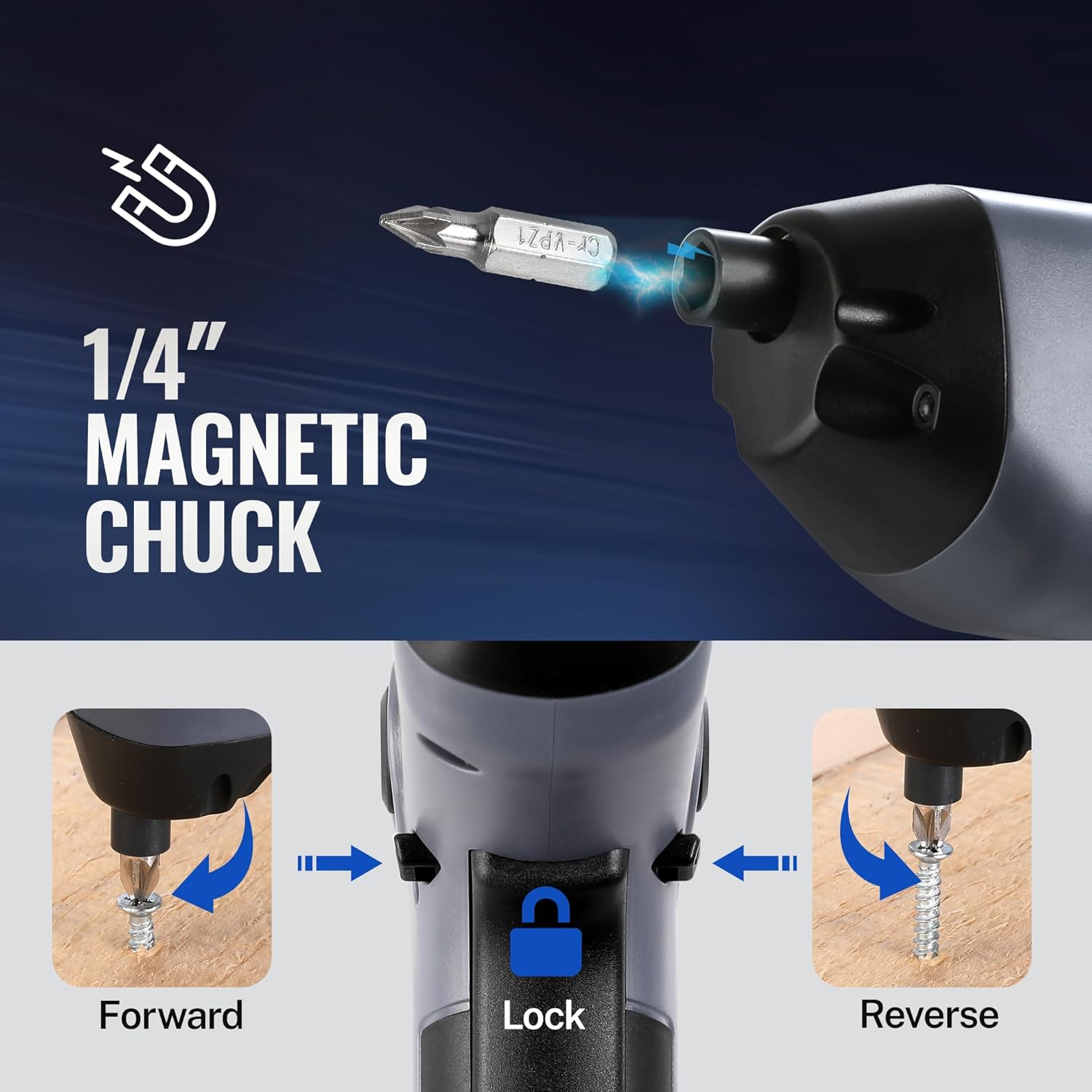
Image: A visual representation of inserting a bit into the magnetic chuck and the Forward, Lock, and Reverse positions of the control switch.
Návod k obsluze
Zapnutí/vypnutí
To operate the screwdriver, press the ON/OFF switch (trigger) located on the handle. Release the switch to stop the tool.
Provoz vpřed/vzad
The Forward/Reverse/Lock control switch is located near the top of the handle.
- Push the switch forward (towards the bit) for vpřed rotation (to drive screws).
- Push the switch backward (towards the base) for zvrátit rotation (to remove screws).
- Nastavte přepínač na centrum position to lock the tool, preventing accidental activation and allowing for manual tightening/loosening if needed.
Použití LED světla
The integrated LED light automatically activates when the ON/OFF switch is pressed, illuminating your work area. It will turn off automatically when the switch is released.

Image: The screwdriver in use, demonstrating how the LED light illuminates the screw and surrounding area for better visibility.
Utilizing the Offset Driving Shaft
The offset design of this screwdriver allows it to reach screws in confined spaces and close to edges where traditional screwdrivers or drills might not fit.
- When working in corners or near obstacles, position the offset shaft to align the bit with the screw head.
- This design provides increased flexibility for precise work in challenging areas.

Image: A comparison showing a standard drill with a center driving shaft unable to reach a screw in a corner, contrasted with the WORKPRO screwdriver's offset driving shaft successfully accessing the screw in a narrow space.
Údržba
Správná údržba zajistí dlouhou životnost a optimální výkon vašeho šroubováku.
- Čištění: Regularly wipe the tool with a soft, damp hadříkem. Nepoužívejte agresivní chemikálie ani abrazivní čisticí prostředky. Udržujte větrací otvory čisté od prachu a nečistot.
- Skladování: Store the screwdriver and its accessories in the provided carrying case in a dry, cool place, away from direct sunlight and moisture.
- Péče o baterie: Pro dlouhodobé skladování nabíjejte baterii přibližně na 50 % každé 3–6 měsíců, aby se zachovala její životnost.
- Kontrola bitů: Periodically inspect screwdriver bits for wear or damage. Replace worn bits to ensure effective screw driving and prevent damage to screw heads.
Odstraňování problémů
If you encounter issues with your WORKPRO Electric Cordless Screwdriver, refer to the following common problems and solutions:
- Screwdriver does not turn on:
- Ensure the battery is charged. Connect the tool to a power source and check the charging indicator.
- Verify the Forward/Reverse/Lock switch is not in the 'Lock' (center) position.
- Screwdriver lacks power/torque:
- The battery may be low. Recharge the tool.
- Ensure the correct bit size is used for the screw to prevent stripping and maximize torque transfer.
- Bit falls out of chuck:
- Ensure the bit is fully inserted into the magnetic chuck.
- Check if the bit is a standard 1/4" hex shank.
- Charging indicator light does not turn green:
- Ensure the USB cable is securely connected to both the screwdriver and the power source.
- Try a different USB cable or power adapter to rule out a faulty accessory.
Specifikace
| Funkce | Specifikace |
|---|---|
| Značka | WORKPRO |
| Model | 3.6V Electric Cordless Screwdriver |
| Typ baterie | Lithium-iontová (součástí balení) |
| Točivý moment | Až 5 Nm |
| Rychlost naprázdno | 210 ot./min |
| Doba nabíjení | 1.5-2 hodin |
| Nabíjecí port | USB-C |
| Styl hlavy | Phillips, Pozidriv, Torx, Hex, Slotted |
| Velikost bitu | 1/4" Hex Shank (25mm and 50mm bits included) |
| Hmotnost položky | 1.96 libry |
| Rozměry balení | 9.96 x 5.71 x 2.64 palce |
Záruka a podpora
WORKPRO products are manufactured to high-quality standards. For warranty information, technical support, or service inquiries, please refer to the contact information provided with your purchase documentation or visit the official WORKPRO webstránky. Uschovejte si prosím doklad o koupi pro případ reklamace.