Zavedení
Děkuji za nákupasing the VGN V98Pro V2 Gaming Keyboard. This manual provides detailed instructions for setting up, operating, and maintaining your new keyboard. Please read this manual thoroughly before use to ensure optimal performance and longevity of your device.
Obsah balení
- VGN V98Pro V2 Gaming Keyboard
- Kabel USB-C na USB-A
- Stahovač klíčů
- Uživatelská příručka
Konec produktuview
The VGN V98Pro V2 is a high-performance gaming keyboard designed for durability and responsiveness. It features a compact layout with a dedicated number pad, customizable keycaps, and a robust build quality.
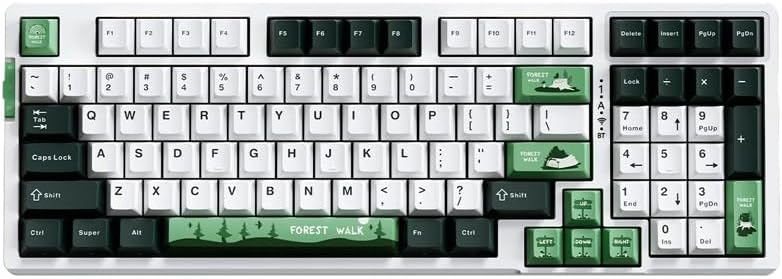
Obrázek 1: Shora dolů view of the VGN V98Pro V2 Gaming Keyboard. This image displays the full keyboard layout, including the main alphanumeric keys, function row, navigation cluster, and numeric keypad. The keycaps feature a white, dark green, and light green color scheme, with specific keys like 'Forest Walk' and 'Forest' having unique designs.
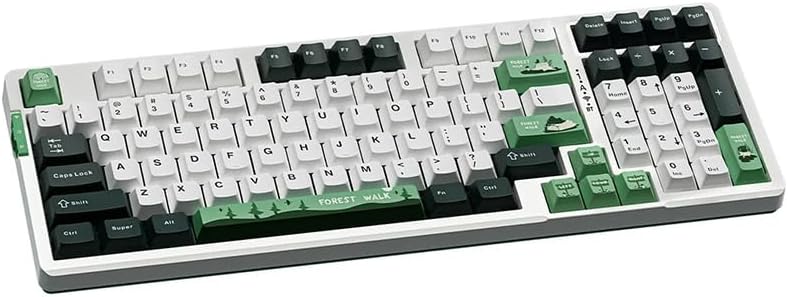
Obrázek 2: Úhlové view of the VGN V98Pro V2 Gaming Keyboard. This perspective highlights the profile of the keycaps and the overall ergonomic design of the keyboard. The side view shows the slight incline of the keyboard base and the texture of the keycaps.
Nastavení
- Rozbalte klávesnici: Opatrně vyjměte klávesnici a veškeré příslušenství z obalu.
- Připojte kabel USB:
- Insert the USB-C end of the provided cable into the port on the back or side of the VGN V98Pro V2 keyboard.
- Insert the USB-A end of the cable into an available USB port on your computer or laptop.
- Rozpoznávání systému: Your operating system should automatically detect and install the necessary drivers for the keyboard. This process may take a few moments. No additional software installation is typically required for basic functionality.
- Test funkčnosti: Open a text editor or browser and type to ensure all keys are functioning correctly.
Návod k obsluze
Základní použití
The VGN V98Pro V2 functions as a standard QWERTY keyboard. Simply connect it to your computer, and it will be ready for use. The numeric keypad provides convenient data entry.
Kombinace funkčních kláves (klávesa Fn)
The keyboard features an Fn (Function) key, typically located near the left Ctrl or Alt key. This key, when pressed in combination with other keys, activates secondary functions. Common Fn key combinations include:
- Fn + F1–F12: Multimedia controls (e.g., volume up/down, play/pause, stop, next/previous track). Specific functions may vary.
- Fn + klávesa Windows: Zamkne/odemkne klávesu Windows, aby se zabránilo nechtěnému stisknutí během hraní.
- Fn + klávesy se šipkami: May control backlight brightness or effects (if applicable).
- Fn + PrtSc/ScrLk/Pause: May offer additional system functions.
Refer to the keycap legends for specific Fn key functions on your V98Pro V2 keyboard.
Údržba a péče
- Čištění:
- Před čištěním odpojte klávesnici od počítače.
- Použijte měkký hadřík, který nepouští vlákna dampKlávesy a šasi otřete vodou nebo jemným čisticím roztokem.
- Pro odstranění prachu a nečistot mezi klávesami použijte stlačený vzduch.
- Vyhněte se používání agresivních chemikálií, abraziv nebo rozpouštědel.
- Demontáž krytky kláves: Use the provided keycap puller to carefully remove keycaps for deeper cleaning or replacement. Gently pull straight up to avoid damaging the switch.
- Skladování: Klávesnici skladujte v čistém a suchém prostředí mimo dosah extrémních teplot a přímého slunečního záření.
- Expozice tekutin: Avoid spilling liquids on the keyboard. If a spill occurs, immediately disconnect it, turn it upside down to drain, and allow it to dry completely before reconnecting.
Odstraňování problémů
- Klávesnice nereaguje:
- Ujistěte se, že je kabel USB bezpečně připojen k klávesnici i k počítači.
- Zkuste připojit klávesnici k jinému USB portu na počítači.
- Otestujte klávesnici na jiném počítači, abyste vyloučili problém specifický pro systém.
- Restartujte počítač.
- Nefunkční konkrétní klávesy:
- Remove the keycap using the keycap puller and check for any debris obstructing the switch. Clean if necessary.
- Pokud problém přetrvává, může to znamenat chybu hardwaru.
- Input Lag or Delays:
- Ujistěte se, že ovladače USB vašeho počítače jsou aktuální.
- Avoid connecting the keyboard through unpowered USB hubs. Connect directly to the computer.
Specifikace
| Značka | VGN |
| Číslo modelu | V98PROV2BBICF |
| Typ klávesnice | Herní klávesnice |
| Kompatibilní zařízení | Notebook, PC |
| Konektivita | Kabelové (USB-C) |
| Hmotnost položky | 1 kg |
| Barevné schéma | Blueberry Ice Cream - Forest (White, Dark Green, Light Green) |
Záruka a podpora
The VGN V98Pro V2 Gaming Keyboard comes with a standard manufacturer's warranty. Please refer to the warranty card included in your package for specific terms and conditions. For technical support, troubleshooting assistance, or warranty claims, please contact VGN customer service through their official webwebu nebo prodejce, od kterého jste produkt zakoupili.


