Zavedení
This manual provides detailed instructions for the installation, operation, maintenance, and troubleshooting of your Xiaomi Smart Doorbell 3S. Please read this manual thoroughly before using the product to ensure proper function and safety. The Xiaomi Smart Doorbell 3S features ultra-clear 2K resolution, AI human recognition, a 5200mAh battery, an electronic chime, and two-way audio communication.

Image: The Xiaomi Smart Doorbell 3S and its accompanying indoor chime unit.
Co je v krabici
Ověřte, zda jsou v balení přítomny všechny součásti:
- Xiaomi Smart Doorbell 3S (Main Unit)
- Vnitřní zvonkohra
- Montážní konzola
- Montážní šrouby a hmoždinky
- Nabíjecí kabel (typ C)
- Uživatelská příručka
Nastavení
1. Fyzická instalace
- Vyberte umístění: Select a suitable location near your door, ensuring a clear view a dobrý signál Wi-Fi.
- Namontujte držák: Pro bezpečné připevnění montážního držáku ke zdi použijte dodané šrouby a hmoždinky.
- Připojení napájení:
- Napájení baterie: Ensure the doorbell's internal 5200mAh battery is charged.
- Pevné napájení: If using hardwired power, connect the doorbell to your existing doorbell wiring according to local electrical codes.
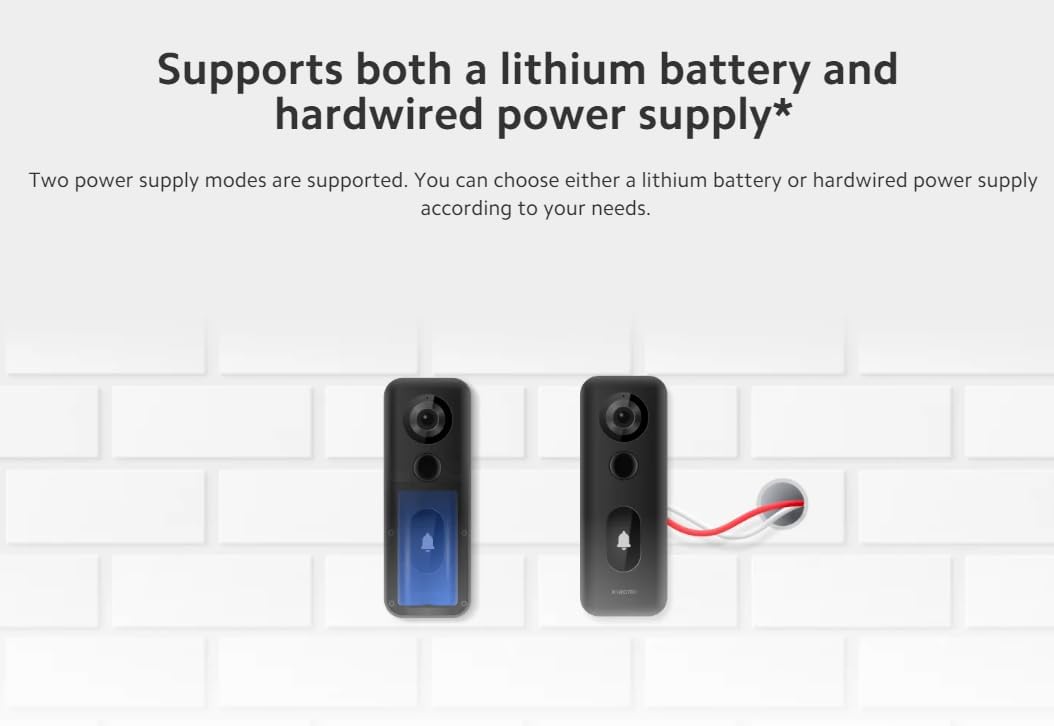
Image: Illustration showing the two power supply options for the doorbell: internal battery or hardwired connection.
- Připevnění zvonku: Slide the Xiaomi Smart Doorbell 3S onto the mounted bracket until it clicks into place.
2. Párování aplikací
- Stáhněte si aplikaci: Download the Xiaomi Home app from your device's app store.
- Vytvořit/Přihlásit se: Open the app and create a new account or log in to an existing one.
- Přidat zařízení: Follow the in-app instructions to add the Xiaomi Smart Doorbell 3S. This typically involves scanning a QR code on the device or selecting it from a list of nearby devices.
- Připojení k Wi-Fi: Connect the doorbell to your home Wi-Fi network (supports Wi-Fi 6).
- Pair Chime: Follow the app's instructions to pair the indoor chime unit with the doorbell.
Návod k obsluze
1. Živě View a obousměrný zvuk
Access the Xiaomi Home app to view a live feed from your doorbell. Use the two-way audio feature to communicate with visitors at your door.
2. Detekce pohybu a upozornění
The doorbell features 24-hour smart motion detection with AI human recognition. When motion is detected, especially human presence, the doorbell will automatically record video and send notifications to your smartphone.

Image: A smartphone displaying a notification indicating motion detection by the Smart Doorbell 3S, showing a delivery person at the door.
3. Rozlišení videa
The doorbell records in ultra-clear 2K resolution, providing clearer and more detailed images compared to 1080p, allowing for better identification of visitors.

Image: A visual comparison demonstrating the superior clarity and detail of 2K resolution over 1080p in a doorbell camera feed.
4. Cloudové úložiště
The device includes free, rolling 72-hour cloud storage for recorded events.
Údržba
1. Nabíjení baterie
The built-in 5200mAh lithium battery offers extended usage. When the battery level is low, charge the doorbell using the provided Type-C charging cable. The charging port is typically located on the back or bottom of the doorbell unit. Frequent charging is minimized due to the large battery capacity.

Image: An illustration showing the internal 5200mAh battery of the doorbell and its Type-C charging port.
2. Čištění
To maintain optimal performance, periodically clean the doorbell's camera lens and body with a soft, dry cloth. Avoid using harsh chemicals or abrasive materials that could damage the device. The doorbell has an IP65 waterproof rating, providing protection against dust and water splashes.
Odstraňování problémů
- Bez napájení: Ensure the battery is charged or the hardwired connection is secure and providing power.
- Žádné připojení k Wi-Fi: Check your router and ensure the doorbell is within range. Re-pair the device through the Xiaomi Home app if necessary.
- Špatná kvalita videa: Ujistěte se, že objektiv fotoaparátu je čistý a bez překážek. Zkontrolujte sílu signálu Wi-Fi.
- Problémy s detekcí pohybu: Adjust the motion detection sensitivity and customizable monitoring area settings within the Xiaomi Home app.
- Zvonkohra nezvoní: Verify the indoor chime is powered and properly paired with the doorbell via the app.
Specifikace

Image: A comparison table highlighting the specifications and features of the Xiaomi Smart Doorbell 3S against the previous Xiaomi Smart Doorbell 3.
| Funkce | Specifikace |
|---|---|
| Značka | XIAOMI |
| Číslo modelu | 46068 |
| Rozměry produktu | 19.99 x 19.99 x 14 cm |
| Hmotnost položky | 312 g |
| Rezoluce | 2K |
| Pole View (FoV) | Úhlopříčka 180 ° |
| Typ baterie | Lithium Ion |
| Kapacita baterie | 5200 XNUMX mAh |
| Typ zdroje napájení | Lithium battery + Hardwired |
| Odolnost proti prachu a vodě | IP65* |
| Bezdrátové připojení | Wi-Fi 6 |
| Cloudové úložiště | Free, rolling 72-hour |

Image: Icons representing key features: 180° field of view, IP65 waterproof, two power supply modes, Xiaomi security chip, 2K resolution, 5200mAh battery, 72h cloud storage, and dedicated indoor chime.
Záruka a podpora
Informace o záruce a technickou podporu získáte na oficiálních stránkách Xiaomi. website or contact Xiaomi customer service. Keep your purchase receipt as proof of purchase for warranty claims. You can also visit the Obchod XIAOMI na Amazonu pro další informace o produktu a zdroje podpory.