1. Úvod
The Ashfly Mini Pocket Handheld Microscope Model 355 is an educational science kit designed to introduce children to the microscopic world. Featuring a 2-inch IPS screen, 1080P high-definition autofocus imaging, and up to 200x magnification, this device allows for real-time observation of tiny details. Its portable and durable design makes it suitable for both indoor and outdoor exploration.

Image: The Ashfly Mini Pocket Handheld Microscope, showcasing its display and connectivity to a laptop for larger viewIng.
2. Bezpečnostní informace
- Varování: DO NOT point the illuminated lens directly at your eyes or the eyes of others.
- Chraňte zařízení před vodou a nadměrnou vlhkostí.
- Avoid dropping the device from significant heights to prevent damage.
- Ensure proper adult supervision for young children during use.
3. Obsah balení
Ověřte, zda jsou v balení přítomny všechny položky:
- Ashfly Mini Pocket Handheld Microscope (Model 355)
- USB nabíjecí kabel
- Hanging Ropes / Lanyard
- Uživatelská příručka
4. Konec produktuview
The microscope features a user-friendly design with intuitive controls.
- Displej: 2-inch IPS screen for clear, real-time viewIng.
- Digital Lens: 1080P high-definition autofocus lens with up to 200x magnification (up to 500x with 4x digital zoom).
- Physical Magnifying Glass: Located on the opposite side for quick, lower-magnification viewIng.
- LED světla: 8 adjustable LED lights for optimal illumination in various lighting conditions.
- Ovládací tlačítka: Power, zoom in/out, capture photo/video, and menu navigation.
- Porty: USB port for charging and PC connection, MicroSD card slot (supports up to 64GB).
- Odolný design: Lightweight plastic body with a protective silicone/rubber cover.
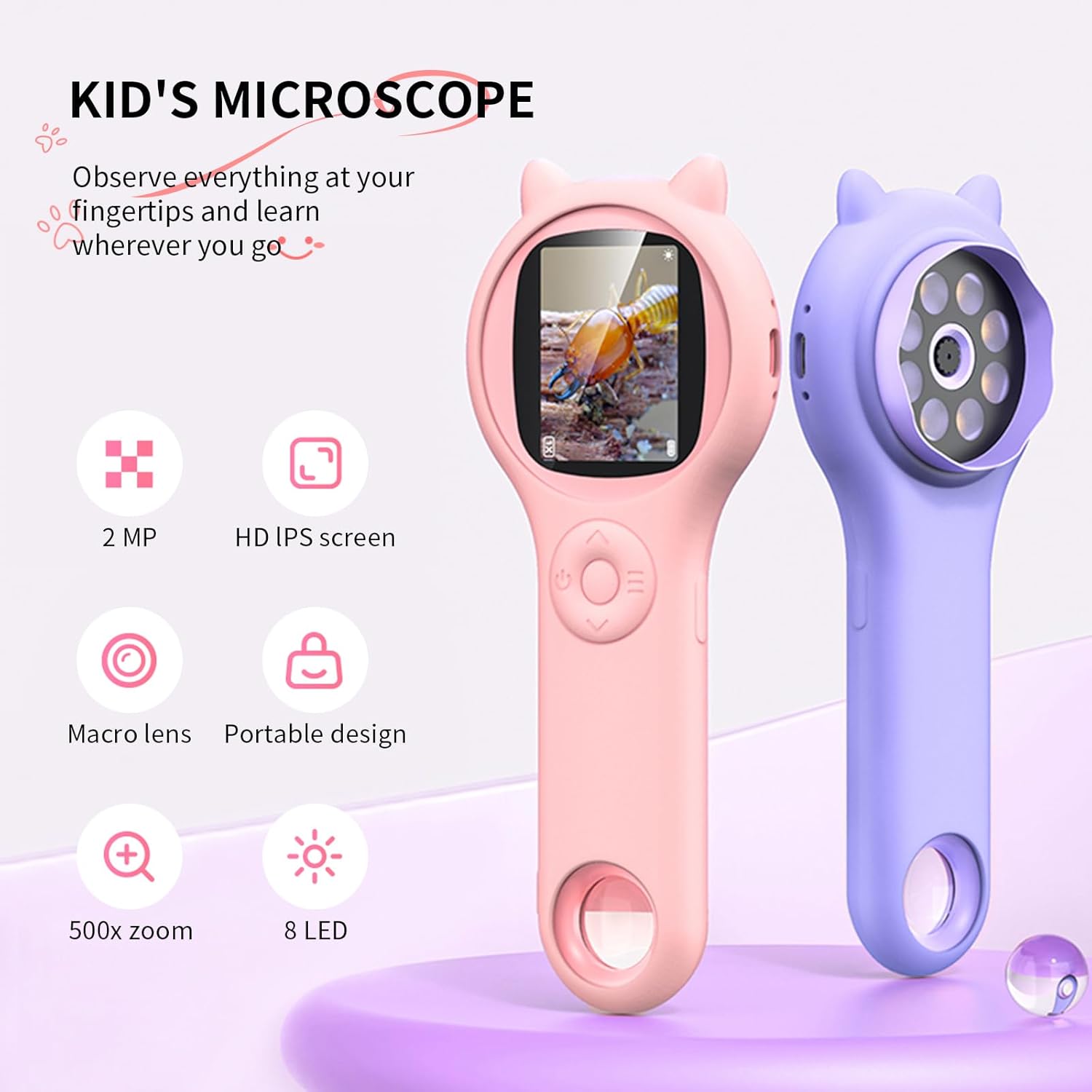
Image: Key features of the Ashfly Mini Pocket Handheld Microscope, including its screen, lens, and lighting.
5. Nastavení
5.1 Nabíjení zařízení
Before first use, fully charge the microscope. Connect the provided USB charging cable to the device's USB port and plug the other end into a compatible USB power adapter or computer. The charging indicator light will show the charging status. A full charge provides approximately 2 hours of continuous use.
5.2 Inserting a Memory Card (Optional)
The microscope has built-in storage for up to 200 photos. For extended storage of photos and videos, insert a MicroSD card (up to 64GB, not included) into the designated slot. Ensure the card is inserted correctly until it clicks into place.
5.3 Připevnění šňůrky
Attach the provided hanging rope/lanyard to the designated loop on the microscope. This helps prevent accidental drops and makes the device easier to carry during outdoor activities.
6. Návod k obsluze
6.1 Zapnutí/vypnutí
- Pro zapnutí stiskněte a podržte tlačítko napájení, dokud se obrazovka nerozsvítí.
- Chcete-li zařízení vypnout, znovu stiskněte a podržte tlačítko napájení, dokud se obrazovka nevypne.
6.2 Using the Digital Microscope
- Point the digital lens (the end with LED lights) directly at the object you wish to observe.
- The microscope features autofocus, providing clear images automatically.
- Use the zoom buttons (+/-) to adjust the digital magnification up to 4x.
- Adjust the brightness of the 8 LED lights using the dedicated light button to enhance visibility.

Image: A child observing a plant with the microscope, demonstrating its ease of use for young explorers.
6.3 Using the Physical Magnifying Glass
For quick, lower-magnification viewing, use the physical magnifying glass located on the opposite end of the digital lens. Simply hold it over the object to magnify.
6.4 Pořizování fotografií a videí
- While observing, press the Capture button to take a photo.
- To record a video, press and hold the Capture button. Press again to stop recording.
- Captured media is saved to the internal memory or the inserted MicroSD card.
6.5 Viewing Saved Media
Navigate to the Album or Gallery section on the device's menu to view uložené fotografie a videa.
6.6 Connecting to a PC/Laptop
Connect the microscope to a PC or laptop using the USB cable for real-time observation on a larger screen or to transfer captured media. Supported systems include Windows XP, Vista/7/8/10/11, and Mac OS x 11.0 or higher.

Image: The microscope connected to a laptop, enabling real-time display and transfer of observations.
Video: Official Ashfly demonstration of the Kid's Hand-Held Microscope in use, showcasing its display and functionality.
7. Údržba
- Čištění: Otřete zařízení měkkým, damp tkanina. Vyhněte se používání agresivních chemikálií nebo abrazivních materiálů.
- Skladování: Store the microscope in a cool, dry place away from direct sunlight when not in use.
8. Řešení problémů
- Zařízení se nezapne: Ujistěte se, že je zařízení plně nabité.
- Problémy s nabíjením: Check that the USB cable is securely connected to both the device and the power source. Ensure the silicone cover is not obstructing the charging port.
- Nejasný obraz: Ensure the digital lens is very close to the object. Adjust the zoom and LED lights for optimal clarity.
- Nelze ukládat fotografie/videa: Check if a MicroSD card is inserted correctly and has sufficient storage space.
9. Specifikace
| Funkce | Detail |
|---|---|
| Číslo modelu | 355 |
| Rozměry produktu | 7 x 2 x 3 palce |
| Hmotnost položky | 0.035 unce (1 gramů) |
| Obrazovka displeje | 2palcový IPS HD displej |
| Zvětšení | Up to 200x (optical), 500x with 4x digital zoom |
| Rozlišení fotoaparátu | 1080P |
| Typ světelného zdroje | 8 LED světel |
| Baterie | 1 lithium-iontová baterie (součástí balení) |
| Životnost baterie | Až 2 hodin na jedno nabití |
| Skladování | Built-in for 200 photos, supports up to 64GB MicroSD card |
| Konektivita | USB to PC/Laptop |
| Materiál | Plast |
10. Záruka a podpora
For warranty information or technical support, please contact Ashfly customer service through the retailer where the product was purchased or visit the official Ashfly webmísto.


