1. Úvod
The ATuMan LS6 is a versatile 3-in-1 laser distance meter designed for high-precision measurements. It combines distance measurement, laser projection, and angle detection, making it suitable for a wide range of applications from home DIY projects to professional construction and interior design. This manual provides detailed instructions on how to set up, operate, and maintain your device to ensure optimal performance and longevity.

Image 1.1: The ATuMan LS6 Laser Distance Meter, showcasinjeho kompaktní design a integrovaný displej.
2. Obsah balení
Please verify that all items are present in the package before use:
- Laser Distance Meter (LS6) x1
- Charging Cable (USB Type-C) x1
- Šňůrka na krk x1
- Uživatelská příručka x1

Image 2.1: Contents of the ATuMan LS6 package, including the device, charging cable, and lanyard.
3. Bezpečnostní informace
The ATuMan LS6 uses a Class 1 laser. While generally safe, please observe the following precautions:
- Nedívejte se přímo do laserového paprsku.
- Nemiřte laserovým paprskem na lidi nebo zvířata.
- Udržujte zařízení mimo dosah dětí.
- Nepokoušejte se zařízení rozebírat nebo upravovat.
- Používejte zařízení pouze k účelu, ke kterému je určeno, jak je popsáno v tomto návodu.
- Nevystavujte zařízení extrémním teplotám, vlhkosti nebo přímému slunečnímu záření.
4. Konec produktuview
The ATuMan LS6 features a durable aluminum body and a clear TFT color display. Its intuitive user interface allows for effortless one-handed operation.
4.1 klíčové komponenty
- Laserový vysílač/přijímač: Located at the top of the device for sending and receiving laser signals.
- Barevný TFT displej: High-definition screen for displaying measurements, modes, and settings.
- Ovládací tlačítka: For power, measurement activation, mode selection, and settings adjustment.
- Port USB Type-C: Pro nabíjení interní baterie.

Obrázek 4.1: Detail view of the ATuMan LS6 laser emitter, highlighting its precision.

Image 4.2: The TFT color display of the LS6, showing clear and easy-to-read data with an intuitive user interface.
5. Nastavení
5.1 Nabíjení zařízení
The ATuMan LS6 is equipped with a 300mAh rechargeable battery. Before first use, or when the battery indicator shows low power, charge the device using the provided USB Type-C cable.
- Připojte kabel USB typu C k nabíjecímu portu na zařízení.
- Druhý konec kabelu připojte ke standardnímu napájecímu adaptéru USB (není součástí balení) nebo k portu USB počítače.
- Indikátor baterie na displeji bude zobrazovat stav nabíjení.
- Po úplném nabití odpojte kabel.

Image 5.1: The ATuMan LS6 connected to a USB Type-C charger, illustrating its long battery life feature.
5.2 Zapnutí/vypnutí
- Zapnutí: Press and hold the main control button (center button) for a few seconds until the display lights up.
- Vypnutí: Press and hold the main control button again for a few seconds. The device also features an auto-off function after 180 seconds of inactivity to conserve battery.
6. Provoz
The ATuMan LS6 offers 19 measurement functions. Familiarize yourself with the control buttons and display icons for efficient use.
6.1 Základní měření (vzdálenost)
- Ujistěte se, že je zařízení zapnuté.
- Namiřte laserový zářič na cílový povrch.
- Press the main control button once to activate the laser beam.
- Press the main control button a second time to take the measurement. The distance will be displayed on the screen.
6.2 Režimy měření
The device supports various measurement modes. Use the side button(s) to cycle through the available modes. The current mode will be indicated on the display.
- Průběžné měření: Provides real-time distance updates as you move the device.
- Měření plochy: Measure two sides (length and width) to automatically calculate the area.
- Měření objemu: Measure three sides (length, width, and height) to automatically calculate the volume.
- Pythagorean Measurement (Pythagoras-1 & Pythagoras-2): Used for indirect measurements where direct measurement is not possible. Follow the on-screen prompts to take the required measurements (e.g., hypotenuse and one leg).
- Měření úhlu: Utilizes the visual aligning beam for precise angle detection.
- Addition & Subtraction: Umožňuje přidávání nebo odečítání měření.
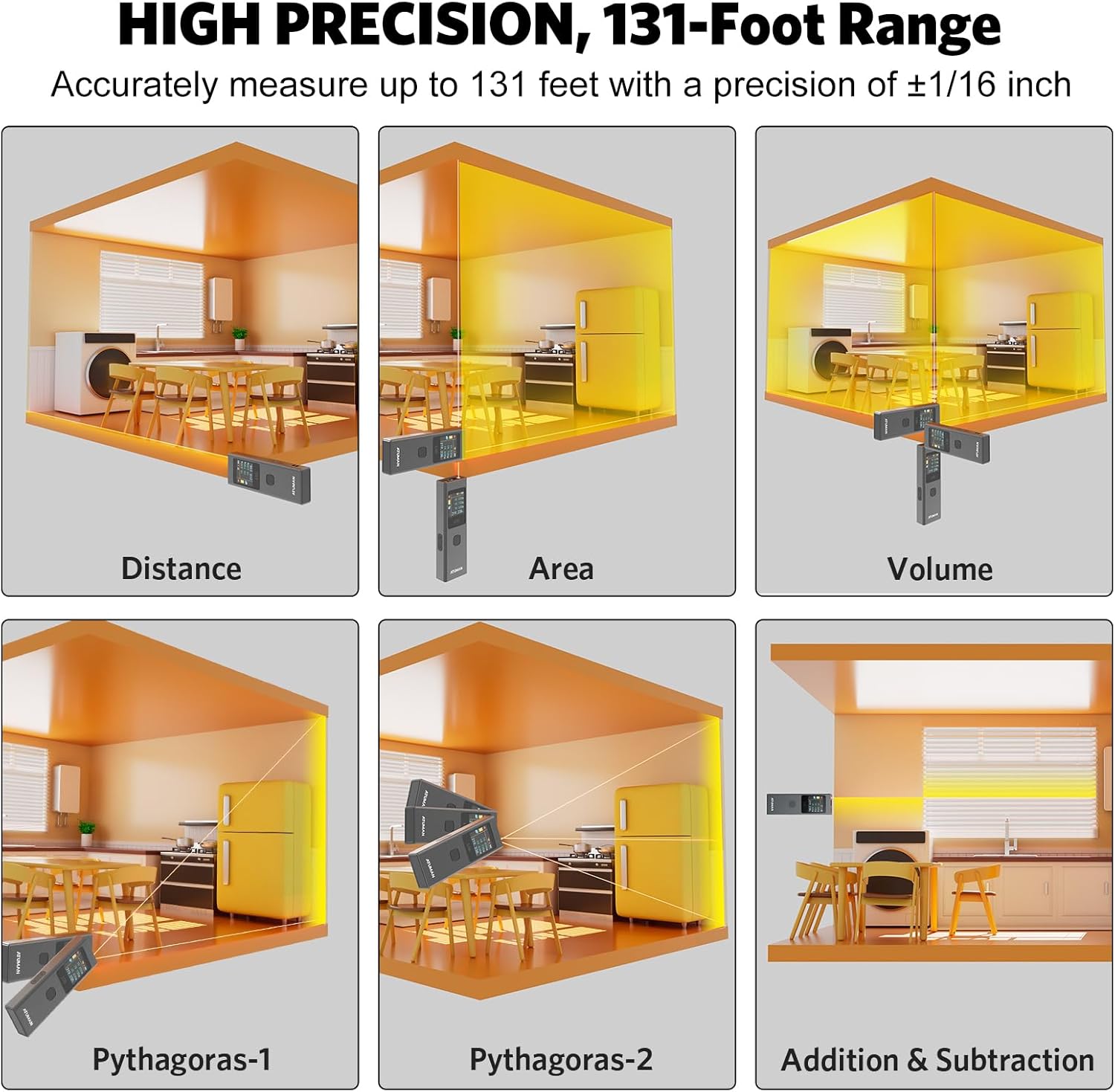
Image 6.1: Visual representation of various measurement modes including Distance, Area, Volume, and Pythagorean calculations.

Obrázek 6.2: Příkladamples of advanced measurement types, including various Pythagorean calculations and area/volume measurements in different settings.

Obrázek 6.3: Konecview of the 19+ built-in functions for versatile use, including linear, continuous, area, volume, and various Pythagorean modes.
6.3 Přepínání jednotek
The device supports switching between meters (M), inches (IN), and feet (FT). Refer to the user manual's specific instructions for unit switching, as it may involve multiple button presses.

Image 6.4: The ATuMan LS6 display showing measurements in meters, inches, and feet, demonstrating unit switching capability.
6.4 úložiště dat
The LS6 can store up to 20 sets of measurement data. This feature allows for efficient data management and review of past measurements.

Image 6.5: The ATuMan LS6 displaying multiple stored measurement data sets, indicating its 20-data set storage capacity.
7. Údržba
Proper care and maintenance will extend the life of your ATuMan LS6.
- Čištění: Use a soft, dry cloth to clean the device. Do not use abrasive cleaners or solvents. For the lens, use a lens cleaning cloth.
- Skladování: Zařízení skladujte na chladném a suchém místě mimo dosah přímého slunečního záření a extrémních teplot. Pokud jej skladujete delší dobu, ujistěte se, že je baterie částečně nabitá (kolem 50 %), a dobíjejte ji každé několik měsíců, abyste zabránili jejímu hlubokému vybití.
- Vyhněte se dopadu: I když je zařízení odolné, vyvarujte se pádu zařízení nebo jeho vystavení silným nárazům.
8. Řešení problémů
If you encounter issues with your ATuMan LS6, refer to the following common problems and solutions:
| Problém | Možná příčina | Řešení |
|---|---|---|
| Zařízení se nezapne. | Slabá baterie. | Nabijte zařízení pomocí kabelu USB typu C. |
| Display is difficult to read outdoors. | Vysoké okolní světlo. | The TFT color display may be less visible in direct bright sunlight. Try to shade the screen or use in less direct light. |
| Nepřesná měření. | Obstruction in laser path, unstable surface, or incorrect measurement mode. | Ensure a clear path for the laser. Measure from a stable surface. Verify you are in the correct measurement mode for the task. |
| Difficulty changing settings (e.g., units). | Unfamiliarity with button combinations. | Refer to the detailed instructions in the full printed user manual for specific button sequences for settings adjustments. Practice the button presses. |
| Laser dot not visible at long distances. | Environmental factors (bright light) or target surface. | In very bright conditions or on non-reflective surfaces, the laser dot may be hard to see. Consider using a target plate or measuring at closer distances if possible. For very long distances, a tripod may help stabilize the device. |
If the problem persists after trying these solutions, please contact ATuMan customer support.
9. Specifikace
Technical specifications for the ATuMan LS6 Laser Distance Meter:
| Funkce | Specifikace |
|---|---|
| Značka | ATuMan |
| Název modelu | LS6 Laser Distance Meter |
| Rozsah měření | Až 131 stop (40 metrů) |
| Přesnost | +/- 1/16 palce |
| Laserová třída | třída 1 |
| Laserový výstup | 0.081 mW |
| Typ laseru | 520nm ± 10nm |
| Typ baterie | Lithium (300mAh rechargeable) |
| Nabíjecí port | USB Type-C |
| Materiál | Hliník |
| Barva | Černý |
| Rozměry (D x Š x V) | 5.04 x 2.76 x 0.75 palce |
| Hmotnost | Přibližně 0.1 kilogramů |
| Ukládání dat | 20 datových sad |
| Automatické vypnutí | 180 sekund |
10. Záruka a podpora
10.1 Záruka výrobce
The ATuMan LS6 Laser Distance Meter comes with a 2-Year Manufacturer Warranty. This warranty covers defects in materials and workmanship under normal use. Please retain your proof of purchase for warranty claims.
10.2 Zákaznická podpora
For technical assistance, troubleshooting not covered in this manual, or warranty inquiries, please contact ATuMan customer support through their official channels or the retailer from whom you purchased the product.
You can visit the official ATuMan store on Amazon for more information and support: ATuMan Amazon Store


