Zavedení
This manual provides detailed instructions for the installation, operation, and maintenance of your Mount-It! Single Monitor Arm. Please read this manual thoroughly before installation and use to ensure proper function and safety.
The Mount-It! Single Monitor Arm is designed to provide an ergonomic and space-saving solution for mounting a single computer monitor to your desk. It features full motion adjustability, including tilt, swivel, and rotation, allowing you to position your monitor for optimal viewpohodlí.
Bezpečnostní informace
Dodržujte prosím následující bezpečnostní opatření:
- Ensure the desk surface is stable and strong enough to support the weight of the monitor arm and the monitor.
- Nepřekračujte maximální nosnost 9 kg (19.8 liber).
- Před použitím se ujistěte, že jsou všechny šrouby a šrouby bezpečně utaženy.
- Udržujte děti a domácí zvířata mimo dosah místa instalace.
- If any parts are missing or damaged, contact Mount-It! customer support immediately. Do not attempt to install with damaged parts.
Obsah balení
Ověřte, zda jsou všechny komponenty přítomny a v dobrém stavu:
- Sestava ramene monitoru
- Stůl Clamp (C-Clamp)
- Základna průchodky
- Deska VESA
- Sada hardwaru (šrouby, podložky, imbusové klíče)
- Klipy pro správu kabelů

Image: All components of the Mount-It! Single Monitor Arm, including the arm, desk clamp, grommet base, and VESA plate.

Image: A visual representation of the various parts included with the monitor mount, such as the arm, pole, VESA plate, and mounting hardware.
Nastavení a instalace
The Mount-It! Single Monitor Arm offers two installation options: C-Clamp and Grommet Mount.

Obrázek: Ilustrace znázorňující C-Clamp and Grommet mounting options for the monitor arm, with dimensions for desk thickness compatibility.
1. Vyberte si způsob montáže
C-Clamp Instalace:
- Připojte C-clamp ke spodní části tyče.
- Umístěte C-clamp na okraji vašeho stolu.
- Utáhněte třamp šroubujte, dokud nebude držák bezpečně upevněn ke stolu. Ujistěte se, že je stabilní a nekýve se.
Montáž průchodky:
- Pokud má váš stůl otvor pro průchodku, vložte základnu průchodky otvorem.
- Secure the grommet base from underneath the desk using the provided plate and nut.
- Attach the pole to the grommet base and tighten securely.
2. Attach the Monitor Arm to the Pole
Slide the monitor arm assembly onto the pole. Adjust the height as desired and secure it with the provided collar and screw.
3. Připevněte desku VESA k monitoru
The monitor arm supports VESA patterns of 75x75mm and 100x100mm.

Image: Diagram illustrating VESA compatibility (75x75mm, 100x100mm) and the maximum weight capacity of 19.8 lbs for the monitor arm.
- Carefully remove the VESA plate from the monitor arm by loosening the top screw.
- Zarovnejte desku VESA s montážními otvory na zadní straně monitoru.
- Secure the VESA plate to the monitor using the appropriate screws from the hardware kit. Ensure they are tightened firmly but do not overtighten.
4. Připevněte monitor k rameni
- With the VESA plate attached to your monitor, carefully slide the monitor onto the monitor arm's VESA head.
- Secure the monitor by tightening the screw on top of the VESA head.
5. Správa kabelů
Utilize the integrated cable management clips on the arm to route your monitor cables neatly along the arm and down the pole, reducing clutter.
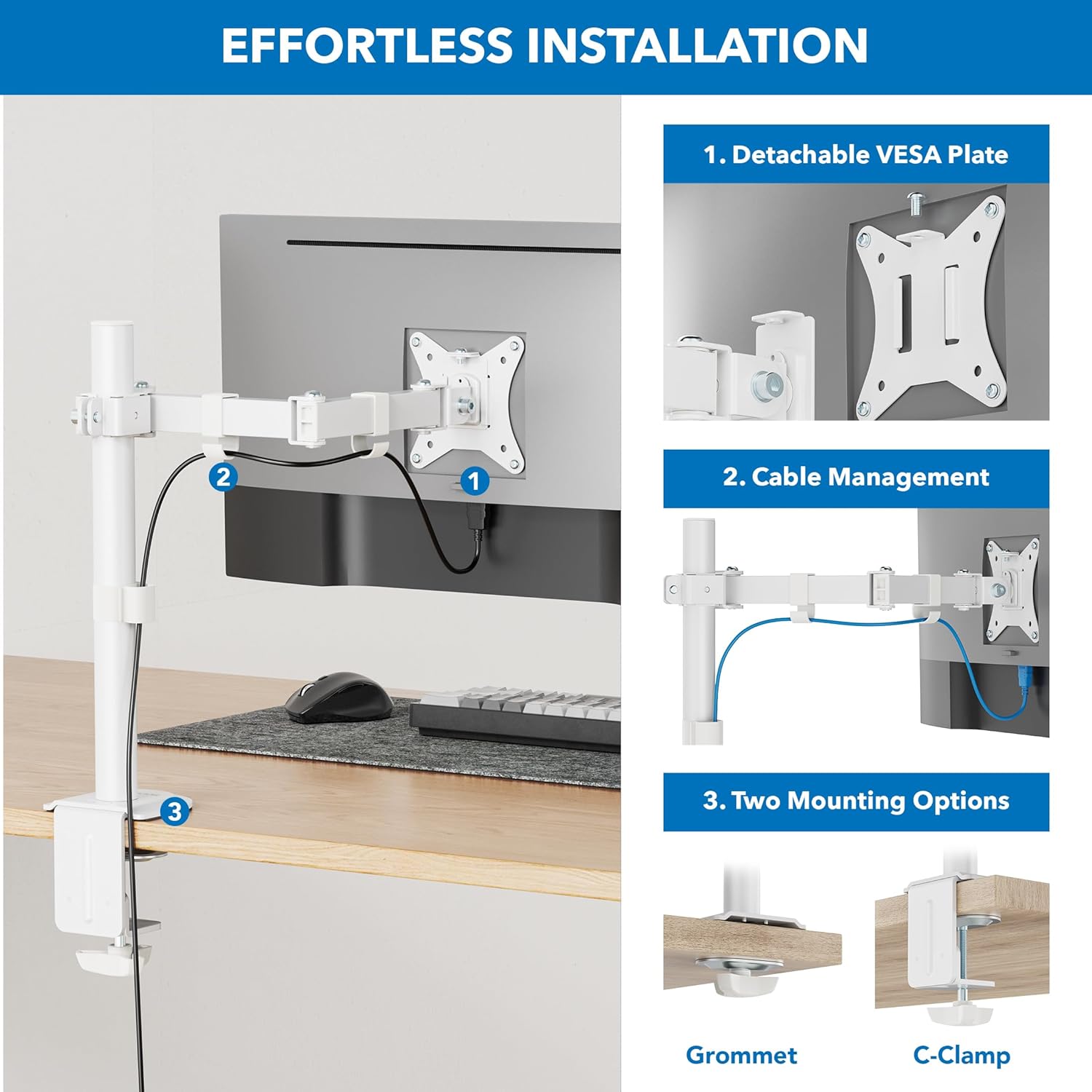
Image: Step-by-step illustration of the installation process, highlighting the detachable VESA plate, cable management, and two mounting options (Grommet and C-Clamp).
Provoz a seřízení
The Mount-It! Single Monitor Arm offers a range of adjustments for optimal viewpohodlí.
Nastavení výšky:
To adjust the monitor height, loosen the collar screw on the pole, slide the arm to the desired height, and re-tighten the screw firmly.

Image: Illustration showing how the monitor arm allows for height adjustment along the central pole, with a pole height of 16 inches indicated.

Image: A person sitting at a desk with a monitor mounted on the arm, demonstrating how to adjust the monitor to eye level for ergonomic comfort.
Nastavení sklonu:
The monitor can be tilted +/- 45 degrees. Loosen the tilt knob or screw behind the VESA plate, adjust the angle, and re-tighten.

Image: Diagram showing the monitor's tilt range of +/- 45 degrees and the 16-inch pole height, illustrating ergonomic comfort adjustments.
Nastavení otáčení:
The arm features multiple swivel points, allowing for +/- 90 degrees of rotation at each joint. This enables flexible positioning and screen sharing.

Image: Illustration of the monitor arm's full motion design, showing multiple swivel points with +/- 90-degree rotation for easy screen sharing and optimal positioning.

Image: A monitor mounted on the arm, demonstrating the tilt and swivel functionality to find the perfect screen position.
Rotation (Portrait/Landscape):
The VESA plate allows for 180-degree rotation, enabling quick switching between landscape and portrait orientations.
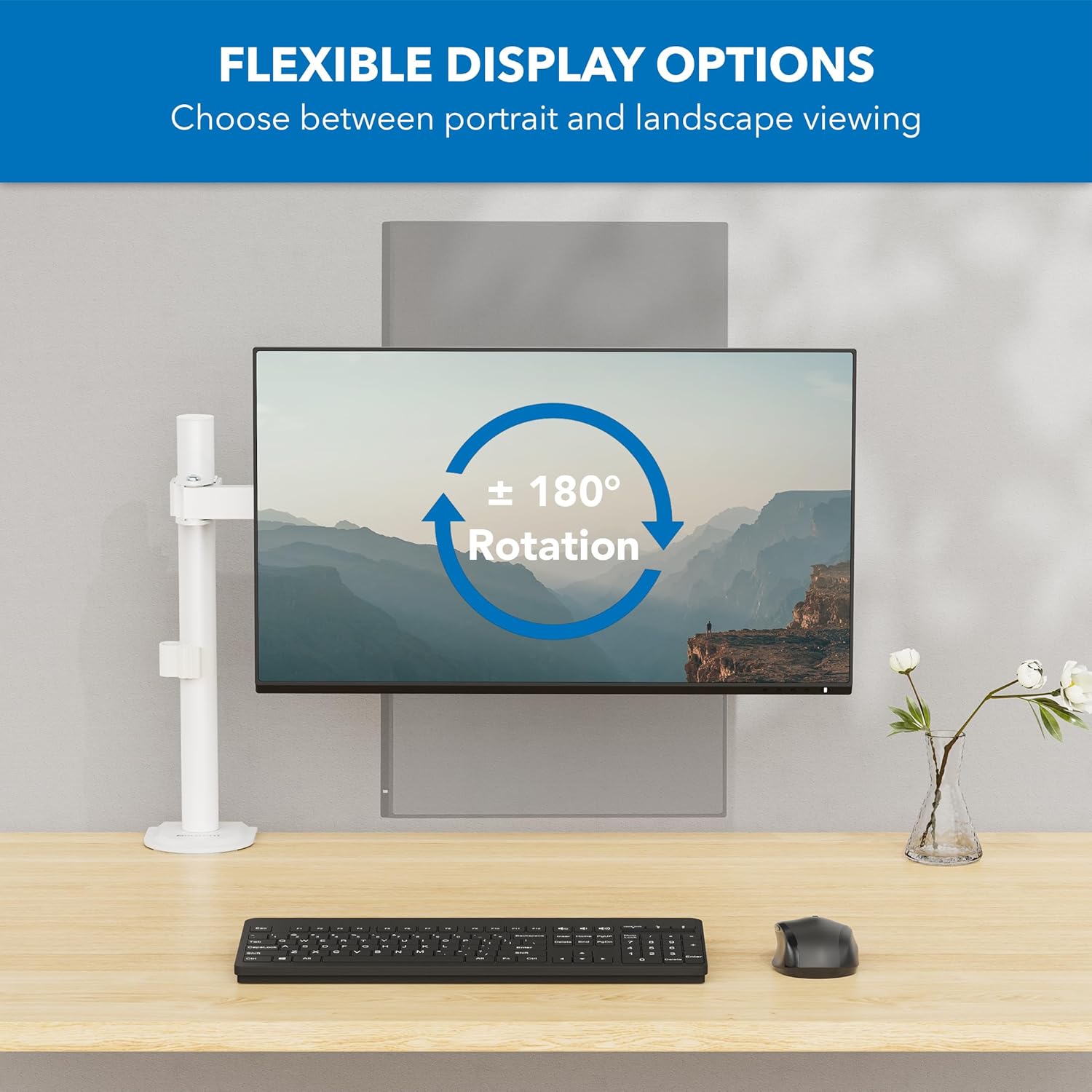
Image: Diagram showing the monitor's 180-degree rotation capability, allowing for flexible display options between portrait and landscape viewIng.

Image: Two monitors, one in landscape and one in portrait orientation, demonstrating the arm's ability to switch display orientation.
Údržba
Pravidelná údržba zajišťuje dlouhou životnost a bezpečný provoz ramene vašeho monitoru.
- Čištění: Otřete rameno monitoru měkkým hadříkemamp hadříkem. Nepoužívejte abrazivní čisticí prostředky ani rozpouštědla, která by mohla poškodit povrchovou úpravu.
- Kontrola těsnosti: Periodically check all screws and connections, especially the desk clamp/grommet mount and VESA plate screws, to ensure they remain tight. Re-tighten if necessary.
- Mazání: The joints are designed for smooth movement and typically do not require lubrication. If movement becomes stiff, consult customer support.
Odstraňování problémů
If you encounter issues with your Mount-It! Single Monitor Arm, refer to the following common solutions:
| Problém | Možná příčina | Řešení |
|---|---|---|
| Monitor arm is unstable or wobbles. | Psací stůl třamp/grommet mount is not tight enough. Monitor is too heavy. | Zajistěte stůl třamp/grommet mount is securely tightened. Verify monitor weight is within the 19.8 lbs (9 kg) limit. |
| Monitor se prohýbá nebo nedrží svou polohu. | Tilt or swivel screws are loose. Monitor is too heavy. | Tighten the tilt and swivel adjustment screws. Confirm monitor weight is within specifications. |
| Cables are messy. | Cable management not utilized. | Route cables through the integrated cable management clips on the arm and pole. |
| Monitor nepasuje na desku VESA. | Nesprávný vzor VESA. | Verify your monitor's VESA pattern is 75x75mm or 100x100mm. |
Specifikace
| Funkce | Detail |
|---|---|
| Číslo modelu | MI-4751WHT |
| Barva | Bílý |
| Materiál | Legovaná ocel |
| Typ montáže | Tabletop Mount (C-Clamp, Průchodka) |
| Kompatibilní velikost monitoru | 17 - 32 palce |
| Hmotnostní kapacita | Až 19.8 liber (9 kg) |
| Kompatibilita VESA | 75x75mm, 100x100mm |
| Úhel náklonu | +/- 45 stupňů |
| Úhel otočení | +/- 90 degrees (at each joint) |
| Otáčení | 180 degrees (Portrait/Landscape) |
| Výška sloupu | 16 palců |
| Hmotnost položky | 6.45 libry |
| UPC | 810041739841 |

Image: Detailed technical drawing showing the dimensions of the monitor arm, including pole height, arm lengths, and various angles of adjustment.
Záruka a podpora
Mount-It! products are designed for durability and performance. For warranty information, product support, or to purchase replacement parts, please visit the official Mount-It! webwebu nebo se přímo obraťte na jejich zákaznický servis.
Kontaktní údaje:
- Webmísto: www.mount-it.com
- Customer Service: Refer to the Mount-It! website for current contact methods (phone, email, chat).
Please have your model number (MI-4751WHT) and purchase date available when contacting support.


