Zavedení
The PeriPage P40 is a sleek, portable mini thermal printer designed for mobile and wireless printing. It utilizes Bluetooth connectivity and requires no ink, making it suitable for printing documents, photos, and even tattoo stencils directly from your Android or iOS device. This manual provides comprehensive instructions for setting up, operating, and maintaining your P40 printer.

Image: The PeriPage P40 Mini Thermal Printer, a compact white device.
Bezpečnostní informace
- Tiskárnu nerozebírejte, neopravujte ani neupravujte.
- Chraňte tiskárnu před vodou, vlhkostí a přímým slunečním zářením.
- Používejte pouze určený nabíjecí kabel a napájecí adaptér.
- Bezprostředně po tisku se nedotýkejte tiskové hlavy, protože může být horká.
- Store the printer and thermal paper in a cool, dry place.
- Uchovávejte mimo dosah dětí.
Obsah balení
Po vybalení zkontrolujte obsah balení:
- PeriPage P40 Mini Thermal Printer
- Thermal Paper Roll (Included Components: Paper)
- Nabíjecí kabel USB typu C.
- Uživatelská příručka (tento dokument)
Konec produktuview
Familiarize yourself with the various parts of your PeriPage P40 printer.

Obrázek: Podrobný view of the PeriPage P40 printer showing the Power Button with Indicator Light, Cover-open Button, Type-C Interface for charging/connection, and the internal mechanism for easy paper replacement.
- Power Button / Indicator Light: Used to turn the printer on/off and indicates status.
- Cover-open Button: Releases the top cover for paper loading.
- Rozhraní typu C: For charging the printer and connecting to a computer (if applicable, though primarily Bluetooth).
- Výstupní otvor pro papír: Where printed paper emerges.
- Přihrádka na papír: Holds the thermal paper.
Nastavení
1. Nabíjení tiskárny
Before first use, fully charge the printer. Connect the provided USB Type-C cable to the printer's Type-C interface and the other end to a USB power adapter (not included) or a computer's USB port. The indicator light will show charging status (e.g., red while charging, green when fully charged).
The printer features a 2600mAh battery, offering approximately 3 hours of continuous printing or up to 90 days of standby time on a full charge, capable of printing around 360 papers.
Image: Information graphic detailing the PeriPage P40's battery performance: 90 days standby, 2600mAh battery, 3 hours continuous print, and 360 papers print per full charge.
2. Installing Thermal Paper
The PeriPage P40 supports two types of thermal paper: folding paper and inner roll paper.

Image: Illustration showing the two supported paper types for the PeriPage P40: Folding Paper for automatic paging and multiple paper printing, and Inner Roll Paper for portability, free space, and customized paper length.
- Press the Cover-open Button to open the printer's top cover.
- Insert the thermal paper into the paper compartment, ensuring the printing side faces the print head. For roll paper, ensure it unwinds from the bottom. For folding paper, align it correctly.
- Pull a small amount of paper out of the paper exit slot.
- Pevně zavřete horní kryt, dokud nezacvakne na místo.
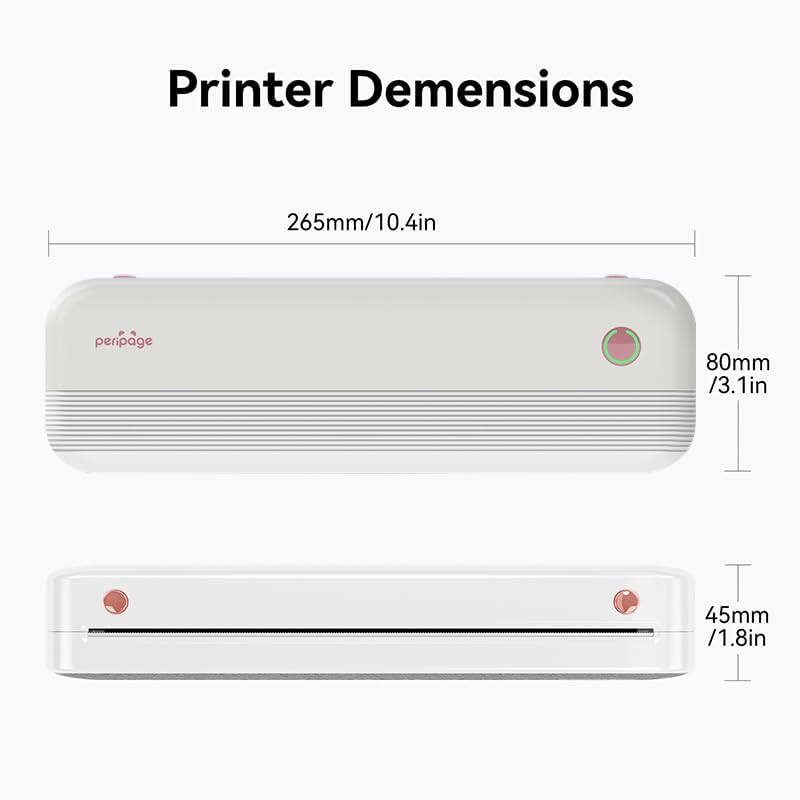
Image: The PeriPage P40 printer actively printing a document, with paper emerging from the front slot.
3. Stažení aplikace a připojení Bluetooth
The PeriPage P40 printer operates via the dedicated "PeriPage" mobile application.
- Hledat "PeriPage" in your device's APP store (Google Play Store for Android, Apple App Store for iOS) and download the official application. Alternatively, scan the QR code provided in the physical instruction manual to download the app.
- Ensure your printer is turned on and fully charged.
- Povolte na svém mobilním zařízení Bluetooth.
- Open the "PeriPage" app. The app will guide you through connecting to your printer via Bluetooth. Select "P40" from the list of available devices.
- Once connected, the indicator light on the printer may change color or status to confirm the connection.
Návod k obsluze
Zapnutí/vypnutí
- Zapnout: Stiskněte a podržte tlačítko napájení, dokud se nerozsvítí kontrolka.
- Vypnout: Stiskněte a podržte tlačítko napájení, dokud kontrolka nezhasne.
Printing from the App
Once your printer is connected to the PeriPage app:
- Open the PeriPage app on your smartphone.
- Vyberte typ obsahu, který chcete vytisknout (např. dokument, fotografii, web page, note).
- Adjust print settings such as density, size, and orientation within the app as needed.
- Confirm your selection and tap the print icon. The printer will begin printing.
Údržba
- Čištění tiskové hlavy: If print quality degrades, gently wipe the print head with a cotton swab lightly dampošetřeno isopropylalkoholem. Před čištěním se ujistěte, že je tiskárna vypnutá a vychladlá. Před použitím ji nechte zcela vyschnout.
- Čištění exteriéru: Use a soft, dry cloth to wipe the printer's exterior. Do not use abrasive cleaners or solvents.
- Skladování: When not in use for extended periods, turn off the printer and store it in a cool, dry place away from direct sunlight and extreme temperatures. Remove any paper if storing for very long durations to prevent dust accumulation.
Odstraňování problémů
| Problém | Možná příčina | Řešení |
|---|---|---|
| Tiskárna se nezapne. | Slabá baterie nebo žádný proud. | Connect the printer to a power source and charge it fully. |
| Nelze se připojit přes Bluetooth. | Bluetooth is off on device; printer not in pairing mode; app issue. | Ensure Bluetooth is enabled on your phone. Restart the printer and the app. Try pairing again within the PeriPage app. |
| Poor print quality / Blank prints. | Incorrect paper loading; low battery; dirty print head; non-thermal paper. | Ensure thermal paper is loaded correctly with the print side facing up. Charge the printer. Clean the print head. Use only thermal paper. |
| Zaseknutý papír. | Improper paper loading; foreign object. | Turn off the printer. Open the cover and carefully remove any jammed paper. Ensure paper is loaded straight. |
Specifikace

Image: Diagram illustrating the dimensions of the PeriPage P40 printer: 265mm/10.4in (length), 80mm/3.1in (width), and 45mm/1.8in (height).
| Funkce | Detail |
|---|---|
| Název modelu | PeriPage-P40 |
| Technologie tisku | Tepelný |
| Technologie připojení | Bluetooth |
| Kompatibilní zařízení | Chytré telefony (Android, iOS) |
| Rezoluce | 300 x 300 dpi (Max Black and White Print Resolution, Max Color Print Resolution) |
| Maximální velikost média | 210mm (8.26"x11.69" Sheet Size) |
| Tisková média | Thermal Paper (Folding Paper, Inner Roll Paper) |
| Maximální vstupní kapacita listu | 10 |
| Tiskový výstup | Monochromatický |
| Baterie | 2600mAh (approx. 3 hours continuous print, 90 days standby) |
| Rozměry produktu | 2.5 cm H x 11 cm Š x 4.1 cm V (přibližně 265 mm x 80 mm x 45 mm) |
| Hmotnost položky | 2.18 libry |
| Barva | Bílý |
Záruka a podpora
For warranty information and technical support, please refer to the warranty card included with your product or visit the official PeriPage webUschovejte si účtenku jako doklad o koupi pro případ reklamace.
For further assistance, you may contact PeriPage customer service through the contact information provided on their official website or within the PeriPage mobile application.


