Zavedení
This manual provides comprehensive instructions for the TTfone TT660 Flip Mobile Phone. The TT660 is designed for ease of use, featuring a convenient flip design for call management, large buttons, talking keys, and a clear 2.8-inch screen. It includes essential features such as an emergency assistance button and long battery life, making it suitable for users seeking a straightforward and reliable mobile communication device.
Co je v krabici
Upon opening your TTfone TT660 package, you should find the following items:
- Mobilní telefon
- Baterie
- Kabel USB typu C
- Uživatelská příručka (tento dokument)
Optional accessories such as a Mains Charger and Dock Charger may be included depending on your purchase variant.
Průvodce nastavením
1. Instalace baterie a SIM karty
To begin, remove the back cover of the phone. Insert the provided battery into its compartment, ensuring the contacts align correctly. If you are using a SIM card, carefully slide it into the designated SIM card slot. The TT660 supports 2G networks from most major carriers, excluding Three and Smarty.

Image: The TTfone TT660 flip phone in its open position, displaying the main screen with various application icons and the large, easy-to-read keypad below.
2. Powering On Your Phone
Once the battery and SIM card (if applicable) are installed, replace the back cover. To power on the phone, press and hold the red power button located on the keypad until the screen illuminates and the TTfone logo appears. The phone will boot up and display the current time and date.
3. Initial Navigation
The TT660 features a user-friendly interface. Use the navigation keys (up, down, left, right) to scroll through menu options. Press the OK button to select an option or confirm an action. The Zadní button allows you to return to the previous screen.
For a visual guide on unboxing and initial setup, please refer to the official unboxing video below:
Video: Official TTfone TT660 Unboxing Video, demonstrating the contents of the box and initial phone setup.
Návod k obsluze
Uskutečňování a přijímání hovorů
To make a call, simply open the flip phone, dial the number using the large keypad, and press the green call button. To answer an incoming call, open the flip phone. To end a call, close the flip phone or press the red end call button.

Image: The TTfone TT660 with its large, clear display showing dialed numbers, emphasizing its readability.
Speed Dial (M1, M2, M3 Buttons)
The TT660 features three dedicated memory buttons (M1, M2, M3) for speed dial. These buttons can be programmed to quickly dial frequently contacted friends or family members with a single press. Refer to the phone's settings menu to assign contacts to these memory buttons.
Další praktické funkce
- Pochodeň: The phone includes a built-in torch for illumination in low-light conditions.
- Funkce alarmu: Set alarms for reminders or wake-up calls through the phone's menu.
- Exterior Indicator Lights: Convenient lights on the exterior of the phone notify you of missed calls, unread messages, or low battery status without needing to open the phone.
Emergency Assistance Features
Tlačítko SOS
The TTfone TT660 is equipped with a dedicated SOS button on the rear of the device. In an emergency, pressing and holding this button will activate a sequence of actions:
- The phone will automatically call pre-programmed emergency contacts.
- It will also send text messages to up to five designated family members or friends, informing them of your situation and need for assistance.
Ensure your emergency contacts are correctly set up in the phone's settings for this feature to function effectively.
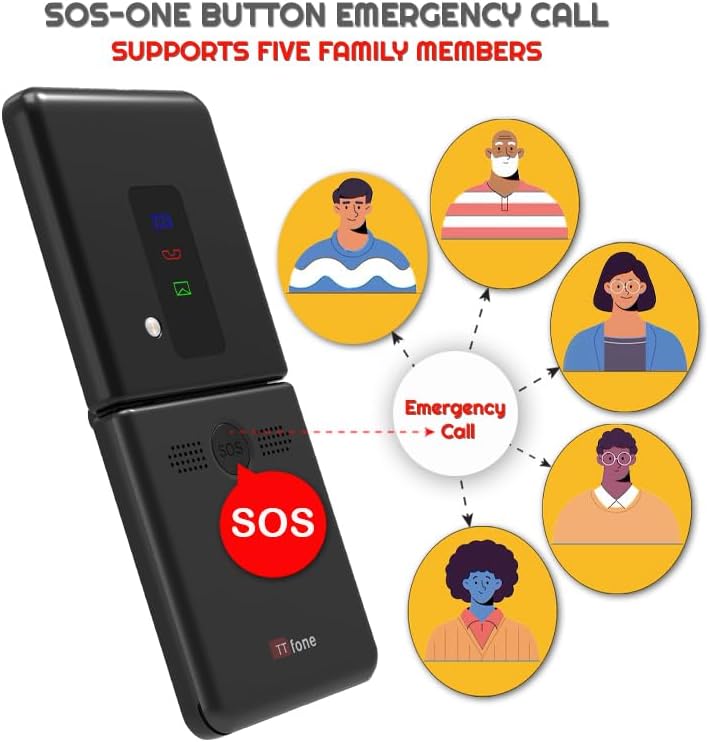
Image: A visual representation of the SOS button on the phone's back, illustrating its function to connect with up to five pre-set emergency contacts.
Nabíjení telefonu
The TTfone TT660 comes with a USB Type-C cable for charging. Connect the USB-C end to the phone's charging port and the other end to a compatible USB power adapter (not always included) or a computer's USB port. The phone's impressive battery life allows for extended use without frequent charging.

Image: The TTfone TT660 screen showing a 100% battery charge, alongside a graphic of a full battery, indicating long battery life.
Optional Charging Dock
For added convenience, an optional charging dock is available. Simply place the TT660 into the dock, and it will automatically begin charging. The phone can be charged in the dock whether it is open or closed.

Image: The TTfone TT660 flip phone resting securely in its dedicated charging dock.
Specifikace
| Funkce | Detail |
|---|---|
| Název modelu | TT660 |
| Značka | TTfone |
| Velikost obrazovky | 2.4 Inches (internal) / 3 Inches (visible diagonal) |
| Rezoluce | 320 x 240 |
| Buněčná technologie | 2G (Note: Will not work on 3G only networks like Three, Smarty, and ID Mobile) |
| Bezdrátový nosič | Odemčeno pro všechny přepravce |
| Velikost nainstalované paměti RAM | 32 MB |
| Baterie | 1 lithium-iontová baterie (součástí balení) |
| Rozměry balení | 16.4 x 12.5 x 2.9 cm; 220 g |
| Výrobce | TTfone |
| Země původu | Čína |
Odstraňování problémů
If you encounter any issues with your TTfone TT660, please consider the following common solutions:
- Telefon se nezapíná: Ensure the battery is correctly inserted and fully charged. Connect the phone to the charger and try again.
- Žádný síťový signál: Verify that your SIM card is properly inserted. Check with your network provider to ensure 2G service is available in your area and your account is active. Remember, this phone does not support 3G-only networks.
- Tlačítka nereagují: Power off the phone, remove the battery, wait a few seconds, then reinsert the battery and power on the phone.
- Problémy s nabíjením: Ensure the USB-C cable is securely connected to both the phone and the power source. If using the charging dock, ensure the phone is seated correctly.
If problems persist after attempting these steps, please contact TTfone customer support for further assistance.
Záruka a podpora
The TTfone TT660 comes with a manufacturer's warranty. For specific warranty details and to register your product, please refer to the warranty information included in your packaging or visit the official TTfone website. Keeping your purchase receipt is recommended for warranty claims.
For additional support, FAQs, or to purchase accessories, please visit the TTfone Store on Amazon or contact TTfone customer service directly.


