1. Úvod
Thank you for choosing the Machenike G6 Pro Wireless Gaming Controller. This manual provides detailed instructions on how to set up, operate, and maintain your controller to ensure optimal performance and longevity. Please read this manual thoroughly before using the product.
2. Obsah balení
- Machenike G6 Pro Wireless Gaming Controller
- USB nabíjecí kabel
- Wireless Receiver (if applicable)
- Uživatelská příručka
3. Konec produktuview

Přední view of the Machenike G6 Pro Wireless Gaming Controller, showcasing its ergonomic design, dual analog sticks, D-pad, action buttons (A, B, X, Y), shoulder buttons, and central function buttons.
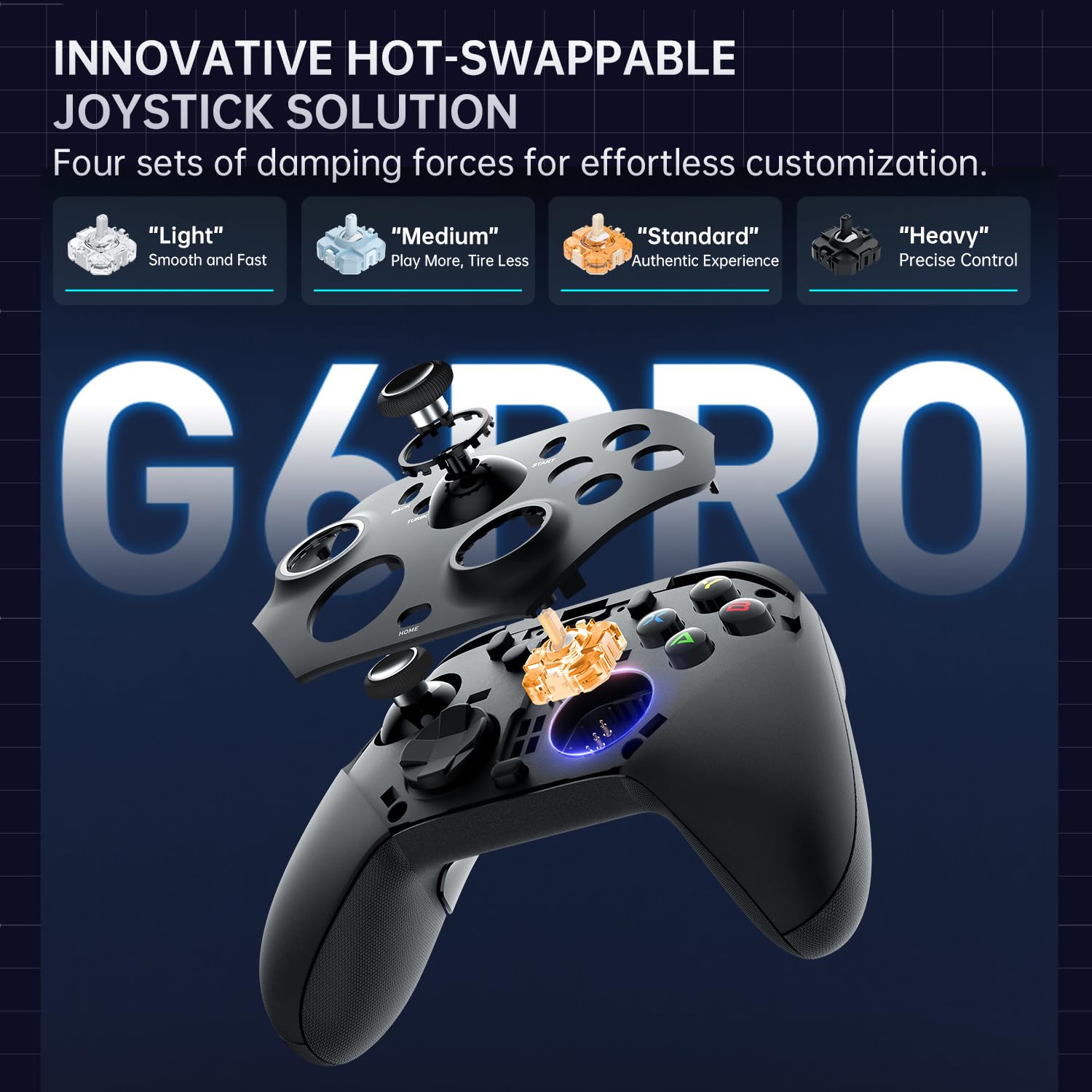
Diagram illustrating the innovative hot-swappable joystick solution of the G6 Pro controller, with four sets of damping forces: Light, Medium, Standard, and Heavy, allowing for customized control feel.
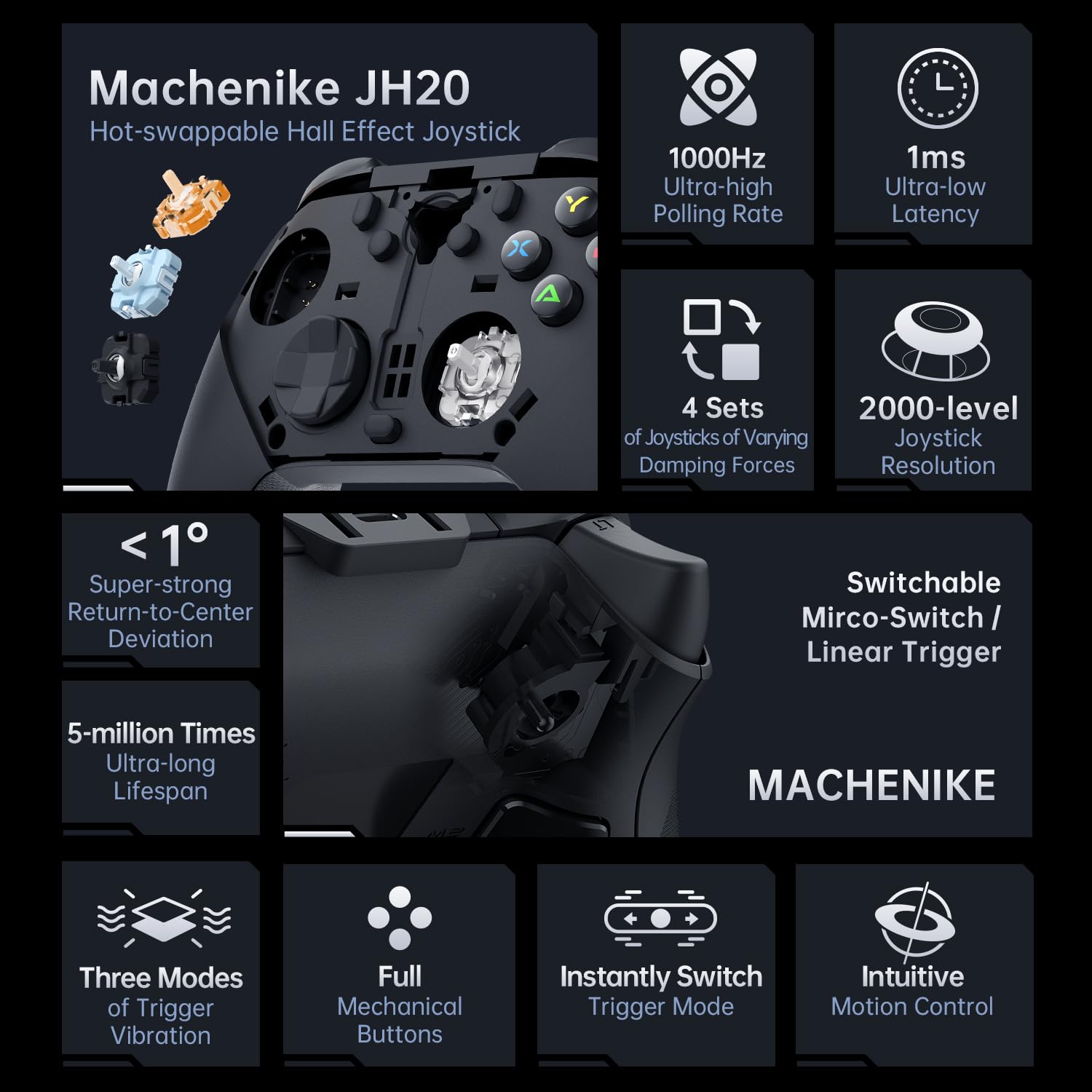
Detailed breakdown of the Machenike JH20 Hot-swappable Hall Effect Joystick features, including 1000Hz ultra-high polling rate, 1ms ultra-low latency, 4 sets of varying damping forces, 2000-level joystick resolution, super-strong return-to-center deviation, 5-million times ultra-long lifespan, switchable micro-switch/linear trigger, three modes of trigger vibration, full mechanical buttons, instant trigger mode switch, and intuitive motion control.

Detailní záběr view of the JH20 Hot-swappable Hall Effect Joystick, highlighting its true 1000Hz polling rate, 2000 levels of joystick resolution, less than 1 degree return-to-center deviation, 500,000 times rotational lifespan, 90 +/- 1 degree centering offset, and 30 degree rotation angle.
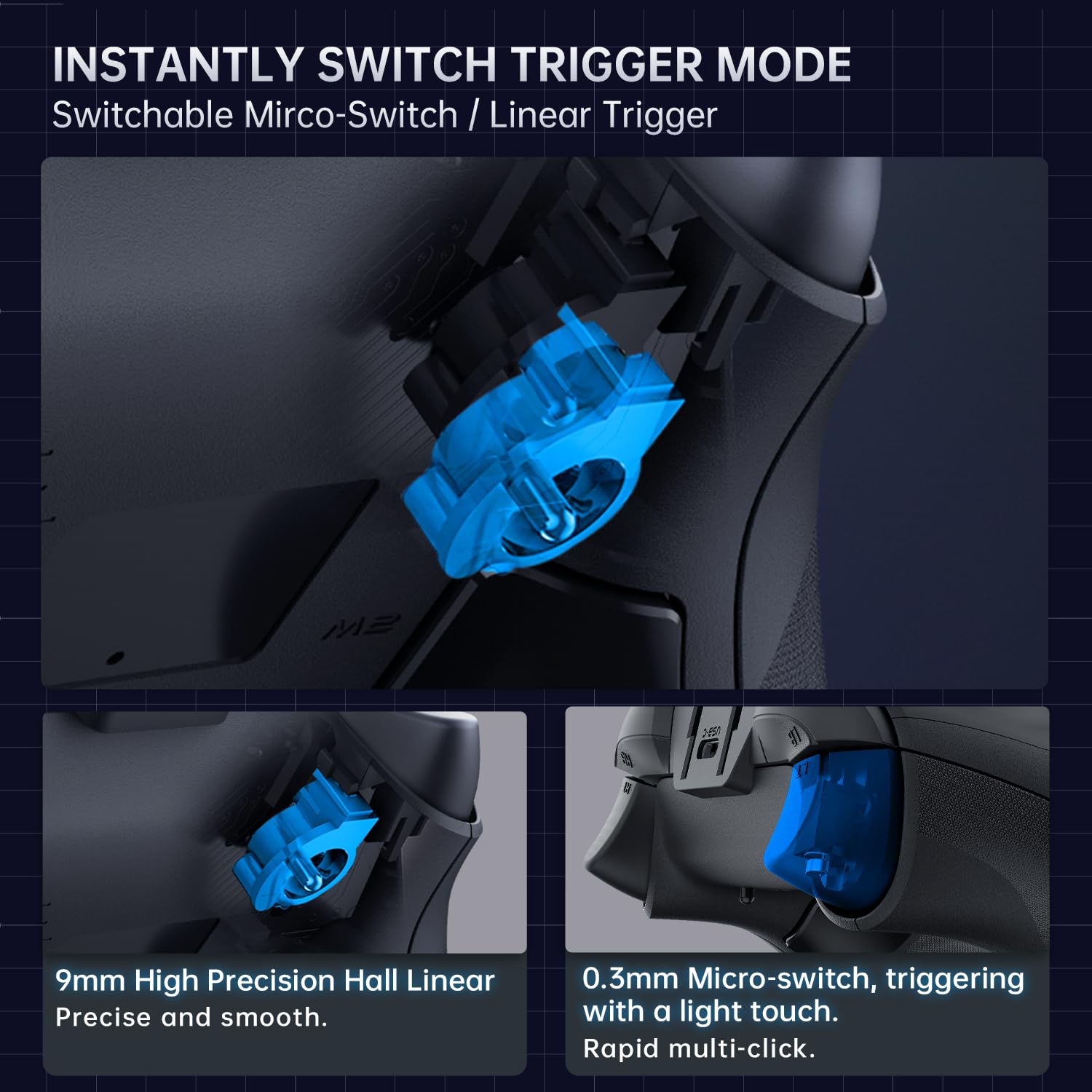
Illustration of the instantly switchable trigger mode, showing both 9mm high precision Hall Linear for precise and smooth input, and 0.3mm Micro-switch for rapid multi-click with a light touch.

Diagram explaining the immersive rumble triggers with high-frequency, multi-mode vibration, including Linear Response Mode, Game-native Trigger Rumble Mode, and Linked Rumble Mode, providing enhanced haptic feedback.
4. Nastavení
4.1 Nabíjení ovladače
Before first use, fully charge the controller using the provided USB cable. Connect the small end of the USB cable to the controller's charging port and the other end to a USB power source (e.g., computer USB port, USB wall adapter). The indicator light will show charging status and turn off when fully charged.
4.2 Připojení k vašemu zařízení
The Machenike G6 Pro supports multiple connection modes. Refer to the specific instructions below for your desired platform:
- Bezdrátové připojení (2.4 GHz): Insert the wireless receiver into an available USB port on your PC or compatible device. Press and hold the pairing button on the controller until the indicator light flashes rapidly. The controller will automatically connect to the receiver.
- Kabelové připojení: Connect the controller directly to your PC or device using the USB cable. The controller will be recognized automatically.
- Připojení Bluetooth: (If supported by your model) Put the controller into Bluetooth pairing mode (refer to specific button combination in quick start guide). On your device, search for Bluetooth devices and select "Machenike G6 Pro" to pair.
5. Návod k obsluze
5.1 Základní funkce tlačítek
Seznamte se s rozložením ovladače:
- Analogové páčky: Pro přesný pohyb a ovládání kamery.
- D-Pad: For directional input, typically in menus or for specific game actions.
- Akční tlačítka (A, B, X, Y): Pro akce ve hře.
- Ramenní tlačítka (LB, RB) a spouštěče (LT, RT): Pro různé herní funkce, jako je střelba, míření nebo navigace v menu.
- ZADNÍ/VIEW Tlačítko: Typically for accessing in-game maps or menus.
- Tlačítko START/MENU: Typically for pausing games or accessing main menus.
- Tlačítko Domů: For accessing the system dashboard or main menu.
- Tlačítko TURBO: Activates rapid fire for selected buttons.
- Tlačítko FN: Function button for advanced settings or mode switching.
5.2 Customizing Joysticks and Triggers
The G6 Pro features hot-swappable joysticks and switchable triggers for personalized control:
- Joystick Damping: The controller comes with four sets of damping forces (Light, Medium, Standard, Heavy). To change, carefully remove the existing joystick module and insert the desired one. Ensure it clicks into place.
- Režim spouštění: Switch between Hall Linear (9mm precision) and Micro-switch (0.3mm rapid click) trigger modes. Use the dedicated switch or combination of buttons as indicated in the quick start guide to toggle between modes.
5.3 Rumble Triggers
Experience enhanced immersion with multi-mode rumble triggers. The controller supports Linear Response, Game-native, and Linked Rumble modes, providing varied haptic feedback based on game events.
6. Údržba
To ensure the longevity of your Machenike G6 Pro controller, follow these maintenance guidelines:
- Čištění: K otření ovladače použijte měkký, suchý hadřík. V případě odolné nečistoty lehceamphadřík vodou. Nepoužívejte agresivní chemikálie ani abrazivní čisticí prostředky.
- Skladování: Regulátor skladujte na chladném a suchém místě mimo dosah přímého slunečního záření a extrémních teplot.
- Péče o baterie: Do not expose the battery to high temperatures or disassemble it. If the controller will not be used for an extended period, charge it periodically to maintain battery health.
7. Řešení problémů
7.1 Řídicí jednotka se nepřipojuje
- Ujistěte se, že je ovladač nabitý.
- Verify the wireless receiver is properly inserted into a working USB port.
- Try re-pairing the controller by holding the pairing button.
- Pokud používáte kabelové připojení, zkuste jiný port USB nebo kabel.
7.2 Tlačítka nebo joysticky nereagují
- Restart the controller and your device.
- Ujistěte se, že se kolem tlačítek nebo joysticků nenacházejí žádné nečistoty.
- If using hot-swappable joysticks, ensure they are fully seated.
- Update controller drivers on your PC if available.
7.3 Vstupní zpoždění nebo přerušení
- Ensure the controller is within range of the wireless receiver.
- Minimalizujte rušení od jiných bezdrátových zařízení.
- Ujistěte se, že je ovladač plně nabitý.
8. Specifikace
| Funkce | Detail |
|---|---|
| Číslo modelu | G6 Pro |
| Výrobce | Machenike |
| Typ joysticku | JH20 Hot-swappable Hall Effect Joystick |
| Míra hlasování | 1000Hz Ultra-high |
| Latence | 1ms ultranízká |
| Rozlišení joysticku | 2000 XNUMX úrovní |
| Typ spouště | Switchable Micro-switch / Linear Trigger |
| Typ baterie | Lithium Polymer |
| Konektivita | Wireless (2.4GHz), Wired (USB) |
9. Záruka a podpora
The Machenike G6 Pro Wireless Gaming Controller comes with a standard manufacturer's warranty. Please refer to the warranty card included in your package for specific terms and conditions. For technical support, troubleshooting assistance, or warranty claims, please contact Machenike customer service through their official webnebo prodejce, u kterého jste produkt zakoupili. Uschovejte si doklad o koupi pro ověření záruky.


