1. Úvod
Thank you for choosing the Reobiux 2K PTZ IP 6MP Dual Lens Outdoor Security Camera. This manual provides essential information for the proper installation, operation, and maintenance of your security camera system. Please read this manual thoroughly before use and retain it for future reference.
Obsah balení:
- 2 x Reobiux 2K PTZ IP 6MP Dual Lens Outdoor Security Camera
- 1 x Uživatelská příručka
- 1 x Sada instalačních šroubů
- 1 x 3m napájecí kabel
2. Bezpečnostní informace
Pro zajištění bezpečného provozu a prevenci poškození dodržujte prosím následující bezpečnostní opatření:
- Zajistěte napájení objtage matches the camera's requirements (12V DC).
- Nevystavujte fotoaparát extrémním teplotám nebo vlhkosti mimo jeho provozní rozsah.
- Neumisťujte kameru do blízkosti silných elektromagnetických polí.
- Před prováděním jakékoli údržby nebo instalace odpojte napájení.
- Only use authorized accessories and power adapters.
- This camera is designed for outdoor use and is IP66 waterproof. However, avoid submerging it in water.
3. Konec produktuview
The Reobiux A33H-2P camera features a dual-lens system for comprehensive surveillance. It includes a fixed lens and a rotating lens, providing a wide field of view and PTZ (Pan-Tilt-Zoom) capabilities.

Image 3.1: Camera Components and PTZ Control. This image illustrates the Reobiux A33H-2P camera mounted on a wall, highlighting its fixed upper lens and rotating lower lens. Arrows indicate a 355-degree pan capability and a 90-degree tilt capability. Below the camera, a smartphone screen displays a dual-view interface, showing simultaneous feeds from both lenses, demonstrating the camera's comprehensive monitoring features.
Klíčové vlastnosti:
- Dvojitý objektiv a dvojitý displej: One fixed lens and one rotatable lens for 360° coverage.
- Rozlišení 2.5K: High-definition video recording for clear images.
- Barevné noční vidění: Zlepšená viditelnost za zhoršených světelných podmínek.
- Automatické sledování: Follows detected human movement.
- Obousměrný zvuk: Vestavěný mikrofon a reproduktor pro komunikaci.
- IP66 voděodolný: Durable for various outdoor weather conditions.
- Připojení přes Wi-Fi a Bluetooth: Easy setup and remote access.
4. Nastavení
4.1 Fyzická instalace
- Vyberte umístění: Select an outdoor location that provides the desired surveillance coverage and has access to a power outlet. Ensure the mounting surface is sturdy.
- Montáž kamery: Use the provided installation screws to securely mount the camera to the wall. The camera supports wall mounting.
- Připojte napájení: Connect the 3m power cable to the camera and then to a 12V DC power source.
4.2 Instalace a připojení aplikace
The Reobiux camera uses the 'icsee' application for setup and remote control.
- Stáhněte si aplikaci: Hledat 'icsee' in your smartphone's app store (App Store for iOS or Google Play for Android) and download it.
- Vytvořit účet: Open the icsee app and follow the on-screen instructions to create a new user account.
- Přidat fotoaparát:
- Ujistěte se, že máte v telefonu zapnuté Bluetooth a Wi-Fi.
- In the icsee app, tap the '+' icon to add a new device.
- The app will use Bluetooth to quickly discover and pair with the camera.
- Follow the prompts to connect the camera to your 2.4 GHz Wi-Fi network. Poznámka: The camera only supports 2.4 GHz Wi-Fi; 5 GHz networks are not supported.
- Kompletní nastavení: Once connected, you can name your camera and adjust initial settings.

Image 4.1: App Download. This image displays the logos for the Apple App Store and Google Play Store, indicating where users can download the 'icsee' application for their Reobiux camera.

Image 4.2: Multi-Device Monitoring. This image shows a smartphone, tablet, and desktop computer all displaying live video feeds from the Reobiux camera, illustrating the multi-platform accessibility of the icsee application.
5. Provoz
5.1 Živě View a Nahrávání
Access the icsee app to view živé footage from your camera. The dual-lens design allows for simultaneous monitoring of different angles on a split screen.

Image 5.1: 2.5K FHD Resolution. This image depicts a child and a dog playing outdoors, with an inset magnifying the dog's face to showcase the camera's 2.5K Full HD resolution, which provides significantly clearer images than standard 1080p cameras.
The camera records video in 2.5K resolution, providing detailed and clear images. Recordings can be stored locally on a microSD card (not included) or via cloud storage (subscription may be required).
5.2 Ovládání PTZ
Use the icsee app to remotely control the pan and tilt functions of the rotating lens. The camera offers a 355-degree pan and a 90-degree tilt, allowing you to adjust the viewúhel nastavení podle potřeby.
5.3 Režimy nočního vidění
The camera features three night vision modes:
- Infračervený režim: Poskytuje černobílé video v naprosté tmě.
- Barevný režim: Utilizes white lights to provide full-color video at night.
- Režim alarmu: Automatically switches to color night vision and activates lights upon detection of motion.

Image 5.2: Two Night Vision Modes. This image is split to demonstrate the difference between Infrared Night Vision (left, monochrome) and Color Night Vision (right, full color) when viewing a house at night, highlighting the camera's versatility in low-light conditions.
5.4 Detekce pohybu a alarmy
The camera is equipped with advanced motion detection and automatic tracking capabilities:
- Automatické sledování: When human movement is detected, the camera will automatically pan and tilt to follow the subject, keeping it centered in the frame.
- Přizpůsobitelné alarmy: You can set specific detection times, zones, and alarm intervals within the app.
- Nastavitelná citlivost: Choose from low, medium, or high sensitivity levels to minimize false alarms.
- Upozornění: Receive real-time push notifications on your smartphone. The camera can also trigger sound and light alarms.

Image 5.3: Real-time Push & Sound Alarm. This image shows a Reobiux camera mounted on a house at night, illuminating a person with a flashlight. A smartphone screen in the foreground displays a push notification from the 'icsee' app, indicating a 'Human Detection' alert, demonstrating the camera's real-time alarm capabilities.
5.5 Obousměrný zvuk
The integrated microphone and speaker enable clear two-way communication through the camera. You can speak to visitors or deter intruders directly from your smartphone.

Image 5.4: Two-Way Audio Functionality. This image illustrates the two-way audio feature, showing a delivery person at a front door and a smartphone displaying the camera's live feed with an audio interface, allowing the user to communicate remotely.
The camera is also compatible with Amazon Alexa, allowing you to view live feeds using voice commands.
5.6 Přístup pro více uživatelů
The icsee app allows you to create multiple family accounts and share access to the camera feed with trusted family members or friends.
6. Údržba
6.1 Čištění
Pravidelně čistěte objektiv fotoaparátu měkkým, suchým hadříkem, abyste zajistili ostrý a kvalitní obraz. Nepoužívejte agresivní chemikálie ani abrazivní materiály.
6.2 aktualizací firmwaru
Check the icsee app periodically for available firmware updates. Keeping your camera's firmware up-to-date ensures optimal performance and security.
6.3 Odolnost vůči povětrnostním vlivům
The camera has an IP66 waterproof rating, meaning it is protected against dust and powerful water jets. It is designed to operate reliably in various weather conditions, including sunshine, rain, and snow.
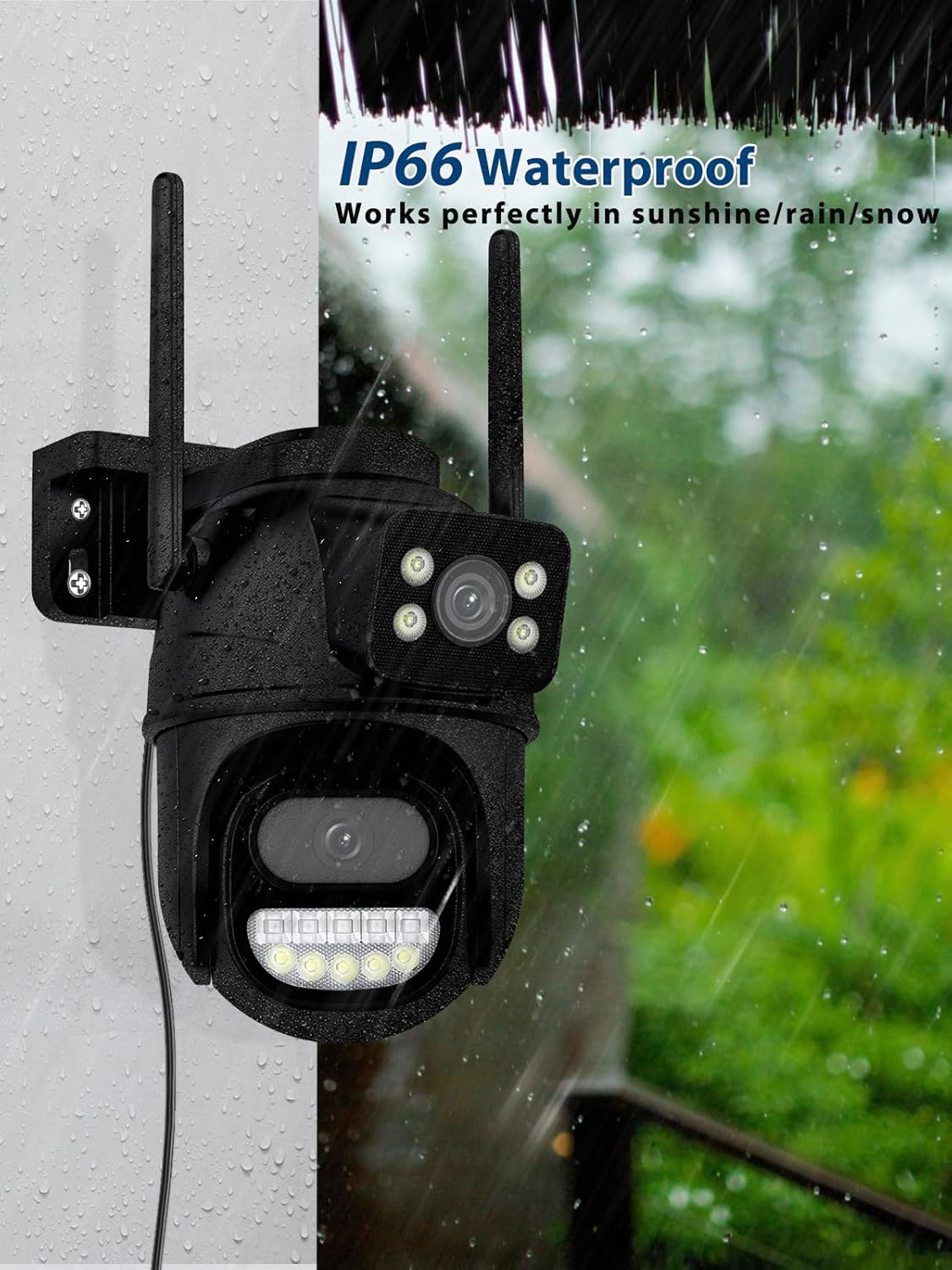
Image 6.1: IP66 Waterproof. This image shows the Reobiux A33H-2P camera mounted on an exterior wall during a rain shower, with water droplets visible. This visually confirms its IP66 waterproof rating, indicating its ability to function effectively in various weather conditions.
7. Řešení problémů
- Fotoaparát se nepřipojuje k Wi-Fi:
- Ujistěte se, že vaše Wi-Fi síť pracuje na frekvenci 2.4 GHz. Kamera nepodporuje Wi-Fi na frekvenci 5 GHz.
- Check that the Wi-Fi signal strength is adequate at the camera's location.
- Restartujte router a kameru.
- Ověřte, zda je heslo k Wi-Fi zadané v aplikaci správné.
- Časté falešné poplachy:
- Adjust the motion detection sensitivity to a lower level (low/medium).
- Define specific detection zones to exclude areas with irrelevant motion (e.g., moving trees, street traffic).
- Ujistěte se, že objektiv fotoaparátu je čistý a bez překážek.
- Špatná kvalita obrazu:
- Vyčistěte čočku fotoaparátu.
- Check your internet connection speed. A stable and fast connection is crucial for high-resolution streaming.
- Ensure the camera is receiving sufficient power.
- Obousměrný zvuk nefunguje:
- Check the volume settings on your smartphone and in the icsee app.
- Ujistěte se, že mikrofon nebo reproduktor kamery neblokují žádné překážky.
- Verify that the app has microphone permissions on your smartphone.
8. Specifikace
| Funkce | Specifikace |
|---|---|
| Značka | Reobiux |
| Číslo modelu | REO-A33H-2P |
| Rozlišení záznamu videa | 2.5 tis |
| Technologie bezdrátové komunikace | Bluetooth, Wi-Fi (2.4 GHz only) |
| Počet kanálů | 2 |
| Form Factor | Bullet / Dome |
| Viewúhel | 355 stupňů (otáčení), 90 stupňů (náklon) |
| Typ instalace | Screw-in / Wall Mount |
| Rozsah nočního vidění | Až 30 metrů |
| Materiál | Plast |
| svtage | 12 V (DC) |
| Spotřeba energie | 5 wattů |
| Úroveň odolnosti proti vodě | IP66 Vodotěsný |
| Speciální funkce | Two-Way Audio, Local Recording, HD Resolution, Night Vision |
| Kompatibilní zařízení | Smartphone, Tablet, Computer, Digital Video Recorder |
| Typ ovladače | Amazon Alexa |
9. Záruka a podpora
Reobiux products are designed for reliability and performance. For warranty information, please refer to the specific terms and conditions provided at the time of purchase or contact Reobiux customer support.
Zákaznická podpora:
If you encounter any issues or have questions regarding your Reobiux camera, please visit the official Reobiux website or contact their customer service team for assistance. Please have your model number (A33H-2P) and purchase details ready when contacting support.


