1. Úvod
This instruction manual provides essential information for the safe and efficient use of your NIIMBOT D110M Bluetooth Label Maker. Please read this manual thoroughly before operating the device and retain it for future reference. The NIIMBOT D110M is a compact, wireless thermal label printer designed for various organizational tasks in home, office, and school environments.

Image 1.1: The NIIMBOT D110M Label Maker, a roll of blank labels, and three example labels showing a barcode, 'Biscuits', and 'Tools'.
2. Obsah balení
Ověřte, zda jsou všechny níže uvedené položky součástí balení. Pokud některé položky chybí nebo jsou poškozené, kontaktujte zákaznickou podporu.

Image 2.1: The complete package contents for the NIIMBOT D110M, neatly arranged.
- NIIMBOT D110M Label Maker
- Uživatelská příručka
- Nabíjecí kabel typu C.
- Balící krabice
- Label Paper Roll (12x40mm)
3. Konec produktuview a funkce
The NIIMBOT D110M is designed for ease of use and portability, featuring advanced thermal printing technology.
Klíčové vlastnosti:
- Bluetooth připojení: Seamless wireless connection to smartphones via the NIIMBOT app.
- Tepelný tisk: Využívá technologii přímého termálního tisku bez obsahu BPA, čímž eliminuje potřebu inkoustu nebo toneru.
- Vysoké rozlišení: 203 DPI pro jasný a ostrý tisk.
- Přenosný design: Compact and lightweight, powered by a built-in 1500mAh rechargeable Lithium-Ion battery.
- Rychlé nabíjení: Fully charged in approximately 2 hours via Type-C cable.
- Dlouhá výdrž baterie: Up to 5 hours of continuous printing on a full charge.
- Inteligentní identifikace: Built-in RFID chip automatically recognizes label types for simplified setup.
- Odolné štítky: Compatible labels are waterproof, oil-proof, abrasion-resistant, and fade-resistant.

Image 3.1: Visual representation of the NIIMBOT D110M's key features, including text printing, scanning, inkless operation, portability, high-speed printing, and Bluetooth connectivity.

Image 3.2: Details on the D110M's upgraded battery performance, highlighting its 1500mAh capacity, charging time, and print speed.
4. Nastavení
4.1 Nabíjení zařízení
Before first use, fully charge the label maker. Connect the provided Type-C charging cable to the device and a compatible USB power adapter. The indicator light will show charging status.
4.2 Vkládání štítkového papíru
- Otevřete kryt přihrádky na štítky.
- Insert the label roll with the printing surface facing upwards, ensuring the first label extends slightly out of the printing slot.
- Close the cover securely. The device's RFID chip will automatically detect the label type.
4.3 Stažení aplikace a připojení Bluetooth
- Download the "NIIMBOT" app from your smartphone's app store (available for iOS and Android).
- Turn on the NIIMBOT D110M label maker by pressing the power button. The indicator light will illuminate.
- Povolte na svém smartphonu Bluetooth.
- Open the NIIMBOT app and follow the on-screen instructions to connect to your D110M device. The device name typically appears as "D110_XXXX".
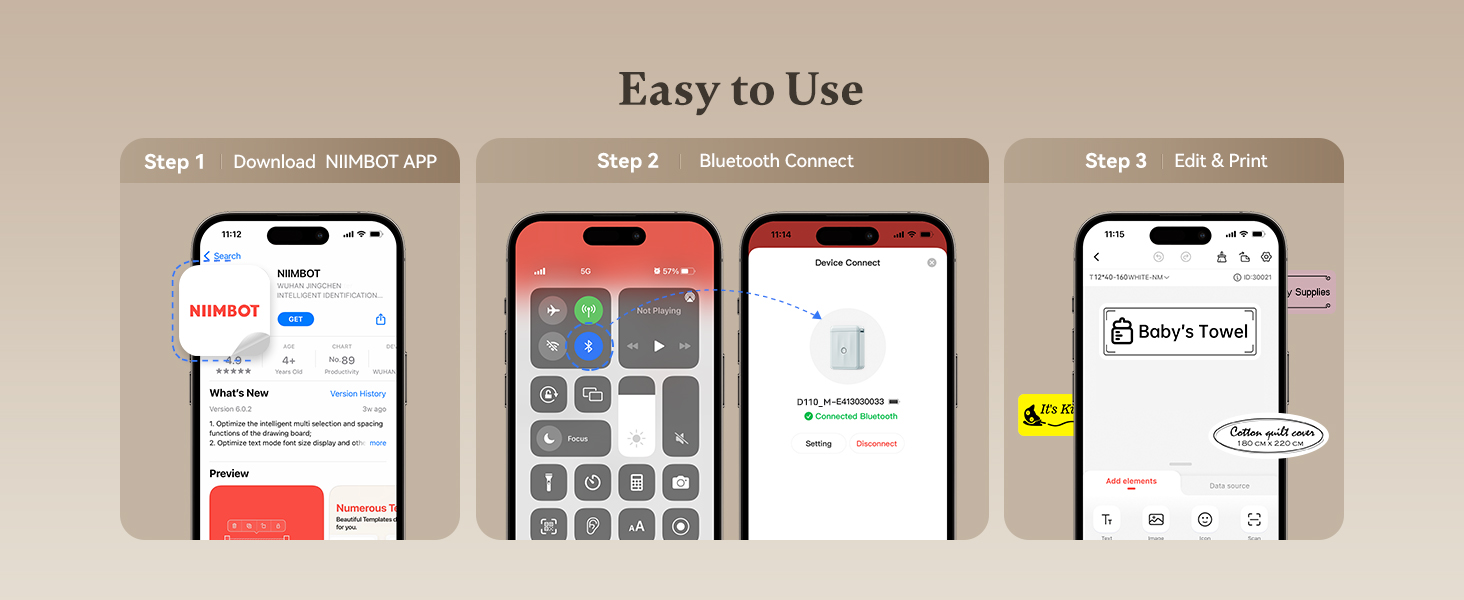
Image 4.1: A visual guide to the three-step setup process: downloading the app, connecting via Bluetooth, and then editing and printing labels.
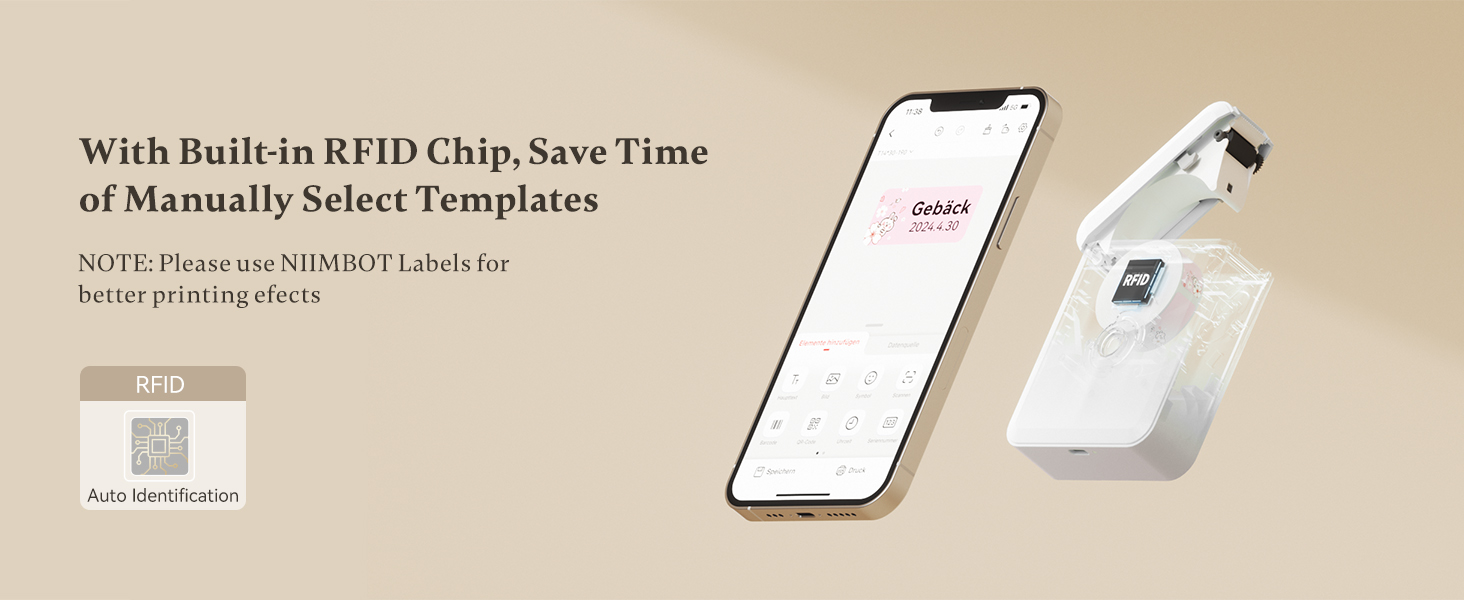
Image 4.2: The NIIMBOT app interface on a smartphone, demonstrating the automatic label identification feature via the built-in RFID chip.
5. Návod k obsluze
5.1 Vytváření a úprava štítků
Once connected, use the NIIMBOT app to design your labels. The app offers various templates, fonts, symbols, and customization options.
- Vyberte šablonu nebo začněte s novým návrhem štítku.
- Enter text, add icons, barcodes, or QR codes.
- Adjust font size, style, and alignment.
- Předview your label before printing.

Image 5.1: The NIIMBOT app displaying options for personalizing labels, including different categories of icons and templates.
5.2 Tisk štítků
After designing your label, tap the print button in the app. You can choose to print a single label or multiple copies (batch printing).
- Ensure the label maker has sufficient battery and label paper.
- Confirm the label design in the app.
- Tap "Print" and select the number of copies.
- The label will print rapidly from the device.

Image 5.2: Illustration of different printing modes available with the D110M, including real-time printing and reprinting previous labels.
5.3 Label Applications
The NIIMBOT D110M is versatile for various labeling needs:
- Domácí organizace: Labeling storage bins, kitchen containers, spice jars, and personal items.
- Kancelářské použití: Organizování filesložky, kabely a kancelářské potřeby.
- Školní potřeby: Naming school items, books, and craft materials.
- Maloobchodní: Tvorba ceny tags and product labels for small businesses.

Obrázek 5.3: Příkladamples of the D110M label maker's versatility across different categories like toys, kitchen, pricing, cosmetics, and personal items.

Image 5.4: Demonstrations of label durability, showcasing resistance to water, grease, abrasion, and fading.
6. Údržba
6.1 Čištění tiskové hlavy
Pro zajištění optimální kvality tisku pravidelně čistěte tiskovou hlavu. Použijte vatový tampon lehceampened with isopropyl alcohol to gently wipe the print head surface. Allow it to dry completely before use.
6.2 Péče o baterii
To prolong battery life, avoid fully discharging the device frequently. Charge the device regularly, even if not in constant use. Store the device in a cool, dry place.
6.3 Ukládání štítků
Store label rolls in a cool, dry place away from direct sunlight and heat to prevent degradation of the thermal material.
7. Řešení problémů
If you encounter issues with your NIIMBOT D110M, refer to the following common problems and solutions:
| Problém | Možná příčina | Řešení |
|---|---|---|
| Zařízení se nezapne | Slabá baterie | Nabijte zařízení pomocí kabelu typu C. |
| Nelze se připojit přes Bluetooth | Bluetooth na telefonu vypnutý; Zařízení není viditelné; Problém s aplikací | Ensure phone Bluetooth is on. Restart the label maker. Restart the NIIMBOT app. |
| Poor print quality / Faint print | Dirty print head; Incorrect label orientation; Low battery | Clean the print head. Ensure label paper is inserted correctly. Charge the device. |
| Štítky se nepodávají správně | Label roll improperly installed; Obstruction | Re-install the label roll, ensuring it's straight. Check for any debris in the paper path. |
| App does not recognize label type | Non-NIIMBOT labels; RFID chip issue | Ensure you are using genuine NIIMBOT labels. Restart the device and app. |
8. Specifikace
Detailed technical specifications for the NIIMBOT D110M Label Maker:
- Model: D110M (Item model number: D110-M-New)
- Technologie tisku: Tepelný
- Rozlišení tisku: 203 DPI
- Rychlost tisku: 30 mm/s
- Konektivita: Bluetooth
- Kompatibilní zařízení: Chytré telefony (Android, iOS)
- Zdroj napájení: 1500mAh Lithium-Ion Battery (rechargeable)
- Nabíjecí rozhraní: Typ C USB
- Rozměry produktu: 0.8 x 2.7 x 3.9 palce
- Hmotnost položky: 10.9 unce
- Barva inkoustu: Monochrome (Black text only)
- Speciální funkce: Portable, RFID Automatic Label Identification
9. Záruka a podpora
9.1 Informace o záruce
The NIIMBOT D110M Label Maker comes with a Limited Warranty. Please refer to the warranty card included in your package or contact NIIMBOT customer service for specific terms and conditions.
9.2 Zákaznická podpora
For further assistance, technical support, or inquiries regarding your product, please visit the official NIIMBOT webwebu nebo se podívejte na kontaktní informace uvedené na obalu produktu.
Elektronická verze uživatelské příručky je k dispozici ke stažení: Uživatelská příručka (PDF)


