1. Úvod
This manual provides essential information for the safe and effective operation of your OWON DGE1060 Waveform Generator. Please read this manual thoroughly before using the device and keep it for future reference. The DGE1060 is a versatile arbitrary waveform generator designed for various applications in laboratories, research, and education, offering a 60MHz bandwidth, 300MSa/s sampling rate, and a wide range of waveform outputs.
2. Bezpečnostní informace
Always observe the following safety precautions to prevent injury and avoid damage to the instrument or any products connected to it.
- Zdroj napájení: Používejte pouze určený napájecí adaptér. Ujistěte se, že hlasitosttage and frequency match the device requirements.
- Základy: Ensure the instrument is properly grounded to prevent electric shock.
- Prostředí: Operate the device in a dry, well-ventilated area, away from direct sunlight, high temperatures, humidity, and dust.
- Větrání: Neblokujte větrací otvory. Přehřátí může způsobit poškození.
- Čištění: Před čištěním odpojte napájení. Použijte měkký, suchý hadřík. Nepoužívejte tekuté ani aerosolové čisticí prostředky.
- Servis: Nepokoušejte se přístroj opravovat sami. Veškerý servis svěřte kvalifikovanému servisnímu personálu.
3. Obsah balení
Ověřte, zda jsou všechny níže uvedené položky součástí balení. Pokud některé položky chybí nebo jsou poškozené, kontaktujte prosím svého dodavatele.
- Host Machine (OWON DGE1060 Waveform Generator)
- BNC to Alligator Clip Cable
- USB kabel
- USB to DC Cord
- Napájecí adaptér
- Rychlý průvodce

Figure 3.1: OWON DGE1060 Waveform Generator and included accessories.
4. Konec produktuview
4.1 Přední panel

Obrázek 4.1: Rozložení předního panelu
The front panel features a 3.6-inch TFT LCD display for clear waveform observation and parameter settings. Key areas include:
- 3.6-inch TFT LCD Display: Shows waveform graphs, parameters, and menu options.
- Function Setting Area: Buttons and rotary knob for adjusting parameters and navigating menus.
- Waveform Switching Area: Dedicated buttons for selecting basic waveforms.
- Channel Output Control Area: BNC connector for waveform output and ON/OFF button for the output.
4.2 Zadní panel

Obrázek 4.2: Rozložení zadního panelu
The rear panel provides essential connectivity:
- Rozhraní zařízení USB: Supports PC remote control via SCPI commands.
- Zásuvka: Pro připojení externího napájecího adaptéru.
5. Klíčové vlastnosti
- Waveform Generation: Šířka pásma 60 MHz, rychlost 300 MSa/s v reálném časeampling rate, 8K record depth, 14 bits vertical resolution.
- Comprehensive Waveform Output: Includes 5 standard basic waveforms and 160 built-in arbitrary waveforms (e.g., exponential rise, exponential fall, sin(x)/x, step wave).
- Uživatelsky přívětivé rozhraní: 3.6-inch TFT LCD display and intuitive function setting area for clear observation and easy operation.
- Multiple Modulation Modes: Supports AM, FM, PM, and FSK modulation modes.
- Pokročilé funkce: Features Sweep and Burst functions.
- Ukládání průběhů: Stores 16 digital arbitrary waveforms.
- PC Remote Control: Compatible with PC remote control for enhanced functionality.
- Kompaktní design: Ultra-thin body for portability and convenient shortcut keys for improved user interaction.
6. Nastavení
- Připojení napájení: Connect the provided power adapter to the Power Socket on the rear panel and then to a suitable AC power outlet.
- Výstupní připojení: Connect the BNC to Alligator Clip cable to the OUT1 BNC connector on the front panel. Connect the alligator clips to your test circuit or device.
- Zapnutí: Press the ON/OFF button on the front panel to power on the device.
- Připojení k PC (volitelné): For remote control, connect the USB cable from the USB Device interface on the rear panel to your computer. Install any necessary drivers or software provided by OWON.
7. Návod k obsluze
7.1 Generování základních průběhů
To generate a basic waveform (Sine, Square, Pulse, Ramp, Noise):
- Press the desired waveform button in the Waveform Switching Area (e.g., Sine wave button).
- Use the Function Setting Area buttons and rotary knob to adjust parameters such as Frequency, Amplitude, Offset, and Phase.
- Press the OUT1 ON/OFF button to enable the output.
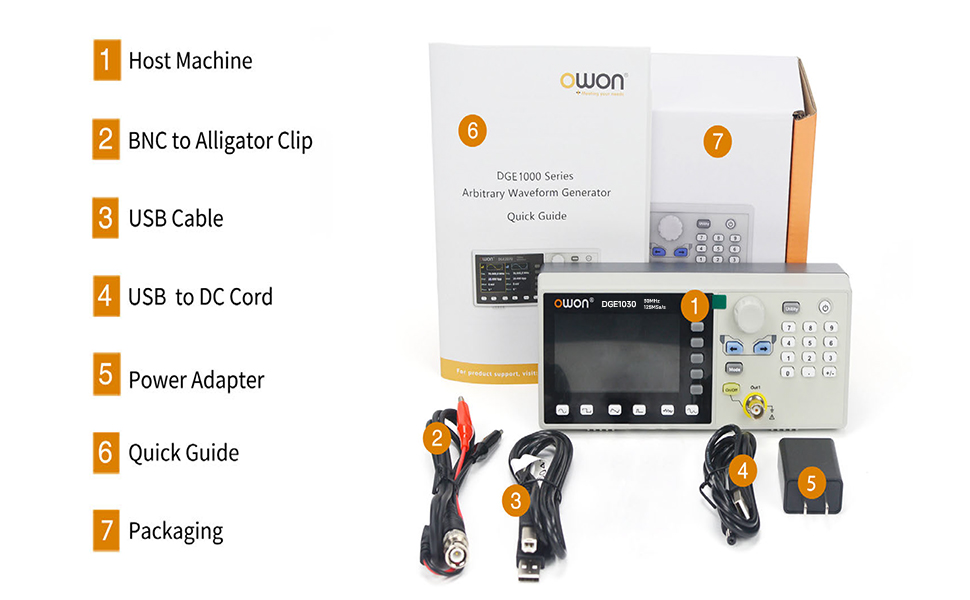
Figure 7.1: High Frequency Stable Output and Arbitrary Waveform Selection
7.2 libovolných průběhů
The DGE1060 includes 160 built-in arbitrary waveforms and supports user-defined waveforms.
- Press the 'Arb' button (if available, or navigate through the menu to 'Arb').
- Select a built-in arbitrary waveform from the list using the navigation buttons and rotary knob.
- Adjust parameters as needed and enable output.
7.3 Modulation Functions (AM, FM, PM, FSK)
To apply modulation to a waveform:
- Select a basic waveform to be modulated.
- Press the 'Mode' button and select the desired modulation type (AM, FM, PM, or FSK).
- Adjust the modulation parameters (e.g., depth, frequency) using the controls.

Figure 7.2: Modulation and Sweep Function Settings
7.4 Funkce Sweep
The sweep function allows the output frequency to vary over a specified range.
- Press the 'Sweep' button.
- Select the sweep type (Linear or Log).
- Set the Start Frequency, Stop Frequency, and Sweep Time.
7.5 Burst Function
The burst function generates a specific number of waveform cycles.
- Press the 'Burst' button.
- Set the Burst Period and the number of Cycles (N-Cycle, Gated, or Infinite).
- Select the Trigger Source (Internal or Manual).

Figure 7.3: Burst Function and Waveform Storage
7.6 PC Remote Control
The DGE1060 supports remote control via a PC using the USB device interface and SCPI commands. Refer to the OWON website or additional software documentation for detailed instructions on setting up and using PC remote control.
Video 7.1: An official product video demonstrating the OWON DGE1060 Waveform Generator, highlighting its compact size, exterior dimensions, large LCD display, and remote operation capabilities. It also introduces various functions like high frequency stable output, arbitrary waveforms, multi-modulation modes (AM, FM, PM, FSK), sweep function, burst function, and waveform storage.
8. Specifikace
| Kategorie | Specifikace |
|---|---|
| Značka | OWON |
| Název modelu | DGE1060 |
| Frekvenční výstup | 60 MHz |
| Sampsazba ling | 300MSa / s |
| Vertikální rozlišení | 14 bitů |
| Délka křivky | 8K points |
| Standardní průběhy | Sinus, čtverec, puls, Ramp, Hluk |
| Libovolné tvary vln | 160 built-in, user-defined |
| Typy modulace | AM, FM, PM, FSK, Sweep, Burst |
| Zobrazit | 3.6palcový TFT LCD |
| Komunikační rozhraní | Zařízení USB |
| Zdroj napájení | AC/DC |
| svtage | 120 voltů (AC) |
| Výstupní Wattage | 120 wattů |
| Rozměry produktu (D x Š x V) | 5 cm D x 3 cm Š x 5 cm V (přibližně) |
| Hmotnost položky | 2.35 libry |
| Barva | Černý |
9. Údržba
- Čištění: Regularly clean the exterior of the instrument with a soft, dry cloth. Do not use abrasive cleaners or solvents.
- Skladování: When not in use for extended periods, store the device in a cool, dry place, protected from dust and extreme temperatures.
- Kalibrace: Periodic calibration by qualified personnel is recommended to maintain measurement accuracy.
10. Řešení problémů
If you encounter issues with your DGE1060 Waveform Generator, refer to the following common troubleshooting steps:
- Bez napájení: Ensure the power adapter is securely connected to both the device and the power outlet. Verify the power outlet is functional.
- Žádný výstupní signál: Check if the OUT1 ON/OFF button is enabled. Verify that the output cable is correctly connected and not damaged. Ensure the amplitude and frequency settings are appropriate for your application.
- Incorrect Waveform: Double-check the selected waveform type and all associated parameters (frequency, amplitude, offset, etc.).
- PC Remote Control Issues: Ensure the USB cable is properly connected. Verify that the correct drivers are installed on your PC and that the remote control software is configured correctly.
If the problem persists after attempting these steps, please contact OWON customer support or your local distributor for assistance.
11. Záruka a podpora
For warranty information, technical support, or service inquiries, please refer to the official OWON website or contact your authorized OWON dealer. Keep your purchase receipt as proof of purchase for warranty claims.


