Zavedení
Welcome to the user manual for your new Machenike K500A 75% Mechanical Keyboard. This guide provides comprehensive instructions on setting up, operating, maintaining, and troubleshooting your keyboard to ensure optimal performance and longevity. Please read this manual carefully before using the product.
Obsah balení
Ověřte prosím, zda jsou ve vašem balení obsaženy všechny níže uvedené položky:
- Machenike K500A 75% Mechanical Keyboard
- USB kabel
Konec produktuview
The Machenike K500A is a compact 75% mechanical keyboard designed for gaming and general use. It features 84 keys, hot-swappable linear red switches, and customizable RGB LED backlighting.
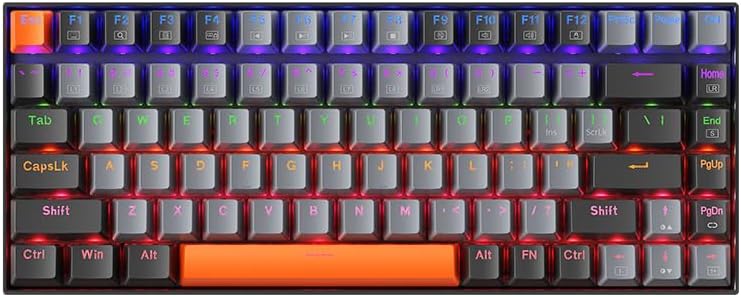
Obrázek 1: Nahoru view of the Machenike K500A 75% Mechanical Keyboard, showcasing its compact 84-key layout and rainbow LED backlighting.
Klíčové vlastnosti:
- 75% kompaktní provedení:
This keyboard features a space-saving 75% layout with 84 keys, providing essential keys while maintaining a compact design. This makes it portable and suitable for various desk setups.

Obrázek 2: Illustration of the 75% compact form factor (84 keys) compared to a standard full-sized 104-key keyboard, highlighting its space-saving design.
- Hot-Swappable Linear Red Switches:
Equipped with linear red switches, the keyboard offers a smooth and quiet typing experience. The hot-swappable design allows users to change switches without soldering, enabling customization of typing feel.
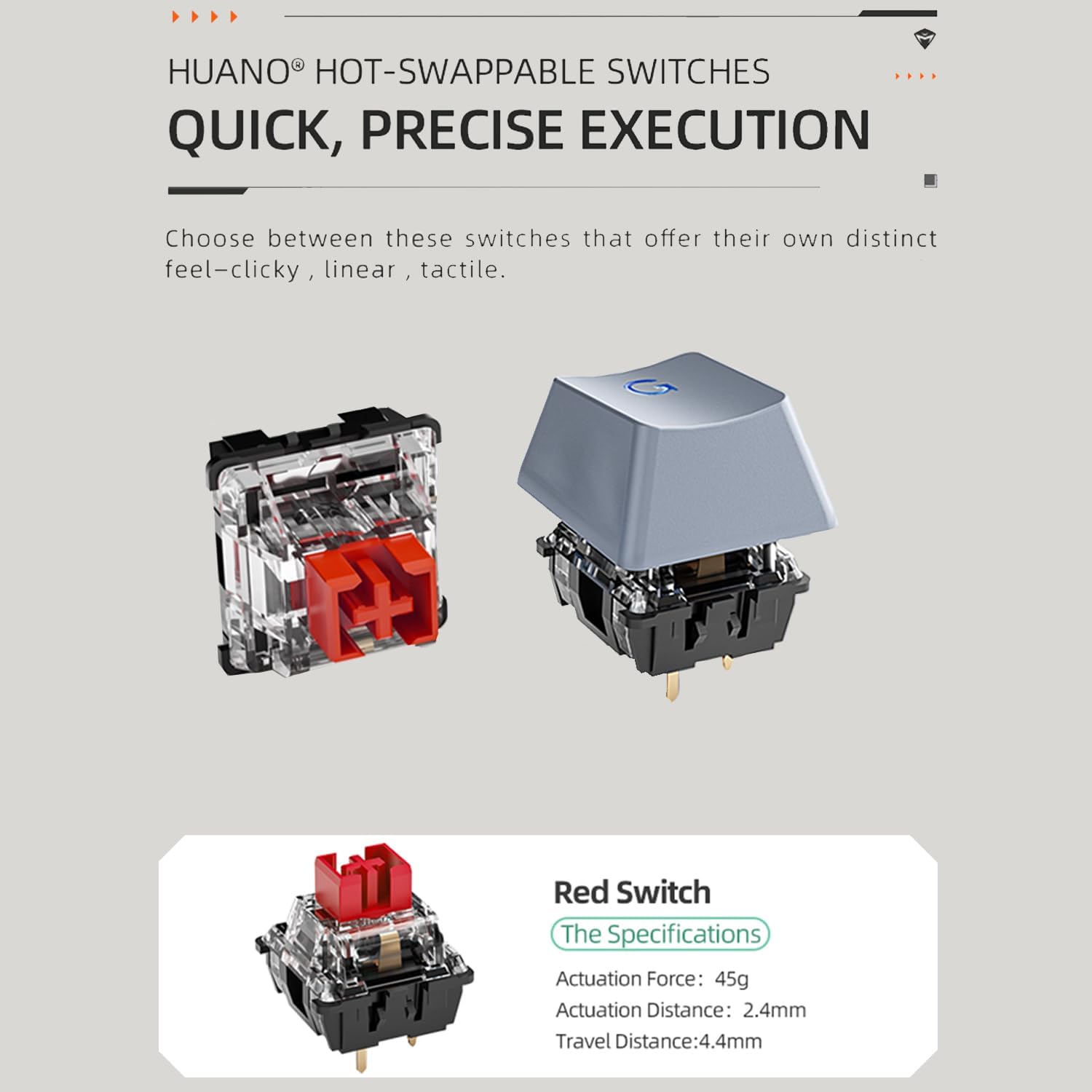
Obrázek 3: Diagram showing the components of a hot-swappable mechanical switch, emphasizing the ease of replacement without soldering. Specifications for the red switch are also shown: Actuation Force: 45g, Actuation Distance: 2.4mm, Travel Distance: 4.4mm.
- Duhové LED podsvícení:
The keyboard features vibrant rainbow LED backlighting with 9 preset lighting effects. These effects can be cycled and adjusted for speed and brightness directly from the keyboard.

Obrázek 4: Detailní záběr view of the keyboard keys illuminated by the rainbow LED backlight, demonstrating the visual effects.
- Odnímatelný USB kabel:
The keyboard connects via a detachable USB cable, ensuring a stable and lag-free wired connection. This design also enhances portability and makes cable management easier.

Obrázek 5: Image illustrating the detachable USB cable connected to the keyboard, highlighting its convenience for setup and transport.
- Dvojité PBT klávesy:
The durable double-shot PBT keycaps resist wear and shine, ensuring legends remain clear and legible over time.
- Anti-slip Feet and EVA Foam:
Features height-adjustable anti-slip feet for ergonomic positioning and EVA foam for sound dampening, reducing hollow sounds during typing.

Obrázek 6: Diagram showing the anti-slip feet for height adjustment and the internal EVA foam layer designed to reduce typing noise.
Nastavení
Follow these steps to set up your Machenike K500A keyboard:
- Rozbalte klávesnici: Opatrně vyjměte klávesnici a USB kabel z obalu.
- Připojte kabel USB: Insert one end of the provided USB cable into the USB-C port on the keyboard and the other end into an available USB-A port on your computer.
- Instalace ovladače: The keyboard is plug-and-play and typically does not require additional drivers. Your operating system should automatically detect and install the necessary drivers.
- Upravit výšku: If desired, extend the adjustable feet on the underside of the keyboard to achieve a comfortable typing angle.
Návod k obsluze
Základní funkce:
- psaní: Pro psaní použijte standardní rozložení QWERTY.
- Funkční klávesy (F1–F12): Access multimedia controls and system functions by pressing the Fn key in combination with the corresponding F-key. Refer to the keycap legends for specific functions (e.g., Fn+F1 for Media Player, Fn+F2 for Volume Down).
Ovládání LED podsvícení:
The Machenike K500A features 9 preset LED lighting effects. Use the following key combinations to control the backlight:
- Cycle Lighting Effects: Stiskněte Fn + \ | to cycle through the 9 different lighting modes.
- Upravit jas: Stiskněte Fn + ↑ pro zvýšení jasu a Fn + ↓ ke snížení jasu.
- Upravit rychlost: Stiskněte Fn + ← to slow down the lighting effect speed and Fn + → to speed up the lighting effect.
Přepínače s výměnou za provozu:
The keyboard supports hot-swappable switches, allowing you to replace the existing switches with compatible 3-pin or 5-pin mechanical switches without soldering. Use a switch puller tool (not included) to carefully remove switches. When inserting new switches, ensure the pins align correctly with the sockets to avoid bending them.
Údržba
Správná údržba může prodloužit životnost vaší klávesnice:
- Čištění kláves: Použijte měkký, damp cloth to wipe down the keycaps. For deeper cleaning, keycaps can be carefully removed using a keycap puller (not included) and washed with mild soap and water. Ensure they are completely dry before reattaching.
- Čištění těla klávesnice: Use a soft, dry cloth to wipe dust and debris from the keyboard body. Avoid using harsh chemicals or abrasive materials.
- Odstranění prachu: Use compressed air to blow out dust and crumbs from between the keycaps.
- Péče o kabely: Abyste předešli poškození, vyhněte se ostrým ohybům nebo nadměrnému tahání za kabel USB.
Odstraňování problémů
Pokud narazíte na problémy s klávesnicí, podívejte se na následující běžné problémy a jejich řešení:
| Problém | Možná příčina | Řešení |
|---|---|---|
| Klávesnice nereaguje | Volné připojení USB; vadný port USB; problém s ovladačem. | Ujistěte se, že je kabel USB bezpečně připojen ke klávesnici i k počítači. Zkuste jiný port USB. Restartujte počítač. |
| Podsvícení nefunguje nebo je nekonzistentní | Backlight turned off; Brightness set to minimum; Software glitch. | Stiskněte Fn + ↑ to increase brightness. Cycle through lighting modes using Fn + \ |Odpojte a znovu připojte klávesnici. |
| Některé klávesy nefungují | Dust/debris under keycap; Faulty switch; Keycap not properly seated. | Remove the keycap and clean underneath. Ensure the keycap is pressed down firmly. If hot-swapping, ensure the switch is fully seated and pins are not bent. Consider replacing the switch if it's faulty. |
Specifikace
| Funkce | Detail |
|---|---|
| Značka | Machenike |
| Číslo modelu | K500A-B84 |
| Rozložení | 75 % (84 kláves) |
| Typ přepínače | Hot-swappable Linear Red Switches |
| Materiál krytky klíče | Dvojitý vstřik PBT |
| Podsvícení | Rainbow LED (9 preset effects) |
| Konektivita | Kabelové USB |
| Rozměry produktu | 12.23 x 4.86 x 1.4 palce |
| Hmotnost položky | 5 libry |
| Kompatibilní zařízení | PC |
Záruka a podpora
Machenike products are manufactured to high quality standards. For information regarding warranty coverage, please refer to the warranty card included with your product or visit the official Machenike website. If you encounter any issues not covered in this manual or require further assistance, please contact Machenike customer support through their official channels.
For the latest drivers, software, and support resources, please visit the official Machenike support page.


