1. Úvod
The MASTECH MS8236 is a versatile 2-in-1 digital multimeter and network cable track tester designed for electrical and network diagnostics. This device combines the functions of a digital multimeter for measuring electrical parameters with a network cable tester for verifying cable integrity and a tone generator for tracing wires. It is suitable for professional and DIY use in various applications.
2. Bezpečnostní informace
Always adhere to basic safety precautions when using this device to prevent personal injury or damage to the meter or equipment under test. Read all instructions carefully before use.
- Nepřekračujte maximální vstupní hodnoty uvedené pro každou funkci.
- Při práci s obvody pod napětím buďte mimořádně opatrní.
- Před měřením se ujistěte, že je přepínač funkcí ve správné poloze.
- Nepoužívejte měřicí přístroj, pokud se jeví poškozený nebo pokud jsou poškozené měřicí vodiče.
- Pro zajištění přesných údajů vyměňte baterie ihned po zobrazení indikátoru slabé baterie.
- Avoid using the device in environments with high humidity, extreme temperatures, or explosive gases.
- Always disconnect power to the circuit before testing continuity or resistance.
3. Konec produktuview
The MASTECH MS8236 integrates a digital multimeter with a detachable cable tracker/tone generator. The main unit features a clear digital display, function selector dial, and input jacks. The cable tracker assists in identifying and tracing network and telephone lines.
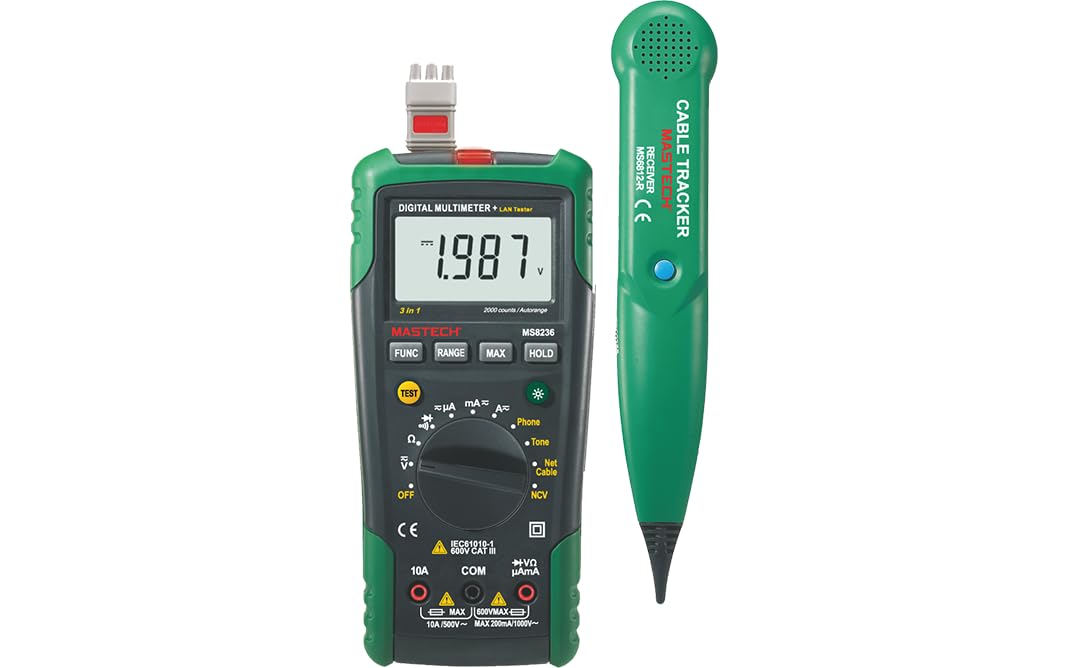
Figure 3.1: MASTECH MS8236 Digital Multimeter and Cable Tracker. The image shows the main multimeter unit on the left and the separate cable tracker unit on the right. Both are green and black.
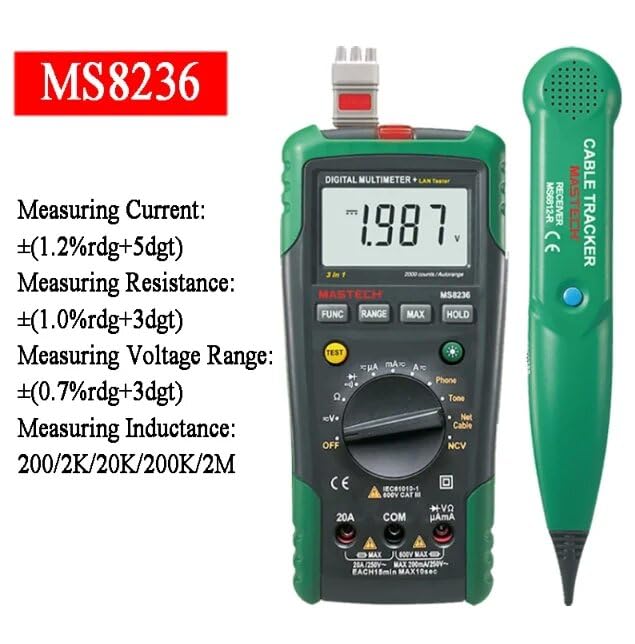
Figure 3.2: Close-up of the MASTECH MS8236 Multimeter Display and Controls. The display shows '1.987 V' and the function dial indicates various measurement modes including V, A, Ohm, Diode, Continuity, Phone, Net Cable, and NCV.
Klíčové vlastnosti:
- Displej: 2000 počítá
- Ranging: Auto & Manual
- Bezkontaktní svtage (NCV) detektor
- Volumen otevřené diodytage: 1.7V
- Continuity Buzzer: Activates below 70Ω
- Funkce Data Hold
- Nízký stav baterie
- Podsvícení displeje
- Automatické vypnutí
- Network Cable Check: Tests for open circuits, shorts, miss-wires, reversals, split pairs, and shield detection. Supports T568A, T568B, 10Base-T.
- Telephone Line Check: Identifies line states (Busy, Ringing, Clear) and continuity.
- Tone Function: For tracking cables and diagnosing break points.
4. Nastavení
4.1. Vybalení a kontrola
Carefully unpack the MS8236 and all accessories. Inspect the device for any signs of damage. If any damage is found, contact your supplier immediately.
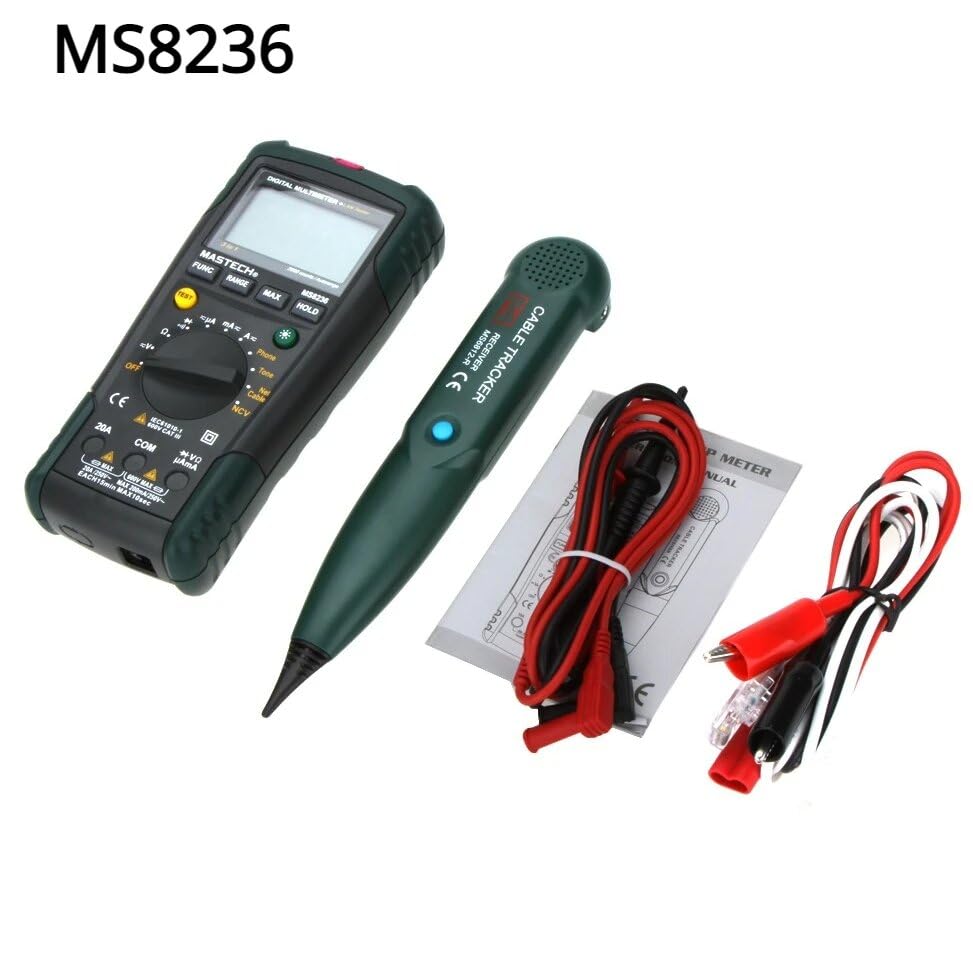
Figure 4.1: MASTECH MS8236 Kit Contents. The image displays the multimeter, cable tracker, red and black test leads, a network cable adapter, and a small instruction manual.
4.2. Instalace baterie
The MS8236 requires 2 LR44 batteries, which are included. To install or replace batteries:
- Locate the battery compartment cover on the back of the multimeter unit.
- Pomocí šroubováku otevřete přihrádku na baterie.
- Insert the 2 LR44 batteries, observing the correct polarity (+/-).
- Bezpečně zavřete kryt prostoru pro baterie.
5. Návod k obsluze
5.1. Basic Multimeter Functions
Connect the test leads to the appropriate input jacks (COM for black lead, VΩmA for red lead for most measurements, or 20A for high current). Select the desired function using the rotary switch.
- svtage Measurement (DCV/ACV): Turn the rotary switch to the 'V' position. Select DC or AC voltage if applicable. Connect test leads in parallel to the circuit.
- Current Measurement (DCA/ACA): Turn the rotary switch to the 'A' position. Select DC or AC current. Connect test leads in series with the circuit. Ensure the correct input jack (mA or 20A) is used.
- Měření odporu (Ω): Turn the rotary switch to the 'Ω' position. Ensure the circuit is de-energized. Connect test leads across the component.
- Test diod (→|): Turn the rotary switch to the diode symbol. Connect the red lead to the anode and the black lead to the cathode of the diode.
- Test kontinuity ()))): Turn the rotary switch to the continuity symbol. The buzzer will sound if the resistance is below approximately 70Ω.
5.2. Network Cable Check
This function tests the integrity of network cables (RJ45). It can detect open circuits, shorts, miss-wires, reversals, split pairs, and shield detection for T568A, T568B, and 10Base-T standards.
- Turn the rotary switch to the 'Net Cable' position.
- Connect one end of the network cable to the RJ45 port on the main multimeter unit.
- Connect the other end of the network cable to the RJ45 port on the remote cable tracker unit.
- Observe the display for test results, which will indicate the cable status. The device also features a debug mode for detailed fault identification.
5.3. Telephone Line Check
This function allows for checking the state of a working telephone line and its continuity.
- Turn the rotary switch to the 'Phone' position.
- Connect the telephone line to the appropriate port on the main unit.
- The device will identify the state of the line as Busy, Ringing, or Clear. It can also judge the continuity of the telephone cables or wires.
5.4. Tone Function
The tone function is used with the cable tracker to trace cables and wires and diagnose break points.
- Turn the rotary switch to the 'Tone' position.
- Connect the test leads or RJ11/RJ45 plug to the cable you wish to trace.
- Use the remote cable tracker unit to follow the cable. The tracker will emit an audible tone when it detects the signal from the main unit, helping to locate the cable and identify breaks.
5.5. Nekontaktní svtage (NCV) Detekce
Funkce NCV umožňuje detekci střídavého proudu (AC Volume).tage bez přímého kontaktu s vodičem.
- Otočte otočný přepínač do polohy „NCV“.
- Přesuňte horní část multimetru blízko živého střídavého proudu.tage zdroj.
- Zařízení bude indikovat přítomnost střídavého proudu.tage prostřednictvím zvukového alarmu a/nebo vizuálního indikátoru.
5.6. Další funkce
- Pozastavení dat: Stiskněte tlačítko „HOLD“ pro zmrazení aktuální hodnoty na displeji. Dalším stisknutím jej uvolníte.
- Podsvícení: Press the backlight button (often labeled with a light bulb symbol) to illuminate the display for better visibility in low-light conditions.
- Automatické vypnutí: Zařízení se po určité době nečinnosti automaticky vypne, aby se šetřila baterie.
6. Údržba
6.1. Čištění
Otřete pouzdro reklamouamp hadříkem a jemným čisticím prostředkem. Nepoužívejte abrazivní prostředky ani rozpouštědla. Před použitím se ujistěte, že je zařízení zcela suché.
6.2. Výměna baterie
When the low battery indicator appears on the display, replace the batteries as described in Section 4.2. Remove batteries if the device will not be used for an extended period.
7. Řešení problémů
- Žádné zobrazení nebo slabé zobrazení: Zkontrolujte instalaci baterií a jejich stav nabití. V případě potřeby baterie vyměňte.
- Nesprávné hodnoty: Ensure test leads are properly connected and the correct function is selected. Verify the circuit is de-energized for resistance/continuity tests.
- Selhání testu síťového kabelu: Ensure both ends of the cable are securely connected to the main unit and remote. Check for physical damage to the cable or connectors.
- No tone from cable tracker: Verify the main unit is in 'Tone' mode and properly connected to the cable. Check the cable tracker's battery.
8. Specifikace
The following table outlines the general and electrical specifications for the MASTECH MS8236.

Figure 8.1: MASTECH MS8236 Features and Specifications Table. This image provides detailed electrical specifications for DC Voltage, AC svtage, DC Current, AC Current, and Resistance, including ranges, resolutions, and accuracies.
| Parametr | Rozsah | Rezoluce | Přesnost |
|---|---|---|---|
| DC svtage | 200mV/2V/20V/200V/600V | 0.1mV/1mV/10mV/100mV/1V | ± (0.5 % + 5) |
| AC svtage | 200mV/2V/20V/200V/600V | 0.1mV/1mV/10mV/100mV/1V | ± (0.8 % + 5) |
| Stejnosměrný proud | 200µA/2000µA/20mA/200mA/2A/10A | 0.1µA/1µA/10µA/0.1mA/1mA/10mA | ± (1.2 % + 5) ±(2.0%+10) for 10A |
| AC proud | 200µA/2000µA/20mA/200mA/2A/10A | 0.1µA/1µA/10µA/0.1mA/1mA/10mA | ± (1.5 % + 5) ±(3.0%+10) for 10A |
| Odpor | 200Ω/2kΩ/20kΩ/200kΩ/2MΩ/20MΩ | 0.1Ω/1Ω/10Ω/100Ω/1kΩ/10kΩ | ± (1.0 % + 5) ±(1.5%+5) for 20MΩ |
| Volumen otevřené diodytage | 1.7V | ||
| Bzučák spojitosti | <70Ω | ||
| Zobrazit | 2000 počítá | ||
| Rozsah | Auto & Manual | ||
| Bezkontaktní svtage Detektor | Ano | ||
| Automatické vypnutí | Ano | ||
| Data Hold | Ano | ||
| Nízký stav baterie | Ano | ||
| Podsvícení displeje | Ano | ||
| Zdroj napájení | 2 baterie LR44 (součástí balení) | ||
| Rozměry produktu | 16 x 9 x 5 cm | ||
| Hmotnost položky | 500 g | ||
| Materiál | Akrylonitrilbutadienstyren (ABS) | ||
| Certifikace | CE, RoHS | ||
9. Záruka a podpora
For warranty information and technical support, please refer to the documentation provided with your purchase or contact the seller or manufacturer directly. Specific warranty terms may vary by region and retailer.


