1. Úvod
Welcome to the ACwO DwOTS Fire user manual. These innovative earbuds offer a unique dual-style design, providing both in-ear and half-in-ear options within a single charging case. Designed for versatility and high-quality audio, the DwOTS Fire earbuds feature advanced connectivity, extended battery life, and intuitive controls to enhance your listening experience.

Image: ACwO DwOTS Fire earbuds showcasing both half-in-ear and in-ear styles from a single case.
2. Co je v krabici
Prosím, ověřte, zda jsou v balení přítomny všechny položky:
- 2 x Set of Wireless Earbuds (one in-ear, one half-in-ear)
- 1 x Type-C Fast Charging Cable
- 4 x Extra Earmuffs (for in-ear style)
- 1 x Záruční list
- 1 x Scan Me Card

Image: The ACwO DwOTS Fire earbuds and charging case.
3. Nastavení a párování
3.1 Počáteční párování
- Ujistěte se, že jsou sluchátka nabitá.
- Otevřete nabíjecí pouzdro. Sluchátka se automaticky přepnou do režimu párování.
- Na svém zařízení (chytrém telefonu, tabletu atd.) povolte Bluetooth.
- Hledat available devices and select "ACwO Fire" or "ACwO DwOTS Fire" to connect.
- Po připojení uslyšíte zvukový signál a kontrolka na sluchátkách se změní.
3.2 Duální připojení
The ACwO DwOTS Fire earbuds offer unique dual connectivity options:
- Connect Each Pair to Two Different Devices: Ideal for sharing your listening experience.
- Connect Both Pairs to a Single Device: Perfect for watching movies or listening to music together with a loved one. This feature is available only for devices with dual audio connectivity (e.g., certain Android devices).

Image: Illustration of the dual connectivity feature, showing two pairs of earbuds.
Steps for Dual Sharing (Connecting Both Pairs to a Single Device):
- Connect both 'ACwO DwOTS Fire' and 'ACwO Fire +' with your device's Bluetooth.
- Once both pairs are connected, scroll down your device's notification panel and click on 'Media Output'.
- One pair will already be selected. Select the other pair to enable dual audio.
- You can now listen on both pairs of your earbuds simultaneously.

Image: Visual guide for setting up dual sharing on a compatible device.
4. Návod k obsluze
4.1 Intuitivní dotykové ovládání
The earbuds feature intuitive touch controls for easy management of music, calls, and voice assistants. Refer to the included 'Scan Me Card' for a detailed diagram of touch functions.
- Přehrát/pozastavit: Jediným klepnutím na jedno sluchátko.
- Další skladba: Dvakrát klepněte na pravé sluchátko.
- Předchozí skladba: Dvakrát klepněte na levé sluchátko.
- Přijmout/ukončit hovor: Jediným klepnutím na jedno sluchátko.
- Odmítnout hovor: Dlouze stiskněte libovolné sluchátko.
- Aktivovat Voice Assistant: Trojitě klepněte na kterékoli sluchátko.
4.2 režimy EQ
Customize your audio experience with 3 preset EQ modes, offering a total of 3+3 EQ options across the two earbud styles. Switch between modes to suit your preference for deep bass, balanced sound, or enhanced treble.
- Herní režim: Optimized for immersive gaming audio with low latency.
- Režim divadla: Vylepšené zvukytage for movies and videos.
- Vyvážený režim: Provides a neutral and clear audio profile pro běžný poslech.

Image: ACwO DwOTS Fire earbuds with a visual representation of available EQ modes.
4.3 Hlasový asistent
Easily access your device's voice assistant by triple-tapping either earbud. Compatible with "Ok Google" and "Hey Siri" for hands-free control.
5. Nabíjení
5.1 Earbuds and Case Charging
The ACwO DwOTS Fire earbuds provide up to 52 hours of music playtime with the charging case. The case supports both wired and wireless charging.
- Kabelové nabíjení: Connect the provided Type-C fast charging cable to the charging port on the case and a power source.
- Bezdrátové nabíjení: Place the charging case on a compatible wireless charging pad (wireless charger not included). The indicator light on the case will show charging status.

Image: ACwO DwOTS Fire charging case highlighting 52 hours of playtime.

Image: 'One On, One Charging' feature for extended use.
6. Údržba
6.1 Odolnost proti vodě a potu
The earbuds are IPX5 water and sweat resistant, making them suitable for workouts and outdoor activities. This rating protects against low-pressure water jets from any direction. Do not submerge the earbuds in water.

Image: ACwO DwOTS Fire earbuds demonstrating IPX5 water and sweat resistance.
6.2 Čištění
Regularly clean your earbuds and charging case with a soft, dry, lint-free cloth. Avoid using abrasive materials or harsh chemicals. For the in-ear style, gently remove and clean the earmuffs with water and mild soap, ensuring they are completely dry before reattaching.
7. Specifikace
| Funkce | Detail |
|---|---|
| Název modelu | DwOTS Fire |
| Technologie připojení | Bezdrátové připojení (Bluetooth V5.3) |
| Typ zvukového ovladače | 13mm Real Drivers |
| Kontrola hluku | AI-ENC with Quad Mics, Passive Noise Cancellation |
| Prázdno | Až 52 hodin (s nabíjecím pouzdrem) |
| Latence | Up to 45ms (Ultra-low) |
| Úroveň odolnosti proti vodě | IPX5 (Water Repellent) |
| Nabíjení | Type-C Fast Charging, Wireless Charging Capability |
| Kontrolní metoda | Touch Controls, Voice Assistant (Ok Google, Hey Siri) |
| Tvar sluchátka | In-Ear, Half-in-Ear |
| Hmotnost položky | 43 g |
| Rozměry produktu | 5.6 x 5.6 x 1.8 cm |
| Materiál | Plast |
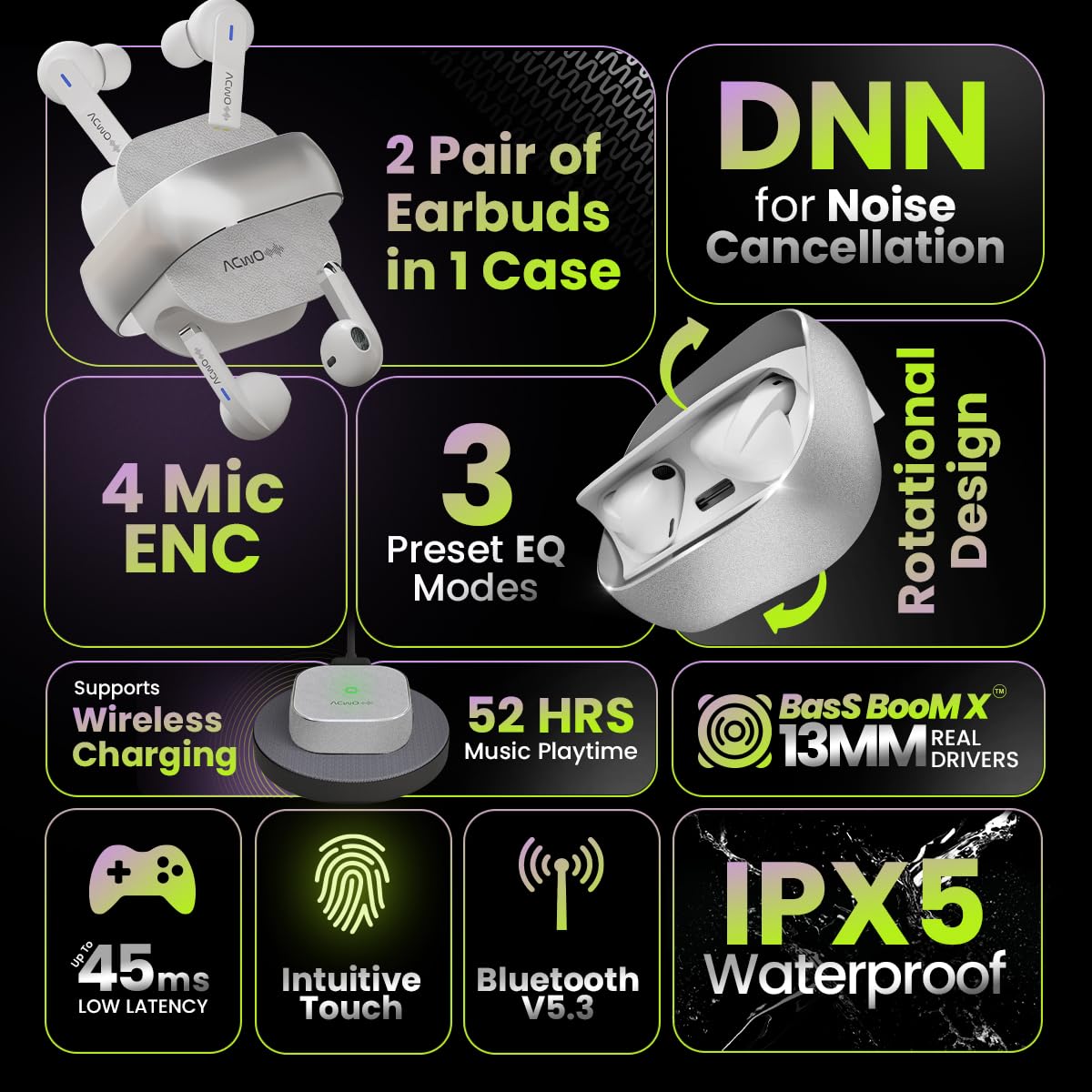
Image: Summary of ACwO DwOTS Fire key features.
8. Řešení problémů
8.1 Sluchátka se nespárují
- Ensure earbuds are charged and the case lid is open.
- Vypněte a zapněte Bluetooth na vašem zařízení.
- Zapomeňte na zařízení ze seznamu Bluetooth a zkuste spárování znovu.
- Reset the earbuds (refer to the 'Scan Me Card' for specific reset instructions).
8.2 Žádný zvuk nebo nízká hlasitost
- Zkontrolujte úroveň hlasitosti na zařízení i ve sluchátkách.
- Ujistěte se, že máte sluchátka správně nasazená v uších.
- Očistěte reproduktory sluchátek a nabíjecí kontakty od nečistot.
- Znovu připojte sluchátka k zařízení.
8.3 Problémy s nabíjením
- Ujistěte se, že je nabíjecí kabel bezpečně připojen k pouzdru i ke zdroji napájení.
- If using wireless charging, ensure the case is correctly placed on a compatible wireless charging pad.
- Check for any obstructions on the charging contacts of the earbuds and inside the case.
- Zkuste jiný nabíjecí kabel nebo napájecí adaptér.
9. Záruka a podpora
The ACwO DwOTS Fire earbuds come with a standard brand warranty. Please refer to the included Warranty Card for specific terms and conditions.
Zákaznická podpora:
For any queries, technical assistance, or warranty claims, please contact ACwO customer support:
- E-mail: help@acwo.com
- Telefon: +91 9320420001
- Výrobce: ACWO LIFESTYLE PRIVATE LIMITED, Borivali, Mumbai, Maharashtra - 400092, India


