Zavedení
The Baseus Spacemate Series 11-in-1 Docking Station is a versatile and compact solution designed to expand the connectivity of your laptop or compatible device. This docking station transforms a single USB-C port into a comprehensive workstation, supporting multiple displays, high-speed data transfer, network connectivity, and power delivery.
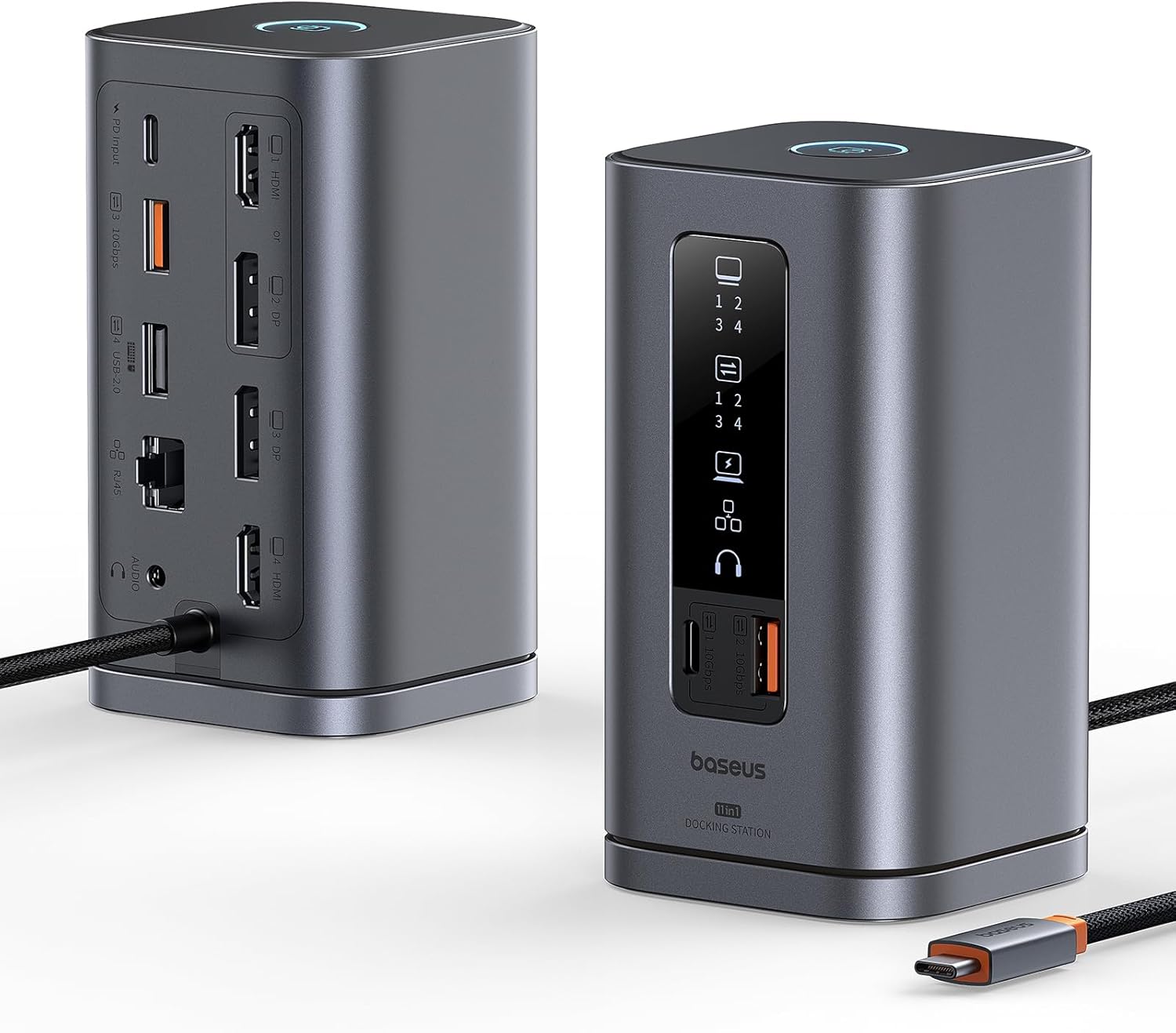
Image: The Baseus Spacemate Series 11-in-1 Docking Station, showcasing its compact vertical design and various ports.
Klíčové vlastnosti
- 11-in-1 Multifunction Expansion: Equipped with a comprehensive array of ports to meet diverse connectivity needs.
- Podpora tří displejů: Extends your screen to up to three external monitors via HDMI and DisplayPort, supporting stunning 4K resolution for enhanced multitasking.
- 100W napájení: Provides up to 100W of power to charge your laptop while using the docking station (power adapter not included).
- Vysokorychlostní přenos dat: Features USB-C and USB-A ports with up to 10Gbps data transfer speeds for rapid file převody.
- Gigabitový Ethernet: Ensures a stable and fast wired network connection up to 1Gbps.
- Inteligentní digitální displej: An intelligent LED display clearly indicates the operational status of each interface.
- Screen Lock Button: A convenient button to quickly lock your screen, protecting confidential information.
- Prostorově úsporný design: Unique vertical design with a magnetic base helps organize your desktop.

Image: Detailed diagram illustrating the 11-in-1 port expansion of the Baseus Spacemate Docking Station, including HDMI, DisplayPort, USB-A, USB-C, Ethernet, and audio ports.
Průvodce nastavením
- Připojení napájení: Connect a 100W PD charger (not included) and cable to the PD input port of the docking station to ensure stable performance for all ports.
- Připojení hostitele: Connect the integrated USB-C cable from the docking station to a compatible USB-C port on your laptop or host device.
- Připojení monitoru: Connect your external monitors to the available HDMI and DisplayPort outputs on the docking station. The docking station supports up to three external displays.
- Periferní připojení: Connect your USB devices (keyboards, mice, external drives) to the USB-A and USB-C data ports.
- Internetové připojení: For a stable wired internet connection, connect an Ethernet cable to the Gigabit Ethernet port.
- Audio připojení: If desired, connect headphones or speakers to the 3.5mm audio input/output jack.

Image: A visual comparison showing a cluttered desk before using the docking station and an organized desk after integrating the Baseus Spacemate Docking Station, highlighting its space-saving benefits.
Návod k obsluze
Režimy zobrazení
Dokovací stanice podporuje různé konfigurace displeje v závislosti na vašem operačním systému.

Image: A user working with a laptop connected to the Baseus Spacemate Docking Station, driving two external monitors for an efficient triple display setup.
Windows MST (Multi-Stream Transport) Mode
Windows systems support MST triple display, allowing for extended desktop across multiple monitors.
| Režim zobrazení | HDMI 1 / DP 2 | DP 3 | HDMI 4 |
|---|---|---|---|
| Jeden displej | 3840x2160 při 60 Hz | 3840x2160 při 60 Hz | 3840x2160 při 60 Hz |
| Duální displej | 3840x2160 při 60 Hz | 3840x2160 při 60 Hz | 3840x2160 při 60 Hz |
| Triple Display | 3840x2160 při 30 Hz | 3840x2160 při 30 Hz | 3840x2160 při 30 Hz |
| Režim zobrazení | HDMI 1 / DP 2 | DP 3 | HDMI 4 |
|---|---|---|---|
| Jeden displej | 3840x2160 při 60 Hz | 3840x2160 při 60 Hz | 3840x2160 při 60 Hz |
| Duální displej | 2560x1440 při 60 Hz | 2560x1440 při 60 Hz | 2560x1440 při 60 Hz |
| Triple Display | 1920x1080 při 60 Hz | 1920x1080 při 60 Hz | 1920x1080 při 60 Hz |
| Režim zobrazení | HDMI 1 / DP 2 | DP 3 | HDMI 4 |
|---|---|---|---|
| Jeden displej | 3840x2160 při 30 Hz | 3840x2160 při 30 Hz | 3840x2160 při 30 Hz |
| Duální displej | 1920x1080 při 60 Hz | 1920x1080 při 60 Hz | 1920x1080 při 60 Hz |
| Triple Display | Insufficient bandwidth may result in low resolution in triple display. | ||
MacOS Display Mode
MacOS does not support MST triple display. It typically supports extended display on one external monitor and mirrored display on others.

Image: A MacOS laptop connected to the Baseus Spacemate Docking Station, demonstrating how external monitors are typically mirrored or extended in a limited fashion due to MacOS MST limitations.
Funkce zámku obrazovky
The docking station features a dedicated button for screen locking. This function helps protect your privacy and sensitive information by quickly turning off connected displays.
- Pro systémy Windows: Press the screen lock button once.
- For MacOS Systems: Press the screen lock button twice.

Image: A hand pressing the screen lock button on the Baseus Spacemate Docking Station, with a laptop and external monitor in the background, illustrating the ease of activating the screen lock feature.
Inteligentní digitální displej
The front panel of the docking station features an intelligent LED display that provides real-time status of connected ports and functions.

Obrázek: Detailní záběr view of the Baseus Spacemate Docking Station's smart digital display, showing various icons that light up to indicate the active status of connected devices and ports.
Údržba
- Čištění: Use a soft, dry cloth to clean the surface of the docking station. Avoid using liquid cleaners or abrasive materials.
- Skladování: Dokovací stanici skladujte na chladném a suchém místě mimo dosah přímého slunečního záření a extrémních teplot.
- Zacházení: S přístrojem zacházejte opatrně. Zabraňte jeho pádu nebo silným nárazům.
- Správa kabelů: Ensure cables are not excessively bent or tangled to prevent damage to the ports or cables themselves.
Odstraňování problémů
- Žádný výstup na displej:
- Ensure the docking station is properly connected to your laptop's USB-C port.
- Verify that the external monitors are powered on and set to the correct input source.
- Zkontrolujte všechny kabely displeje (HDMI, DisplayPort), zda jsou bezpečně připojeny.
- Restartujte notebook a znovu připojte dokovací stanici.
- Ujistěte se, že máte aktuální ovladače grafické karty vašeho notebooku.
- Intermittent Connection/Flickering Display:
- Ensure a 100W PD charger is connected to the docking station's PD input port to provide sufficient power.
- Reduce the number of connected peripherals if the issue persists.
- Try different display cables.
- USB porty nefungují:
- Ujistěte se, že dokovací stanice je dostatečně napájena.
- Zkuste připojit zařízení USB k jinému portu na dokovací stanici.
- Test the USB device directly on your laptop to confirm it is functional.
- Problémy s ethernetovým připojením:
- Ověřte, zda je ethernetový kabel bezpečně připojen k dokovací stanici i k routeru/modemu.
- Check your network settings on your laptop.
- Ujistěte se, že váš router/modem funguje správně.
- Screen Lock Button Not Responding:
- Ensure the docking station is actively connected to your laptop.
- Confirm you are pressing the button the correct number of times for your operating system (once for Windows, twice for MacOS).
Specifikace
| Funkce | Detail |
|---|---|
| Číslo modelu | Spacemate WIN |
| Značka | Baseus |
| Barva | Šedá |
| Celkový počet portů USB | 5 (1x USB-C 10Gbps, 2x USB-A 10Gbps, 1x USB-A 480Mbps, 1x USB-A 2.0) |
| Rychlost přenosu dat | Až 10 Gbps (USB 3.2 Gen 2) |
| Video výstup | 2x HDMI (4K@60Hz), 2x DisplayPort (4K@60Hz) |
| Ethernetový port | 1x gigabitový ethernet (1 Gb/s) |
| Dodávka energie (PD) | Up to 100W (Input) |
| Audio port | 1x 3.5mm Audio In/Out |
| Rozměry (D x Š x V) | 6.6 x 6.6 x 12.3 cm (přibližně 2.6 x 2.6 x 4.8 palce) |
| Hmotnost | 485 gramů (přibližně 1.07 libry) |
| Kompatibilita operačního systému | macOS, Windows, Android |
Kompatibilní zařízení
The Baseus Spacemate Series 11-in-1 Docking Station is widely compatible with various devices that support USB-C Alt Mode (DisplayPort Alternate Mode) and Power Delivery. Compatible devices include, but are not limited to:
- Notebooky: ASUS ROG Ally / Steam Deck / MacBook / MacBook Pro (2021/2020/2019/2018); MacBook Air 2018-2020, Mac mini 2018-2020, Dell XPS 9380/ XPS 13 9365/ XPS 15, Dell Latitude E7370/ E7470/ E7480/ Dell Latitude 13 7000/ E7370L/ New XPS 15 i7, Lenovo Yoga 720-13IKB/Yoga 910; Yoga15 Thinkpad Ultrabook Pro; Thinkpad E590/ Thinkpad P72/ Lenovo C930, Microsoft Surface Book 2, Surface Laptop 3; Surface Pro 7 / Surface Pro 8 / Surface Go, HP Spectre Laptop 13-af001TU/ Spectre x360 13t; Elitebook 840 G5 series/Elitebook x360 103.0 G3, ASUS Zenbook UX330UA/ Zenbook Flip ux370u, Acer Aspire 5 2019; D17w3 Aspire c24-865.
- Tablety: iPad Pro/ Air 2018/2020, iPad mini 6, Galaxy Tab S5e/ Galaxy Tab S4.
- chytré telefony: Samsung Galaxy S10+/ S10/ S9+/ S9/ S8+/ S8 Plus; Note 10/ 9/ 8 kg.

Image: A visual representation of the wide range of compatible devices, including various laptop brands, tablets, and smartphones, that can be used with the Baseus Spacemate Docking Station.
Záruka a podpora
Specific warranty details and direct support contact information are not provided within this manual. For warranty claims, technical support, or further inquiries, please refer to the official Baseus website or contact the retailer from whom you purchased the product. Keep your proof of purchase for any warranty-related services.


