1. Konec produktuview
The OWON DGE1030 is a versatile waveform generator designed for various electronic testing and measurement applications. It features a 30MHz bandwidth, 125MSa/s sampling rate, and 14-bit vertical resolution, making it suitable for generating precise and stable signals. The device includes a 3.6-inch TFT LCD display for clear waveform observation and an intuitive interface for ease of use.

Obrázek 1.1: Přední strana view of the OWON DGE1030 Waveform Generator, showing the display, control knobs, and keypad.
Klíčové vlastnosti:
- Waveform Generation: Šířka pásma 30 MHz, rychlost 125 MSa/s v reálném časeampling rate, 8K record depth, 14-bit vertical resolution.
- Extensive Waveform Library: Includes 5 basic waveforms and 160 built-in arbitrary waveforms (e.g., exponential rise, fall, sin(x)/x, step wave).
- Uživatelsky přívětivý displej: 3.6-inch TFT LCD for clear waveform visualization and intuitive function settings.
- Multiple Modulation Modes: Supports AM, FM, PM, and FSK modulation.
- Pokročilé funkce: Features sweep and burst functions.
- Skladování: Capable of storing 16 digital arbitrary waveforms.
- Dálkové ovládání: Compatible with PC remote control for enhanced operation.
- Kompaktní design: Ultra-thin body for portability and efficient use of workspace.
Video 1.1: Overview of the OWON DGE1030 Waveform Generator, highlighting its compact size, display, and various functions such as high-frequency stable output, arbitrary waveforms, modulation, sweep, burst, and storage capabilities. The video also demonstrates PC remote operation.
2. Nastavení a připojení
2.1. Rozbalení zařízení
Carefully unpack the OWON DGE1030 Waveform Generator and verify that all components are present. Retain the packaging for future transport or storage.
Zahrnuté komponenty:
- OWON DGE1030 Host Machine
- BNC to Alligator Clip Cable
- USB kabel
- USB to DC Cord
- Napájecí adaptér
- Rychlý průvodce
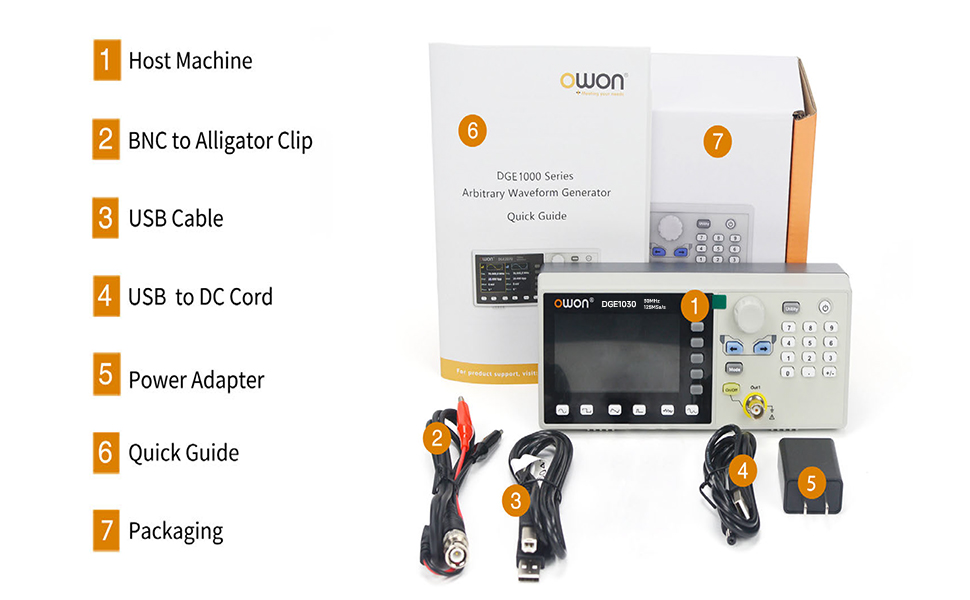
Figure 2.1: Contents of the OWON DGE1030 package, showing the main unit, BNC to alligator clip cable, USB cable, USB to DC cord, power adapter, and quick guide.
2.2. Připojení napájení
Connect the provided power adapter to the DC 5V power connector on the rear panel of the DGE1030. Plug the power adapter into a suitable electrical outlet. Ensure the power source meets the device's voltage requirements (100V-240V, 50/60Hz).

Figure 2.2: Rear panel connections, indicating the USB device interface and the DC 5V power connector.
2.3. Výstupní připojení
Connect the BNC to alligator clip cable to the 'Out1' BNC connector on the front panel. Connect the alligator clips to your test circuit or device. Ensure proper polarity and secure connections to avoid damage or inaccurate readings.
3. Základní obsluha
3.1. Uživatelské rozhraní Overview
The DGE1030 features a 3.6-inch TFT LCD display and a clear control panel. The display shows waveform parameters, settings, and output status. The control panel includes a numeric keypad, navigation buttons, a rotary knob, and dedicated function buttons for waveform selection and output control.

Figure 3.1: Front panel layout, identifying the 3.6-inch TFT LCD, function setting area, waveform switching area, and channel output control area.
3.2. Zapnutí/vypnutí
Stiskněte tlačítko Utility a poté stiskněte Zapnuto/Vypnuto button located on the top right of the keypad to power on the device. To power off, repeat the same sequence.
3.3. Výběr tvaru vlny
Use the dedicated waveform buttons (Sine, Square, Pulse, Ramp, Noise, Arbitrary) located below the display to select the desired waveform type. The selected waveform will be displayed on the screen.
3.4. Nastavení parametrů
After selecting a waveform, use the rotary knob and navigation buttons to adjust parameters such as frequency, amplitude, offset, and phase. The display will show the current values. Use the numeric keypad for precise value entry.

Figure 3.2: Display showing sine wave parameter settings, including frequency, amplitude, offset, and phase.
4. Pokročilé funkce
4.1. Arbitrary Waveforms
The DGE1030 includes 160 built-in arbitrary waveforms, offering a wide range of complex signal generation capabilities. To access these, press the Arb waveform button and navigate through the available options.
Figure 4.1: Arbitrary waveform selection menu, displaying various built-in arbitrary waveform types.
4.2. Modulation Modes (AM, FM, PM, FSK)
Zařízení podporuje Amplitude Modulation (AM), Frequency Modulation (FM), Phase Modulation (PM), and Frequency Shift Keying (FSK). To select a modulation mode, press the Režim button and choose the desired option from the menu. Adjust modulation parameters as needed.
4.3. Sweep Function
The sweep function allows the generator to continuously vary its output frequency over a specified range. Both linear and logarithmic sweep types are available. Access the sweep settings via the Režim button and configure the start frequency, stop frequency, and sweep time.

Figure 4.2: Display showing available modulation modes and sweep function parameters.
4.4. Burst Function
The burst function generates a specific number of waveform cycles or a gated burst. This is useful for testing transient responses in circuits. Configure the burst period, number of cycles, or gated mode through the Režim menu.

Figure 4.3: Display showing burst function settings and the arbitrary waveform storage menu.
4.5. Dálkové ovládání
The DGE1030 supports PC remote control via its USB device interface. This allows for advanced control and programming of the waveform generator from a computer, using SCPI commands. Connect the device to your PC using the provided USB cable.

Figure 4.4: The DGE1030 connected to a PC for remote operation, showing waveform control software.
5. Technické specifikace
The following table details the technical specifications for the OWON DGE1030 Waveform Generator.
| Parametr | DGE1030 |
|---|---|
| Kanál | 1 |
| Frekvenční výstup | 30 MHz |
| Sample Rate | 125MSa / s |
| Vertikální rozlišení | 14 bitů |
| Průběh | |
| Standardní průběh | Sinus, čtverec, puls, Ramp, Hluk |
| Libovolný tvar vlny | Exponential rise, exponential fall, sin(x)/x, step wave, and others; total 160 built-in waveforms, and user-defined arbitrary waveform |
| Frekvence | |
| Sinus | 1µHz - 30MHz |
| Náměstí | 1µHz - 15MHz |
| Puls | 1µHz - 15MHz |
| Ramp | 1µHz - 1MHz |
| Hluk | 20MHz (-3dB, typical) |
| Libovolný tvar vlny | 1µHz - 10MHz |
| Frekvenční rozlišení | 1 µHz or 7 significant figures |
| Frekvenční stabilita | ±30 ppm at 0~40°C |
| Frequency Aging Rate | ±30 ppm per year |
| Libovolný | |
| Délka křivky | 2 - 8K points |
| Sample Rate | 125MSa / s |
| Amplituda | |
| Into 50Ω Load | 1mVpp - 10Vpp (≤10MHz) 1mVpp - 4Vpp (>10MHz) |
| DC Offset Range (AD+DC) | high resistance: ±(10 Vpk - Amplitude Vpp/2) (≤10MHz); ±4Vpk - Amplitude Vpp/2) (>10MHz) 50Ω: ±(5 Vpk - Amplitude Vpp/2) (≤10MHz); ±(2 Vpk - Amplitude Vpp/2) (>10MHz) |
| DC Offset Resolution | 1mV or 4 digits |
| Impedance zátěže | 50Ω (typické) |
| DC Offset Accuracy | ±(1% of [setting] + 1 mV + Amplitude Vpp * 0.5%) |
| Modulace | |
| Typ | AM, FM, PM, FSK, Sweep, Burst |
| Internal Modulation Frequency | 2 MHz až 100 kHz |
| Zametat | |
| Dopravce | Sine, rectangular wave, ramp wave, arbitrary (except DC) |
| Minimum / Maximum Starting Frequency | 2mHz (minimum) / maximum frequency of corresponding carrier |
| Minimum / Maximum Termination Frequency | 2mHz (minimum) / maximum frequency of corresponding carrier |
| Spouštěcí zdroj | Internal, Manual |
| Prasknout | |
| Průběh | Sinusová vlna, obdélníková vlna, ramp wave, pulse wave and arbitrary wave (Except DC) |
| Typy | N-cyklus |
| Spouštěcí zdroj | Internal, Manual |
| Nosná frekvence | 1µHz ≤ Offset ≤ Maximum frequency of corresponding carrier /2 |
| Vstup / výstup | |
| Zobrazit | 3.6-inch TFT LCD with resolution 480 x 272 |
| Komunikační rozhraní | Zařízení USB |
| Mechanické specifikace | |
| Rozměr (Š×V×H) | 200 mm x 68.5 mm x 73.6 mm |
| Hmotnost (bez balení) | 0.5 kg |
6. Řešení problémů
This section provides solutions to common issues you might encounter with your OWON DGE1030 Waveform Generator.
- Bez napájení:
- Ujistěte se, že je napájecí adaptér bezpečně připojen k zařízení a k funkční zásuvce.
- Ověřte funkčnost elektrické zásuvky zapojením jiného zařízení.
- Zkontrolujte napájecí adaptér, zda nevykazuje viditelné poškození.
- Žádný výstupní signál:
- Confirm that the 'Out1' button is illuminated, indicating the output is enabled.
- Check the BNC cable and alligator clip connections for proper contact.
- Verify the waveform parameters (frequency, amplitude, offset) are set to appropriate values for your application.
- Ensure the load impedance matches the generator's output impedance setting (50Ω or High Z).
- Nesprávné zobrazení křivky:
- Check the selected waveform type and its parameters on the display.
- Ensure the display settings (e.g., vertical scale, horizontal scale) are appropriate for the signal being generated.
- PC Remote Control Not Working:
- Ensure the USB cable is correctly connected between the DGE1030 and your PC.
- Ověřte, zda jsou v počítači nainstalovány potřebné ovladače.
- Check the remote control software settings and communication port.
If you continue to experience issues, refer to the full user manual or contact OWON customer support.
7. Bezpečnostní informace
Abyste zajistili bezpečný provoz a zabránili poškození zařízení nebo zranění, dodržujte prosím následující bezpečnostní opatření:
- Vždy používejte dodaný napájecí adaptér a kabely.
- Neprovozujte zařízení ve vlhku nebo damp podmínky.
- Nevystavujte zařízení extrémním teplotám nebo přímému slunečnímu záření.
- Neotevírejte zařízení casing; uvnitř nejsou žádné součásti, které by mohl uživatel opravit. Veškerý servis svěřte kvalifikovanému personálu.
- Zajistěte dostatečné větrání kolem zařízení, aby nedošlo k přehřátí.
- Before making any connections, ensure that the device and the circuit under test are powered off.
- Neaplikujte voltagproudy nebo proudy překračující specifikované maximální jmenovité hodnoty.
8. Záruka a podpora
The OWON DGE1030 Waveform Generator comes with a standard manufacturer's warranty. For detailed warranty terms and conditions, please refer to the warranty card included with your product or visit the official OWON webmísto.
For technical support, service, or inquiries, please contact OWON customer service or your local distributor. You can find more information and contact details on the OWON Brand Store.


