1. Úvod
Thank you for choosing the EDUP Wireless HDMI Transmitter and Receiver Kit. This device provides a convenient and efficient way to wirelessly transmit high-definition video and audio signals from your source device to a display, eliminating the need for long, cumbersome HDMI cables. Designed for ease of use, it offers a true plug-and-play experience without requiring any software installation or complex configurations.
Enjoy seamless 1080P HD video and high-fidelity audio streaming with minimal latency, making it perfect for a variety of applications including home entertainment, business presentations, and educational environments.
2. Konec produktuview
2.1 Obsah balení
- 1 x EDUP Wireless HDMI Transmitter
- 1 x EDUP Wireless HDMI Receiver
- 2 x USB kabel
- 1 x Uživatelská příručka
2.2 Komponenty
The kit consists of two main units: the Transmitter (TX) and the Receiver (RX). Both units are compact and designed for easy integration into your existing setup.

Image: The Transmitter (TX) and Receiver (RX) units.

Image: Wireless HDMI setup demonstrating casting to a large screen.
3. Průvodce nastavením
The EDUP Wireless HDMI Kit is designed for true plug-and-play functionality, requiring no app installations, Bluetooth pairing, Wi-Fi configuration, or driver installations. The units are pre-paired from the factory for immediate use.
3.1 Postup instalace
- Connect Transmitter (TX) to Power: Plug the USB-C power cable into the TX unit and connect the USB-A end to a power source (e.g., laptop USB port, USB wall adapter).
- Connect Transmitter (TX) to Source Device: Plug the HDMI connector of the TX unit into the HDMI output port of your source device (e.g., laptop, PC, game console, camera).
- Connect Receiver (RX) to Power: Plug the USB-C power cable into the RX unit and connect the USB-A end to a power source (e.g., display USB port, USB wall adapter).
- Connect Receiver (RX) to Display Device: Plug the HDMI connector of the RX unit into an available HDMI input port on your display device (e.g., monitor, projector, HDTV).
- Čekání na připojení: The units will automatically connect within 10-15 seconds. Once connected, your source device's screen will be mirrored or extended to the display.

Image: Visual guide for connecting the Transmitter (TX) and Receiver (RX) units.
3.2 Kompatibilita
The EDUP Wireless HDMI Kit is compatible with a wide range of HDMI-enabled devices and operating systems, including Android, Windows, iOS, and Mac OS. For smartphones, an extra interface adapter (not included) may be required.
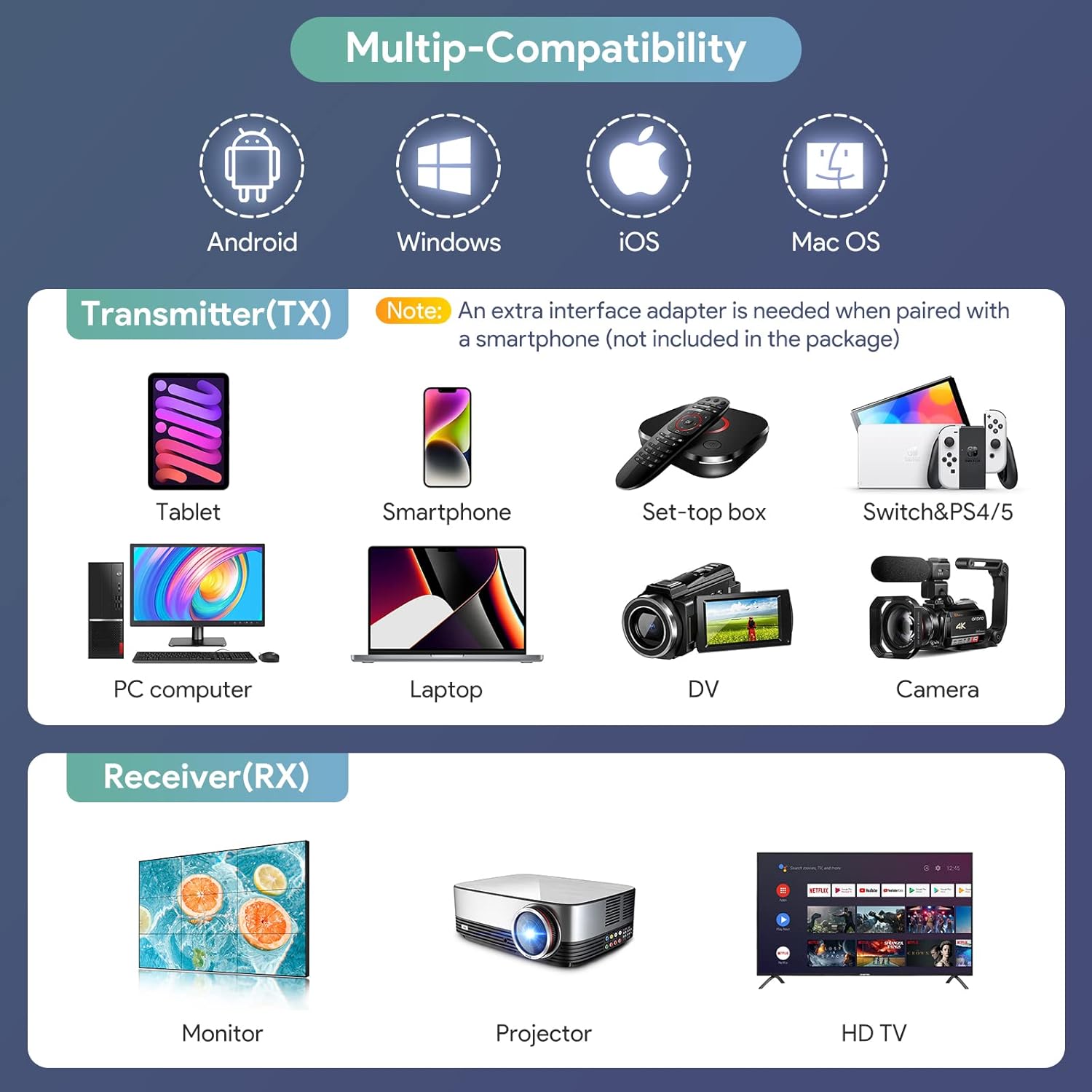
Image: Chart illustrating various compatible devices for both Transmitter (TX) and Receiver (RX).
4. Návod k obsluze
The device supports both mirroring and extended display modes, adapting to your multimedia needs.
4.1 Zrcadlový režim
In mirror mode, the display shows the exact same content as your source device's screen. This is ideal for presentations, sharing videos, or displaying content on a larger screen.
4.2 Extended Mode
In extended mode, the display acts as a secondary monitor, allowing you to extend your desktop space. This is useful for multitasking, working with multiple applications, or having different content on each screen. (Requires your computer to support extend mode).

Image: Illustration of Mirror Mode and Extend Mode for flexible display options.
4.3 Multiple Transmitters (Optional)
This wireless HDMI kit supports connecting one receiver to up to eight transmitters simultaneously. You can switch between different transmitting sources by simply clicking the 'PAIR' button on the desired TX unit.

Image: Diagram illustrating the connection of one Receiver (RX) to multiple Transmitters (TXs).
5. Údržba
- Udržujte zařízení čisté a bez prachu. K čištění používejte měkký, suchý hadřík.
- Nevystavujte zařízení extrémním teplotám, vlhkosti nebo přímému slunečnímu záření.
- Nepokoušejte se jednotky rozebírat ani opravovat sami, jinak ztratíte platnost záruky.
- Ensure proper ventilation around the units during operation to prevent overheating.
6. Řešení problémů
- Žádný signál/Černá obrazovka:
- Ensure both TX and RX units are properly powered and their indicator lights are on.
- Verify that the HDMI cables are securely connected to both the source and display devices.
- Check if the display's input source is set to the correct HDMI port.
- Try restarting both the source device and the wireless HDMI units.
- Intermittent Connection/Signal Drop:
- Zmenšete vzdálenost mezi jednotkami TX a RX.
- Minimalizujte překážky (stěny, nábytek) mezi jednotkami.
- Avoid interference from other wireless devices operating on 2.4Ghz/5Ghz frequencies.
- Ensure the external antenna on the receiver is properly positioned.
- High Latency/Lag:
- While the device boasts low latency (0.1s), environmental factors or heavy network traffic can affect performance. Try to minimize other wireless activity in the area.
- Ensure both units have a clear line of sight if possible.

Image: Visual representation of the ultra-low 0.1s delay for smooth transmission.

Obrázek: Detail view of the advanced 5G chip, highlighting the core technology.
7. Specifikace
| Funkce | Popis |
|---|---|
| Název značky | EDUP |
| Číslo modelu | EH-WD9905 |
| Hmotnost položky | 8.4 unce |
| Rozměry produktu | 7.76 x 1.77 x 0.75 palce |
| Barva | Černý |
| Technologie připojení | Wi-Fi, HDMI |
| Typ konektoru | HDMI |
| Rezoluce | 1080p (Supports 720p) |
| Bezdrátové Dosah | Up to 165ft (50m) in open spaces; 32ft (10m) through walls/floors |
| Latence | 0.1s |
8. Záruka a podpora
EDUP provides a 3-year manufacturer replacement warranty for this product. Additionally, a 45-day no-questions-asked return policy is offered.
For any questions or support needs, please feel free to contact us via Amazon message. Our customer service team is ready to assist you.


