Mount-It! Universal Tablet Stand Instruction Manual
Model: MI-3881BLK
1. Úvod
This manual provides comprehensive instructions for the assembly, operation, and maintenance of your Mount-It! Universal Tablet Stand (Model MI-3881BLK). This stand is designed to securely hold tablets ranging from 9.7 inches to 13 inches in screen size, offering versatile viewing options and enhanced security for various environments.
Key features include a universal enclosure compatible with a wide range of tablets, an anti-theft design suitable for retail and public spaces, 90-degree rotation for portrait or landscape viewing, and 180-degree tilt adjustment. Constructed from durable cold-rolled steel, the stand ensures stability and longevity.
2. Obsah balení
Před zahájením montáže se prosím ujistěte, že jsou všechny komponenty přítomny:
- Tablet Mount (includes stand base, column, and tablet enclosure)
- Hex Wrenches (for assembly and adjustments)
- Mounting Hardware (screws, plugs for freestanding option, grommet option hardware)
3. Nastavení a instalace
Follow these steps to assemble and install your tablet stand:
3.1. Montáž základny
- Unscrew the bolts located underneath the column using the provided hex wrench.
- Attach the column to the larger base, aligning the holes. Secure it using the bolts and hex wrench.
- For a freestanding setup, insert the provided rubber plugs into the screw holes on the base.
- Alternatively, for enhanced security, the base can be bolted down to a surface or installed using the grommet option.
The image below illustrates the stand's components and the bolted base option.

Obrázek 1: Zadní view of the tablet stand with base and enclosure.
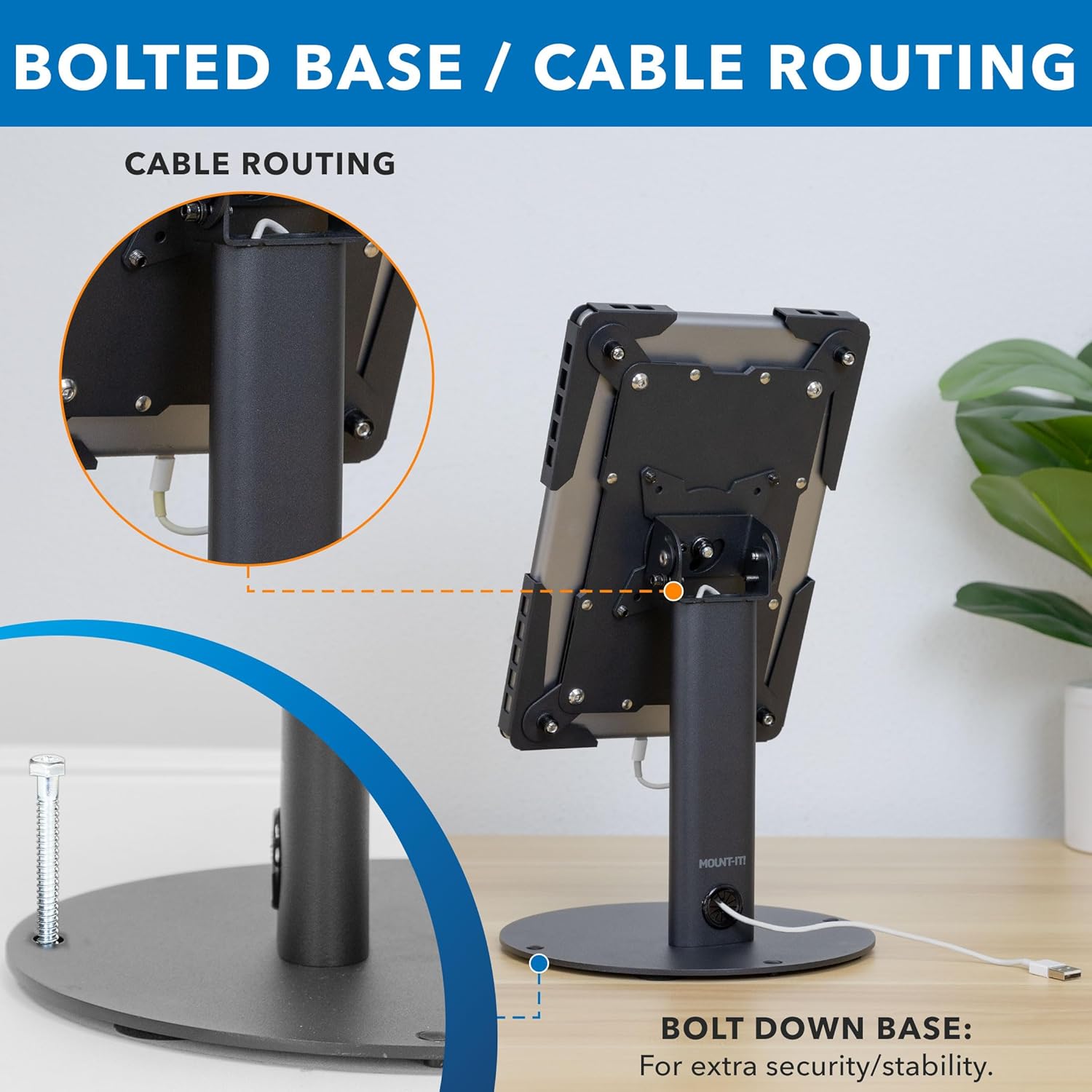
Figure 2: Bolted base and cable routing feature.

Figure 3: Grommet installation option.
3.2. Tablet Enclosure Adjustment
- Loosen the bolts on the back of the tablet enclosure using the hex wrench.
- Expand the enclosure to a size slightly larger than your tablet.
- Insert your tablet into the enclosure.
- Adjust the sides of the enclosure until all four corners snugly hold the tablet.
- Tighten the bolts on the back of the enclosure to secure the tablet in place.
The stand is compatible with tablets from 9.7" to 13" screen size. The image below provides detailed dimensions for tablet fit.

Figure 4: Tablet size compatibility and enclosure dimensions.
3.3. Správa kabelů
For a tidy setup, utilize the integrated cable management system:
- Run your tablet's charging cable through the cable pass-through hole at the base of the column.
- Pass the cable up through the column and out the top opening.
- Plug the cable into your tablet.
3.4. Instalační videonávod
Vizuální návod k instalaci naleznete v oficiálním instalačním videu:
Video 1: Mount-It! Universal Tablet Stand MI-3881 Installation Guide. This video demonstrates step-by-step assembly and setup of the tablet stand.
4. Návod k obsluze
The Mount-It! Universal Tablet Stand offers flexible viewmožnosti:
4.1. Nastavení sklonu
The tablet enclosure can be tilted up to 180 degrees to achieve the desired viewing angle. To adjust the tilt, loosen the joint bolt behind the tablet case using the hex wrench, set the desired angle, and then tighten the bolt to secure it.
4.2. Rotace
The tablet enclosure can be rotated 90 degrees to switch between portrait and landscape orientation. Simply rotate the tablet to your preferred orientation.
The image below illustrates the tilt and rotation capabilities of the stand.

Figure 5: Fully adjustable tilt and rotation features.
4.3. Konec produktuview Video
Na generálkuview of the product's features and usage, please watch the official product video:
Video 2: Universal Tablet Countertop Stand - Black or White. This video highlights the key features and versatility of the tablet stand.
5. Údržba
To ensure the longevity and optimal performance of your tablet stand:
- Regularly inspect all screws and bolts to ensure they are tight. Re-tighten as necessary.
- Stojan čistěte měkkým, suchým hadříkem. Nepoužívejte abrazivní čisticí prostředky ani rozpouštědla.
- Ensure the tablet enclosure is free from debris that could scratch your device.
6. Řešení problémů
If you encounter any issues with your tablet stand, please consider the following:
- Tablet not fitting securely: Ensure the enclosure bolts are sufficiently loosened before inserting the tablet, and then tightened firmly once the tablet is in place. Verify your tablet's size is within the 9.7" to 13" range.
- Stojan se zdá být nestabilní: Confirm that the base is securely attached to the column. If using the freestanding option, ensure it is placed on a flat, stable surface. For maximum stability, consider using the bolted-down or grommet installation options.
- Difficulty adjusting tilt or rotation: Loosen the joint bolts slightly with the hex wrench before attempting to adjust the angle or rotation. Re-tighten once the desired position is achieved.
- Potential camera obstruction: When installing tablets, especially those with rear cameras, carefully position the device within the enclosure to avoid any obstruction or damage to the camera lens from the enclosure's adjustable components.
7. Specifikace
| Funkce | Specifikace |
|---|---|
| Číslo modelu | MI-3881BLK |
| Kompatibilní zařízení | iPad, iPad Air, Samsung, Android Tablets (9.7" to 13" screen size) |
| Materiál | Ocel válcovaná za studena |
| Barva | Černý |
| Nastavení sklonu | 180 stupňů |
| Otáčení | 90 degrees (Portrait to Landscape) |
| Hmotnost položky | 5.39 libry |
| Rozměry balení | 12 x 8.5 x 3.5 palce |
8. Záruka a podpora
This Mount-It! countertop tablet kiosk comes with a Doživotní záruka. Our knowledgeable and responsive US-based customer support team is available to answer any questions you may have during standard business hours.
For technical assistance, warranty claims, or general inquiries, please contact Mount-It! customer support through the official webweb nebo vaše nákupní platforma.


