1. Přesview
1.1 Popis produktu
The PNI GreenHouse SC1800C PRO Solar Inverter is a central component for small off-grid solar systems, suitable for areas with or without grid electricity. It provides a continuous output of 3000W with a pure sine wave, making it suitable for various household lighting installations and other small electronic motors, including refrigerators, pumps, tools, and charging devices for phones, laptops, and TVs.
1.2 Klíčové vlastnosti
- Maximum photovoltaic panel input power: 2000 W.
- Maximální vstupní stejnosměrný objtage from photovoltaic panels: 30 - 120 VDC (Vmp).
- Maximum solar charge current: 30 A input from panels, 60 A output to batteries.
- Solar charging efficiency: 98%.
- MPPT solar charger type.
- Jmenovitý výstupní objemtage: 230 V.
- Rated output power: 3000 W (under ideal conditions with proportional battery count and 100% charged batteries).
- Maximum apparent power: 6000 VA (peak, 0.5 seconds under ideal conditions).
- Výstupní objemtage waveform: Pure sine wave.
- Output signal frequency: 50, 60 Hz.
- Vstupní objemtage: 230 V AC.
- Grid connection for backup.
- Compatible with 24V batteries: AGM, lead-acid, gel, flooded lithium-ion.
- Minimum battery start voltage: 23 V (cold start voltagE).
- Integrated high-frequency inverter type (switching).
- Inverter efficiency: 90% ~ 93% (100% charged battery).
- Typical transfer time: 10 ms (UPS, VDE) 20 ms (APL).
- Line mode efficiency: > 95% (rated R load, fully charged battery).
- Hybrid operating modes: SBU – Solar/Battery/Utility, Solar Utility (UPS).
- AC charge voltage: 230 V.
- Maximum AC charge current: 30 A.
- Automatic switching: Solar - Batteries - Grid.
- Funkce úspory energie.
- Multiple protections.
- Multifunkční displej.
- Dedicated menu for advanced settings.
- Monitoring with PC software (USB cable included).
- Remote monitoring from mobile/PC (with optional WiFi USB dongle).
1.3 Obsah balení
- PNI GreenHouse SC1800C PRO Solar Inverter
- USB kabel
- Uživatelská příručka
- PNI Smart Dongle-WLAN (for WiFi monitoring)
2. Bezpečnostní informace
Před instalací a provozem si pečlivě přečtěte všechny pokyny a varování. Nedodržení těchto pokynů může vést k úrazu elektrickým proudem, požáru nebo vážnému zranění.
- Kvalifikovaný personál: Instalaci a údržbu musí provádět kvalifikovaný personál.
- Nebezpečí úrazu elektrickým proudem: Toto zařízení pracuje s vysokou hlasitostítagNeotevírejte casing unless specifically instructed.
- Bezpečnost baterie: Batteries can produce explosive gases. Ensure proper ventilation. Do not smoke or allow sparks or flames near batteries. Wear eye protection.
- Správné větrání: Měnič instalujte v dobře větraném prostoru, aby nedošlo k jeho přehřátí.
- Podmínky prostředí: Avoid exposure to rain, snow, spray, or any liquids. Operate within the specified temperature range (-26 °C to 80 °C).
- Základy: Ujistěte se, že je měnič řádně uzemněn v souladu s místními elektrotechnickými předpisy.
- Odpojit napájení: Always disconnect all power sources (solar, battery, AC grid) before performing any wiring or maintenance.
3. Komponenty produktu
3.1 PNI GreenHouse SC1800C PRO Solar Inverter

Obrázek 3.1: Přední strana view of the PNI GreenHouse SC1800C PRO Solar Inverter, showing the display and control buttons.

Obrázek 3.2: Zadní view of the PNI GreenHouse SC1800C PRO Solar Inverter, illustrating the various connection ports for solar panels, batteries, AC input, and AC output.
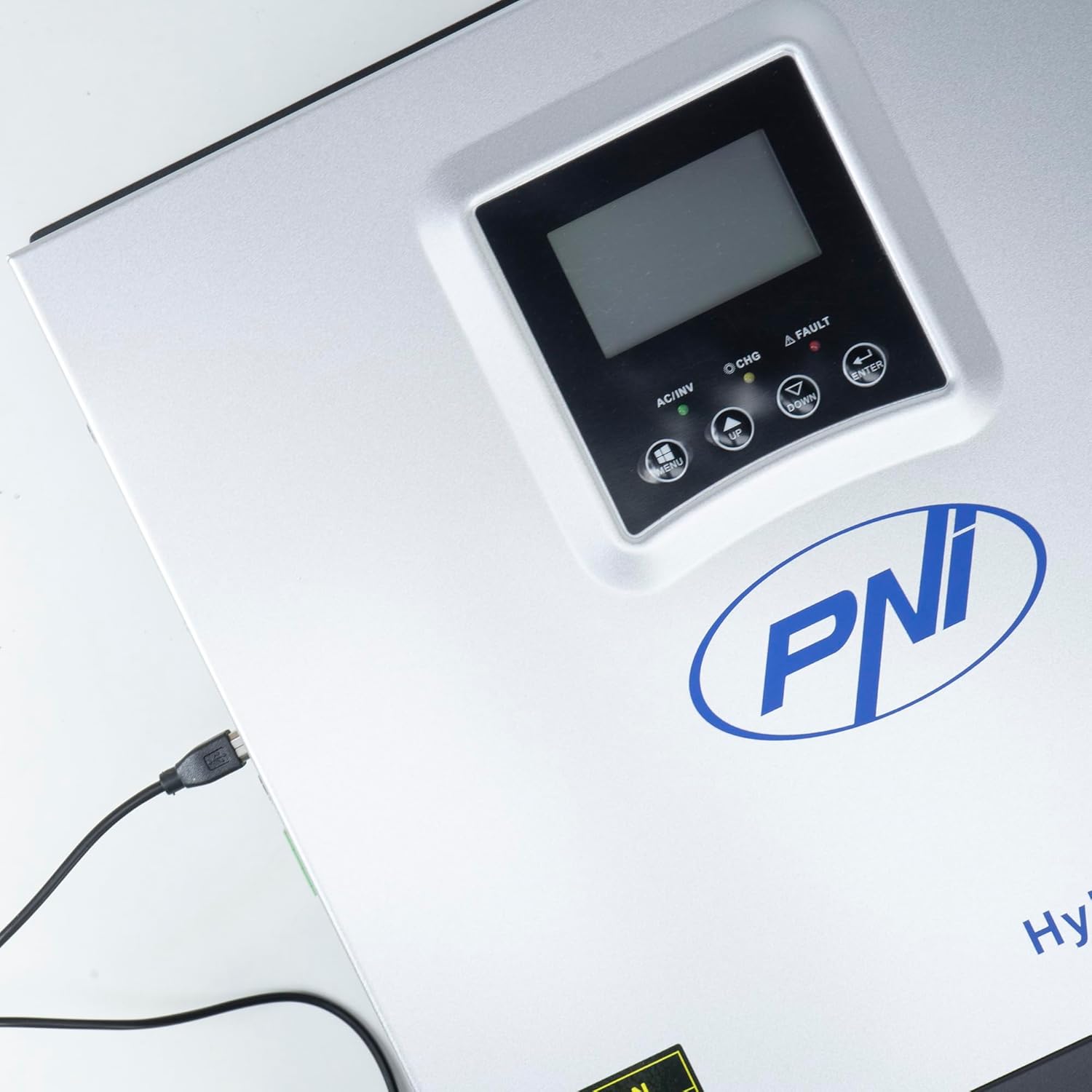
Figure 3.3: Close-up of the USB connection port on the inverter, used for PC monitoring.
3.2 PNI Smart Dongle-WLAN (Optional)

Figure 3.4: The PNI Smart Dongle-WLAN, an optional accessory for remote WiFi monitoring of the inverter.

Figure 3.5: The PNI Smart Dongle-WLAN connected to the inverter's dedicated port for WiFi communication.
4. Instalace a nastavení
4.1 Montáž na stěnu
The inverter is designed for wall mounting. Choose a location that is dry, well-ventilated, and protected from direct sunlight and moisture. Ensure sufficient clearance around the unit for proper airflow and heat dissipation. Use appropriate mounting hardware for your wall type.
4.2 Schéma připojení systému

Figure 4.1: Basic application diagram showing the connections between solar panels, utility grid, generator, inverter, battery, and home loads. Note: Generator, PV modules, WiFi module, and battery are not included with the inverter unless specified.
4.3 Zapojení kabeláže
Follow the diagram above and the labels on the inverter for correct wiring. Ensure all connections are secure and properly insulated. It is highly recommended that a qualified electrician performs all wiring.
- Připojení solárního panelu: Connect your solar panels to the designated PV input terminals. Observe correct polarity (positive to positive, negative to negative). The maximum DC input voltage je 120 V DC.
- Připojení baterie: Connect the 24V battery bank to the battery terminals. Ensure correct polarity. The inverter supports AGM, lead-acid, gel, and flooded lithium-ion batteries.
- Vstup střídavého proudu (síť/generátor): Connect the AC utility grid or a generator to the AC input terminals. This provides backup power and can charge batteries.
- AC výstup (zátěže): Connect your household loads to the AC output terminals.
4.4 Počáteční zapnutí
After all connections are made and verified:
- Zapněte jistič baterie.
- Turn on the solar panel breaker (if applicable).
- Turn on the AC input breaker (if connected to grid/generator).
- Turn on the inverter's power switch.
- Observe the display for status indicators and initial readings.
5. Provozní režimy
The PNI GreenHouse SC1800C PRO offers intelligent energy management with several configurable operating modes:
- Solar Priority Mode (SBU): In this mode, the inverter prioritizes power consumption from solar energy. If solar power is insufficient, it will draw from batteries. The utility grid acts as a backup.
- Režim priority baterie: The inverter prioritizes drawing power from the batteries. Solar energy will charge the batteries. The utility grid is used only when battery voltage klesne pod stanovenou prahovou hodnotu.
- Utility Priority Mode (UPS): This mode prioritizes power from the utility grid. Solar energy will charge the batteries. The inverter switches to battery power only when the grid is unavailable, functioning as an Uninterruptible Power Supply (UPS).
These modes can be configured via the inverter's multifunction display and dedicated menu for advanced settings.
5.1 Monitorování
The inverter supports monitoring through:
- PC Software (USB): Connect the inverter to a PC using the provided USB cable and dedicated software for detailed monitoring and analysis of parameters.
- Remote Monitoring (WiFi - Optional): With the optional PNI Smart Dongle-WLAN, you can monitor the inverter remotely via a mobile application or web rozhraní.
6. Údržba
Regular maintenance ensures optimal performance and longevity of your inverter. Always disconnect all power sources before performing any maintenance.
- Čištění: Pravidelně čistěte vnější povrch střídače suchým hadříkem. Ujistěte se, že větrací otvory jsou bez prachu a nečistot. Nepoužívejte tekuté čisticí prostředky.
- Kontroly připojení: Annually inspect all wiring connections (solar, battery, AC input/output) for tightness and signs of corrosion. Tighten any loose connections.
- Kontrola baterie: Pokud používáte olověné baterie, zkontrolujte hladinu elektrolytu a stav pólů podle pokynů výrobce baterie.
- Kontrola prostředí: Zajistěte, aby teplota a vlhkost vzduchu v instalačním prostředí zůstaly v rámci specifikovaného rozsahu.
7. Řešení problémů
Tato část obsahuje pokyny pro řešení běžných problémů. V případě složitých problémů se obraťte na kvalifikovaný servisní personál.
| Problém/Alarm | Možná příčina | Řešení |
|---|---|---|
| Alarm slabé baterie | Baterie voltage je pod nízkým objememtage warning threshold. | Check battery charge level. Ensure solar panels are producing power or AC input is connected for charging. Reduce load. |
| Battery Disconnected Alarm | Battery cables are loose or disconnected. | Safely disconnect all power sources and check battery connections. Reconnect securely. |
| Přepětítage Alarm | Vstupní objemtage (PV or AC) exceeds safe limits. | Verify solar panel array voltage or AC input voltage. Ensure it is within the inverter's specifications. |
| Ochrana proti přetížení AC | Connected loads exceed the inverter's output capacity. | Reduce the total load connected to the inverter. Check individual appliance power consumption. |
| Žádný výstupní výkon | Inverter off, low battery, overload, or fault. | Check if the inverter is powered on. Verify battery voltage. Check for overload or fault codes on the display. |
8. Specifikace
| Funkce | Specifikace |
|---|---|
| Značka | PNI |
| Číslo modelu | PNI-SC1800P-DG |
| Jmenovitý výkon | 3000 W |
| Špičkový výkon | 6000 VA (0.5 seconds) |
| Baterie Voltage | 24 V |
| Max. FV vstupní výkon | 2000 W |
| Max. PV vstup Voltage (Vmp) | 30 - 120 V stejnosměrného proudu |
| MPPT Solar Charge Current | 60 A (output to batteries) |
| AC vstup Voltage | 230 V |
| Výstupní napětí ACtage | 230 V |
| Výstupní průběh | Čistá sinusová vlna |
| Výstupní frekvence | 50/60 Hz |
| Max. AC nabíjecí proud | 30 A |
| Účinnost měniče | 90 % ~ 93 % |
| Provozní teplota | -26 °C až 80 °C |
| Rozměry (D x Š x V) | 29 x 12 x 35 cm |
| Hmotnost | 6.9 kg |
| Spotřeba v pohotovostním režimu | ≈ 25 W (Energy saving mode ≈ 12.5 W) |
| Sdělení | USB, Optional WiFi Dongle |
9. Záruka a podpora
Informace o záruce a technickou podporu naleznete v dokumentaci dodané s vaším nákupem nebo se obraťte na svého prodejce. Uschovejte si doklad o koupi pro případné reklamace.


