1. Úvod
Thank you for choosing the Baseus Bowie E12 True Wireless Earphones. This manual provides detailed instructions on how to set up, operate, and maintain your earphones to ensure optimal performance and longevity.
1.1 Obsah balení
- Baseus Bowie E12 True Wireless Earphones (Left and Right)
- Nabíjecí pouzdro
- Nabíjecí kabel USB-C
- Uživatelská příručka
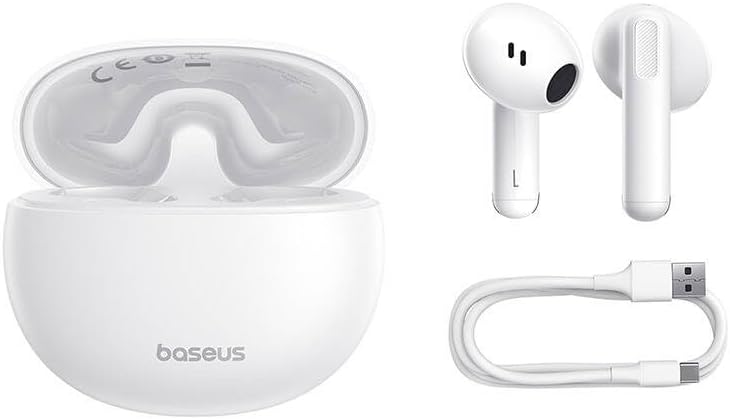
Figure 1.1: Package contents including the earphones, charging case, and USB-C charging cable.
2. Nastavení
2.1 Počáteční nabíjení
Před prvním použitím sluchátka a nabíjecí pouzdro plně nabijte.
- Vložte obě sluchátka do nabíjecího pouzdra.
- Připojte nabíjecí kabel USB-C k nabíjecímu portu na pouzdře a druhý konec k napájecímu adaptéru USB (není součástí balení) nebo k portu USB počítače.
- The indicator light on the charging case will show charging status. A full charge typically takes approximately 1.5 hours for the case and 1 hour for the earphones.

Figure 2.1: Earphones placed inside the charging case.
2.2 Spárování se zařízením
The earphones will automatically enter pairing mode when taken out of the charging case.
- Ujistěte se, že jsou sluchátka nabitá.
- Open the charging case and remove both earphones. They will automatically power on and enter pairing mode.
- Na svém zařízení (chytrý telefon, tablet, počítač) povolte Bluetooth.
- Hledat "Baseus Bowie E12" in the list of available Bluetooth devices and select it to connect.
- Po připojení hlasový pokyn potvrdí úspěšné spárování.
Note: The earphones will automatically reconnect to the last paired device when removed from the case, if Bluetooth is enabled on the device.
3. Návod k obsluze
3.1 Dotykové ovládání
The Baseus Bowie E12 earphones feature touch-sensitive areas on each earbud for easy control of music playback and calls.
| Akce | Levé sluchátko | Pravé sluchátko |
|---|---|---|
| Přehrát/Pozastavit | Jediný kohoutek | Jediný kohoutek |
| Další stopa | Dvakrát klepněte | |
| Předchozí stopa | Dvakrát klepněte | |
| Přijmout/ukončit hovor | Jediný kohoutek | Jediný kohoutek |
| Odmítnout hovor | Stiskněte a podržte (2 s) | Stiskněte a podržte (2 s) |
| Aktivujte hlasového asistenta | Trojité klepnutí | Trojité klepnutí |
3.2 Nošení sluchátek
Pro optimální kvalitu zvuku a pohodlí se ujistěte, že jsou sluchátka správně usazena v uších.
- Určete levé (L) a pravé (R) sluchátko.
- Gently insert each earphone into the corresponding ear canal.
- Upravte úhel, dokud nebudete cítit bezpečně a pohodlně a zvuk nebude čistý.

Obrázek 3.1: Detailní view of an earbud, highlighting the design for proper fit.
4. Údržba
4.1 Čištění
Pravidelné čištění pomáhá udržovat kvalitu zvuku a hygienu.
- K otření sluchátek a nabíjecího pouzdra použijte měkký, suchý hadřík, který nepouští vlákna.
- Pro odolnou špínu lehceampOtřete hadřík vodou nebo jemným, neabrazivním čisticím prostředkem. Zabraňte vniknutí vlhkosti do otvorů.
- Gently clean the speaker mesh with a dry cotton swab or a small, soft brush to remove earwax or debris.
- Nepoužívejte agresivní chemikálie, alkohol ani abrazivní materiály.
4.2 Skladování
Pokud sluchátka nepoužíváte, uložte je do nabíjecího pouzdra, aby byla chráněna a zůstávala nabitá.
- Skladujte na chladném a suchém místě, mimo dosah přímého slunečního záření a extrémních teplot.
- Avoid dropping or subjecting the earphones and case to strong impacts.
5. Řešení problémů
If you encounter issues with your Baseus Bowie E12 earphones, refer to the following common solutions:
5.1 Žádný zvuk nebo přerušované připojení
- Zkontrolujte baterii: Ensure both earphones and the charging case are sufficiently charged.
- Opravit: Disconnect "Baseus Bowie E12" from your device's Bluetooth settings, then re-pair following the instructions in Section 2.2.
- Vzdálenost: Ensure the earphones are within the Bluetooth range (typically 10 meters) of your device.
- Rušení: Move away from strong Wi-Fi signals, other Bluetooth devices, or microwave ovens that might cause interference.
5.2 Only One Earphone Working
- Zkontrolujte baterii: Ujistěte se, že jsou obě sluchátka nabitá.
- Resetovat: Place both earphones back into the charging case, close the lid for 5 seconds, then open and remove them. This often re-syncs them.
- Opravit: If the issue persists, try unpairing and re-pairing the earphones as described above.
5.3 Sluchátka se nenabíjejí
- Zkontrolujte kabel: Ensure the USB-C charging cable is securely connected to both the case and the power source. Try a different cable or power adapter.
- Vyčistit kontakty: Gently clean the charging contacts on both the earphones and inside the charging case with a dry cotton swab.
- Baterie pouzdra: Ujistěte se, že nabíjecí pouzdro má dostatečnou kapacitu.
6. Specifikace
Detailed technical specifications for the Baseus Bowie E12 True Wireless Earphones.
| Funkce | Specifikace |
|---|---|
| Značka | Baseus |
| Název modelu | Bowie E12 |
| Číslo modelu | A00059801216-Z1 |
| Form Factor | Intraauricular (In-Ear) |
| Rozměry produktu | 10 x 5 x 1.27 cm |
| Hmotnost položky | 100 g |
| Barva | Bílý |
| Zahrnuté komponenty | 1 pack (Earphones, Charging Case, USB-C Cable) |
| Jsou vyžadovány baterie | No (Built-in rechargeable batteries) |
Poznámka: Specifikace se mohou změnit bez předchozího upozornění.
7. Záruka a podpora
Baseus products are designed with quality and reliability in mind. For warranty information and customer support, please refer to the official Baseus webstránky nebo se obraťte na svého místního distributora.
You can also download the official Baseus app for additional features and support:
For further assistance, please visit the official Baseus website or contact their customer service directly. Contact information may also be found on the product packaging.

Figure 7.1: Product packaging with support information and QR code for app download.


