1. Úvod
Thank you for choosing the Imou Wi-Fi Cruiser Dual 10 MP Dual Lens Full Color IR Sense Camera (Model: IPC-S7XP-10M0WED). This advanced surveillance camera is designed to provide comprehensive outdoor monitoring with its dual lens system, high-resolution imaging, and intelligent features. Please read this manual thoroughly before installation and operation to ensure proper use and optimal performance.

Figure 1: Imou Wi-Fi Cruiser Dual 10 MP Camera. This image shows the front view of the white and black camera unit with two antennas and dual lenses.
2. Klíčové vlastnosti
- Rozlišení 10 megapixelů: Captures clear and detailed images.
- Systém dvou čoček: Poskytuje vylepšené možnosti dohledu.
- Plně barevné noční vidění: Maintains color images even in low-light conditions.
- IR Sense: Infrared capabilities for night vision.
- Pan/Tilt (PT) Function: Allows for remote adjustment of camera viewúhel záběru (355° horizontálně, 90° vertikálně).
- Wi-Fi připojení: Easy wireless connection to your network.
- Aktivní odstrašení: Features to deter intruders.
- Detekce lidí/vozidel pomocí umělé inteligence: Intelligent recognition to reduce false alarms.
- Obousměrný rozhovor: Vestavěný reproduktor a mikrofon pro komunikaci.

Figure 2: Imou Cruiser Dual Camera highlighting key features. This image displays the camera with icons for 10MP, Dual Lens, Active Deterrence, and AI Human/Vehicle Detection.

Figure 3: Camera's pan and tilt capabilities. An aerial view of a house shows the camera's 355-degree horizontal and 90-degree vertical rotation range.

Figure 4: AI Human and Vehicle Detection in action. This image depicts a person near a car with detection outlines, illustrating the camera's intelligent recognition capabilities.

Figure 5: Two-way Talk functionality. A person is shown holding a smartphone, with icons for microphone and speaker, and a small dog image, indicating the ability to communicate through the camera.
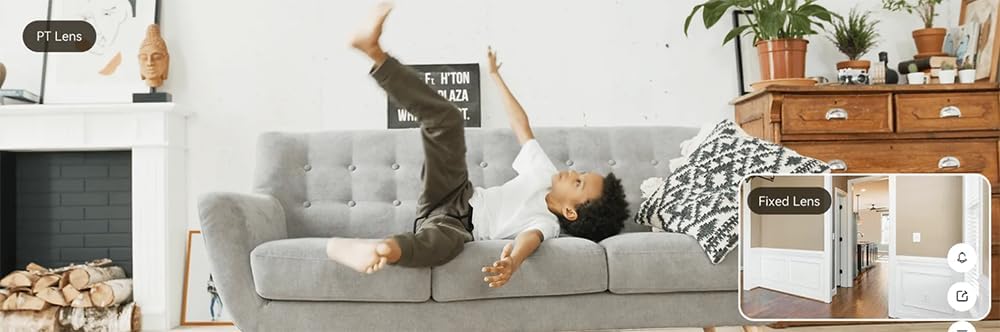
Figure 6: Comparison of PT Lens and Fixed Lens views. This image shows a split view, demonstrating the wider coverage and adjustability of the PT lens compared to a fixed lens.
3. Obsah balení
Po vybalení zkontrolujte obsah balení:
- Imou Wi-Fi Cruiser Dual Camera
- Montážní rameno
- Napájecí kabely
- Montážní šrouby a kotvy
- Stručný průvodce (není součástí této příručky)
4. Nastavení
4.1 Montáž fotoaparátu
The camera is designed for outdoor use and comes with a wall mount bracket. Choose a suitable location that provides the desired viewing angle and is within Wi-Fi range. Ensure the mounting surface is sturdy enough to support the camera's weight.
- Mark the drilling points on the wall using the mounting template (if provided).
- Vyvrtejte otvory a v případě potřeby vložte do zdi hmoždinky.
- Secure the mounting arm to the wall using the provided screws.
- Attach the camera to the mounting arm, ensuring it is firmly locked in place.
4.2 Připojení k napájení
Connect the provided power cable to the camera's power input port and then plug it into a suitable power outlet. Ensure the power source is stable and meets the camera's power requirements.
4.3 Konfigurace sítě
The camera connects to your network via Wi-Fi. Download the official Imou Life app from your smartphone's app store. Follow the in-app instructions to add your camera, connect it to your Wi-Fi network, and complete the initial setup. This typically involves scanning a QR code on the camera or entering its serial number.
5. Návod k obsluze
5.1 Živě View
Once the camera is connected and configured, open the Imou Life app. Select your camera from the device list to access the live video feed. You can view foo v reálném časetagz vašeho fotoaparátu kdykoli a kdekoli.
5.2 Nahrávání a přehrávání
The camera supports continuous recording or event-triggered recording (e.g., motion detection). Recordings are typically stored on a microSD card (not included) or via cloud storage (subscription may be required). To view zaznamenané footage, navigate to the playback section within the Imou Life app and select the desired date and time.
5.3 Ovládání otáčení/náklonu
V přímém přenosu view interface of the Imou Life app, you will find controls to remotely pan (horizontal rotation) and tilt (vertical rotation) the camera. Use these controls to adjust the camera's viewing angle and cover different areas.
5.4 Obousměrný zvuk
The camera features a built-in microphone and speaker. To use the two-way talk function, tap the microphone icon in the app's live view. You can then speak through your phone, and your voice will be projected through the camera's speaker. Similarly, you can hear audio from the camera's surroundings.
5.5 Funkce inteligentní detekce
Configure detection settings in the Imou Life app. The AI Human/Vehicle Detection feature can differentiate between humans, vehicles, and other moving objects, sending more accurate alerts and reducing false alarms from pets or swaying trees. You can also set up detection zones and sensitivity levels.
6. Údržba
6.1 Čištění
Regularly clean the camera lens and housing to ensure clear image quality. Use a soft, damp cloth to wipe away dust and dirt. Avoid using harsh chemicals or abrasive materials that could damage the lens or surface.
6.2 aktualizací firmwaru
Periodically check for firmware updates through the Imou Life app. Keeping your camera's firmware up-to-date ensures optimal performance, security enhancements, and access to new features.
7. Řešení problémů
7.1 Běžné problémy
- Bez napájení: Ujistěte se, že je napájecí adaptér bezpečně připojen k fotoaparátu a k funkční zásuvce.
- Žádné připojení k Wi-Fi: Check your Wi-Fi router's status. Ensure the camera is within range and there are no strong interferences. Reconfigure Wi-Fi settings in the app if necessary.
- Špatná kvalita obrazu: Clean the camera lens. Check your network speed. Ensure there is sufficient lighting for optimal image capture.
- Aplikace se nepřipojuje: Ensure your smartphone has a stable internet connection. Restart the app or your phone.
For more detailed troubleshooting steps, refer to the support section of the Imou Life app or the official Imou webmísto.
8. Specifikace
| Funkce | Specifikace |
|---|---|
| Název modelu | Cruiser Dual 10MPX |
| Číslo modelu | IPC-S7XP-10M0WED |
| Značka | Imou |
| Technologie připojení | Bezdrátové (Wi-Fi) |
| Speciální funkce | PT Camera, Dual Lens |
| Prostředí použití | Venkovní |
| Rozlišení záznamu videa | 4K |
| Barva | Bílý |
| Rozměry (D x Š x V) | 12.4 x 15.8 x 20.1 cm |
| Hmotnost | 1.08 kilogramu |
| Zahrnuté komponenty | Arm, Camera, Cables |
9. Záruka a podpora
This product comes with a standard manufacturer's warranty. For specific warranty terms and conditions, please refer to the warranty card included with your product or visit the official Imou website. For technical support, troubleshooting assistance, or service inquiries, please contact Imou customer support through their official channels or the Imou Life app.


