1. Úvod
The Formuler Z Mini is a compact and powerful Android 12-based streaming media player designed to deliver a high-quality entertainment experience. Featuring 4K output resolution, 2GB RAM, 8GB ROM, and dual-band 5G Wi-Fi connectivity, it provides seamless streaming and access to a wide range of applications. This manual provides essential information for setting up, operating, maintaining, and troubleshooting your Formuler Z Mini device.
2. Bezpečnostní informace
- Nevystavujte zařízení vodě, vlhkosti ani extrémním teplotám.
- Používejte pouze dodaný napájecí adaptér, abyste předešli poškození.
- Ensure proper ventilation around the device to avoid overheating.
- Nepokoušejte se zařízení rozebírat ani opravovat sami. Obraťte se na kvalifikovaný servisní personál.
- Udržujte zařízení a příslušenství mimo dosah dětí.
3. Obsah balení
Ověřte, zda jsou v balení přítomny všechny položky:
- Formuler Z Mini Streaming Device
- Bluetooth dálkové ovládání
- Power Adapter (5VDC / 1A)
- HDMI Extension Cable (integrated with device)
- 2 x AA baterie (pro dálkové ovládání)

Image: Contents of the Formuler Z Mini package, including the streaming device, remote, and box.
4. Průvodce nastavením
4.1 Připojení zařízení
- Připojení k televizi: Plug the HDMI connector of the Formuler Z Mini directly into an available HDMI port on your television or display.
- Připojte napájení: Insert the power adapter cable into the DC IN port on the Formuler Z Mini, then plug the adapter into a wall outlet.
- Zapnutí: Zařízení by se mělo automaticky zapnout. Pokud ne, stiskněte tlačítko napájení na dálkovém ovladači.
4.2 Počáteční konfigurace
- Párování dálkového ovladače: Upon first use, the remote control may need to be paired. Follow the on-screen instructions, typically by pressing and holding specific buttons (e.g., Plus and Equals keys as indicated by some users) until the remote pairs.
- Výběr jazyka: Vyberte preferovaný jazyk z nabídky na obrazovce.
- Internetové připojení: Connect the device to your Wi-Fi network. Select your network name (SSID) from the list and enter the password. The device supports Dual Band 5G 2x2 AC Wi-Fi for fast and stable connections.
- Nastavení účtu Google: Přihlaste se pomocí svého účtu Google a získejte přístup k Obchodu Google Play a dalším službám Google.
- Kompletní nastavení: Follow any remaining on-screen prompts to finalize the initial setup process.

Image: The Formuler Z Mini device and its remote control, ready for connection.
5. Obsluha zařízení
5.1 Dálkové ovládání Overview
The Formuler Z Mini comes with an advanced Bluetooth remote control. Familiarize yourself with its functions:
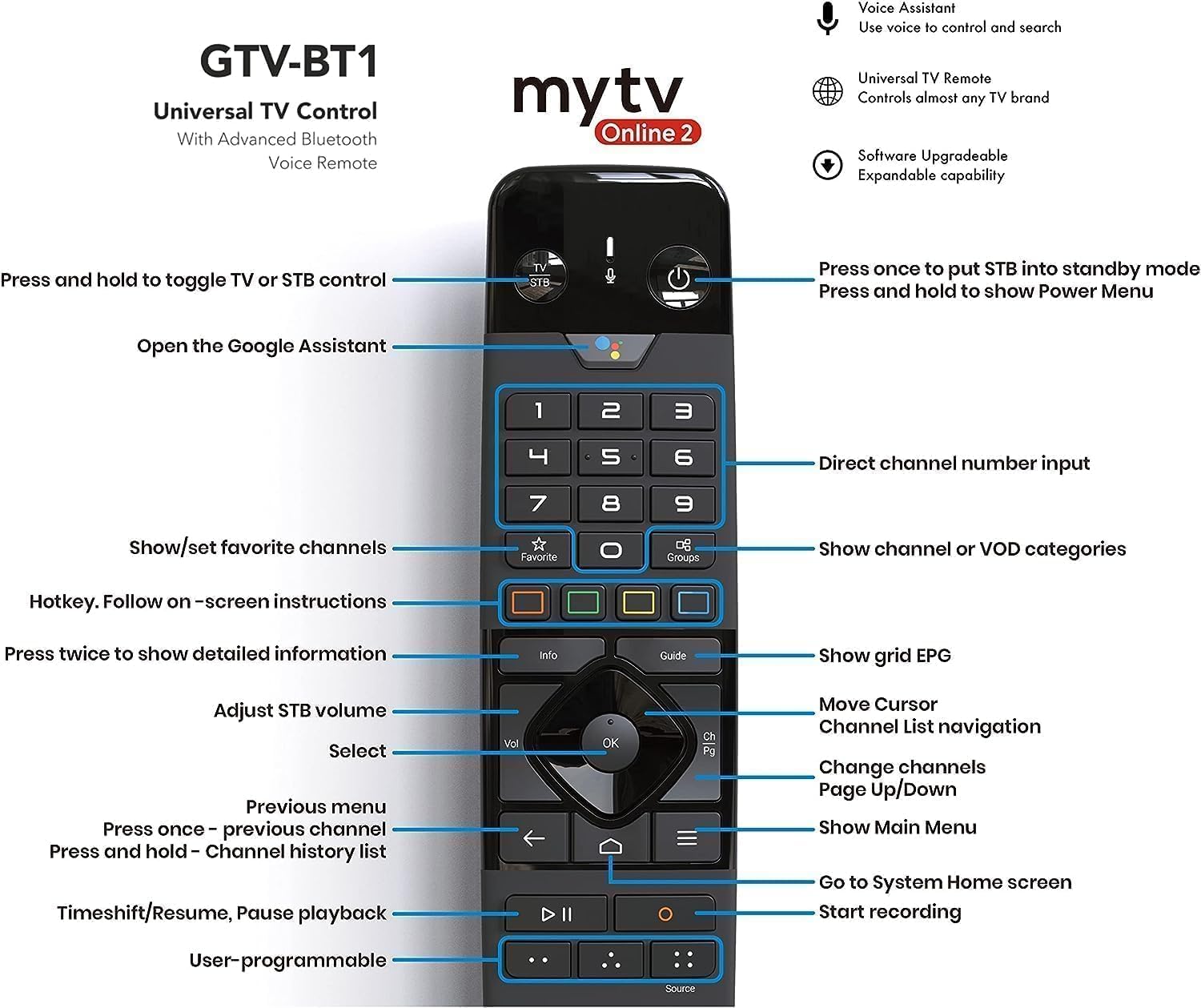
Obrázek: Podrobný view of the remote control with labeled buttons for various functions.
- Vypínač: Press once to put the device into standby mode; press and hold to show the Power Menu.
- TV/STB Control: Press and hold to toggle between TV or STB control.
- Asistent Google: Open the Google Assistant for voice commands.
- Číselná klávesnice: Direct channel number input.
- Navigační tlačítko (OK, nahoru, dolů, vlevo, vpravo): Procházení nabídek a výběr položek.
- Tlačítko Zpět: Vraťte se do předchozí nabídky nebo obrazovky.
- Tlačítko Domů: Go to the System Home screen.
- Tlačítka hlasitosti: Adjust STB volume.
- Tlačítka kanálů: Change channels (Page Up/Down).
- Info tlačítko: Press twice for detailed information.
- Tlačítko průvodce: Show grid EPG (Electronic Program Guide).
- Favorite/Groups: Show/set favorite channels or show channel/VOD categories.
- Ovládání přehrávání: Timeshift/Resume, Pause playback, Start recording.
- User-programmable Buttons: Customize for quick access to preferred functions.
5.2 Navigation and Streaming
Once powered on, the Formuler Z Mini will display its home screen. Use the remote control's navigation pad to browse applications and settings. Launch your preferred streaming apps to enjoy content. The device supports 4K resolution, ensuring a crisp and clear viewzkušenosti s kompatibilními displeji.
6. Údržba
- Čištění: K čištění zařízení používejte měkký, suchý hadřík. Nepoužívejte tekuté čisticí prostředky ani aerosoly.
- Aktualizace softwaru: Regularly check for and install software updates to ensure optimal performance and access to the latest features. Updates are typically available through the device's settings menu.
- Větrání: Ensure the device is placed in a well-ventilated area and that its vents are not obstructed.
7. Řešení problémů
| Problém | Možná příčina | Řešení |
|---|---|---|
| Žádná síla | Napájecí adaptér není připojen; problém se zásuvkou. | Ensure power adapter is securely connected to device and a working power outlet. |
| Žádný signál na televizi | Vybrán nesprávný vstup HDMI; uvolněné připojení HDMI. | Select the correct HDMI input on your TV. Check HDMI cable connection. |
| Dálkové ovládání nereaguje | Baterie jsou slabé/vybité; dálkový ovladač není spárovaný. | Replace batteries. Re-pair the remote control by following on-screen instructions or referring to Section 4.2. |
| Problémy s připojením Wi-Fi | Nesprávné heslo; problémy s routerem; rušení signálu. | Verify Wi-Fi password. Restart your router. Move device closer to router or reduce interference. |
| Zařízení je pomalé nebo zamrzá | Příliš mnoho spuštěných aplikací; málo úložiště. | Close unused applications. Clear cache or uninstall unnecessary apps to free up storage. Restart the device. |
8. Specifikace
Detailed technical specifications for the Formuler Z Mini:
- Výstupní rozlišení: 4K (3840 x 2160)
- BERAN: 2GB LPDDR4 @2400MHz
- Skladování: 8GB eMMC
- Operační systém: Android 12
- Networking: Wireless AC 2x2, Bluetooth 5.0
- Dimensions (L x W x T): 83 mm x 60 mm x 12.5 mm (3.3 x 2.4 x 0.5 palce)
- Barva: Černý
- Příkon: 5 V ss. / 1 A.
- Spotřeba energie: Max. 5 W
- Hmotnost položky: 15.8 unce
- Země původu: Čína


Obrázek: Horní a boční views of the Formuler Z Mini device, highlighting its compact design.
9. Záruka a podpora
For warranty information, technical support, or further assistance, please refer to the official Formuler webnebo se obraťte na jejich zákaznický servis. Uschovejte si doklad o koupi pro případ reklamace.


