Zavedení
Thank you for choosing the Reobiux Security Camera Outdoor with Dual Lens. This advanced security system is designed to provide comprehensive surveillance for your home or business, featuring 2.5K/6MP resolution, auto-tracking, human detection, color night vision, and two-way audio. This manual will guide you through the setup, operation, and maintenance of your new security cameras.

Image: Two Reobiux outdoor security cameras, showcasing their design and the accompanying mobile application interface.
Co je v krabici
Pečlivě zkontrolujte obsah balení. Pokud některé položky chybí nebo jsou poškozené, kontaktujte zákaznickou podporu.
- Reobiux Security Cameras (2 units)
- Uživatelská příručka
- Montážní taška na šrouby
- Power Cables (10-foot)

Obrázek: Vizuální znázornění všech položek obsažených v balení produktu.
Konec produktuview
The Reobiux security camera features a unique dual-lens design for comprehensive coverage and advanced monitoring capabilities.

Image: Detailed diagram illustrating the fixed and rotating lenses, along with the 355° pan and 90° tilt functionality of the camera.
Klíčové komponenty:
- Pevný objektiv: Provides a stable view of a primary area.
- Rotating Lens: Offers broader coverage with 355° pan and 90° tilt capabilities.
- Infračervené LED diody: For clear night vision in low light.
- Bodová světla: For full-color night vision and alarm illumination.
- Mikrofon: Pro audio vstup a obousměrnou komunikaci.
- Reproduktor: Pro audio výstup a obousměrnou komunikaci.
- Antén: For stable Wi-Fi connectivity.
- Montážní základna: Pro bezpečnou instalaci.
Průvodce nastavením
1. Stažení aplikace a registrace účtu
- Aktivovat oprávnění: Ensure Bluetooth and 2.4GHz Wi-Fi are enabled on your smartphone.
- Stáhněte si aplikaci: Scan the QR code below or search for "iCSee" in the App Store (iOS) or Google Play Store (Android).
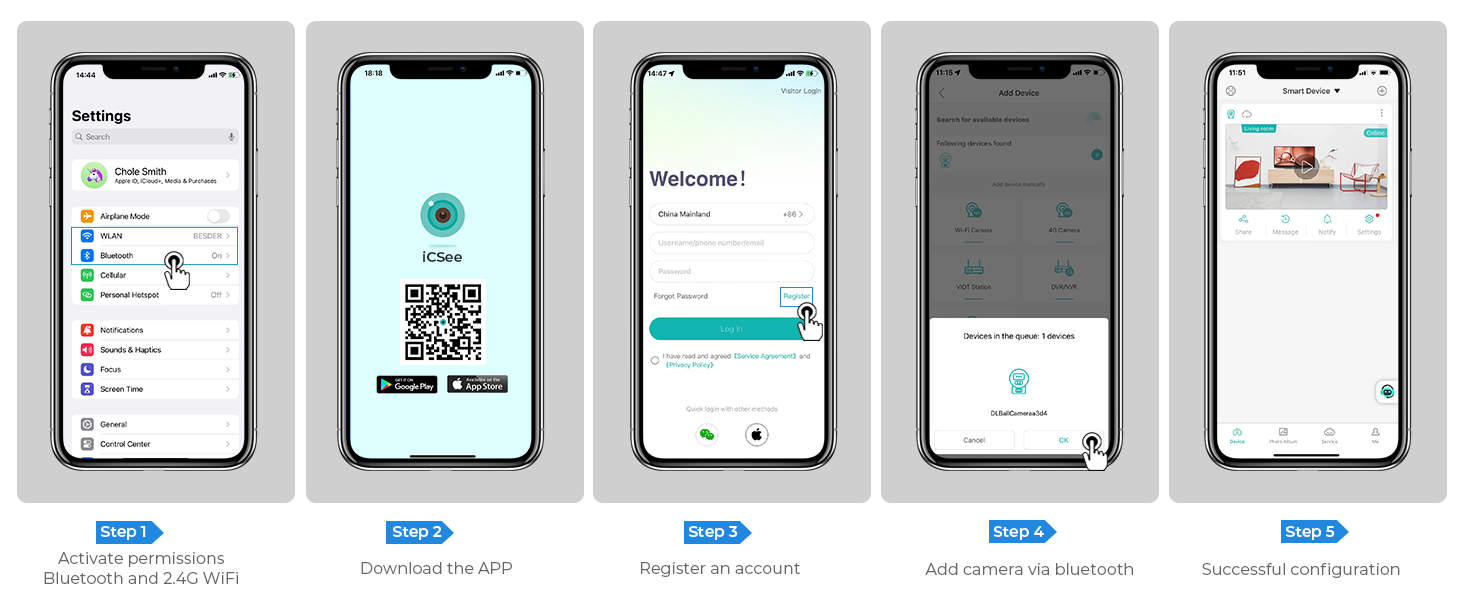
Image: Step-by-step guide for app download, account registration, and device configuration.
Alternatively, download the iCSee app directly from: http://d.xmeye.net/CSee
- Zaregistrujte si účet: Open the iCSee app and follow the on-screen instructions to register a new account.
- Přidání kamery přes Bluetooth: Once logged in, select "Add Device" and choose to add the camera via Bluetooth. The app will guide you through the pairing process.
- Úspěšná konfigurace: After successful pairing, your camera will be ready for use.
2. Napájení kamery
Connect the provided power cable to the camera's power input port and then plug it into a standard electrical outlet. The camera will power on and initiate its startup sequence.
3. Network Connection Options
- Wi-Fi připojení: The camera supports 2.4GHz Wi-Fi networks only. During app setup, select your Wi-Fi network and enter the password.
- Připojení ethernetového kabelu: For a more stable connection, you can connect the camera directly to your router using an Ethernet cable.
- Personal Hotspot: In situations where Wi-Fi is unavailable, the camera can also connect via a personal hotspot from your smartphone.
4. Montáž kamery
The camera is designed for both indoor and outdoor use and can be ceiling-mounted. Choose a location that provides optimal viewing angles and is within range of your Wi-Fi network or Ethernet connection.
- Označte vrtné body: Use the mounting template (if provided) or the camera base to mark the drilling points on the desired surface.
- Vrtací otvory: Drill holes at the marked points. Insert wall anchors if mounting on drywall or masonry.
- Zajistěte základnu: Attach the camera's mounting base to the surface using the provided screws.
- Připojte kameru: Securely attach the camera unit to the mounted base.

Image: The camera installed outdoors, highlighting its robust IP66 waterproof design suitable for various weather conditions.
Návod k obsluze
1. Živě View a přehrávání
Access the iCSee app to view živé footage from your cameras. You can switch between the fixed and rotating lens views. The app also allows you to review zaznamenané footage stored on the SD card or cloud.

Image: The dual-screen feature in the iCSee app, displaying simultaneous views from the fixed and rotating lenses.
2. Pan, Tilt, and Digital Zoom
Use the iCSee app to remotely control the rotating lens. You can pan the camera 355° horizontally and tilt it 90° vertically to cover a wide area. The camera also supports 5x digital zoom to view podrobnosti.

Obrázek: Pohled zhora view demonstrating the camera's extensive 355° pan and 90° tilt range, covering a large residential area.
3. Motion Tracking and Human Detection
The camera is equipped with advanced motion tracking. When human motion is detected, the rotating lens will automatically track the subject's movement. You will receive real-time alerts on your smartphone via the iCSee app, capturing images or video of the activity.

Image: The camera's alarm features, including real-time push notifications, siren, and light activation upon detecting suspicious activity.
4. Obousměrný zvuk
With the built-in microphone and speaker, you can communicate with visitors or deter intruders directly through the iCSee app from anywhere.

Image: Illustration of the two-way audio function, allowing communication with individuals near the camera.
5. Režimy nočního vidění
The camera offers three night vision modes, selectable via the app, to ensure clear visibility up to 30 meters (98 feet) in various lighting conditions:
- Plně barevné noční vidění: Utilizes built-in spotlights to provide vivid, full-color images even in complete darkness.
- Infračervené noční vidění: Uses infrared LEDs for clear black-and-white images in low-light conditions.
- Smart Vision: Automaticky přepíná mezi infračerveným a plnobarevným režimem na základě detekovaného pohybu nebo světelných podmínek.

Image: Visual comparison of infrared night vision and full-color night vision capabilities at night.
6. Možnosti úložiště
- Micro SD karta: Supports up to 128GB micro SD card for local storage of recordings. (Card not included)
- Cloudové úložiště: Optional cloud storage service available for secure, remote access to your video recordings.
7. Integrace chytré domácnosti
The Reobiux camera is compatible with NVR systems for continuous recording and can be integrated with Amazon Alexa for convenient voice control.

Image: The camera's compatibility with smart home devices like Amazon Alexa for voice-controlled viewIng.
Údržba
- Čištění: Pravidelně otírejte objektiv a tělo fotoaparátu měkkým hadříkemamp hadříkem odstraňte prach a nečistoty. Nepoužívejte agresivní chemikálie ani abrazivní čisticí prostředky.
- Aktualizace firmwaru: Check the iCSee app periodically for firmware updates to ensure optimal performance and security.
- Napájení: Ujistěte se, že je napájecí kabel bezpečně připojen a není poškozen.
- Podmínky prostředí: While IP66 rated, avoid prolonged exposure to extreme temperatures outside the operating range (-20°C to 55°C) or direct high-pressure water jets.
Odstraňování problémů
| Problém | Možná příčina | Řešení |
|---|---|---|
| Fotoaparát je offline/Nelze se připojit k Wi-Fi | Incorrect Wi-Fi password; Camera too far from router; 5GHz Wi-Fi network used; Network interference. |
|
| Špatná kvalita obrazu | Znečištěný objektiv; Nedostatečné osvětlení; Problémy s šířkou pásma sítě. |
|
| Detekce pohybu nefunguje | Detection sensitivity too low; Detection zone not set correctly; Obstructions in view. |
|
| Problémy s obousměrným zvukem | Mikrofon/reproduktor v aplikaci ztlumený; Hlasitost příliš nízká; Latence sítě. |
|
Specifikace
| Funkce | Detail |
|---|---|
| Číslo modelu | A9Q-2PCS |
| Rozlišení videa | 2.5K/6MP (2048p) |
| Efektivní rozlišení | 3 MP |
| Objektivy | Dual Lens (Fixed and Rotating) |
| Rozsah otáčení/naklánění | Pan 355°, náklon 90° |
| Digitální zoom | 5x |
| Rozsah nočního vidění | Až 30 metrů (98 stop) |
| Režimy nočního vidění | Full-color, Infrared, Smart Vision |
| Konektivita | 2.4GHz Wi-Fi, Ethernet, Bluetooth, ONVIF, RTSP |
| Možnosti úložiště | Micro SD karta (až 128 GB), cloudové úložiště |
| Zvuk | Two-Way Audio (Built-in Mic & Speaker) |
| Detekce | Human Detection, Motion Tracking |
| Upozornění | Real-time App Notifications, Siren, Light Alarm |
| Odolnost vůči povětrnostním vlivům | IP66 Vodotěsný |
| Zdroj napájení | Elektrický s kabelem (12 voltů, 3 wattů) |
| Provozní teplota | Do 55°C |
| Rozměry (D x Š x V) | 5.88 x 4.68 x 6.2 palce |
| Hmotnost | 2.75 libry |
| Kompatibilní zařízení | Smartphone, Tablet, Laptop, NVR Systems, Amazon Alexa |
| Kontrolní metoda | Aplikace iCSee |
Záruka a podpora
Reobiux provides dedicated customer support for its products. For any technical assistance, warranty claims, or inquiries, please contact our 24/7 online customer support team. Refer to your purchase documentation for specific warranty terms and conditions.

Image: Reobiux customer support representative ready to assist.


