COLBOR W60

Uživatelská příručka k LED videosvětlu COLBOR Wonder W60

Model: W60 Značka: COLBOR

Compact and powerful LED video light with wide color temperature range and APP control.

1. Úvod

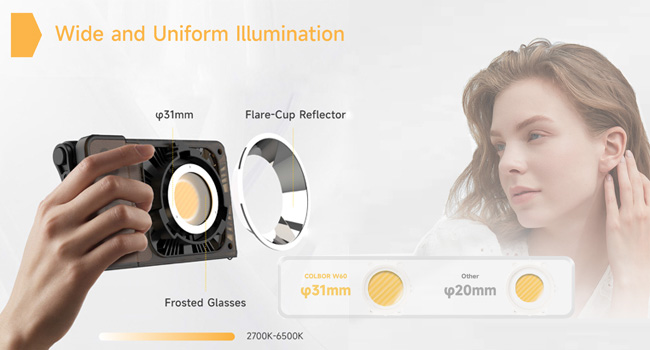
The COLBOR Wonder W60 is a compact and powerful LED video light designed for various photography and videography needs, including YouTube content creation and live streaming. It offers a wide color temperature range from 2700K to 6500K and boasts a high CRI of 97+ for accurate color rendition. Its lightweight and slim design make it highly portable, while multiple power options and APP control enhance its versatility and ease of use.

2. Co je v krabici

COLBOR Wonder W60 LED Video Light and included accessories

Image: The COLBOR Wonder W60 LED Video Light shown with its complete set of accessories.

  • COLBOR Wonder W60 Video Light x1
  • Kabel x1
  • Napájecí adaptér x1
  • COB kryt x1
  • Dome x1
  • Reflektor x1

3. Konec produktuview a Nastavení

Familiarize yourself with the components and initial setup of your COLBOR Wonder W60 LED Video Light.

3.1 Komponenty produktu

Strana view of COLBOR Wonder W60 showing controls and ports

Obrázek: Boční view of the COLBOR Wonder W60, highlighting the control buttons and ports.

  • Vypínač: Used for turning the device on and off.
  • Wireless Control Setting Button: For switching between 2.4GHz remote and APP control modes, and initiating pairing.
  • Brightness Control Wheel: Adjusts the light's brightness.
  • Color Temperature Control Knob: Adjusts the color temperature.
  • Oblast detekce NFC: Pro rychlé párování s kompatibilními zařízeními.
  • COLBOR Mount Lock & Mount: Securely attach accessories.
  • Port DC: Pro připojení napájecího adaptéru.
  • Port typu C: For PD Type-C fast charging.
  • 1/4" Hole Screw: For mounting the light onto stands or grips.

3.2 Instalace světla

Follow these steps to prepare your light for use:

  1. Removal of COB protection cover: Hold the COB cover with the COLBOR Mount tenon and rotate it to remove it.
    Removing the COB protection cover from the COLBOR W60

    Image: Demonstrating the removal of the protective COB cover by rotating it from the mount.

  2. Montáž a demontáž reflektoru: Zarovnejte reflektor s drážkou kolem lamp head and clip it in, then rotate it to fix it. Follow the instructions for "Removal of COB protection cover" to remove the reflector.
    Attaching a reflector to the COLBOR W60

    Image: A reflector being attached to the front of the COLBOR W60 light.

  3. Installation of stand: Align the 1/4" screw hole on the light's bottom or side with the 1/4" screw on the stand, and rotate it to fix it.
    COLBOR W60 mounted on a stand and with a power grip

    Image: The COLBOR W60 shown mounted on a light stand and also attached to a power grip, demonstrating versatile mounting options.

3.3 Napájení zařízení

The COLBOR Wonder W60 offers flexible powering options:

  • Power with power adapter: Připojte napájecí adaptér, zarovnejte stejnosměrný napájecí konektor na lamp body, and then power on through the cable after stable connection.

    *Do not suspend the power adapter in the air. Use wire rings to hang it on the lamp stánek.

    Connecting COLBOR W60 to power adapter

    Image: The COLBOR W60 being powered via its included power adapter.

  • Power with COLBOR Power Grip: Align the 1/4" screw hole on the light's bottom or side with the 1/4" screw on the stand. Rotate it to fix it. Connect the light to the Power Grip via the D-Tap to DC cable for powering.

    *Please do not use the Type-C to Type-C cable to power the light.

    Connecting COLBOR W60 to COLBOR Power Grip

    Image: The COLBOR W60 connected to a COLBOR Power Grip for portable power.

4. Návod k obsluze

Learn how to operate your COLBOR Wonder W60 LED Video Light.

Video: Official instruction video for the COLBOR Wonder W60/W100 LED Video Light, covering setup, powering, and operation.

4.1 Zapnutí/vypnutí

  • Zapnutí: Připojte se ke zdroji napájení a poté dlouze stiskněte tlačítko napájení.
  • Vypnout: Long-press the power button to turn it off.

4.2 Nastavení teploty barev

  • Rotate the color temperature control knob for continuous color temperature adjustment.
  • Short press the knob to select the preset color temperature: (2700K, 3200K, 4300K, 5600K, 6500K).

4.3 Nastavení jasu

  • Roll the brightness adjustment wheel for continuous brightness adjustment.
  • Short press the wheel side to select preset brightness: (0%, 25%, 50%, 75%, 100%).

4.4 Wireless Connection (APP Control)

The COLBOR Wonder W60 supports APP control for seamless and efficient lighting adjustments.

  • Krátkým stisknutím tlačítka dálkového ovládání přepnete mezi režimy ovládání 2.4 GHz (dálkové ovládání CTRL1) a APP (COLBOR Studio APP).
  • Long-press the button to start pairing with the APP.
  • Připojte se k APP pro nastavení ventilátoru a nastavení EFF.
COLBOR W60 controlled via smartphone app

Image: The COLBOR W60 being controlled remotely via the COLBOR Studio APP on a smartphone.

5. Údržba

To ensure the longevity and optimal performance of your COLBOR Wonder W60 LED Video Light, follow these maintenance guidelines:

Diagram of COLBOR W60's smart cooling system

Obrázek: Interní view highlighting the intelligent air duct and heat pipe cooling system of the COLBOR W60.

6. Řešení problémů

If you encounter issues with your COLBOR Wonder W60, refer to the following common problems and solutions:

ProblémMožná příčinaŘešení
Světlo se nerozsvítí.No power, loose connection, or power button not pressed correctly.Ensure power adapter is securely connected and plugged into a working outlet. If using a power grip, ensure it is charged and properly attached. Long-press the power button for 2-3 seconds.
Jas ani teplotu barev nelze upravit.Control knob/wheel malfunction or in locked mode.Check the display for any lock indicators. Try restarting the device. If using APP control, ensure the light is properly paired and the APP is functioning correctly.
Ovládání přes APLIKACI nefunguje.Bluetooth/2.4GHz connection issue, APP not updated, or incorrect mode.Ensure the light is in APP control mode (short press wireless control button). Long-press the button to re-initiate pairing. Check your smartphone's Bluetooth settings. Update the COLBOR Studio APP to the latest version.
Světlo se přehřívá.Obstructed ventilation or prolonged high-power use in hot environment.Ensure ventilation grilles are clear of obstructions. Reduce brightness or allow the light to cool down. Operate in a well-ventilated area.

If the problem persists after trying these solutions, please contact COLBOR customer support for further assistance.

7. Specifikace

FunkceDetail
ZnačkaCOLBOR
ModelW60
Rozměry produktu6.18 x 1.69 x 3.66 palce
Hmotnost položky2.14 pounds (approx. 345g as per feature bullet)
Osvětlení2890Lux@1m (5600K)
Teplota barev (CCT)2700K až 6500K
CRI97+
Technologie připojeníBluetooth (pro ovládání přes aplikaci)
Možnosti napájeníCOLBOR Battery Grip, DC adapter, PD Type-C fast charging
Chladicí systémIntelligent Air Duct and Heat Pipe Cooling System
Úroveň odolnosti proti voděNení odolný vůči vodě
Země původuČína

8. Záruka a podpora

COLBOR products are manufactured to the highest quality standards. For warranty information and technical support, please refer to the warranty card included with your product or visit the official COLBOR webUschovejte si účtenku jako doklad o koupi pro případ reklamace.

For further assistance, you may contact COLBOR customer service through their official channels. Please provide your product model (W60) and any relevant details when seeking support.

Související dokumenty - W60

Předview COLBOR PB74 Power Base Uživatelská příručka
Uživatelská příručka k napájecí základně COLBOR PB74 s podrobným popisem jejích funkcí, obsluhy, nabíjení, instalace, specifikací a záručních informací pro napájení světel řady COLBOR W60 a W100.
Předview Uživatelská příručka k monosvětlu Colbor CL60R RGB COB LED
Komplexní uživatelská příručka pro monoblok Colbor CL60R RGB COB LED s podrobnými bezpečnostními pokyny, komponenty produktu, instalací, provozem a různými režimy osvětlení včetně CCT, HSI a speciálních efektů.
Předview COLBOR CL220 COB Video Light User Manual
Comprehensive user manual for the COLBOR CL220 COB Video Light, detailing its features, operation, installation, specifications, and warranty information. Learn how to set up, control, and maintain your lighting equipment.
Předview Uživatelská příručka k videosvětlu COLBOR CL220M | Obsluha, specifikace, záruka
Komplexní uživatelská příručka k videosvětlu COLBOR CL220M. Seznamte se s funkcemi produktu, návodem k obsluze, připojením k napájení, nastavením, ovládáním pomocí aplikace, specifikacemi, obsahem balení a informacemi o záruce.
Předview Uživatelská příručka k videosvětlu COLBOR CL220R
Komplexní průvodce pro videosvětlo COLBOR CL220R s podrobným popisem jeho funkcí, provozu, režimů, ovládání pomocí aplikace, specifikací a informací o záruce.
Předview Uživatelská příručka k výrobníku mlhy COLBOR CineFlare CF5
Uživatelská příručka k výrobníku mlhy COLBOR CineFlare CF5 s podrobným popisem jeho obsluhy, funkcí, specifikací a informací o záruce.