1. Úvod
This manual provides detailed instructions for the Formuler Z11 Pro Android 11 4K Streaming Media Player. Please read this manual thoroughly before using your device to ensure proper operation and to maximize your user experience. Keep this manual for future reference.
The Formuler Z11 Pro is a high-performance streaming media player designed to deliver 4K resolution content. It operates on Android 11 and comes equipped with 2GB RAM and 16GB ROM. The package includes a Universal Bluetooth Voice Remote Control (BT1 Edition), a protective case cover for the remote, an extra air remote keyboard with backlighting, and an extra magnetic mount.

Image 1.1: Formuler Z11 Pro and included accessories.
2. Obsah balení
Ověřte, zda jsou v balení přítomny všechny položky:
- Formuler Z11 Pro BT1 Edition Streaming Device
- HDMI kabel
- Napájecí kabel
- Bluetooth Voice Remote Control (BT1 Edition)
- Case Cover for Bluetooth Remote Control
- Extra Air Remote Keyboard (Backlit)
- Extra Magnetic Mount
- 2 AA batteries (for BT1 Remote Control)

Image 2.1: Formuler Z11 Pro device and BT1 remote control.
3. Průvodce nastavením
3.1 Připojení zařízení
- Připojení k televizi: Use the provided HDMI cable to connect the HDMI port on the Formuler Z11 Pro to an available HDMI input on your television.
- Připojte napájení: Plug the power adapter into the DC IN port on the Formuler Z11 Pro, then plug the adapter into a wall outlet. The device will power on automatically.
- Síťové připojení (volitelné):
- Ethernet: For a wired connection, connect an Ethernet cable from your router to the Gigabit LAN port on the Formuler Z11 Pro.
- Wi-Fi: For a wireless connection, you will configure Wi-Fi during the initial setup process.
3.2 Nastavení dálkového ovládání
The Formuler Z11 Pro comes with two remote controls: the Bluetooth Voice Remote Control (BT1 Edition) and an extra Air Remote Keyboard.
3.2.1 Bluetooth Voice Remote Control (BT1 Edition)
- Vložte baterie: Open the battery compartment on the back of the BT1 remote and insert the two AA batteries provided, ensuring correct polarity.
- Párování: The BT1 remote should automatically pair with the Z11 Pro upon first boot. If not, navigate to Nastavení > Dálkové ovladače a příslušenství > Přidat příslušenství on the Z11 Pro and follow the on-screen instructions to pair the remote.
- Remote Case Cover: Slide the protective case cover onto the BT1 remote for added protection.

Image 3.1: BT1 Remote Control with protective case cover.
3.2.2 Extra Air Remote Keyboard
- Insert USB Dongle: Locate the small USB dongle included with the air remote keyboard. Insert this dongle into an available USB port on the Formuler Z11 Pro.
- Automatické připojení: The air remote keyboard should connect automatically once the dongle is inserted.

Image 3.2: Extra Air Remote Keyboard with USB dongle.
3.3 Počáteční nastavení softwaru
Upon first boot, the Formuler Z11 Pro will guide you through an initial setup wizard. Follow the on-screen prompts to:
- Vyberte svůj jazyk.
- Připojte se k síti Wi-Fi (pokud nepoužíváte Ethernet).
- Sign in with your Google Account (recommended for app access).
- Přijměte obchodní podmínky.
- Install essential updates.
4. Návod k obsluze
4.1 Using the BT1 Voice Remote Control
The BT1 remote is your primary interface for the Formuler Z11 Pro. It features universal TV control, voice search, and programmable buttons.
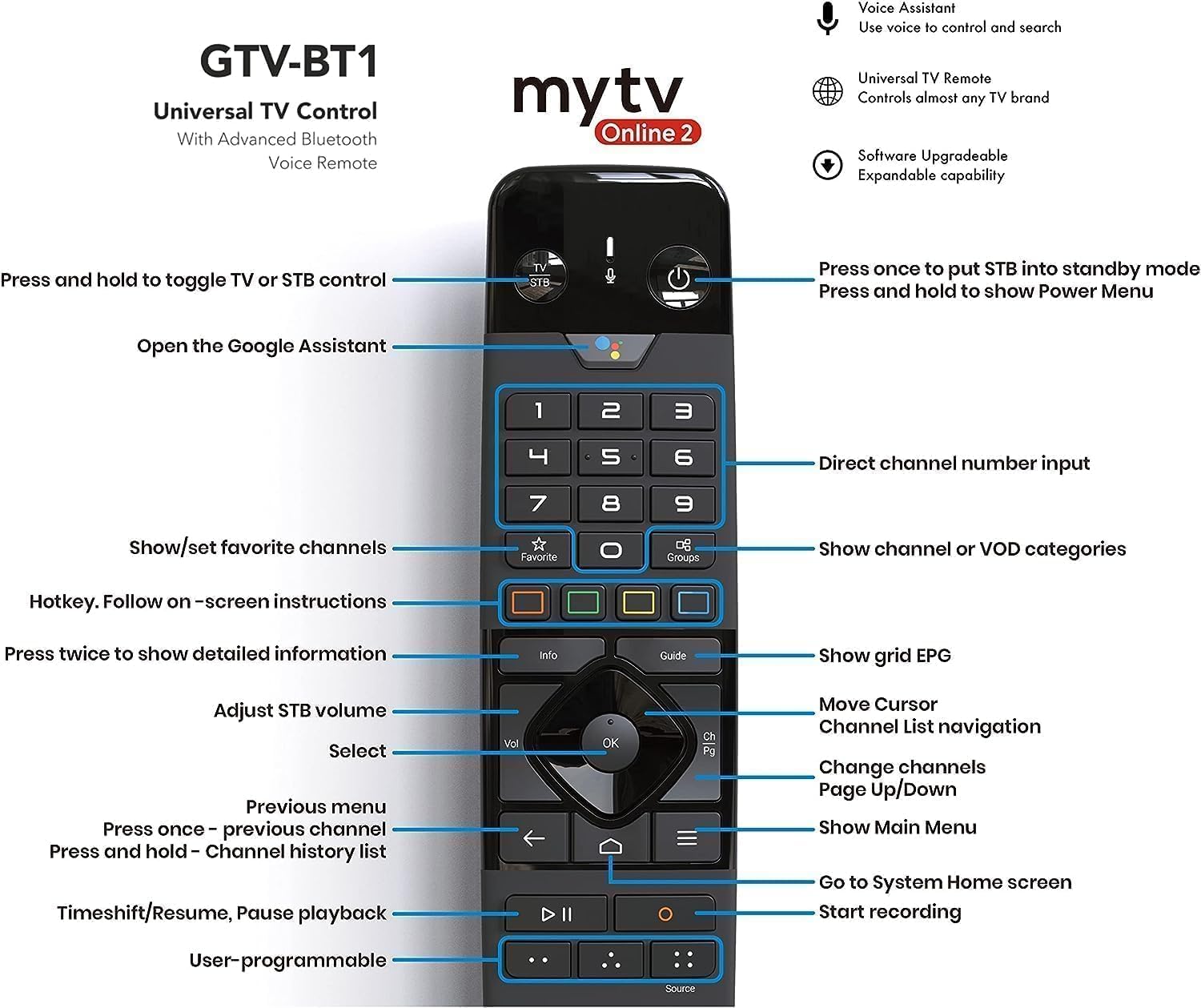
Image 4.1: BT1 Remote Control Button Layout and Functions.
- Vypínač: Press once to put the device into standby mode. Press and hold to show the Power Menu.
- TV/STB Toggle: Press and hold to switch control between TV and Set-Top Box.
- Tlačítko Google Assistant: Open Google Assistant for voice commands and search.
- Navigační tlačítko (nahoru/dolů/vlevo/vpravo/OK): Procházení nabídek a výběr položek.
- Volume (Vol): Adjust STB volume.
- Kanál (CH): Change channels, navigate channel lists.
- Back (Arrow Left): Vraťte se do předchozí nabídky.
- Domov (ikona domu): Go to the System Home screen.
- Menu (Three Lines): Show Main Menu.
- Info: Press twice for detailed information.
- Průvodce: Show grid EPG (Electronic Program Guide).
- Oblíbený: Show/set favorite channels.
- Skupiny: Show channel or VOD categories.
- Číselná klávesnice: Direct channel number input.
- Playback Controls (Play/Pause, Rewind, Fast Forward): Ovládání přehrávání médií.
- Rekord (červená tečka): Spusťte nahrávání.
- Zdroj: Změňte zdroj vstupu.
- User-programmable Buttons: Customize these buttons for quick access to functions or apps.
4.2 Using the Extra Air Remote Keyboard
The backlit air remote keyboard is ideal for text input, such as searching for content or entering login details. It also functions as a mouse with its air mouse feature.
- Keyboard Side: Use for typing text. The backlight activates automatically in low light conditions.
- Remote Side: Provides basic navigation and media control buttons.
- Air Mouse: Move the remote in the air to control a cursor on the screen. Press the dedicated mouse button to activate/deactivate the air mouse function.
4.3 Navigace v rozhraní systému Android 11
The Formuler Z11 Pro runs on Android 11, offering a user-friendly interface. You can:
- Instalace aplikací: Stáhněte a nainstalujte aplikace z Obchodu Google Play.
- Přizpůsobení domovské obrazovky: Arrange apps and widgets for quick access.
- Nastavení přístupu: Adjust display, sound, network, and device preferences.
5. Údržba
5.1 Čištění zařízení
- Před čištěním se ujistěte, že je zařízení vypnuté a odpojené ze zásuvky.
- Use a soft, dry, lint-free cloth to wipe the exterior of the device and remotes.
- Do not use liquid cleaners, aerosols, or abrasive materials.
5.2 Aktualizace softwaru
Pravidelně se vydávají aktualizace softwaru, které zlepšují výkon, přidávají funkce a zvyšují zabezpečení. Doporučuje se udržovat software vašeho zařízení aktuální.
- Přejděte na Nastavení > O aplikaci > Aktualizace systému on your Formuler Z11 Pro.
- Zkontrolujte dostupné aktualizace a nainstalujte je podle pokynů na obrazovce.
- Ensure a stable internet connection during updates. Do not power off the device during an update.
5.3 Správa úložiště
The device has 16GB of internal storage. To maintain optimal performance:
- Regularly uninstall unused applications.
- Vymazat data mezipaměti aplikací v Nastavení > Aplikace.
- Consider using external storage (Micro SD card or USB drive) for large media files.
6. Řešení problémů
If you encounter issues with your Formuler Z11 Pro, refer to the following common problems and solutions:
6.1 Žádné napájení / Zařízení se nezapíná
- Ensure the power cable is securely connected to the device and the wall outlet.
- Ověřte funkčnost zásuvky zapojením jiného zařízení.
- Zkuste jinou zásuvku.
6.2 Žádný signál / Prázdná obrazovka
- Check that the HDMI cable is securely connected to both the Formuler Z11 Pro and your TV.
- Ujistěte se, že je váš televizor nastaven na správný vstupní zdroj HDMI.
- Zkuste jiný kabel HDMI nebo port HDMI na televizoru.
- Restart the Formuler Z11 Pro by unplugging and re-plugging the power cable.
6.3 Dálkové ovládání nereaguje
- BT1 Remote:
- Vyměňte baterie AA.
- Re-pair the remote: Go to Nastavení > Dálkové ovladače a příslušenství a postupujte podle pokynů pro párování.
- Air Remote Keyboard:
- Ensure the USB dongle is securely inserted into a USB port on the Z11 Pro.
- Try inserting the dongle into a different USB port.
- Check the batteries in the air remote keyboard.
6.4 Problémy se síťovým připojením
- Wi-Fi:
- Ujistěte se, že je váš Wi-Fi router zapnutý a funkční.
- Přejít na Nastavení > Síť a internet > Wi-Fi and ensure Wi-Fi is enabled and you are connected to the correct network.
- Zkuste zapomenout na síť a znovu se připojit.
- Restart your router and the Formuler Z11 Pro.
- Ethernet:
- Ensure the Ethernet cable is securely connected to both the device and the router.
- Zkontrolujte kabel, zda není poškozený.
- Try a different Ethernet cable or port on your router.
6.5 Device Performance Issues
- Zavřete nepoužívané aplikace běžící na pozadí.
- Vymazat mezipaměť aplikací (Settings > Apps > [App Name] > Clear cache).
- Ujistěte se, že software zařízení je aktuální.
- Pokud problémy přetrvávají, zvažte obnovení továrního nastavení (Nastavení > Systém > Možnosti resetování > Vymazat všechna data (obnovení továrního nastavení)). Varování: This will delete all data and settings on the device.
7. Specifikace
Key technical specifications for the Formuler Z11 Pro:
| Funkce | Specifikace |
|---|---|
| Výstupní rozlišení | 4K (3840 x 2160) |
| BERAN | 2GB DDR @2400MHz |
| Skladování | 16GB eMMC |
| Operační systém | Android 11 |
| Bezdrátové sítě | Dual-Band 2x2 AC Wireless |
| Bluetooth | 5.0 |
| Ethernet | 1000 M (gigabit) |
| Porty | 1x USB 3.0, 1x USB 2.0, 1x HDMI, 1x Gigabit LAN, 1x Micro SD Card, 1x IR Extension, 1x Power Input |
| Rozměry (D/Š/T) | 105mm / 105mm / 21mm |
| Barva | Černý |
| Hmotnost položky | 1.72 libry |
8. Informace o záruce
Formuler products typically come with a limited manufacturer's warranty. The specific terms and duration of the warranty may vary by region and retailer. Please refer to the warranty card included with your product or visit the official Formuler webpodrobné informace o záruce a postupech registrace naleznete na webu.
Uschovejte si doklad o koupi (účtenku nebo fakturu), bude potřebný pro případné reklamace.
9. Zákaznická podpora
For further assistance, technical support, or inquiries not covered in this manual, please contact Formuler customer support through their official website. You may find FAQs, troubleshooting guides, and contact information for support channels there.
Before contacting support, please have your device model (Z11 Pro) and serial number ready.