1. Úvod
This manual provides instructions for the ALLIMITY replacement remote control, designed for various Formuler 4K Android IPTV Receiver models. This remote offers full functionality without the need for complex programming, providing a seamless user experience.
Klíčové vlastnosti
- No programming or setup required for basic use.
- Full functionality, replicating your original remote control.
- Ergonomický design pro pohodlnou manipulaci.
- Lehká konstrukce.
- Offers extended transmission distance and stable remote performance.
2. Nastavení
2.1 Instalace baterie
The remote control requires two AAA batteries (not included). To install, open the battery compartment cover on the back of the remote. Insert the batteries, ensuring correct polarity (+ and - terminals match the indicators inside the compartment). Close the cover securely.
2.2 První použití
Once batteries are installed, the remote is ready for immediate use with compatible Formuler devices. No additional pairing or programming is typically required for the main functions.
2.3 Programming TV or Source Keys (Optional)
This remote includes an optional learning function for the TV and SOURCE keys, allowing you to control basic functions of your television or other source devices. Follow these steps to program:
- Stiskněte a podržte TV or ZDROJ key for 5 seconds. The LED indicator will change from blinking to solid, and the STB RCU will enter Learning Mode.
- Press the key on this remote control that you wish to program. The LED will begin blinking slowly.
- Aim your TV remote control towards the front of this remote control (distance less than 3cm). Press the corresponding button on the TV remote. If programming is successful, the LED on this remote will flash 3 times.
- Opakujte kroky 2–3 pro další klávesy, které chcete naprogramovat.
- Exit Learning Mode by pressing any other button on this remote control. The LED will turn off.
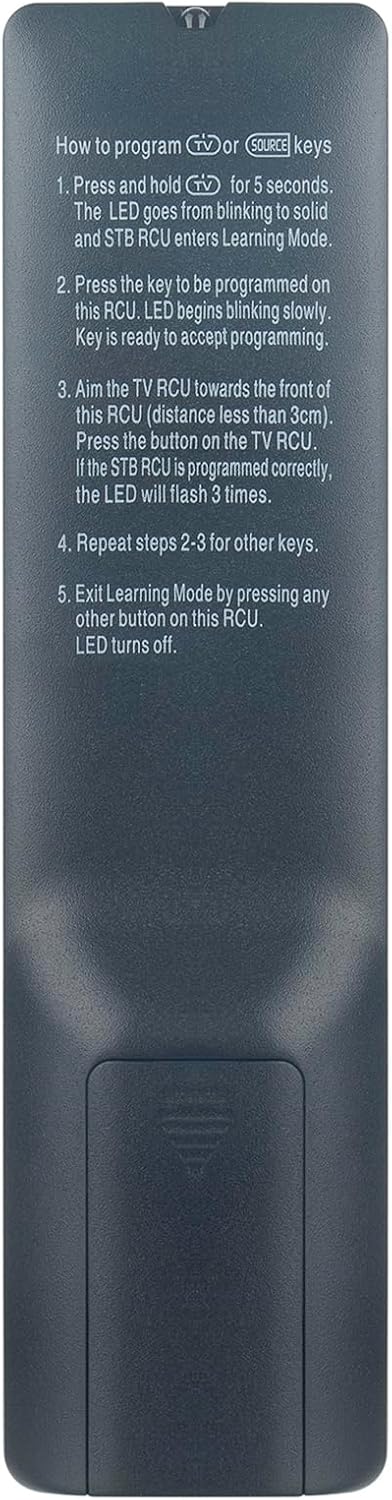
Image: Back of the remote control with programming instructions for TV/Source keys.
3. Návod k obsluze
3.1 Obecná obsluha
Point the remote control directly at your Formuler IPTV receiver. Ensure there are no obstructions between the remote and the receiver for optimal performance. The maximum effective operating range is approximately 10 meters.
3.2 Funkce tlačítek
The remote control features a standard layout with various buttons for navigation, volume, channel selection, and media playback. Below is a general overview of common button categories:
- Vypínač: Zapíná nebo vypíná zařízení.
- Navigační tlačítko (OK, nahoru, dolů, vlevo, vpravo): Používá se pro navigaci v menu a výběr.
- Zvýšení/Snížení hlasitosti: Upravuje hlasitost zvuku.
- Kanál nahoru/dolů: Mění kanály.
- Numerická klávesnice (0-9): Pro přímé zadávání kanálů nebo číselné výběry.
- Menu/Info/Back/Exit: Accesses menus, displays information, returns to previous screens, or exits current functions.
- Media Playback Controls (Play/Pause, Stop, Rewind, Fast Forward): For controlling media content.
- Barevná tlačítka (červená, zelená, žlutá, modrá): Functionality varies depending on the application or menu within your Formuler device.

Obrázek: Přední strana view of the ALLIMITY replacement remote control, displaying all function buttons.
4. Údržba
4.1 Výměna baterie
Replace batteries when the remote's response becomes inconsistent or stops working. Always use new AAA batteries and dispose of old batteries responsibly according to local regulations.
4.2 Čištění
Dálkový ovladač otírejte měkkým, suchým hadříkem. Nepoužívejte tekuté čisticí prostředky, rozpouštědla ani abrazivní materiály, protože by mohly poškodit povrch dálkového ovladače nebo jeho vnitřní součásti.
4.3 Skladování
Store the remote in a cool, dry place away from direct sunlight and extreme temperatures. If storing for extended periods, remove the batteries to prevent leakage and potential damage to the remote.
5. Řešení problémů
5.1 Dálkové ovládání nereaguje
- Zkontrolujte baterie: Ujistěte se, že jsou baterie správně vloženy a dostatečně nabité. V případě potřeby je vyměňte.
- Přímá viditelnost: Verify there are no obstructions between the remote and the receiver. The remote uses infrared technology, requiring a clear path.
- Vzdálenost: Ujistěte se, že jste v efektivním provozním dosahu (až 10 metrů).
- Výkon přijímače: Confirm your Formuler device is powered on.
5.2 Buttons Not Working Correctly
- Čistá tlačítka: Dust or debris under buttons can cause issues. Gently clean around the buttons with a dry, soft cloth.
- Resetovat dálkové ovládání: Remove batteries, press all buttons a few times to discharge any residual power, then reinsert batteries.
5.3 TV/Source Keys Not Controlling TV
- Re-program Keys: Follow the 'Programming TV or Source Keys' instructions in Section 2.3 to re-program the desired keys.
- Kompatibilita: Ensure your TV remote is compatible with the learning function. Some advanced remotes may not be fully compatible.
6. Specifikace
| Funkce | Popis |
|---|---|
| Značka | ALLIMITY |
| Číslo modelu | MM-Z10-SE-NP |
| Technologie připojení | Infračervený |
| Kompatibilní zařízení | Formuler Z11 Pro Max, Z10 SE, Z+ Plus Neo, Z+ Neo, Z Nano, Z+ |
| Speciální funkce | Ergonomický design |
| Maximální dosah | 10 metrů |
| Typ baterie | AAA (not included) |
| Výrobce | ALLIMITYMM |
| Země původu | Čína |
7. Záruka a podpora
Specific warranty information for this ALLIMITY replacement remote control is not provided in the product details. For warranty claims or technical support, please contact your retailer or the manufacturer directly.
For further assistance, please refer to the official ALLIMITY webwebu nebo kontaktujte jejich zákaznický servis.


