Zavedení
Welcome to the GOBOULT UFO True Wireless Earbuds user manual. These earbuds are designed to provide a superior audio experience with features like extended playtime, low latency gaming, advanced noise cancellation, and robust bass drivers. Please read this manual carefully to ensure proper use and optimal performance of your device.
Co je v krabici
- GOBOULT UFO True Wireless Earbuds
- Bezdrátové nabíjecí pouzdro
- Rychlonabíjecí kabel typu C
- Extra pár koncovek do uší
- Uživatelská příručka
- Záruční list
Konec produktuview
The GOBOULT UFO earbuds feature a distinctive design with integrated breathing LEDs on both the earbuds and the charging case. They are equipped with 13mm drivers for rich bass and Quad Mic ENC for clear calls.

Image: GOBOULT UFO Earbuds and Charging Case. This image highlights key features such as Bluetooth 5.3 connectivity, 48 hours of playtime, Quad Mic ENC, 13mm drivers, 45ms low latency, and Type-C fast charging.
Dýchací LED diody
The breathing LEDs on the case and earbuds provide visual feedback for various actions, including opening/closing the case, charging, and when buds are connected.

Image: The GOBOULT UFO charging case and earbuds displaying their distinctive breathing LED lights, which indicate various operational states.
Kvalita zvuku
Experience high-fidelity sound with precision-tuned 13mm drivers, ensuring clear audio across all frequencies and rich bass. The Quad Mic ENC (Environmental Noise Cancellation) system ensures crystal-clear, interference-free calls.
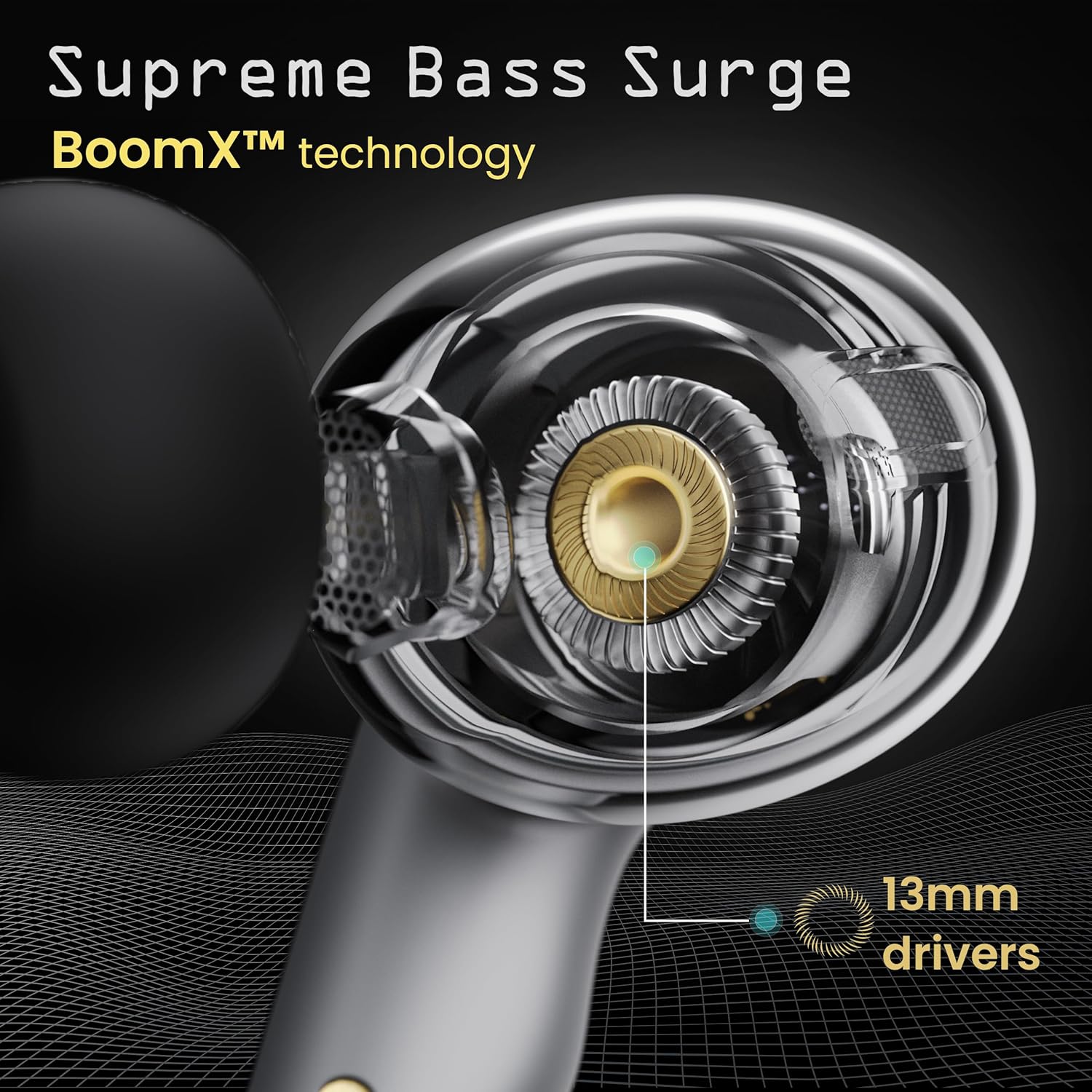
Image: A close-up of a GOBOULT UFO earbud, highlighting the 13mm drivers responsible for supreme bass surge.

Obrázek: Podrobný view of a GOBOULT UFO earbud, showcasing the AI-powered Quad Mic AI-ENC technology for high-definition call clarity and Zen™ mode for silence.
Nastavení
Počáteční párování
- Otevřete nabíjecí pouzdro. Sluchátka se automaticky přepnou do režimu párování.
- Na svém zařízení (chytrém telefonu, tabletu atd.) povolte Bluetooth.
- Hledat "GOBOULT UFO" in the list of available Bluetooth devices and select it to connect.
- Once connected, you will hear an audio prompt, and the LED indicators on the earbuds will change.
The earbuds utilize Bluetooth 5.3 for stable and efficient connection, featuring Blink & Pair™ technology for fast pairing.

Image: GOBOULT UFO Earbuds illustrating stable connectivity with Bluetooth 5.3 and fast pairing technology.
Podpora aplikací
Enhance your experience by downloading the dedicated GOBOULT app. The app allows you to:
- Switch between 6 Equalizer Modes.
- Přizpůsobte si dotykové ovládání.
- Přejmenujte si sluchátka.
- Získejte přístup k dalším nastavením a funkcím.
Návod k obsluze
Dotykové ovládání
The GOBOULT UFO earbuds feature intuitive touch controls on each earbud.
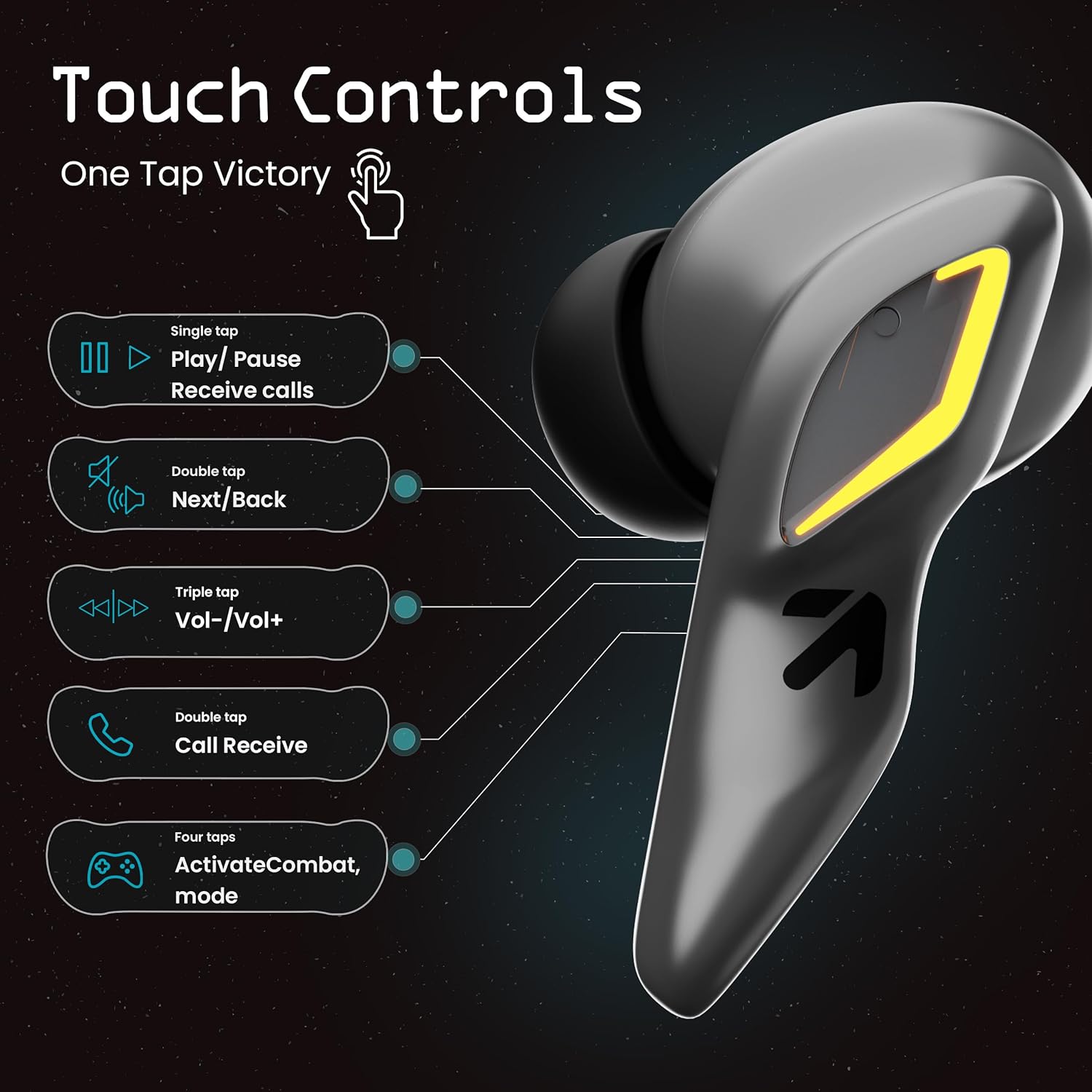
Image: A visual guide to the touch controls on the GOBOULT UFO Earbuds, detailing single, double, triple, and four-tap functions.
- Jedno klepnutí: Play/Pause music, Receive calls.
- Dvojí poklepání: Next/Back track.
- Trojité klepnutí: Zvýšení/snížení hlasitosti.
- Four Taps: Activate Combat Mode (Gaming Mode).
- Dlouhé stisknutí: Activate Voice Assistant (Google Assistant, Siri).
Gaming Mode (Combat Mode)
Activate Combat Mode for an ultra-low latency experience of 45ms, ideal for gaming. Tap the earbud four times to toggle this mode.

Image: The GOBOULT UFO Earbuds case open, highlighting the Combat Gaming Mode with 45ms ultra-low latency, activated by four taps.
Hlasový asistent
Long press the touch control area on either earbud to activate your device's voice assistant (e.g., Google Assistant, Siri).

Image: GOBOULT UFO Earbuds demonstrating the long-press gesture to activate the voice assistant feature.
Nabíjení
The GOBOULT UFO earbuds offer up to 48 hours of total playtime with the charging case.
Nabíjení pouzdra a sluchátek
- Vložte sluchátka do nabíjecího pouzdra. Ujistěte se, že jsou správně usazena.
- Connect the Type-C fast charging cable to the charging port on the case and to a power source.
- LED indikátory na pouzdře ukazují stav nabíjení.
- A full charge for the earbuds and case takes approximately 100 minutes.
- With Type-C fast charging, a 10-minute charge can provide up to 1.5 hours of playtime.
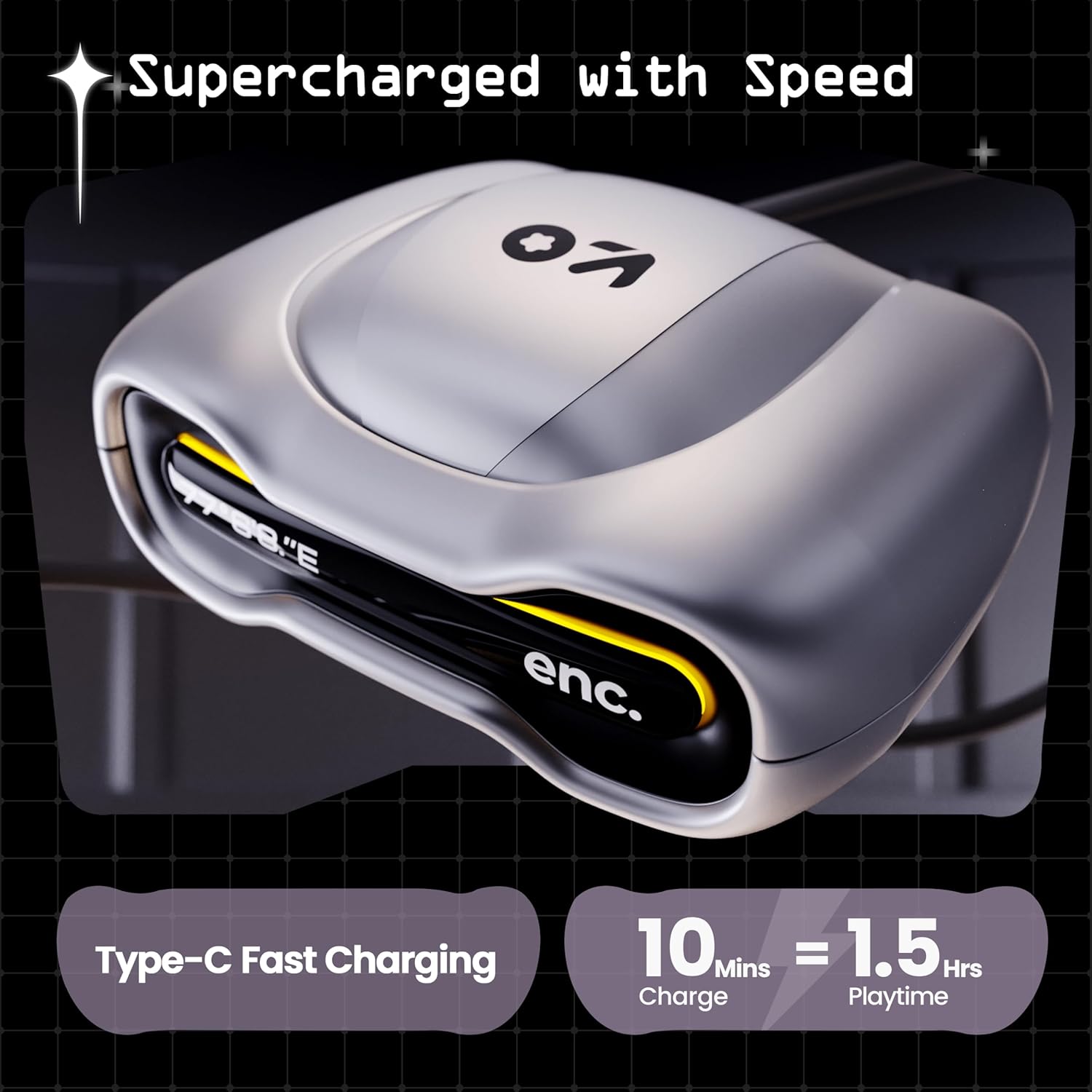
Image: The GOBOULT UFO charging case, illustrating its Type-C fast charging capability, providing 1.5 hours of playtime from a 10-minute charge.
Údržba
Voděodolnost
The GOBOULT UFO earbuds are IPX5 water-resistant, making them sweatproof, rainproof, and splashproof. This protection allows for use during workouts or in light rain.

Image: GOBOULT UFO Earbuds on a metallic surface, indicating their IPX5 water resistance, making them suitable for sweat, rain, and splashes.
Čištění
Pro udržení optimálního výkonu a hygieny pravidelně čistěte sluchátka a nabíjecí pouzdro.
- K otření sluchátek a pouzdra použijte měkký, suchý hadřík, který nepouští vlákna.
- Pro odolnou špínu lehceamphadřík vodou. Nepoužívejte agresivní chemikálie ani abrazivní materiály.
- Ujistěte se, že nabíjecí kontakty na sluchátkách i pouzdře jsou čisté a bez nečistot.
- Allow all components to dry completely before placing earbuds back in the case or charging.
Odstraňování problémů
If you encounter any issues with your GOBOULT UFO earbuds, please refer to the following common solutions:
- Žádný zvuk: Ensure earbuds are charged and properly connected to your device. Check device volume.
- Problémy s párováním: Make sure Bluetooth is enabled on your device. Try forgetting the device in your Bluetooth settings and re-pairing. Ensure earbuds are fully charged.
- Jedno sluchátko nefunguje: Place both earbuds back in the case, close it, and then open it again. This often resets the connection.
- Špatná kvalita hovoru: Ensure microphones are clean. Check for strong Bluetooth connection.
- Nereagující dotykové ovládání: Ujistěte se, že máte čisté a suché prsty. Zkuste sluchátka restartovat tak, že je vložíte do pouzdra a vyjmete.
Pro další pomoc se prosím obraťte na zákaznickou podporu GOBOULT.
Specifikace
| Funkce | Detail |
|---|---|
| Název modelu | UFO (Airbass Earbuds) |
| Verze Bluetooth | 5.3 |
| Prázdno | Až 48 hodin (s nabíjecím pouzdrem) |
| Zvuková latence | 45 milisekund (herní režim) |
| Ovladače | 13mm dynamické ovladače |
| Mikrofony | Quad Mic ENC (Environmental Noise Cancellation) |
| Voděodolnost | IPX5 (Sweatproof, Rainproof, Splashproof) |
| Nabíjecí port | Rychlé nabíjení typu C |
| Doba nabíjení | Cca. 100 minut |
| Dosah Bluetooth | 10 metrů |
| Frekvenční odezva | 20 Hz |
| Citlivost | 115 dB |
| Impedance | 32 ohmů |
| Hmotnost položky | 60 gramů |
| Rozměry produktu | 4.7 x 9 x 10 cm |
| Materiál | Kov |
Záruka a podpora
Informace o záruce
The GOBOULT UFO True Wireless Earbuds come with a 1letá záruka výrobce from the date of purchase. Please retain your proof of purchase for warranty claims. The warranty covers manufacturing defects. It does not cover damage caused by misuse, accidents, or unauthorized modifications.
Zákaznická podpora
For any questions, technical support, or warranty claims, please contact GOBOULT customer service.
Výrobce: Exotic Mile Pvt. Ltd.
Adresa: B67 Wazirpur Industrial Area, New Delhi 110052, India.
Please refer to the warranty card included in your product packaging for specific contact details and procedures.


